Nogic
Turn your codebase into an interactive map you can ask questions about and walkthrough step-by-step.



Quick Start
- Install Nogic from the VS Code Marketplace.
- Open the Command Palette (
Cmd+Shift+P / Ctrl+Shift+P) → run Nogic: Open Visualizer.
- Click Index Workspace to build your code map.
- (Optional) Sign in from the toolbar pill and use your own Claude Code or Codex to enable the AI features. A first-run modal walks you through CLI setup. The static code map works fully signed-out.
Features
Diff Analyze
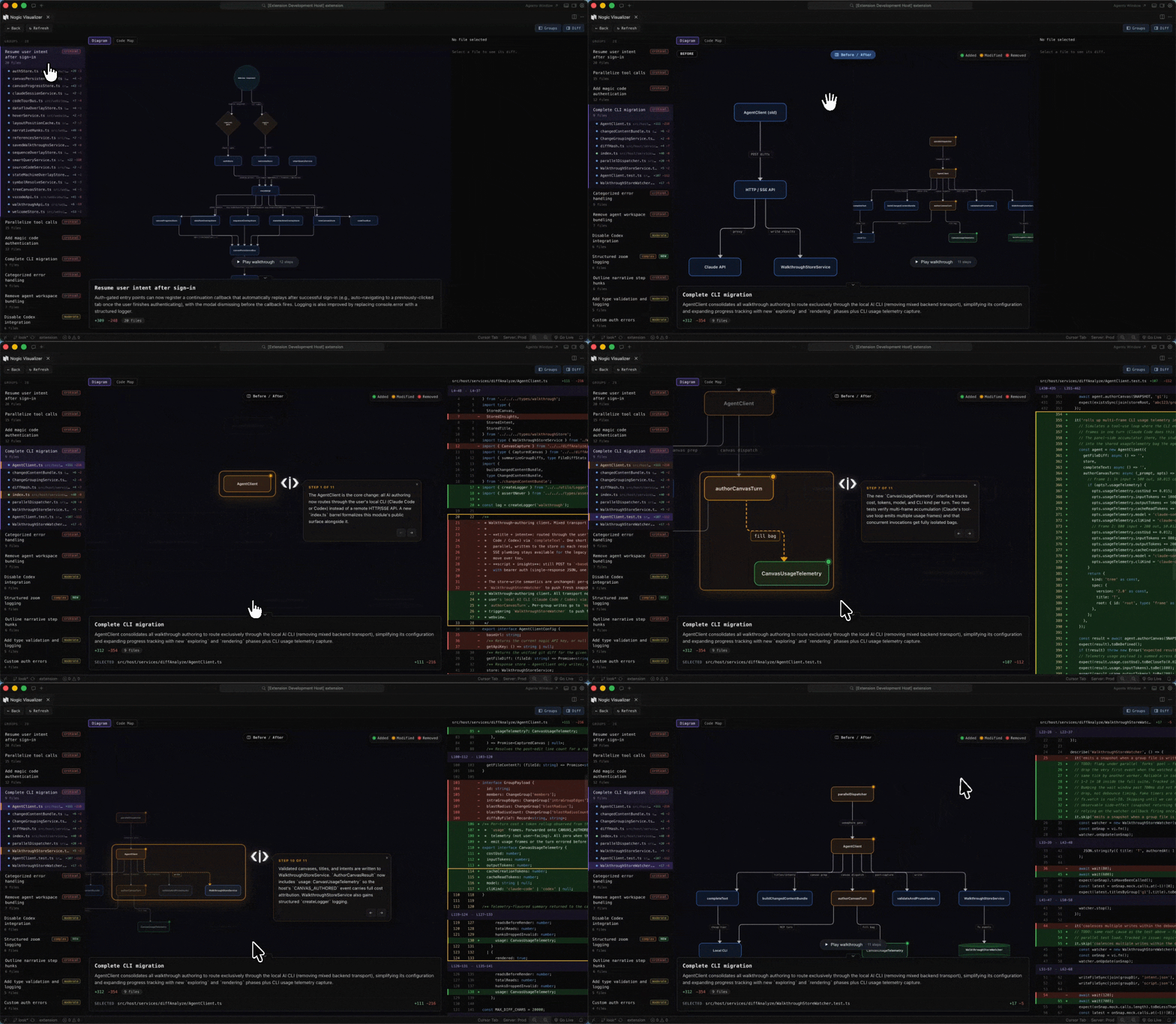
Review your uncommitted changes as diagrams grouped by intent. Each group gets a title, summary, and visualization explaining why the change is shaped that way, not just what changed.
Use when: preparing a PR, onboarding a reviewer, or sanity-checking your own work before committing.
How:
- Open the visualizer with uncommitted changes in your working tree
- Click the Diff Analyze view tab in the boards switcher
- Each change group renders in the left panel; pick one to see its diagram + narration
- Click Refresh on any group to re-author its analysis without redoing the panel
Nogic Agent — Cmd/Ctrl+K
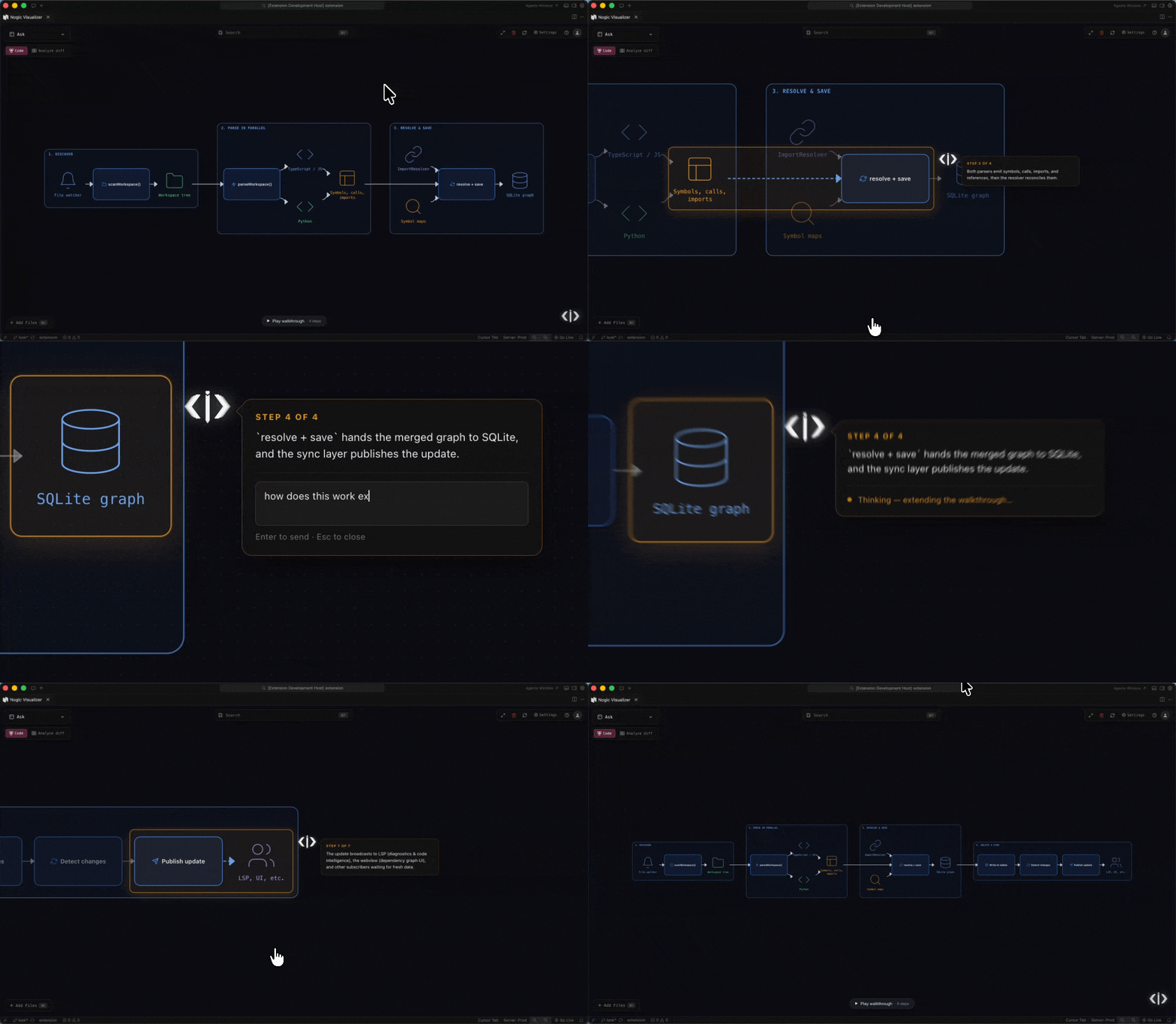
Ask anything about your code in plain English. The cursor renders a diagram tailored to the answer and walks through it step by step. Follow-up questions extend the same diagram and walkthrough.
Use when: you want to understand "how does X work" without reading every file, or explain a flow to someone else.
How:
- Press
Cmd+K (Ctrl+K on Linux/Windows) anywhere in the visualizer
- Type your question (e.g., "how does auth handle expired tokens?")
- Watch the cursor explore your codebase and render the diagram
- Press
Space / N to advance steps, P back, Esc to clear
Step-by-Step Walkthroughs
Every AI canvas comes with a guided walkthrough. Can ask follow-up on any step. In the diff analyzer, hunks in the diff panel are highlighted in sync with each step.
Controls:
Space / N / -> — advanceP / <- — backEsc — exit
Current Diff Board
A live board that mirrors your working-tree changes in real time. Updates on file save, branch switch, and stage. No setup, it auto-manages.
Use when: you want a visual of "what am I changing right now" while coding.
How:
Cmd+Shift+P → Nogic: Open Diff Board- Or pick Current Diff from the boards switcher
Boards — Focused Views
Organize specific parts of your codebase into named views. Each board can hold a curated set of files, classes, or functions — useful for "the auth subsystem," "the migration we're rewriting," etc.
How:
- Right-click any file/folder in the Explorer → Add to Nogic Board
- Or use the + button in the boards switcher to create a new board
- Inside the visualizer, drag/drop nodes to organize layout (saved automatically)
Inspect Mode
Right-click any node to isolate it with its directly connected neighbors in a focused view. Re-laid-out for clarity, with the rest of the graph hidden.
How:
- Right-click a node in any view
- Pick Inspect
- Right-click neighbors → Add Connected Nodes to incrementally expand
- Press
Esc or click the close button to return
Auto-Sync
Code changes reflect automatically in the visualization — no manual reindex needed for in-flight edits.
Supported Languages
AI features are language-agnostic.
Code map supports:



More languages coming soon.
Setup for AI Features
The static code map works without an account or AI CLI. To enable Cmd+K, Diff Analyze, and walkthroughs:
- Sign in from the toolbar account — choose Google, GitHub, or magic-link.
- Install one of these CLIs locally:
- Claude Code (uses your Claude Pro/Max or pay-as-you-go API key)
- OpenAI Codex (uses your OpenAI Plus/Pro or API key)
- Open the setup modal (auto-shows on first run, or
Nogic: Show MCP Setup from the palette) and toggle the CLI you installed. Use Re-detect CLIs if you installed in another terminal.
You only need one CLI — Nogic will use whichever is enabled. Subscriptions you already pay for are what powers the AI; your code, prompts, and AI responses never touch a Nogic server.
Privacy
- Code stays local. Indexing, parsing, and visualization happen 100% inside VS Code.
- AI runs through your own CLI under your existing AI subscription. Nogic does not see your code.
- Anonymous, opt-out telemetry — no code, file paths, AI text, or personal data. Disable via
nogic.telemetry.enabled or VS Code's global telemetry switch. Full disclosure: nogic.dev/telemetry.
Feedback & Support
The project is still evolving and we'd love your feedback:


