Deslop for VS Code
The reference client for the Deslop live duplicate-code analysis server. A long-running LSP + MCP process sits in your workspace and feeds duplicate-code signals — live, on every keystroke — to your editor and to whichever AI coding agent is driving it (Claude Code, Cursor, Copilot, Continue, Codex).
Clone detectors such as PMD CPD, jscpd, SonarLint, and the JetBrains inspections report duplication on CI, on save, or in a panel you open on purpose. Deslop surfaces duplicates inline, next to your cursor, as you type, and exposes the same live analysis to the agent over MCP so it can check before it copy-pastes.
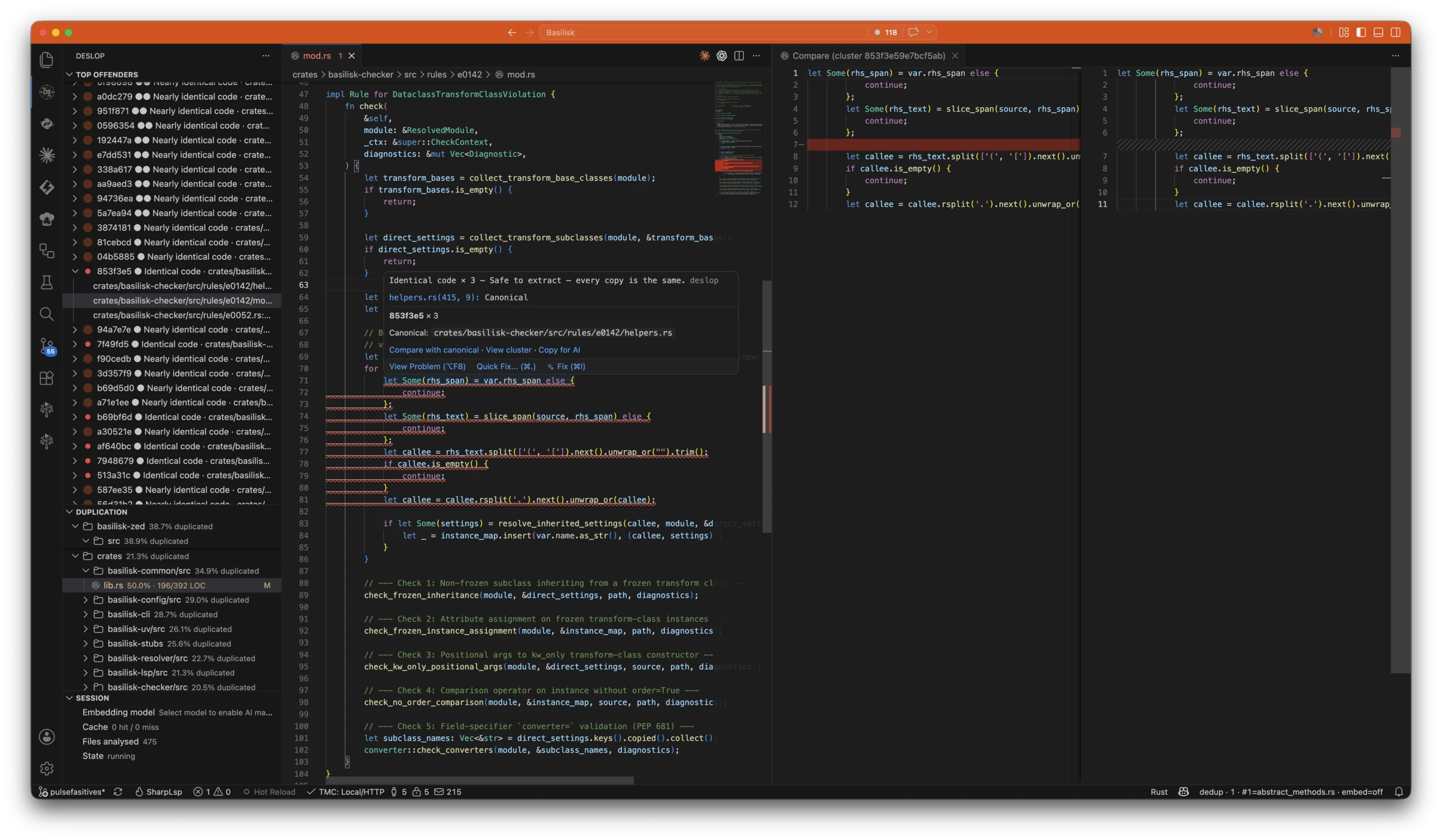
One live report, three surfaces. The screenshot above shows the extension rendering the running analysis inline:
- Sidebar (left) — Top Offenders ranks every clone cluster worst-first (id, severity, plain-English bucket, expandable to occurrences); Duplication breaks the repo down folder-by-folder with a duplicated-percentage on every node; Session shows the live server and the embedding-model picker.
- Editor (centre) — the LSP underlines the duplicate as you type, names the canonical copy used as the anchor, and offers Compare with canonical, View cluster, and Copy for AI right on the finding.
- Compare diff (right) — VS Code's native side-by-side editor lines this occurrence up against the canonical one so you can confirm before extracting.
Every panel refreshes as you type, and the same live report backs the MCP tools your agent calls. Full panel-by-panel walkthrough: VS Code Cluster Panel.
Features
- Live duplication bubble. The moment you type code that matches an existing cluster, a kind-coloured label — Identical code, Nearly identical code, Similar code, Same behavior, different code (AI match), or Same shape, different content (informational, not a clone) — appears at the end of the line, naming the relation and the cluster's mass.
- Worst-first activity-bar view. The Top Offenders view always has cluster
#1 — the single highest-impact offender in the whole workspace — one click away. No drilling.
- Ollama-powered semantic matches. Plug in any local embedding model (
nomic-embed-code, nomic-embed-text, unixcoder, your own) via the built-in picker. Stays loopback-only.
- Live report webview. Sorted worst-first, filterable by language / severity / path, refreshes as you type via Preact Signals.
- Bundled servers and CLI. Every platform ships the
deslop-lsp, deslop-mcp, and deslop binaries. No post-install downloads. The MCP server auto-registers with Copilot Chat (and any other VS Code-hosted MCP client) so your AI agents inside VS Code consult the same live analysis you see — the duplicate is visible to the agent before it generates the copy-paste.
- Uses the installed extension bundle. The VSIX runs the binaries unpacked under its own
bin/<platform>/ folder. No post-install copying and no PATH lookup are required.
Wire deslop-mcp into external MCP clients
External MCP clients that run outside VS Code's process — Claude Code (CLI), Claude Desktop, Codex, Cursor, Continue — do not inherit VS Code's bundled PATH, so they cannot auto-discover the deslop-mcp binary. Point them at the VSIX-bundled binary by absolute path so the agent runs the exact binary this extension ships.
After installing this VSIX, the binary lives at:
~/.vscode/extensions/nimblesite.deslop-live-<VERSION>-<platform>/bin/<platform>/deslop-mcp
Where <platform> is darwin-arm64, darwin-x64, linux-x64, linux-arm64, or win32-x64, and <VERSION> matches the installed extension. Bump <VERSION> whenever you update the extension.
Example — Claude Code:
claude mcp add deslop -s user -- \
  ~/.vscode/extensions/nimblesite.deslop-live-<VERSION>-darwin-arm64/bin/darwin-arm64/deslop-mcp \
  --root .
Example — Codex (~/.codex/config.toml):
[mcp_servers.deslop]
command = "/Users/you/.vscode/extensions/nimblesite.deslop-live-<VERSION>-darwin-arm64/bin/darwin-arm64/deslop-mcp"
args    = ["--root", "."]
The full set of client wiring snippets — including Claude Desktop and the rule against pointing MCP clients at cargo install / target/release binaries — lives in the AI integration docs.
Install
Settings
See Deslop in the Settings UI. Key knobs: deslop.embedding.model, deslop.minNodes, deslop.liveBubble.mode (inline / ghost).
License
MIT.

