
AT Agent Tracker for VS Code
See every coding agent you have running, across all your projects, from the VS Code sidebar: Claude Code (terminal, VS Code, or desktop), OpenAI Codex (CLI or VS Code), and GitHub Copilot Chat agent sessions.
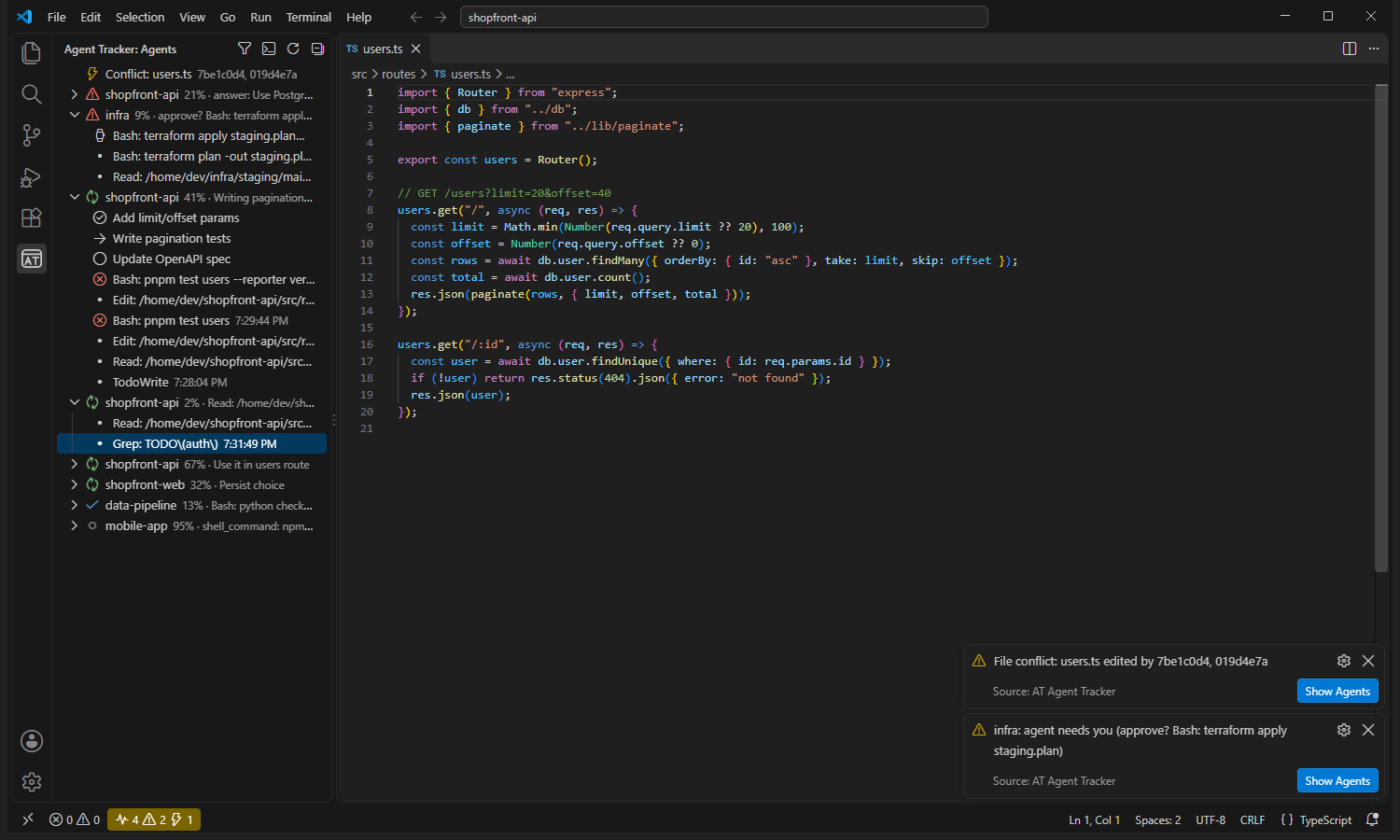
- Sidebar: one row per agent with a status icon, its project, how full its context window is (◔ past 80%, ⟳N = compacted N times), and what it's doing right now. Expand a row to see its todo list and its last 30 actions (failed ones are marked).
- Status bar: how many agents are working, how many need you, how many file conflicts exist, and your Codex plan usage (if you use Codex). It turns yellow when something needs your attention.
- Notifications when an agent is blocked on a question or permission prompt, finishes its turn, passes 80% of its context window, or edits a file another agent is also editing, and when a Codex plan window passes 80%.
- Close an agent with the ✕ button on its row (Claude Code agents with a live process). You're asked first, and the session stays resumable with
claude --resume.
- Timeline button on a row: every command and file the agent touched, with timestamps.
- Terminal dashboard button: the full-width live table in a terminal.
Hover a row for details: model, context window (tokens used / window size), total tokens, failed tool calls, next todo item, and the working directory.
Requirements
Python 3.9+ on your PATH (python3, python, or py), or set agentTracker.pythonPath. Nothing else: the extension runs the bundled zero-dependency tracker.py, which reads the transcripts the agents already write to disk. It doesn't use hooks, API keys or network access.
Settings
| Setting |
Default |
|
agentTracker.pythonPath |
(auto) |
Python 3.9+ to run the tracker |
agentTracker.refreshSeconds |
3 |
refresh interval |
agentTracker.hours |
24 |
show agents active within this many hours |
agentTracker.onlyThisWorkspace |
false |
only agents working in this window's folder (filter button in the view title) |
agentTracker.notifications |
true |
notify on needs-you / finished / context nearly full / conflict / Codex limit |
Full docs and the command-line version: https://github.com/NiloyBhattacharjee/agent-tracker

