Skip to content
| Marketplace
Sign in
Visual Studio Code>Visualization>TimonierNew to Visual Studio Code? Get it now.
Timonier

Timonier

Preview

Nicolas Michel

|
6 installs
| (0) | Free
Timonier helps developers supervise the code AI agents generate without reading every line: a live architecture map, a whiteboard to sketch the architecture the agents must follow, the measured performance of the software's components, and the agents' plan and todo. 13 languages.
Installation
Launch VS Code Quick Open (Ctrl+P), paste the following command, and press enter.
Copied to clipboard
More Info

Timonier

Timonier helps developers supervise their AI coding agents without reading every line they write. It keeps a live map of your code's architecture, compares it with the architecture you drew, shows what changed since your last review, measures your tests, and gives your agents the same plan, todo and constraints you see.

Pre-release. Linux, macOS and Windows. Projects in Rust, TypeScript, JavaScript, Python, Go, Java, Kotlin, Scala, C, C++, C#, Swift and PHP. Source, issues and the full feature list: github.com/nicolas-a-michel/timonier.

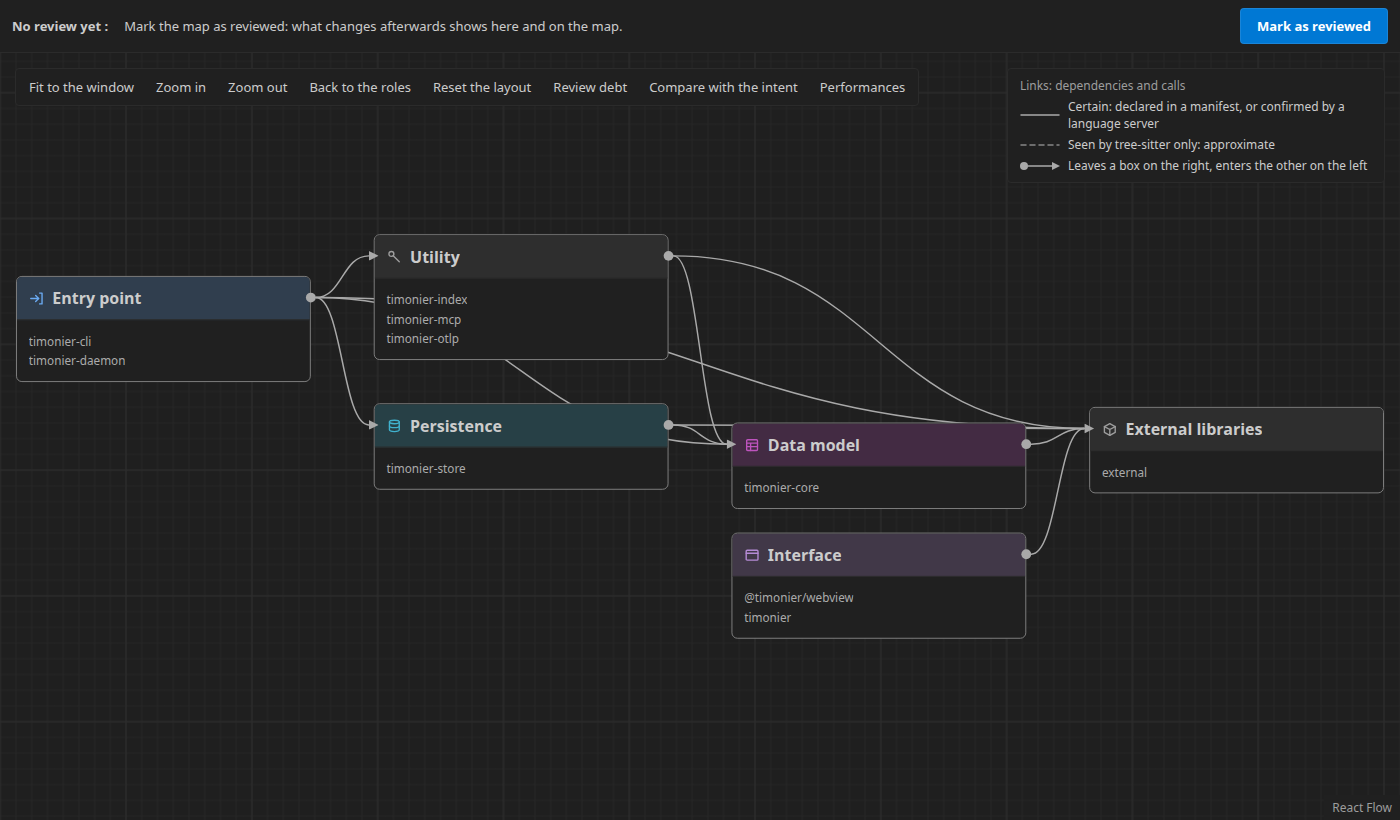
The architecture map: six boxes named by role, with their packages and the dependencies between them

Getting started

  1. Open a project in one of these languages in VSCode, then the Timonier icon (a ship's wheel) in the activity bar.
  2. In the Overview, tick the agents to configure (Claude Code, GitHub Copilot, Cursor, Codex) and click Set up. Timonier writes their instructions, its MCP server and its hooks into the project, and puts the timonier command on your PATH so that the agents find it.
  3. Open the map. Ask your agent for a task: the plan, its todo and its session appear in « Plan, todo and sessions », in the secondary side bar.

The extension ships the timonier program for your system: nothing else to install.

What it shows

  • The architecture map. A few boxes named by role (entry point, data model, persistence, interface…), opened by a click down to files and symbols. Dashed links are known from syntax only; solid ones are confirmed by a manifest or by the IDE's language servers. Shift+Enter opens the code.
  • What changed since your review. « Mark as reviewed » freezes the map; then every new or modified box, new dependency and added cycle says so, and the review debt shows which boxes hold code nobody read again.
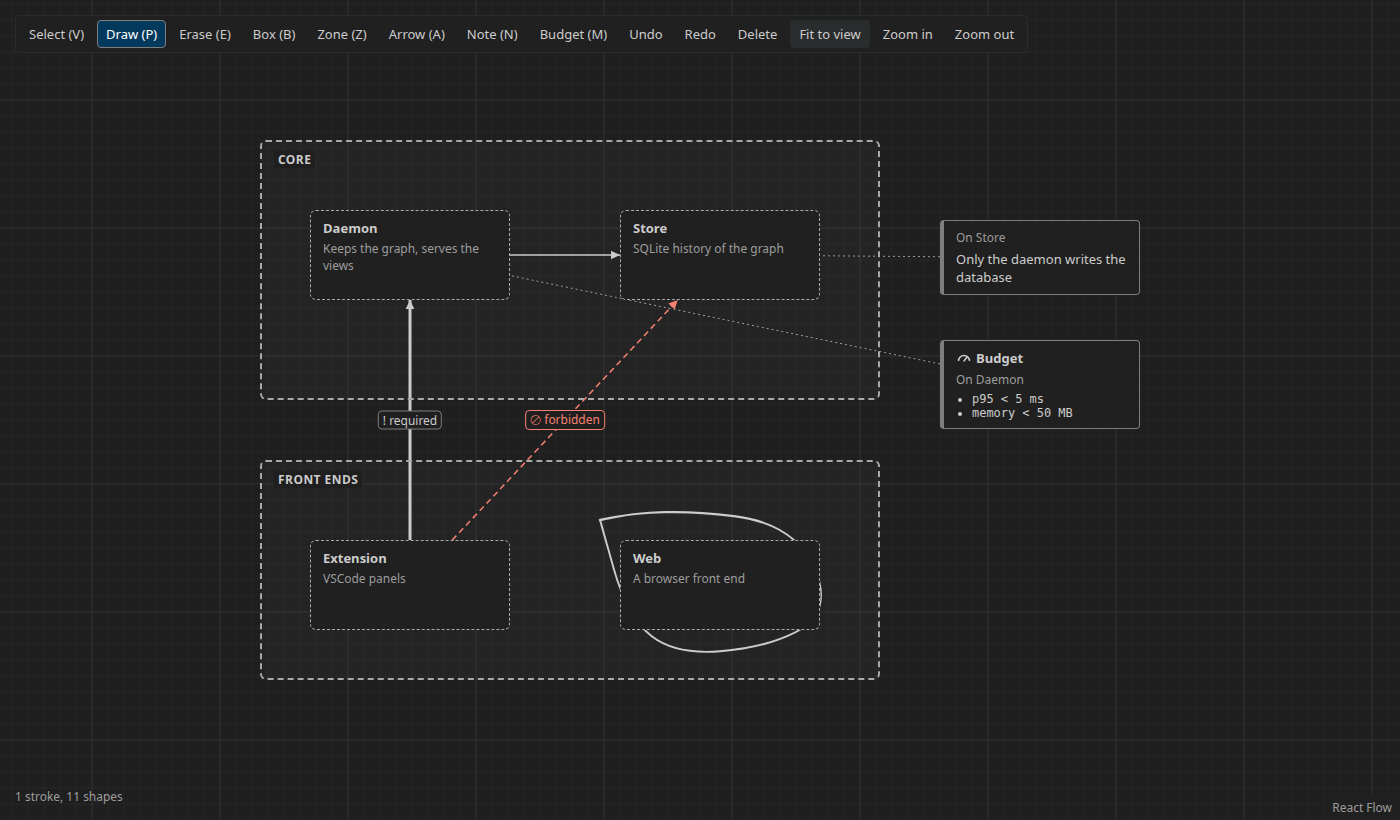
  • The whiteboard. Draw freely, or with typed shapes the agents read as constraints: a box is a component, an arrow is allowed, forbidden or required, a note can set a performance budget. Only you write it. « Compare with the intent » marks forbidden edges crossed and drawn components missing.
  • Plan, todo and sessions. Each agent session, its objective, its todo live, the components it touched, its tests and its AI cost (Claude Code's own token counts).
  • Performance. timonier test measures the tests (time, CPU, memory), receives their OpenTelemetry traces, attaches them to the map, checks the whiteboard's budgets and detects regressions between commits.
  • Technology inventory. Dependencies, licences, duplicates by function, known vulnerabilities (OSV.dev), and a CycloneDX SBOM.

The whiteboard: two layers, four boxes, a required arrow, a forbidden one in red, and a budget of 5 ms at p95

For the agents

Any MCP agent works through Timonier's tools: open a session, split the work into a todo, read the intended architecture and check the drift, read the performance gaps and budget violations, follow the project's development process (tickets, a branch and a pull request per task). The hooks Timonier installs hold an agent once when it stops with its todo not done.

Settings

  • timonier.daemon.path: the timonier program to run. Empty: the one this extension ships.
  • timonier.map.density: comfortable (default) or compact.

Privacy

Everything runs on your machine. The daemon listens on a local socket; the OpenTelemetry receivers listen on 127.0.0.1. The network is used only to look up known vulnerabilities on OSV.dev, when you ask for the inventory, and by gh for the GitHub process, when you choose it.

Licence: MIT.

  • Contact us
  • Jobs
  • Privacy
  • Manage cookies
  • Terms of use
  • Trademarks
  • Your Privacy Choices
  • Consumer Health Privacy
© 2026 Microsoft