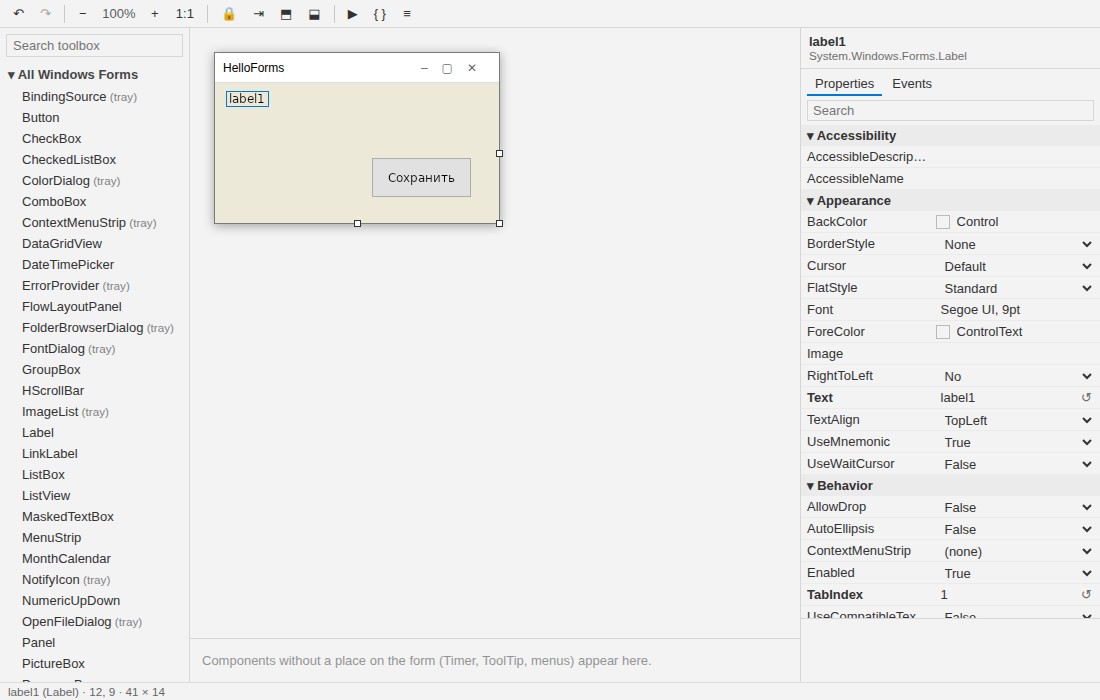
The Windows Forms designer, in VS Code, on Windows and Linux.
Open any *.Designer.cs and you get the canvas, the toolbox and the property grid you know from
Visual Studio. The form is painted by NetForms itself, so
what you see is what runs. The file stays the source of truth: the designer reads and writes
InitializeComponent() exactly as Visual Studio would, and a form made here opens in Visual Studio
unchanged.
Features
- Canvas. Move, resize, snap lines to edges, centres and
Margin/Padding, group selection
(Ctrl/Shift), move into another container, Format → Align/Make Same Size/Spacing, zoom, lock,
bring to front/send to back, tab order mode. Docked controls behave as in Visual Studio.
- Toolbox with search: click to add into the selected container, or drag to a point. Components
(Timer, ToolTip, ImageList, menus, dialogs) go to the component tray.
- Properties and Events by category, with an editor per type: booleans, enums, flags, colours,
string collections one per line,
ListView items with sub-items, TreeView nodes as an indented
outline; reset to default. + next to an event (or a double-click on it, or on the control) writes a
handler stub with the default name (button1_Click) in MainForm.cs and jumps to it; → goes to an
existing handler, ✕ unbinds it (the method stays in the code).
- Code ↔ designer: F7 View Code, Shift+F7 View Designer. Renaming a control renames it in your code too.
- Undo/redo of canvas edits. Editing the file as text (or
git checkout) reloads the canvas.
- New Project, New Form, New User Control with
dotnet new and the NetForms.Templates package from
NuGet (installed on first use, the version this extension is made for). New projects reference the
NetForms package.
- Convert WinForms Project… on any
.csproj: shows what will not carry over to Linux, then switches
the project from UseWindowsForms to the NetForms package. The original is kept as .csproj.winforms.bak.
- Run Project (
dotnet run).
- Offline editing. The canvas needs no network; the webview has no network access.
- English and Russian interface, following the VS Code display language.
Requirements
- .NET 10 SDK. The designer host bundled with the extension
runs on it. NetForms: Check Setup tells you whether it was found.
- Windows 10+ or Linux (x64, arm64).
- Projects that reference the NetForms package. A WinForms project is one command away:
NetForms: Convert WinForms Project….
- Network access to NuGet the first time you create a project or form (the templates and the packages come
from there). Editing forms needs no network.
Commands
| Command |
Default key |
| NetForms: Open Visual Designer |
|
| NetForms: Open as Text |
|
| NetForms: View Code |
F7 |
| NetForms: View Designer |
Shift+F7 |
| NetForms: Tidy Designer File |
|
| NetForms: Create New Project… |
|
| NetForms: New Form… |
|
| NetForms: Convert WinForms Project… |
|
| NetForms: Run Project |
|
| NetForms: Set Designer Host Path… |
|
| NetForms: Check Setup |
|
Settings
| Setting |
|
netforms.dotnetPath |
The dotnet executable. |
netforms.designerHostPath |
Use another designer host (a NetForms checkout you are working on). |
netforms.snapToLines |
Snap while dragging (hold Alt to move freely). |
Not in this preview
Writing .resx (new images from the property grid, localizable forms), extender properties
("ToolTip on toolTip1") in the property grid, a theme editor. See the
compatibility guide for the
state of NetForms itself.
Documentation
https://go-forms.github.io/.NetForms/docs/designer.html (English) ·
https://go-forms.github.io/.NetForms/ru/docs/designer.html (по-русски).
License
MIT. Issues and source: https://github.com/Go-Forms/.NetForms.
| |

