Neo - Autonomous AI Agent for Machine Learning and Data Science

Neo is an autonomous AI agent designed specifically for Machine learning engineers, AI engineers and data scientists.
Neo doesn’t just help you write ML code, it executes experiments, evaluates models, and iterates like a real ML engineer. From training deep learning models and fine-tuning LLMs to building LLM and RAG pipelines and deploying production ready AI systems.
Unlike coding assistants that only generate code snippets, Neo:
- Plans complete ML workflows
- Performs data analysis, preprocessing and feature engineering
- Trains and evaluates models
- Runs experiments, evaluations, and reports
- Iterates based on results like a real AI teammate
All directly inside VS Code.
Works seamlessly with PyTorch, TensorFlow, Hugging Face, and modern AI frameworks using natural language.
Who Neo is For
🤖 Gen AI & LLM Engineers: Build RAG systems, fine-tune latest models (Llama 3, Qwen, Gemma), deploy production LLM applications.
🎯 Data Scientists & ML Engineers: Train deep learning models, experiment with state-of-the-art architectures, build ML pipelines and predictive models.
📈 Product Managers: Prototype, evaluate and integrate different AI models in your product.
What Neo Can Do
🧠 Generative AI & LLM Applications
- RAG Systems: Build question-answering systems with your company documents using Llama 3, Mistral, or GPT-4
- Fine-tune Latest LLMs: Adapt Llama 3, Qwen 2.5, Gemma 2, Mistral, or Phi models to your data
- LLM Agent Development: Create autonomous agents with tool use, memory, and reasoning capabilities
- Chatbots & Assistants: Deploy customer service bots and internal knowledge assistants
- Document Analysis: Summarize contracts, research papers, and reports with vision-language models
- Content Generation: Generate marketing copy, reports, and product descriptions
- Semantic Search: Build intelligent search using modern embedding models
🤖 Machine Learning & AI Development
- Build ML Models: Create PyTorch, TensorFlow, and scikit-learn models from natural language
- Train Deep Learning Models: End-to-end model training with automatic hyperparameter optimization
- Modern Architectures: Work with Vision Transformers, Diffusion Models, and latest research
- Model Evaluation: Compare models, generate metrics, create performance visualizations
💼 Data Intelligence, Forecasting & Analytics
- Predictive Analytics: Forecast sales, customer churn, demand, and business KPIs
- Customer Segmentation: Cluster analysis for marketing and customer insights
- A/B Testing Analysis: Statistical testing and experiment evaluation
- Automated Reporting: Create recurring analysis reports with ML-powered insights
- Time Series Forecasting: Predict stock prices, currency rates, and market trends using Transformers, LSTM, or Prophet
- Risk Modeling: Build VaR, credit risk, and portfolio risk models
- Fraud Detection: Anomaly detection for transaction monitoring
📊 Data Science & Analysis
- Exploratory Data Analysis (EDA): Automatic insights, visualizations, statistical summaries
- Data Preprocessing: Clean, transform, and prepare datasets
- Feature Engineering: Create predictive features from raw data
- Statistical Modeling: Regression, hypothesis testing, causal inference
- Data Pipelines: ETL workflows for data ingestion and processing
👁️ Computer Vision
- Image Classification: Product categorization, quality control, medical imaging
- Object Detection: Inventory tracking, defect detection, security monitoring
- OCR & Document Processing: Extract text from invoices, forms, receipts
- Face Recognition: Identity verification, attendance systems
🎤 Speech & Audio AI
- Speech-to-Text: Transcribe meetings, calls, interviews
- Sentiment Analysis: Analyze customer call sentiment
- Text-to-Speech: Voice notifications, audiobook generation
- Audio Classification: Sound event detection, music genre classification
🔬 Experiment & Research Management
- MLOps Integration: Track experiments with Weights & Biases, MLflow, TensorBoard
- A/B Testing: Design and analyze experiments
- Model Comparison: Benchmark multiple approaches systematically
- Reproducibility: Generate shareable, reproducible analyses
☁️ Cloud Integration
Neo connects to your cloud services:
- AWS S3: Load datasets and save models
- Weights & Biases: Track ML experiments and metrics
- HuggingFace Hub: Access pre-trained models
- Kaggle: Use competition datasets
Quick Start
1. Install & Login
- Install Neo from VS Code marketplace
- Click the Neo icon in the sidebar
- Click Login with your Neo account
- Optionally configure cloud integrations (AWS, W&B, HuggingFace, Kaggle)
New to Neo? Sign up free at heyneo.so
2. Tell Neo What You Want to Build
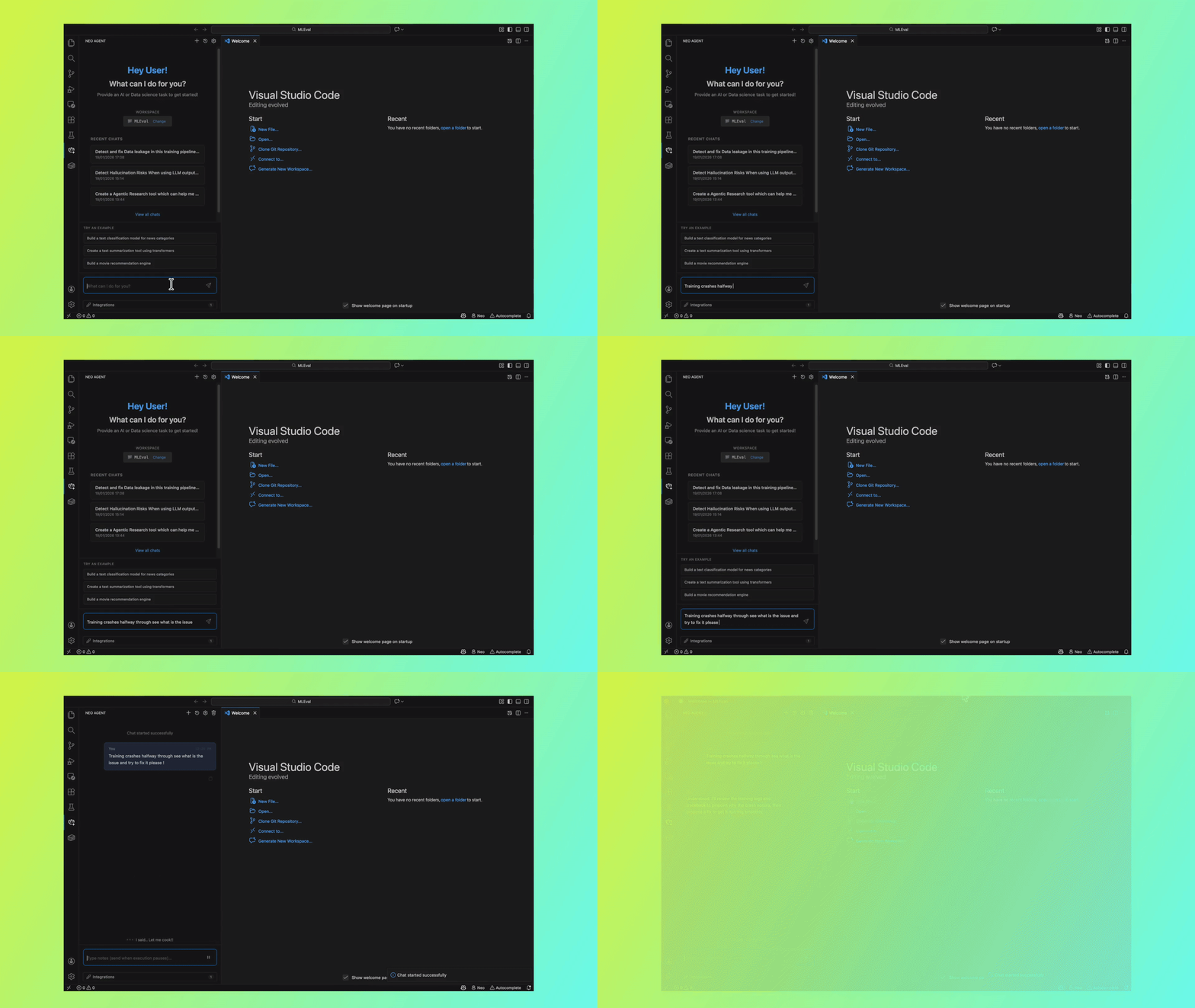
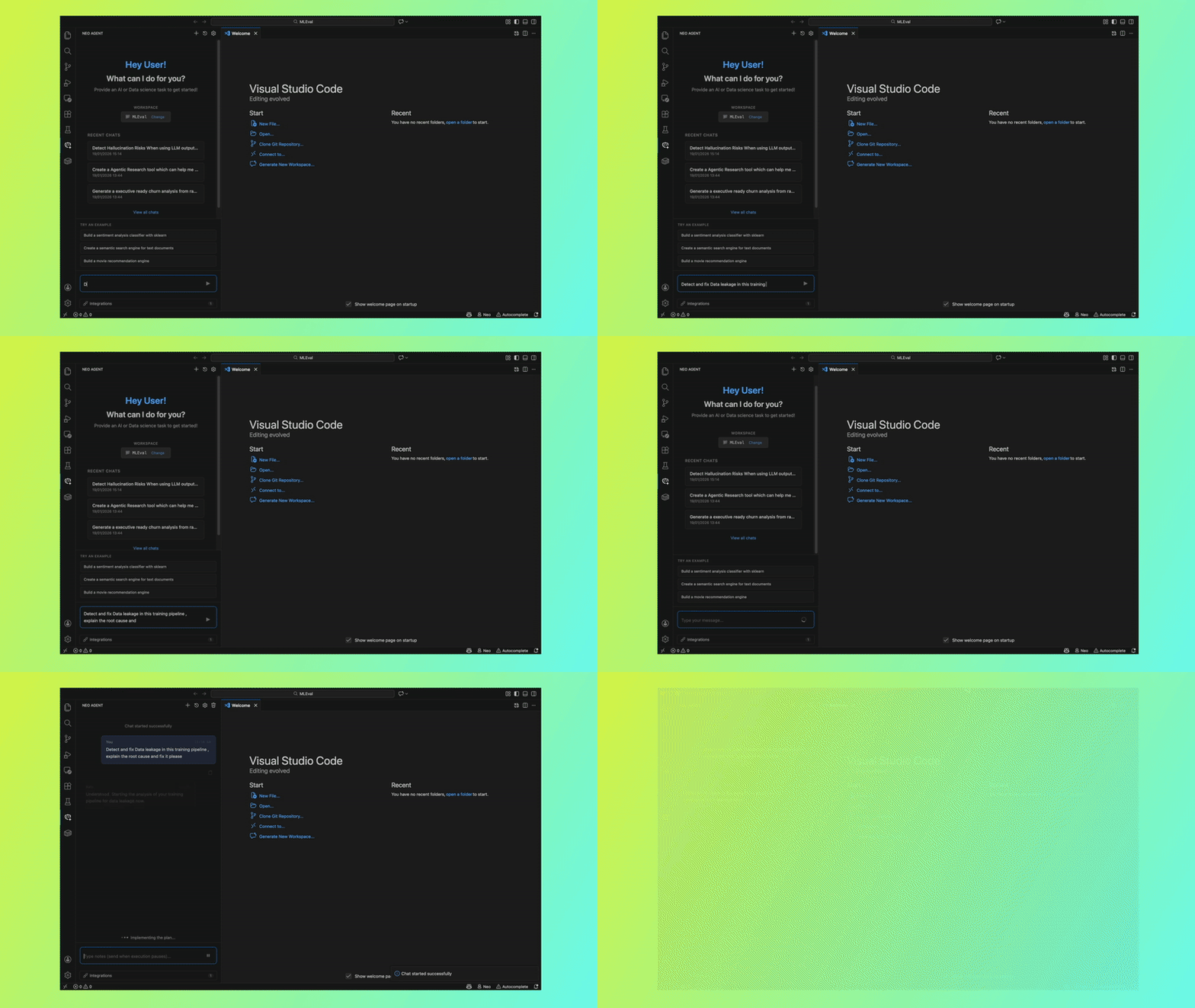
Use natural language to describe your goal, Neo handles the technical implementation:
For AI Engineers, ML Engineers & Data Scientists:
"Fine-tune Llama 3 for sentiment analysis on customer reviews"

"Build YOLOv8 object detection for warehouse inventory images"

"Create a RAG system using Pinecone with Qwen embeddings"

"Train a PyTorch Vision Transformer with custom attention mechanism"

"Compare ViT vs ConvNeXt on my image classification task"
For Data Analysts:
"Analyze my sales data, identify trends, and predict next quarter revenue"

"Build a customer churn prediction model using my CRM data"

"Create a customer segmentation model and visualize the segments"

"Analyze A/B test results and determine statistical significance"

"Generate a weekly automated report with key business metrics"
For Financial Analysts & Quants:
"Forecast stock prices using LSTM with my historical data from S3"

"Build a portfolio optimization model with Sharpe ratio maximization"

"Create a credit risk scoring model using logistic regression"

"Backtest a moving average crossover strategy on crypto data"

"Build a VaR model for my portfolio and calculate risk metrics"

"Detect anomalies in transaction data for fraud detection"
For Domain Experts (Healthcare, Legal, Marketing):
"Analyze patient readmission patterns and build a prediction model"

"Extract key clauses from legal contracts using NLP"

"Predict customer lifetime value from marketing campaign data"

"Classify medical images for disease detection"

"Summarize research papers and extract key findings"
For Product Managers:
"Build a recommendation engine prototype for my product catalog"

"Analyze user feedback sentiment and categorize feature requests"

"Predict user retention based on onboarding behavior"

"Create a content moderation classifier for user-generated content"
3. Watch Neo Work Autonomously
Neo operates as a fully autonomous agent:
- Understands your business goal and breaks it into technical steps
- Writes production-ready Python code (no coding required from you)
- Installs required packages automatically
- Runs analysis and training scripts
- Generates insights, visualizations, and reports
- Handles cloud operations (upload/download data and models)
You maintain full control: Pause, review, or stop at any time. No black box: See exactly what Neo is doing.
Key Features
🚀 Autonomous Workflow Execution
Describe what you want in plain English. Neo handles the technical implementation. No need to know PyTorch, TensorFlow, or ML algorithms.
💻 Local & Secure
All code runs locally in your workspace. Your data, models, and credentials stay on your machine. Full transparency.
📦 Framework & Library Support
Works with industry-standard tools:
- ML/DL: PyTorch, TensorFlow, scikit-learn, XGBoost, LightGBM
- Data Analysis: pandas, NumPy, statsmodels, scipy
- Visualization: matplotlib, seaborn, plotly
- NLP: Hugging Face Transformers, spaCy, NLTK
- Computer Vision: OpenCV, torchvision, PIL
- LLM Frameworks: LangChain, LlamaIndex
- Finance: QuantLib, zipline, backtrader, yfinance
🔄 Full Context Awareness
Neo understands your data structure, existing code, and project context. Works with CSV, Excel, SQL databases, APIs, and cloud storage.
📈 Real-Time Progress
Monitor progress while Neo works: see current tasks, training metrics, and logs in real-time.
🔐 Secure Credential Management
Store AWS, Weights & Biases, HuggingFace, and Kaggle credentials securely using VS Code's encrypted storage.
💬 Conversational Interface
Ask follow-up questions, request modifications, or get explanations. Neo maintains context throughout the conversation.
Use Cases by Role
📊 Data Analysts
- Predictive analytics for revenue, churn, demand forecasting
- Customer segmentation and cohort analysis
- Marketing campaign performance analysis
- Automated reporting and dashboards
- Statistical hypothesis testing
💼 Financial Analysts & Quants
- Time series forecasting (Temporal Fusion Transformers, LSTM, Prophet, ARIMA)
- Risk modeling and portfolio optimization
- Algorithmic trading strategy development
- Financial statement analysis and ratio calculations
- Fraud detection and anomaly detection
- Credit scoring models
🎯 Marketing & Sales
- Customer lifetime value prediction
- Lead scoring and conversion prediction
- Sentiment analysis from customer feedback
- Recommendation engines
- Market basket analysis
🏥 Healthcare & Life Sciences
- Patient risk prediction and readmission modeling
- Medical image classification
- Clinical trial data analysis
- Drug discovery data processing
- Electronic health record (EHR) analysis
🎓 Researchers & Academics
- Reproduce ML research papers
- Run comparative experiments
- Statistical analysis for publications
- Data processing for research
- Create reproducible analysis pipelines
🏗️ Product & Engineering Teams
- Prototype ML features quickly
- Integrate LLMs into applications
- Build recommendation systems
- Implement search and ranking algorithms
- Create data-driven features
Commands
Open Command Palette (Cmd+Shift+P / Ctrl+Shift+P):
Neo: Login - Authenticate with NeoNeo: Logout - Sign outNeo: Start New Chat - Begin new projectNeo: Chat History - Resume previous projectsNeo: Open Chat Sidebar - Open Neo sidebarNeo: Terminate Chat - Stop execution
Cloud Integrations
Connect your private datasets and production tools directly from Neo's integrations panel (Settings → Integrations in Neo sidebar). These integrations enable Neo to seamlessly access your proprietary data, track experiments, and deploy models without manual file transfers—critical for enterprise workflows, fine-tuning on private documents, and production ML pipelines.
- AWS S3: Load private datasets and save trained models to your secure cloud storage
- Weights & Biases: Track experiments, compare model performance, and collaborate with your team
- HuggingFace: Access 500K+ pre-trained models and deploy fine-tuned models to the Hub
- Kaggle: Import competition datasets and benchmark against public leaderboards
Requirements
- VS Code: 1.85.0 or higher
- Python: 3.8+ (installed automatically if needed)
- Internet: Required for AI inference
- Neo Account: Free at heyneo.so
Privacy & Security
- ✅ Local Execution: Code and data stay on your machine
- ✅ Encrypted Storage: Credentials encrypted with VS Code SecretStorage
- ✅ Workspace Isolation: Operations restricted to your project
- ✅ Full Transparency: All actions logged and visible
- ✅ User Control: Pause, resume, or stop anytime
Example Workflows
Business: Sales Forecasting
"Load my sales_data.csv, perform time series decomposition,
build ARIMA and LSTM forecasts, compare accuracy,
create visualization showing historical and predicted sales"
Finance: Portfolio Optimization
"Load stock prices for AAPL, GOOGL, MSFT from Yahoo Finance,
calculate returns and covariance matrix, optimize portfolio
for maximum Sharpe ratio, show efficient frontier plot"
ML: Customer Churn Prediction
"Load customer data from S3, perform EDA, handle missing values,
create features, train XGBoost and Random Forest models,
compare performance, show feature importance, generate predictions"
NLP: Document Analysis
"Load PDF documents from ./contracts folder, extract text,
summarize key terms, identify clauses, create comparison table,
save results to Excel"
Computer Vision: Quality Control
"Load product images, train image classifier to detect defects,
use transfer learning with Vision Transformer, evaluate on test set,
generate confusion matrix and misclassification report"
Troubleshooting
Neo not responding?
- Check View → Output → Neo Agent for errors
- Verify internet connection
- Resume from Chat History if interrupted
Package installation fails?
- Ensure Python 3.8+ is installed
- Check pip is accessible from terminal
- Verify disk space availability
Cloud integration errors?
- Verify credentials in Settings → Integrations
- Test connection before running workflows
- Check firewall/proxy settings
Data loading issues?
- Ensure file paths are correct
- Check file permissions
- Verify data format (CSV, Excel, JSON, etc.)
Need help or want to report an issue?
- In-app feedback: Click Settings in Neo sidebar → Send Feedback
- Email support: support@heyneo.so
Keywords
Machine Learning, ML Engineering, AI Engineering, AI Agent, Data Science, Autonomous AI, Model Training, Experiment Tracking, ML Workflows, Model Evaluation, Time Series Forecasting, Deep Learning, LLM, LLM Fine Tuning, Fine-tuning, Computer Vision, NLP, Natural Language Processing, RAG, Retrieval Augmented Generation, Generative AI, Gen AI, PyTorch, TensorFlow, scikit-learn, Hugging Face, MLOps, Churn Prediction, Python, Data Analysis, Exploratory Data Analysis, Statistical Modeling, Customer Segmentation, A/B Testing, Automated Machine Learning, AutoML, Neural Networks, Transformers, BERT, GPT, Speech Recognition, Text to Speech, Image Classification, Object Detection, Sentiment Analysis, LangChain, Data Visualization
Support
Need help? We're here for you!
- 💬 In-App Feedback: Click Settings in Neo sidebar → Send Feedback (bug reports, feature requests, questions)
- 💌 Email Support: support@heyneo.so
- 🌐 Website: heyneo.so
License
Proprietary - Copyright © 2026 Neo Research Inc.
AI-powered workflows for AI engineers, ML engineers, Data scientists and data analysts ❤️

