Naftiko Crafter
Naftiko Crafter is a VS Code extension that lints (schema validation + rules validation) your files directly in your IDE. For the moment, supported formats are:
- Ikanos capability configuration
- OpenAPI definitions (3.1, 3.0, and swagger 2.0)
How it works
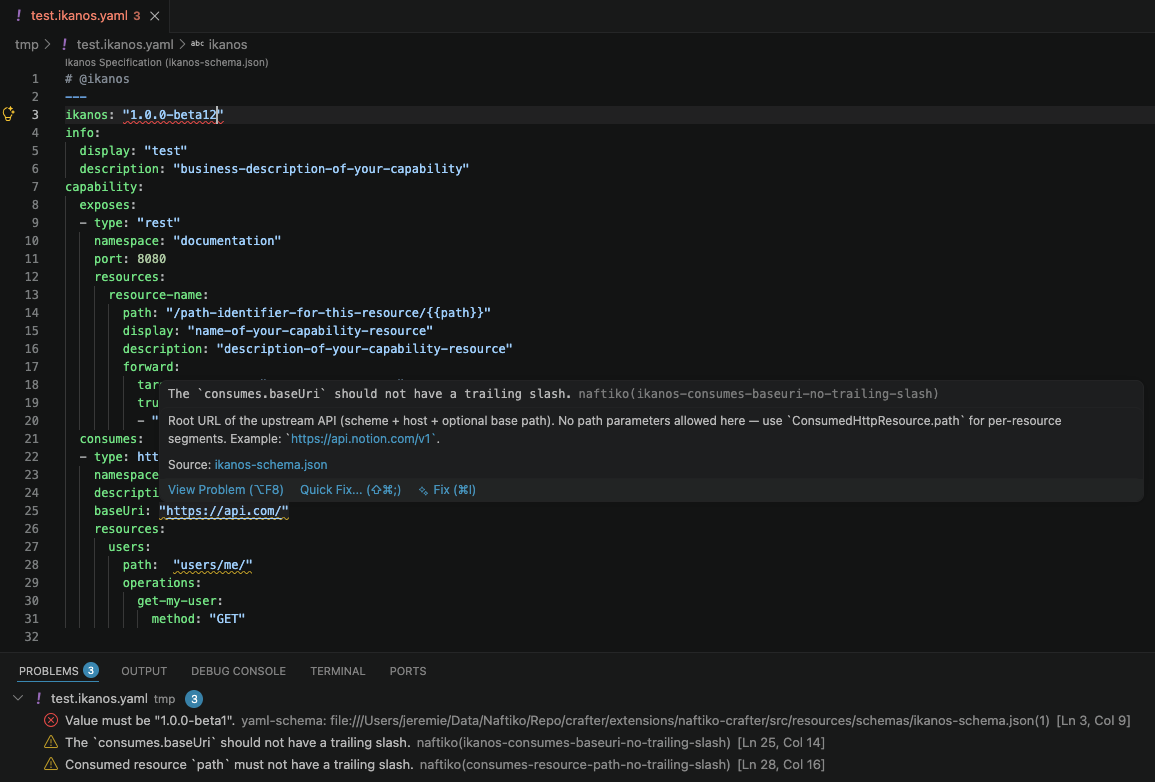
Linting messages are displayed in two ways:
- Inline — elements are underlined in the editor; hover over them to see the details in a pop-up.
- Problems panel — the
PROBLEMS bottom panel lists all messages from all open supported files.
Targeted files
Manual linting
The panel command Naftiko: Validate File lints the currently open file in your IDE. Open the palette (Ctrl+Shift+P / Cmd+Shift+P) and type "Naftiko: Validate File".
Automatic live linting
Naftiko Crafter also applies automatically to files identified in two ways:
- File extension — settings by default: file ending with
.ikanos.yaml or .ikanos.yml.
- Modeline — settings by default: any YAML file containing the following comment in the first 5 lines of the file:
# @ikanos
Of course, these settings can be modified (read Extension Settings for more information).
File Structure Validation
Your file must follow a valid structure defined by a schema (Ikanos or OpenAPI) embedded in Naftiko Crafter. You can find the full schemas reference here:
File Rules Validation
In addition to structure, various technical and business rules are validated by Polychro, which is embedded in the extension.
You can add your own custom rules in the extension settings, or more simply with the command Naftiko: Browse for Custom Ruleset File.... Open the palette (Ctrl+Shift+P / Cmd+Shift+P) and select your ruleset file.
Extension Settings
Access settings via Code > Preferences > Settings and search for "naftiko".
- Default format -
ikanos by default. Default target format used by the linter (ikanos or oas).
- Live linting Enabled - checked by default. Enable or disable live linting for supported files.
- Supported extensions -
.ikanos.ymland .ikanos.yaml by default. List of file extensions supported by the linter for live linting.
- Supported modelines -
@ikanos by default. List of modelines supported by the linter for live linting. To be supported the modeline must be in the first 5 lines of the file.
- Override ruleset path - path to an additional custom Polychro ruleset YAML file. When set, both the built-in rules and your custom rules are applied. You can also browse for the file via the palette: "Naftiko: Browse for Custom Ruleset File...".
Extension Infos
To view the Naftiko Crafter version, date, and embedded Polychro version, open the palette (Ctrl+Shift+P / Cmd+Shift+P) and type "Naftiko: Show Naftiko Crafter Infos".
Release Notes
Naftiko Crafter versions are aligned with the Ikanos framework versions.
1.0.0-beta2
- Add OpenAPI format support.
- Parameterize supported files
extensions and modelines.
- Remove the YAML RedHat extension dependency.
1.0.0-beta1
- Replace Spectral Rule by Polychro.
- Walkthroughs improvements.
- Add
Enabled and Ruleset Path settings.
- Limit rule validation to 0.5s max.
1.0.0-alpha1
Alpha version

