
Forest Ash Theme21 themes, infinite possibilities, zero cost - A collection of dark and light, eye-friendly VS Code themes inspired by forest ash textures and anime palettes. Features dynamic custom theme generation and multi-tool export to JetBrains, Neovim, Sublime Text, Windows Terminal, iTerm2, Alacritty, Zed, Installation Launch VS Code Quick Open ( Ctrl+P), paste the following command, and press enter.Copied to clipboard |

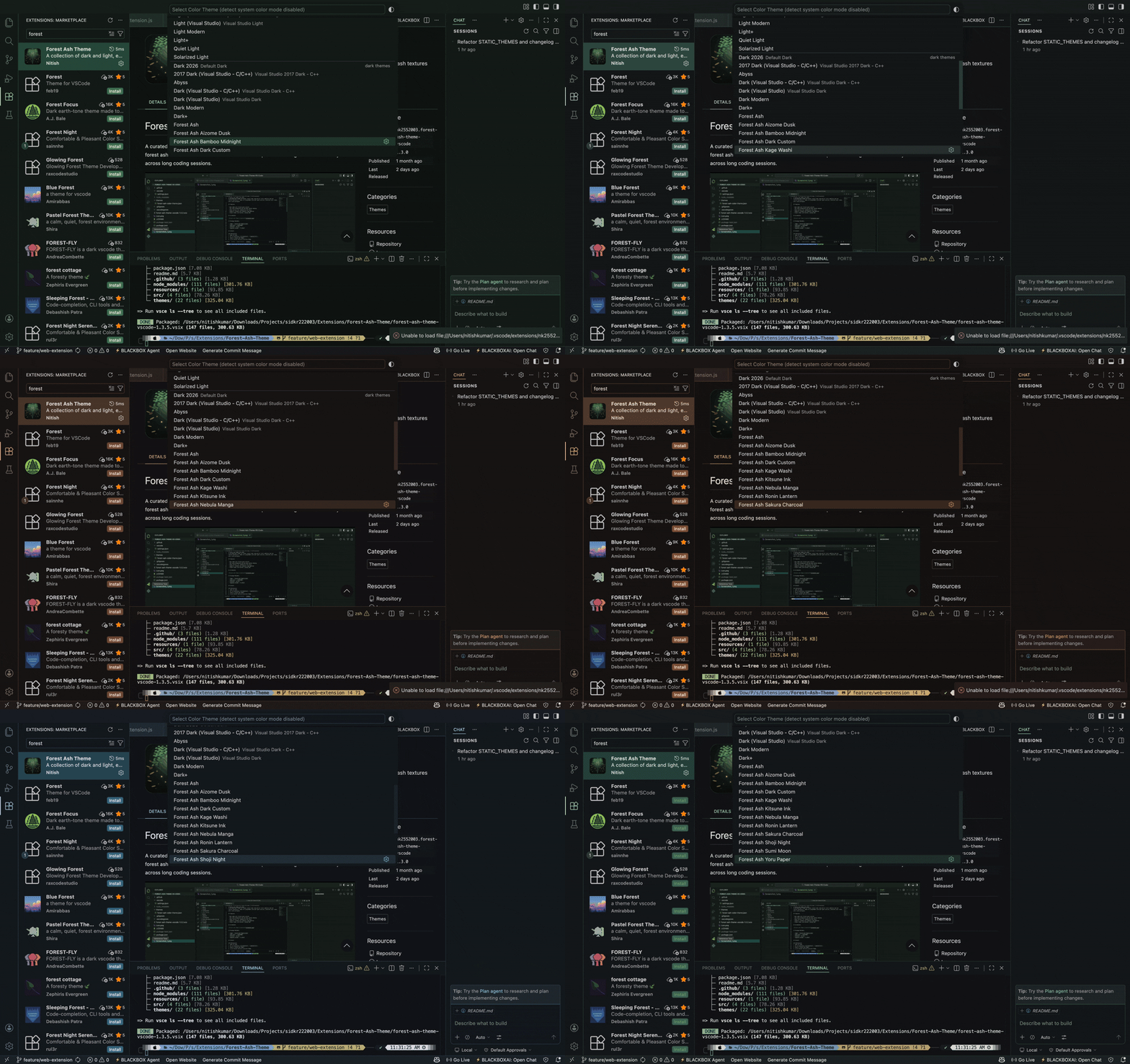
Forest Ash Theme (VS Code)A curated set of dark and light, eye-friendly themes for Visual Studio Code, inspired by forest ash textures and anime mood boards. Each palette is designed for readability across long coding sessions. Now with multi-tool export — take any Forest Ash palette to JetBrains, Neovim, Sublime Text, Windows Terminal, iTerm2, Alacritty, Zed, tmux, and Warp Terminal.
Theme CollectionThis extension includes 21 hand-crafted themes plus unlimited custom themes you can generate yourself. Dark Palette Sheet
Dark Themes
Light Palette Sheet
Light Themes
🌍 Multi-Tool Export (v1.5.2)Take any Forest Ash palette — built-in or custom-generated — and export it for your other tools with a single command. Command:
|
| Target | Format | Install Path |
|---|---|---|
| JetBrains (IDEA, Rider, CLion, PyCharm, WebStorm…) | .icls |
Settings → Editor → Color Scheme → ⚙ → Import Scheme |
| Neovim / Vim | .lua |
~/.config/nvim/colors/ then colorscheme forest-ash |
| Sublime Text | .tmTheme |
Preferences → Browse Packages → Packages/User/ |
| Windows Terminal | .json |
Add to "schemes" array in settings.json |
| iTerm2 | .itermcolors |
Preferences → Profiles → Colors → Color Presets → Import |
| Alacritty | .toml |
Paste into alacritty.toml or use general.import |
| Zed | .json |
~/.config/zed/themes/ then "theme": "Forest Ash" |
| tmux | .conf |
source-file in your ~/.tmux.conf |
| Warp Terminal | .yaml |
~/.warp/themes/ then select in Appearance → Themes |
Command: Forest Ash: Export All Themes for External Tool
Batch-exports all 21 built-in themes for a chosen tool into a single folder. Perfect for creating a themed tool suite.
Theme Generator
Forest Ash includes a built-in dynamic theme generator that creates fully unique themes from any hex accent color. Every input color — including its hue, saturation, and lightness — influences the entire generated palette, so no two colors ever produce the same theme.
How It Works
The generator extracts all three HSL components from your chosen color:
- Hue → drives the base color family and split-complementary triad (keywords, strings, functions, types)
- Saturation → scales how vivid or muted the entire palette is
- Lightness → shifts tonal weight across backgrounds, foregrounds, and syntax tokens
Contrast and readability are preserved automatically for both dark and light variants.
How to Access the Generator
| Method | Instructions |
|---|---|
| Command Palette (Recommended) | Press Ctrl+Shift+P / Cmd+Shift+P, type Forest Ash: Generate Custom Theme, press Enter. |
| Right-Click (Editor) | Right-click inside any open editor tab and select Generate Custom Theme. |
| VS Code Settings | Go to Preferences > Settings, search Forest Ash, and set your default accent color and variant. |
Generation Steps
- Enter a hex accent color (e.g.
#4a9eff) - Choose Dark or Light variant
- Give your theme a unique name
- VS Code will prompt you to Reload — after reloading, your theme appears in the native theme picker (
Cmd+K Cmd+T/Ctrl+K Ctrl+T) alongside all built-in themes
Available Commands
| Command | Description |
|---|---|
Forest Ash: Quick Theme Picker |
Browse and apply all Forest Ash themes (built-in + custom) with mood descriptions |
Forest Ash: Surprise Me (Random Theme) |
Apply a random Forest Ash theme |
Forest Ash: Generate Custom Theme |
Create a new theme from a hex color, variant, and name |
Forest Ash: Apply Custom Theme |
Quickly switch between your saved custom themes |
Forest Ash: Rename Custom Theme |
Rename a saved custom theme |
Forest Ash: Duplicate Custom Theme |
Clone a custom theme under a new name |
Forest Ash: Delete Custom Theme |
Permanently remove a generated theme |
Forest Ash: List Saved Custom Themes |
View all custom themes in a webview panel with color swatches |
Forest Ash: Toggle Focus Mode |
Dim everything except the active function or block |
Forest Ash: Toggle Italic Mode |
Toggle italics for italic-capable token scopes |
Forest Ash: High Contrast Boost |
Increase contrast across Forest Ash tokens |
Forest Ash: Preview Themes |
Preview all 21 Forest Ash themes side-by-side |
Forest Ash: Show Active Palette |
Inspect and copy every color token in the active theme |
Forest Ash: Export Palette as CSS |
Export the active palette as CSS variables |
Forest Ash: Export Palette as SCSS |
Export the active palette as SCSS variables |
Forest Ash: Export Theme for External Tool |
Export current theme to JetBrains, Neovim, Sublime, Terminal apps… |
Forest Ash: Export All Themes for External Tool |
Batch-export all 21 themes for a chosen tool |
Forest Ash: Export Custom Theme |
Export a saved custom theme to a JSON file |
Forest Ash: Share Custom Theme |
Copy a custom theme into the community share folder and prepare a PR note |
Forest Ash: Import Custom Theme |
Import a custom theme JSON file into Forest Ash |
Forest Ash: Apply Circadian Theme Now |
Apply the correct day/night theme right now |
Forest Ash: Theme of the Week |
Show the weekly theme spotlight panel |
High Impact Features
Status Bar Swatch (v1.5.2 fix)
When a Forest Ash theme is active, the status bar shows a ⬤ ThemeName indicator. Click it to open the Quick Theme Picker instantly.
- Setting:
forestAsh.showSwatchInStatusBar(default:true)
Quick Picker Mood Descriptions (v1.5.2 fix)
The Quick Theme Picker now shows the mood/atmosphere description for every built-in theme:
Indigo haze, low glare, steady focus. — Aizome Dusk
Focus Mode / Zen Palette
Toggle a deep-focus mode that dims everything except the active function or block. It also softens CodeLens and inactive selection contrast for a calmer view.
- Command:
Forest Ash: Toggle Focus Mode - Settings:
forestAsh.focusMode.enabled,forestAsh.focusMode.dimOpacity
Circadian Auto-Switching
Automatically switch between a light day theme and warm night theme based on your time zone.
- Command:
Forest Ash: Apply Circadian Theme Now - Settings:
forestAsh.circadian.*
Language-Specific Accent Overrides
Pin a unique accent color per language via settings.
"forestAsh.languageAccents": {
	"python": "#B48EAD",
	"go": "#8FBCBB",
	"rust": "#D08770"
}
Italic / No-Italic Toggle
Instantly toggle italics for token styles (useful with italic-friendly fonts).
- Command:
Forest Ash: Toggle Italic Mode - Setting:
forestAsh.italicMode.enabled
High Contrast Boost
Boosts contrast across all Forest Ash foregrounds and tokens to improve accessibility.
- Command:
Forest Ash: High Contrast Boost - Setting:
forestAsh.highContrast.enabled
Export Palette as CSS / SCSS
Export the active Forest Ash theme as a CSS or SCSS file with :root / $ variables.
- Commands:
Forest Ash: Export Palette as CSS,Forest Ash: Export Palette as SCSS
Theme Preview Webview
Preview all 21 Forest Ash themes side-by-side without switching.
- Command:
Forest Ash: Preview Themes
Palette Inspector
Open a searchable grid of all color tokens in the active theme with copy-on-click.
- Command:
Forest Ash: Show Active Palette
Custom Theme Sharing (Import / Export / Share)
Export a custom theme JSON for sharing, import one from the community, or copy a theme into the share folder with a PR note ready on your clipboard.
- Commands:
Forest Ash: Export Custom Theme,Forest Ash: Share Custom Theme,Forest Ash: Import Custom Theme - Community sharing: add JSON files to the share folder and open a PR.
Theme of the Week
Once per week, Forest Ash surfaces a hand-picked theme with a short mood description, plus a live preview, palette swatches, and syntax token legend.
- Command:
Forest Ash: Theme of the Week - Setting:
forestAsh.themeOfWeek.enabled
Note: Advanced commands (Focus Mode, preview, export, import) run in the desktop app. The web version focuses on theme browsing and switching.
Custom Theme Persistence
Generated themes are saved inside the extension's themes/custom/ folder and registered in package.json automatically. They survive VS Code restarts and are restored silently on every activation. If a theme file goes missing (e.g. after reinstall), the extension cleans up stale metadata automatically.
Note: After generating or deleting a custom theme, a window reload is required for the change to appear in VS Code's native color theme picker.
Design Goals
- Dark and low-glare backgrounds for reduced eye fatigue
- Calm, desaturated accents with anime-inspired mood
- Distinct identity per theme without harsh neon contrast
- Balanced syntax tokens for comments, strings, keywords, functions, types, and punctuation
- Full semantic highlighting support
- Clean terminal ANSI colors that match each palette
- Bracket pair colorization built in
Install
Marketplace
- Open VS Code
- Go to Extensions (
Ctrl+Shift+X/Cmd+Shift+X) - Search for
Forest Ash Theme - Install and switch via
Preferences: Color Theme
Local Source
- Clone this repository
- Run
npm install - Run
npm run package(requiresvsce) - Install the generated
.vsixviaExtensions > ... > Install from VSIX
Package Metadata
| Field | Value |
|---|---|
name |
forest-ash-theme |
displayName |
Forest Ash Theme |
publisher |
NK2552003 |
version |
1.5.2 |
engines.vscode |
^1.70.0 |
Development
npm install          # install dependencies
npm run package      # build .vsix with vsce
npm run publish      # publish to VS Code Marketplace
Repository Structure
forest-ash-theme/
├── extension.js              # extension entry point, all commands
├── package.json              # manifest, contributes.themes, commands
├── src/
│   ├── extension.js          # desktop entry point, commands
│   ├── extension-web.js      # web entry point
│   ├── themeGenerator.js     # dynamic palette + theme JSON builder
│   ├── themeExporter.js      # multi-tool export engine (v1.5.2)
│   ├── themeReading.js       # shared theme JSON loader
│   └── themeWebviews.js      # preview/palette webview helpers
├── themes/
│   ├── *.json                # 21 hand-crafted static themes
│   └── custom/               # runtime-generated user themes (git-ignored)
│       └── .gitkeep
├── docs/
│   └── 1.4.0-features.md      # feature walkthrough for 1.4.0
├── share/
│   └── README.md              # community theme submissions
├── resources/
│   ├── icon.png
│   ├── Preview.png
│   ├── dark.png
│   └── light.png
└── README.md
License
MIT
Theme Collection
This extension includes 21 hand-crafted themes plus unlimited custom themes you can generate yourself.
Dark Palette Sheet
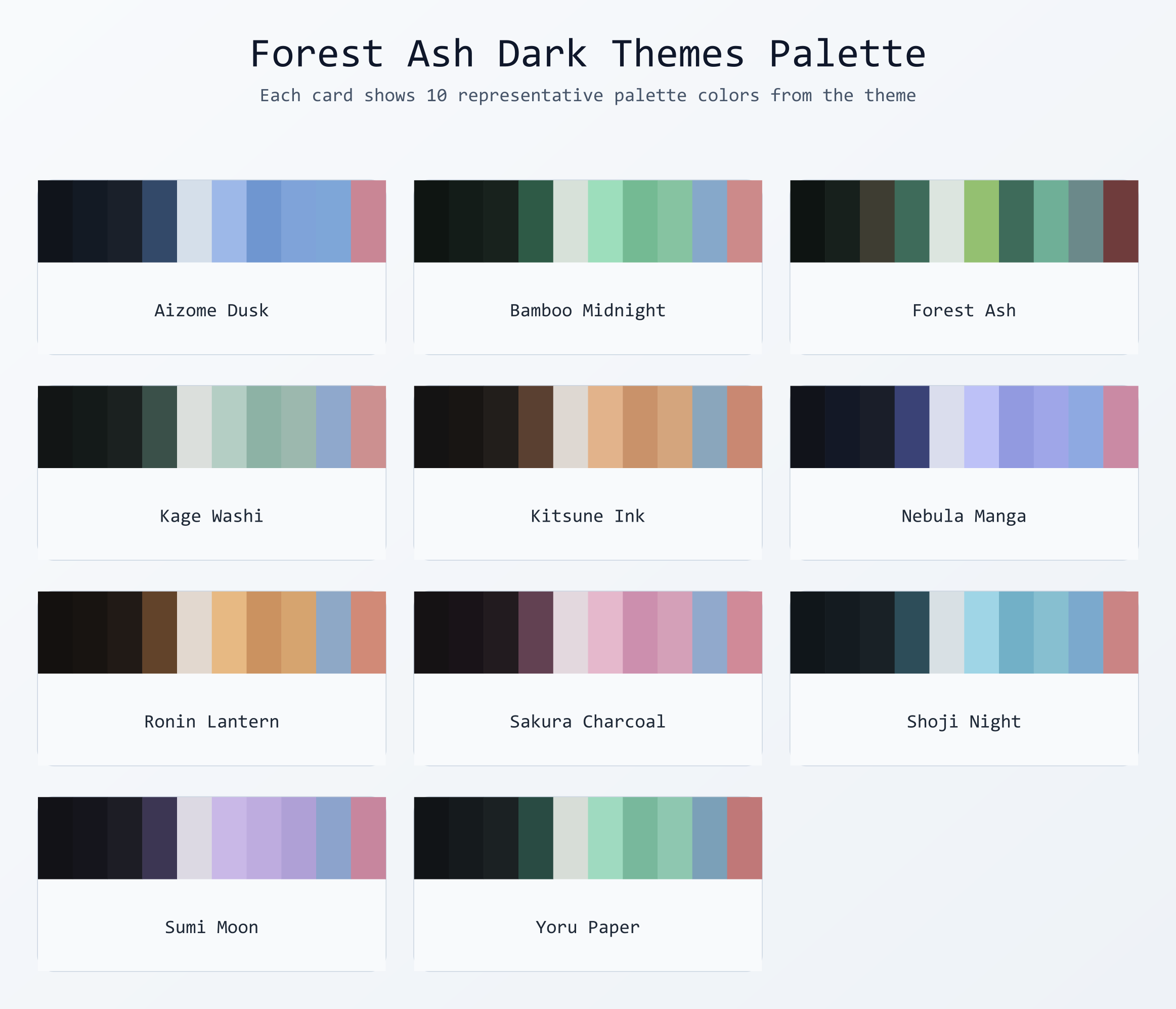
Dark Themes
- Forest Ash
- Forest Ash Yoru Paper
- Forest Ash Sumi Moon
- Forest Ash Kitsune Ink
- Forest Ash Shoji Night
- Forest Ash Aizome Dusk
- Forest Ash Ronin Lantern
- Forest Ash Bamboo Midnight
- Forest Ash Nebula Manga
- Forest Ash Sakura Charcoal
- Forest Ash Kage Washi
Light Palette Sheet
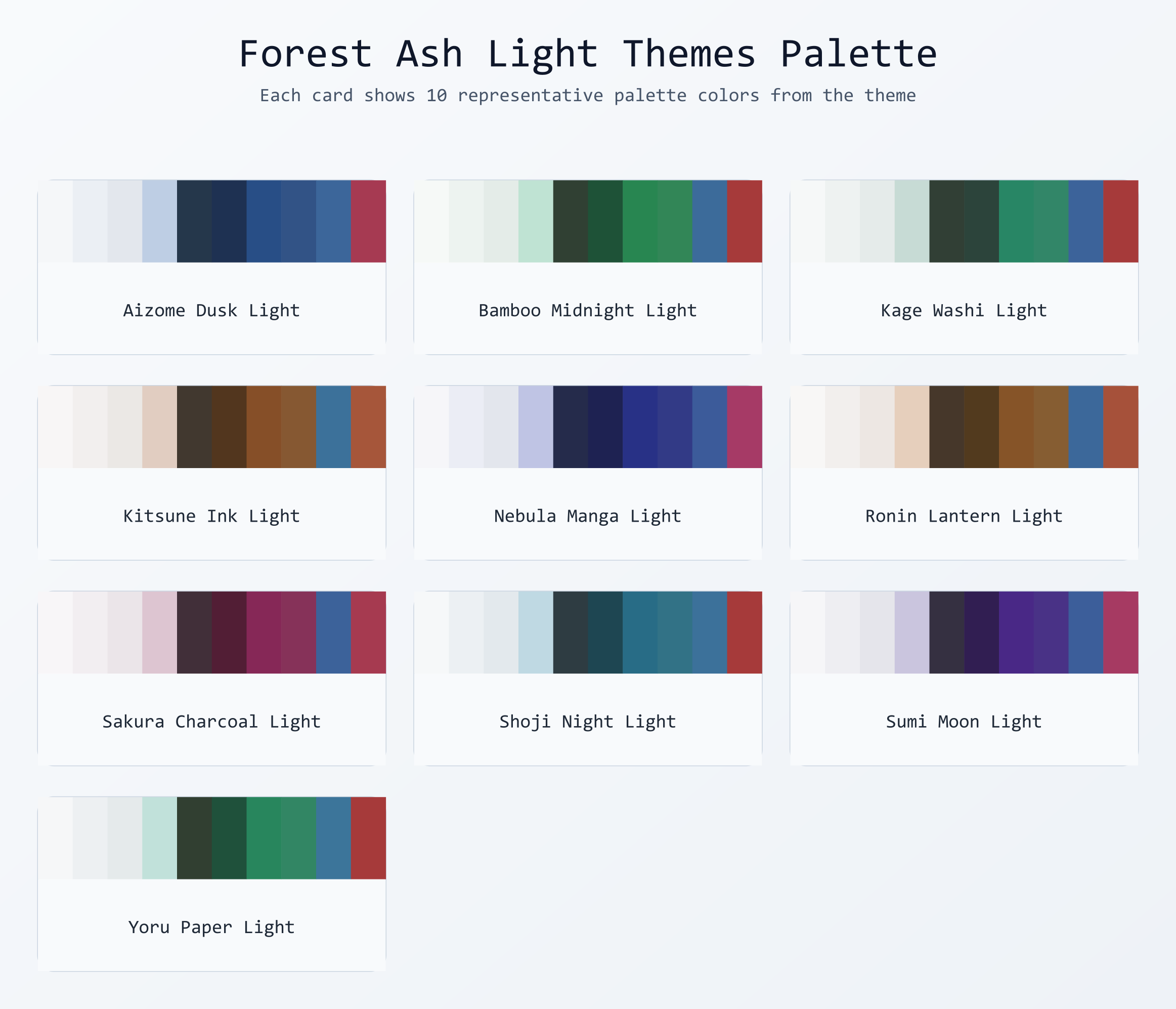
Light Themes
- Forest Ash Yoru Paper Light
- Forest Ash Sumi Moon Light
- Forest Ash Kitsune Ink Light
- Forest Ash Shoji Night Light
- Forest Ash Aizome Dusk Light
- Forest Ash Ronin Lantern Light
- Forest Ash Bamboo Midnight Light
- Forest Ash Nebula Manga Light
- Forest Ash Sakura Charcoal Light
- Forest Ash Kage Washi Light
Theme Generator
Forest Ash includes a built-in dynamic theme generator that creates fully unique themes from any hex accent color. Every input color — including its hue, saturation, and lightness — influences the entire generated palette, so no two colors ever produce the same theme.
How It Works
The generator extracts all three HSL components from your chosen color:
- Hue → drives the base color family and split-complementary triad (keywords, strings, functions, types)
- Saturation → scales how vivid or muted the entire palette is
- Lightness → shifts tonal weight across backgrounds, foregrounds, and syntax tokens
Contrast and readability are preserved automatically for both dark and light variants.
How to Access the Generator
| Method | Instructions |
|---|---|
| Command Palette (Recommended) | Press Ctrl+Shift+P / Cmd+Shift+P, type Forest Ash: Generate Custom Theme, press Enter. |
| Right-Click (Editor) | Right-click inside any open editor tab and select Generate Custom Theme. |
| VS Code Settings | Go to Preferences > Settings, search Forest Ash, and set your default accent color and variant. |
Generation Steps
- Enter a hex accent color (e.g.
#4a9eff) - Choose Dark or Light variant
- Give your theme a unique name
- VS Code will prompt you to Reload — after reloading, your theme appears in the native theme picker (
Cmd+K Cmd+T/Ctrl+K Ctrl+T) alongside all built-in themes
Available Commands
| Command | Description |
|---|---|
Forest Ash: Generate Custom Theme |
Create a new theme from a hex color, variant, and name |
Forest Ash: Apply Custom Theme |
Quickly switch between your saved custom themes |
Forest Ash: Delete Custom Theme |
Permanently remove a generated theme |
Forest Ash: List Saved Custom Themes |
View all custom themes in a webview panel with color swatches |
Forest Ash: Quick Theme Picker |
Browse and apply all Forest Ash themes (built-in + custom) in one picker |
Forest Ash: Toggle Focus Mode |
Dim everything except the active function or block |
Forest Ash: Toggle Italic Mode |
Toggle italics for italic-capable token scopes |
Forest Ash: High Contrast Boost |
Increase contrast across Forest Ash tokens |
Forest Ash: Preview Themes |
Preview all 21 Forest Ash themes side-by-side |
Forest Ash: Show Active Palette |
Inspect and copy every color token in the active theme |
Forest Ash: Export Palette as CSS |
Export the active palette as CSS variables |
Forest Ash: Export Custom Theme |
Export a saved custom theme to a JSON file |
Forest Ash: Share Custom Theme |
Copy a custom theme into the community share folder and prepare a PR note |
Forest Ash: Import Custom Theme |
Import a custom theme JSON file into Forest Ash |
Forest Ash: Apply Circadian Theme Now |
Apply the correct day/night theme right now |
Forest Ash: Theme of the Week |
Show the weekly theme spotlight panel |
High Impact Features (1.4.0)
Focus Mode / Zen Palette
Toggle a deep-focus mode that dims everything except the active function or block. It also softens CodeLens and inactive selection contrast for a calmer view.
- Command:
Forest Ash: Toggle Focus Mode - Settings:
forestAsh.focusMode.enabled,forestAsh.focusMode.dimOpacity
Circadian Auto-Switching
Automatically switch between a light day theme and warm night theme based on your time zone.
- Command:
Forest Ash: Apply Circadian Theme Now - Settings:
forestAsh.circadian.*
Language-Specific Accent Overrides
Pin a unique accent color per language via settings.
"forestAsh.languageAccents": {
	"python": "#B48EAD",
	"go": "#8FBCBB",
	"rust": "#D08770"
}
Italic / No-Italic Toggle
Instantly toggle italics for token styles (useful with italic-friendly fonts).
- Command:
Forest Ash: Toggle Italic Mode - Setting:
forestAsh.italicMode.enabled
High Contrast Boost
Boosts contrast across all Forest Ash foregrounds and tokens to improve accessibility.
- Command:
Forest Ash: High Contrast Boost - Setting:
forestAsh.highContrast.enabled
Export Palette as CSS Variables
Export the active Forest Ash theme as a CSS file with :root variables.
- Command:
Forest Ash: Export Palette as CSS
Theme Preview Webview
Preview all 21 Forest Ash themes side-by-side without switching.
- Command:
Forest Ash: Preview Themes
Palette Inspector
Open a searchable grid of all color tokens in the active theme with copy-on-click.
- Command:
Forest Ash: Show Active Palette
Custom Theme Sharing (Import / Export / Share)
Export a custom theme JSON for sharing, import one from the community, or copy a theme into the share folder with a PR note ready on your clipboard.
- Commands:
Forest Ash: Export Custom Theme,Forest Ash: Share Custom Theme,Forest Ash: Import Custom Theme - Community sharing: add JSON files to the share folder and open a PR.
Theme of the Week
Once per week, Forest Ash surfaces a hand-picked theme with a short mood description, plus a live preview, palette swatches, and syntax token legend.
- Command:
Forest Ash: Theme of the Week - Setting:
forestAsh.themeOfWeek.enabled
Note: Advanced commands (Focus Mode, preview, export, import) run in the desktop app. The web version focuses on theme browsing and switching.
Custom Theme Persistence
Generated themes are saved inside the extension's themes/custom/ folder and registered in package.json automatically. They survive VS Code restarts and are restored silently on every activation. If a theme file goes missing (e.g. after reinstall), the extension cleans up stale metadata automatically.
Note: After generating or deleting a custom theme, a window reload is required for the change to appear in VS Code's native color theme picker.
Design Goals
- Dark and low-glare backgrounds for reduced eye fatigue
- Calm, desaturated accents with anime-inspired mood
- Distinct identity per theme without harsh neon contrast
- Balanced syntax tokens for comments, strings, keywords, functions, types, and punctuation
- Full semantic highlighting support
- Clean terminal ANSI colors that match each palette
- Bracket pair colorization built in
Install
Marketplace
- Open VS Code
- Go to Extensions (
Ctrl+Shift+X/Cmd+Shift+X) - Search for
Forest Ash Theme - Install and switch via
Preferences: Color Theme
Local Source
- Clone this repository
- Run
npm install - Run
npm run package(requiresvsce) - Install the generated
.vsixviaExtensions > ... > Install from VSIX
Package Metadata
| Field | Value |
|---|---|
name |
forest-ash-theme |
displayName |
Forest Ash Theme |
publisher |
NK2552003 |
version |
1.4.0 |
engines.vscode |
^1.70.0 |
Development
npm install          # install dependencies
npm run package      # build .vsix with vsce
npm run publish      # publish to VS Code Marketplace
Repository Structure
├── CHANGELOG.md
├── CODE_OF_CONDUCT.md
├── CONTRIBUTING.md
├── LICENSE
├── README.md
├── SECURITY.md
├── docs
│   └── features-how-it-works.md
├── exports
│   ├── alacritty
│   ├── iterm2
│   ├── jetbrains
│   ├── neovim
│   ├── sublime
│   ├── tmux
│   ├── warp
│   ├── windows-terminal
│   └── zed
├── package-lock.json
├── package.json
├── resources
│   ├── dark.png
│   ├── demo.gif
│   ├── icon.png
│   ├── icon.svg
│   └── light.png
├── share
│   └── README.md
├── src
│   ├── extension-web.js
│   ├── extension.js
│   ├── themeExporter.js
│   ├── themeGenerator.js
│   ├── themeReading.js
│   ├── themeWebviews.js
│   └── themesList.js
└── themes
    ├── custom

17 directories, 234 files
License
MIT