FocusForge: Coding Session Tracker
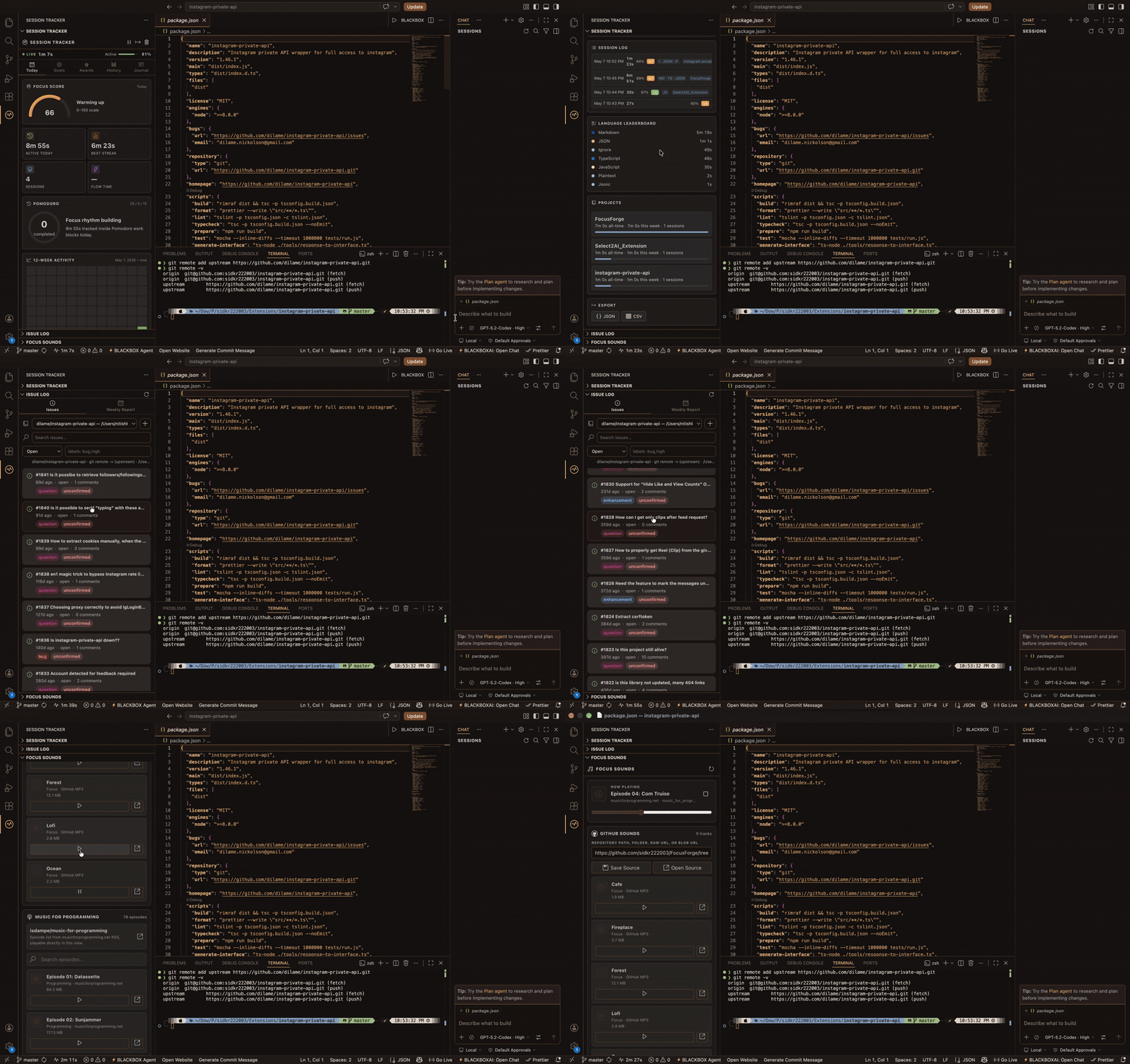
FocusForge turns VS Code into a local-first productivity cockpit for developers and students. It tracks real coding time, focus quality, Pomodoro rhythm, project effort, language practice, GitHub issue work, commits, planner sessions, journal notes, achievements, reports, and optional AI insights.
No extension server. No telemetry pipeline. Your session history stays local unless you explicitly opt into GitHub-powered features.
Highlights
- Live session dashboard with active time, idle time, efficiency, streaks, and flow state.
- Smart Focus Score from active ratio, flow minutes, break hygiene, and idle count.
- Pomodoro Mode with 25/5/15 defaults, long-break rhythm, session counts, and status badges.
- Automatic project detection from active workspace, Git roots, nested repos, and
git remote -v.
- Git commit correlation for commits made during a tracked session.
- GitHub Issue Log with local repo detection, token account fallback, comments, labels, issue creation, and completion logs.
- Language breakdown using VS Code
document.languageId.
- Session notes and weekly journal with mood filtering.
- Deep Work Mode for focused coding blocks.
- Planner with reminders, fulfillment detection, and
.ics calendar export.
- Optional GitHub Gist team leaderboard.
- Optional GitHub Models AI weekly insight using the existing GitHub token.
- Markdown and HTML weekly reports saved to
.vscode/session-reports/.
- 100+ achievements and progressive badges.
Dashboard
Today
The Today tab shows what is happening right now:
- Live active time, total time, idle time, and efficiency.
- Current state: active, idle, paused, flow, or deep work.
- Focus Score gauge with color zones.
- Pomodoro panel with completed work cycles.
- 12-week contribution-style activity heatmap.
- Language donut for today's active editor time.
- Lifetime totals, best streaks, session count, and coding-since date.
Goals
Plan the day and keep the target visible:
- Daily goal ring with milestone markers at 25%, 50%, 75%, and 100%.
- Quick goal presets from 1h to 6h.
- ETA based on current active session rate.
- Weekly goal bars.
- Session Planner for date, time, duration, and label.
- Calendar export to
.vscode/session-reports/planned-sessions.ics.
Awards
Motivation without leaving the editor:
- Progressive badge tiers: Bronze, Silver, Gold, Platinum, Diamond.
- 100+ achievements across milestones, streaks, flow, productivity, time of day, consistency, notes, Pomodoro, projects, commits, and deep work.
- Search and filter for unlocked or locked achievements.
- Optional team leaderboard through GitHub Gist.
- Optional AI weekly insight card powered by GitHub Models.
History
Understand where the time went:
- 14-session bar chart.
- Clickable session detail panel.
- Active time, total duration, peak streak, efficiency, focus score, flow time, breaks, idle events, and deep work time.
- Project, Pomodoro, commit, and note metadata.
- Language leaderboard.
- Project analytics with all-time and weekly totals.
- JSON and CSV export.
Journal
Capture context before it disappears:
- Add a one-line summary, mood, and optional blockers.
- Weekly journal view for the last 7 days.
- Mood filter for quick reflection and standups.
GitHub Issue Log
FocusForge includes a GitHub issue workflow designed for local workspaces:
- Detects the current repo from the active editor, workspace folders, nested Git folders, Git extension API, and
git remote -v.
- Local working repos appear before repositories fetched from a GitHub token.
- Works with repos cloned from another user when the remote points to GitHub.
- Falls back to token-fetched account repos when no local GitHub remote is detected.
- Lists issues, labels, assignees, and comments.
- Supports issue creation, commenting, open-in-browser, copy link, close/reopen, and completion logs.
- Completion logs can be included in weekly reports.
Privacy Model
FocusForge is local-first:
- Session history is stored in VS Code global state.
- GitHub token is stored in VS Code SecretStorage.
- Weekly reports and planner exports are written inside the workspace.
- GitHub API is used only after connecting GitHub.
- Gist leaderboard is opt-in.
- GitHub Models AI insight is opt-in.
- No extension-owned backend is used.
Commands
| Command |
Description |
Session Tracker: Start Session |
Resume tracking |
Session Tracker: End Session |
Pause tracking and offer a note |
Session Tracker: Open Dashboard |
Open the Today tab |
Session Tracker: View Achievements |
Open Awards |
Session Tracker: View History |
Open History |
Session Tracker: Add Session Note |
Add a note to current or latest session |
Session Tracker: Open Journal |
Open Journal |
Session Tracker: Start Deep Work Mode |
Enter focused coding mode |
Session Tracker: End Deep Work Mode |
Exit focused coding mode |
Session Tracker: Export Data |
Export JSON or CSV |
Session Tracker: Reset Today |
Clear today's sessions |
Session Tracker: Set Daily Goal |
Set daily goal minutes |
Session Tracker: Export Planned Sessions (.ics) |
Export planner events |
Session Tracker: Toggle Tracking |
Pause or resume tracking |
Issues: Refresh |
Refresh GitHub Issue Log |
Issues: Connect GitHub Account |
Store a GitHub token |
Issues: Disconnect GitHub Account |
Remove the stored token |
Issues: Create New Issue |
Create or open a new GitHub issue |
Issues: Generate Weekly Report |
Generate this week's report |
Issues: Generate Last Week's Report |
Generate last week's report |
Issues: Export Completion Log (JSON/CSV) |
Export issue completion logs |
Settings
{
  "devToolkit.sessionTracker.dailyGoalMinutes": 120,
  "devToolkit.sessionTracker.idleThresholdMinutes": 2,
  "devToolkit.sessionTracker.idleDetection": true,
  "devToolkit.sessionTracker.engagedThresholdSeconds": 30,
  "devToolkit.sessionTracker.flowStateThresholdMinutes": 25,
  "devToolkit.sessionTracker.breakReminderInterval": 45,
  "devToolkit.sessionTracker.statusBarFormat": "timeAndStreak",
  "devToolkit.sessionTracker.focusScore": {
    "enabled": true,
    "showInStatusBar": true
  },
  "devToolkit.sessionTracker.deepWork": {
    "defaultDurationMinutes": 50,
    "hideActivityBar": true,
    "hideStatusBar": false,
    "muteNotifications": true
  },
  "devToolkit.sessionTracker.notifications": {
    "breakReminders": true,
    "goalReminders": true,
    "achievementToasts": true
  },
  "devToolkit.sessionTracker.pomodoro": {
    "enabled": true,
    "workMinutes": 25,
    "shortBreakMinutes": 5,
    "longBreakMinutes": 15,
    "autoAdvance": true,
    "sound": "bell"
  },
  "devToolkit.sessionTracker.projects": {
    "enabled": true,
    "useGitRemote": true
  },
  "devToolkit.sessionTracker.planner": {
    "enabled": true,
    "reminderMinutesBefore": 5,
    "exportIcs": true
  },
  "devToolkit.sessionTracker.audio": {
    "enabled": false,
    "defaultTrack": "rain",
    "volume": 0.4,
    "autoStartWithSession": false
  },
  "devToolkit.sessionTracker.reports": {
    "enabled": true,
    "format": "markdown",
    "outputPath": ".vscode/session-reports",
    "autoGenerate": true
  },
  "devToolkit.sessionTracker.leaderboard": {
    "gistId": "",
    "teamGistIds": [],
    "name": "",
    "avatar": "◆"
  },
  "devToolkit.sessionTracker.aiInsights": {
    "enabled": false,
    "model": "openai/gpt-4.1-mini",
    "generateOn": "sunday"
  }
}
Development
npm install
npm run compile
Press F5 in VS Code and choose Run Extension.
Package
npm run package
code --install-extension focusforge-1.0.0.vsix
Requirements
- VS Code 1.90.0+
- Node.js 18+
- Git CLI for repository and commit correlation
Documentation
License
Apache 2.0
| |

