
Claude Code Exporter





English · 中文
English
Why This Exists
I use Claude Code every day — across multiple projects, across dozens of sessions. And I kept running into the same wall.
The session boundary problem. Every new Claude Code session starts from zero. You explained your architecture last Tuesday. You debugged that auth issue on Thursday. You spent three hours building a shared mental model with Claude — and then the session ends, and it's gone. The next time you open Claude Code, it knows nothing.
Claude Code does have a built-in memory mechanism (CLAUDE.md, auto-compact summaries). But those summaries are lossy — they're compressed snapshots, not the full reasoning. When you need to reconstruct why a decision was made, or hand off context to a different tool, they fall short.
The real pain: third-party API integration.
This is where it gets sharper. If you're using Claude through a third-party API — whether that's a custom Claude integration, an OpenAI-compatible endpoint, or a platform that bills per token — you face a harder version of the same problem:
- Each API call is stateless. There is no "session" to resume. Every new request must carry its own context window.
- You pay for every token you send. Repasting a long conversation history every time is expensive. But not sending it means Claude has no memory of what you built together.
- Conversation formats differ across providers. Claude's native format, OpenAI's message array, raw text — they're all different. You can't just copy-paste a session from one tool into another.
- Switching tools mid-project loses everything. Move from Claude Code CLI to a web interface, or from one session to another, and the context evaporates.
The exported .md files solve this cleanly. They're plain Markdown — readable by any model, pasteable into any interface, editable before sending. You control exactly what context you include, in a format that works everywhere.
Claude Code Exporter does one thing: it automatically saves every conversation as a Markdown file, inside your project folder, in real time. Your sessions become a local knowledge base — searchable, portable, and model-agnostic.
Note: Claude Code's built-in autodream/memory features cover the single-tool case well. This extension is especially useful when you're crossing session boundaries, switching API providers, or building a persistent record that survives beyond any one tool.
How It Works
~/.claude/projects/<your-project>/session.jsonl
                      │
                      │  auto-detected + real-time file watching
                      ▼
         <your-project>/.cc-history/
              ├── 2025-03-27_143025_fix-auth-bug_a1b2c3d4.md
              ├── 2025-03-28_091530_refactor-api_e5f6g7h8.md
              └── ...
Open any workspace → extension matches it to its Claude sessions → exports to .cc-history/ → watches for new messages and updates instantly. Zero configuration.
Features
| Feature |
Description |
| Auto-export |
Exports to .cc-history/ when you open a workspace. Updates in real time as you chat. |
| Two formats |
Readable — rich Markdown with metadata and tool call details, for archiving. Compact — clean Human/Claude turns only, optimized for pasting back as context. |
| Sidebar |
Browse all sessions for the current project. Click any session to preview. |
| Batch export |
One-click export all sessions, or scan your entire machine for every Claude project. |
| Smart filenames |
{date}_{time}_{first-message}_{sessionId}.md — sorted by second, find what you need at a glance. |
| Tool summaries |
[Tool: Bash — git status] instead of raw JSON walls. |
Quick Start
- Install from the VS Code Marketplace
- Open a project where you've used Claude Code
- Done — check the
.cc-history/ folder in your project root
Use as a Knowledge Base
Set format to Compact, then in a new Claude Code session:
Read .cc-history/2025-03-27_143025_fix-auth-bug_a1b2c3d4_compact.md
and use that context to continue the work.
Claude now has full context from the previous session. This is the closest thing to persistent memory across sessions that Claude Code currently supports.
Settings
| Setting |
Default |
Description |
claudeCodeExporter.autoExport |
true |
Auto-export on open and on changes |
claudeCodeExporter.exportFormat |
readable |
readable for archiving, compact for AI context |
claudeCodeExporter.includeThinking |
false |
Include extended thinking blocks |
claudeCodeExporter.includeToolDetails |
true |
Include tool call details |
claudeCodeExporter.claudeProjectsDir |
~/.claude/projects |
Custom Claude projects path |
See Also
| Extension |
Description |
| Claude Code Prism |
Real-time HUD for Claude Code for VS Code — token usage, cost, context window and model info in your status bar |
Compatibility
- VS Code 1.85+ · Cursor · Claude Code CLI · Claude Code for VS Code
- Windows / macOS / Linux
中文
为什么做这个插件
我每天都在用 Claude Code,跨多个项目,跨几十个会话。然后我一直撞上同一堵墙。
会话边界问题。 每次重开 Claude Code,一切从零开始。上周二解释了系统架构,周四调试了鉴权 bug,花了三个小时和 Claude 建立起完整的心智模型——然后会话结束了,什么都没了。下次打开 Claude Code,它什么都不知道。
Claude Code 本身有内置的记忆机制(CLAUDE.md、自动压缩摘要)。但那些摘要是有损的——它们是压缩快照,不是完整推理过程。当你需要还原"为什么当时做了这个决策",或者把上下文迁移到别的工具时,摘要是不够的。
真正的痛点:第三方 API 接入。
如果你通过第三方 API 使用 Claude——无论是自建的 Claude 集成、兼容 OpenAI 格式的接口,还是按量计费的平台——你会遇到更难处理的同一个问题:
- 每次 API 调用都是无状态的。 没有可以续接的"会话",每次请求必须自带上下文。
- 你为每一个 token 付钱。 每次把完整对话历史贴进去代价高昂;但不贴,Claude 就没有之前建立的记忆。
- 不同 API 的对话格式不一样。 Claude 原生格式、OpenAI 的 message 数组、纯文本——格式各异,无法直接跨工具复制粘贴。
- 中途换工具,上下文全丢。 从 Claude Code CLI 切换到网页界面,或者重开一个会话,之前的一切就消失了。
导出的 .md 文件干净地解决了这个问题。它们是纯 Markdown——任何模型都能读,可以粘贴到任意界面,发送前可以手动编辑裁剪。你完全掌控要带入多少上下文,用一种到处都能用的格式。
Claude Code Exporter 只做一件事:自动把每段对话实时保存为 Markdown 文件,放在你的项目文件夹里。你的会话变成本地知识库——可搜索、可移植、与具体模型无关。
注:Claude Code 内置的 autodream / 记忆功能对单工具场景已经够用。这个插件在跨会话边界、切换 API 提供商、或需要一份超越任何单一工具的持久记录时,尤其有价值。
工作原理
~/.claude/projects/<your-project>/session.jsonl
                      │
                      │  自动检测 + 实时文件监控
                      ▼
         <your-project>/.cc-history/
              ├── 2025-03-27_143025_fix-auth-bug_a1b2c3d4.md
              ├── 2025-03-28_091530_refactor-api_e5f6g7h8.md
              └── ...
打开任意工作区 → 插件自动匹配对应的 Claude 会话 → 导出到 .cc-history/ → 实时监听新消息并更新。零配置。
功能
| 功能 |
说明 |
| 自动导出 |
打开工作区即导出,对话进行中实时更新 |
| 双格式 |
可读模式 — 完整 Markdown,含元数据和工具调用,用于存档。精简模式 — 纯对话流,用于贴回给 Claude 作上下文 |
| 侧边栏 |
浏览当前项目的所有会话,点击直接预览 |
| 批量导出 |
一键导出全部会话,或扫描全机所有 Claude 项目 |
| 智能命名 |
{日期}_{时间}_{首条消息}_{会话ID}.md,按秒排序,一眼找到想要的 |
| 工具摘要 |
[Tool: Bash — git status] 替代大段 JSON |
快速开始
- 从 VS Code Marketplace 安装,或在扩展搜索 "Claude Code Exporter"
- 打开一个你用过 Claude Code 的项目文件夹
- 完成——查看项目根目录下的
.cc-history/ 文件夹
用作知识库
设置格式为 Compact(精简模式),然后在新会话里:
Read .cc-history/2025-03-27_143025_fix-auth-bug_a1b2c3d4_compact.md
and use that context to continue the work.
Claude 就拥有了上一次会话的完整上下文。这是目前 Claude Code 能做到的最接近跨会话持久记忆的方案。
设置项
| 设置 |
默认值 |
说明 |
claudeCodeExporter.autoExport |
true |
打开项目和检测到变更时自动导出 |
claudeCodeExporter.exportFormat |
readable |
readable 存档,compact 喂 AI |
claudeCodeExporter.includeThinking |
false |
包含扩展思考块 |
claudeCodeExporter.includeToolDetails |
true |
包含工具调用详情 |
claudeCodeExporter.claudeProjectsDir |
~/.claude/projects |
自定义 Claude 项目目录 |
相关扩展
| 扩展 |
说明 |
| Claude Code Prism |
Claude Code for VS Code 的实时 HUD——状态栏显示 token 用量、费用、上下文窗口和模型信息 |
兼容性
- VS Code 1.85+ · Cursor · Claude Code CLI · Claude Code for VS Code
- Windows / macOS / Linux
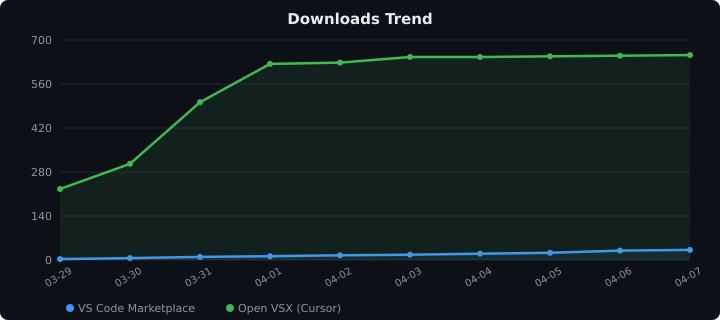
Built for developers who talk to AI all day and don't want to lose those conversations.
为每天和 AI 对话、又不想丢失这些对话的开发者而造。


