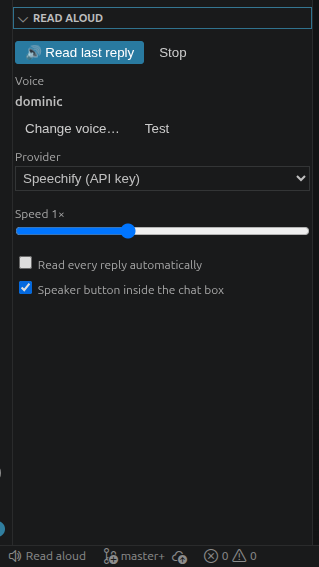
Buttons and hotkeys for the claude-read-aloud plugin: status bar, Claude Code toolbar, right-click "Read aloud", and an optional in-chat composer button.
Installation
Launch VS Code Quick Open (Ctrl+P), paste the following command, and press enter.
Buttons and hotkeys for hearing Claude Code's replies out loud. This extension
is the clickable front end for the claude-read-aloud Claude Code plugin —
install that first (it's the engine: voices, chunked playback, providers).
What you get
Status-bar button (bottom-left, right under the chat input): click to
read Claude's last reply aloud, click again to stop.
A "Read Aloud" settings panel inside Claude Code's sidebar — voice with
test and a searchable picker, provider, speed, auto-read.
Right-click → "Read aloud" on highlighted text in Claude Code, and an
optional in-chat speaker button beside the mic — these two need the
opt-in composer patch: the extension offers it once on startup, or run
"Claude Read Aloud: Install in-chat button" from the Command Palette (it
explains exactly what it changes and is fully revertible).
Setup
Install the plugin in Claude Code:
claude plugin marketplace add michaelpgifford/claude-read-aloud
claude plugin install read-aloud@claude-read-aloud
Install this extension (code --install-extension MichaelGifford.claude-read-aloud-button,
or search "Claude Read Aloud" in the Extensions view).
Click the speaker. Free system voices work immediately; on Linux run
/read-aloud:voice-setup once for a much better free neural voice, or add
a Speechify / ElevenLabs / OpenAI key for premium voices.