FleetView
A dashboard for a Claude Code agent fleet. FleetView reads the session and
transcript files Claude Code already writes on your machine, so you can see every
live main agent, every subagent it launched, what each one is writing right now,
and what the main agent did with the result. GitHub Copilot Chat sessions are
picked up the same way on Windows. Codex main agents and their nested subagents
are discovered from CODEX_HOME/sessions (or ~/.codex/sessions).
Codex rows show each thread's own recorded turn state, model, token counts, output
and answer. Descendants stay grouped under their parent conversation, including
when a subagent forks its parent's history. Tool completion does not mark the
agent finished, and a resumed turn returns to running. Quiet Codex families use
the same two-hour roster retention as other transcript-backed chats. A turn with
no terminal event becomes presumed after 45 minutes of silence; that is not proof
that its process stopped. FleetView does not infer a paid cache lifetime from
Codex token counts. Use Codex itself to chat, stop or resume these threads;
FleetView's Claude-specific controls are unavailable on Codex rows.
FleetView starts nothing while you are not looking. It opens a Claude Code session
only where you press a button — 💬 Chat, or a 🔄 Reload that brings a chat back
with a keeper. It never stops, refuses or resumes a running agent: control those
in the session that dispatched them.
What it looks like
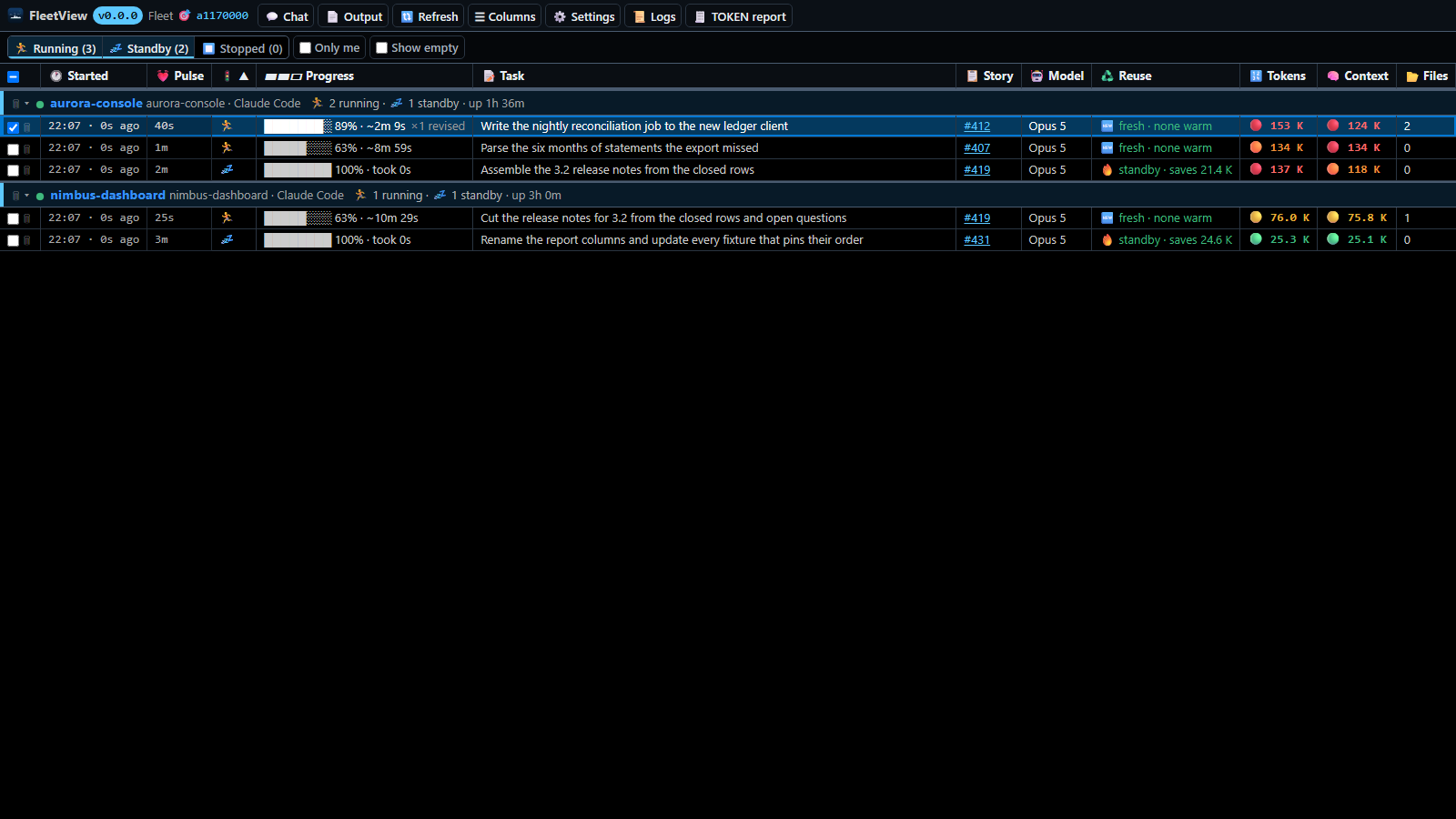
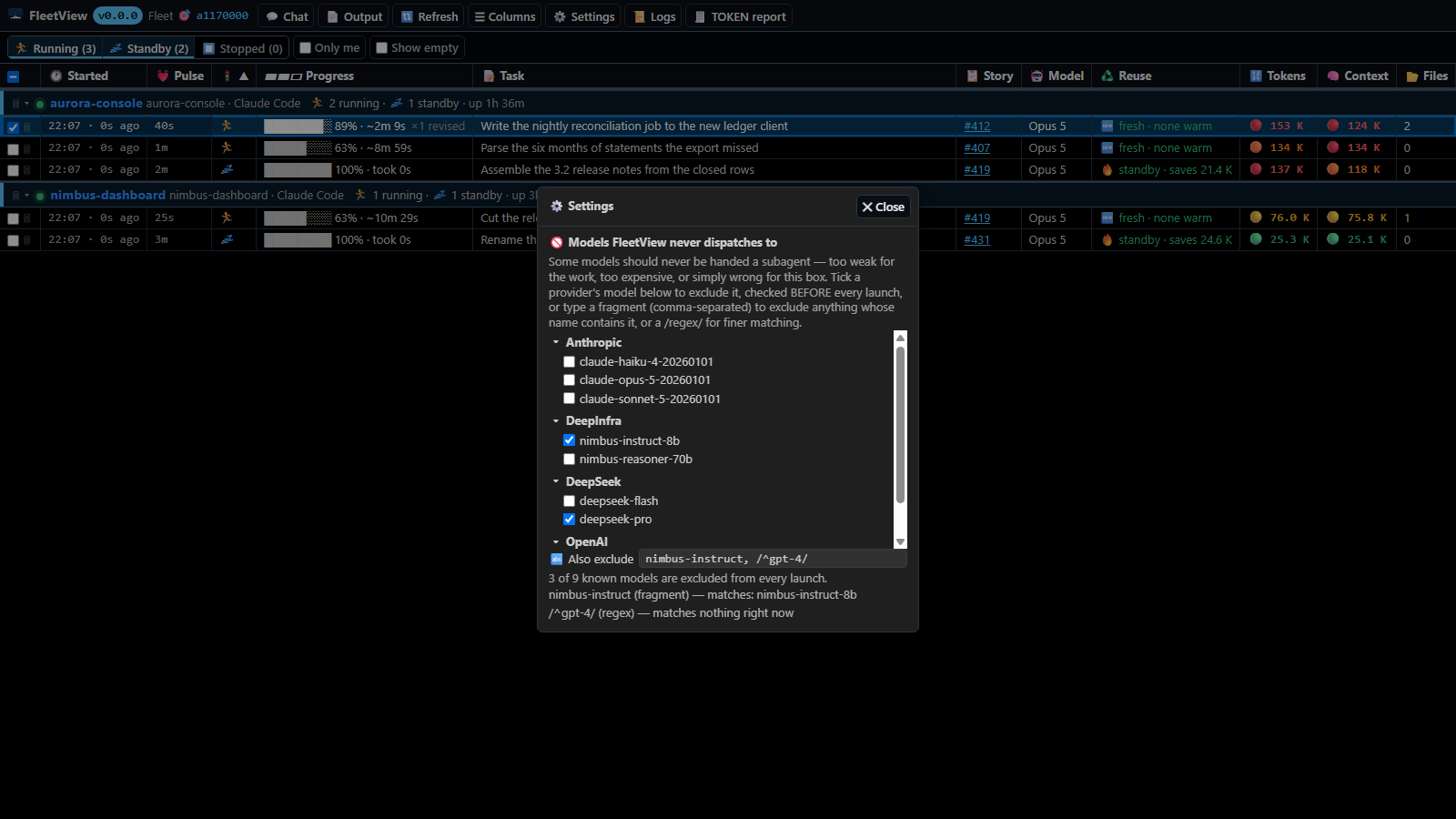
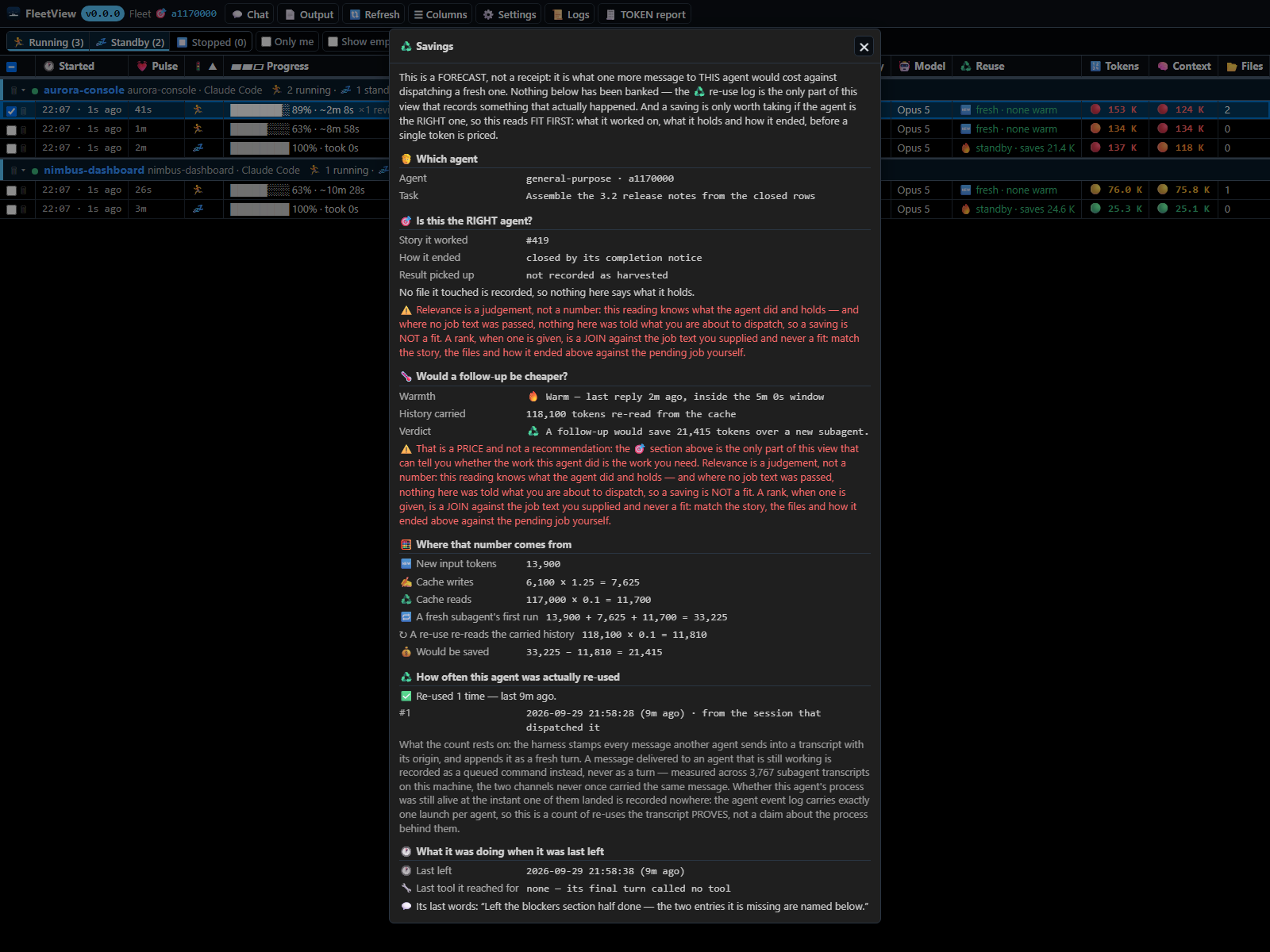
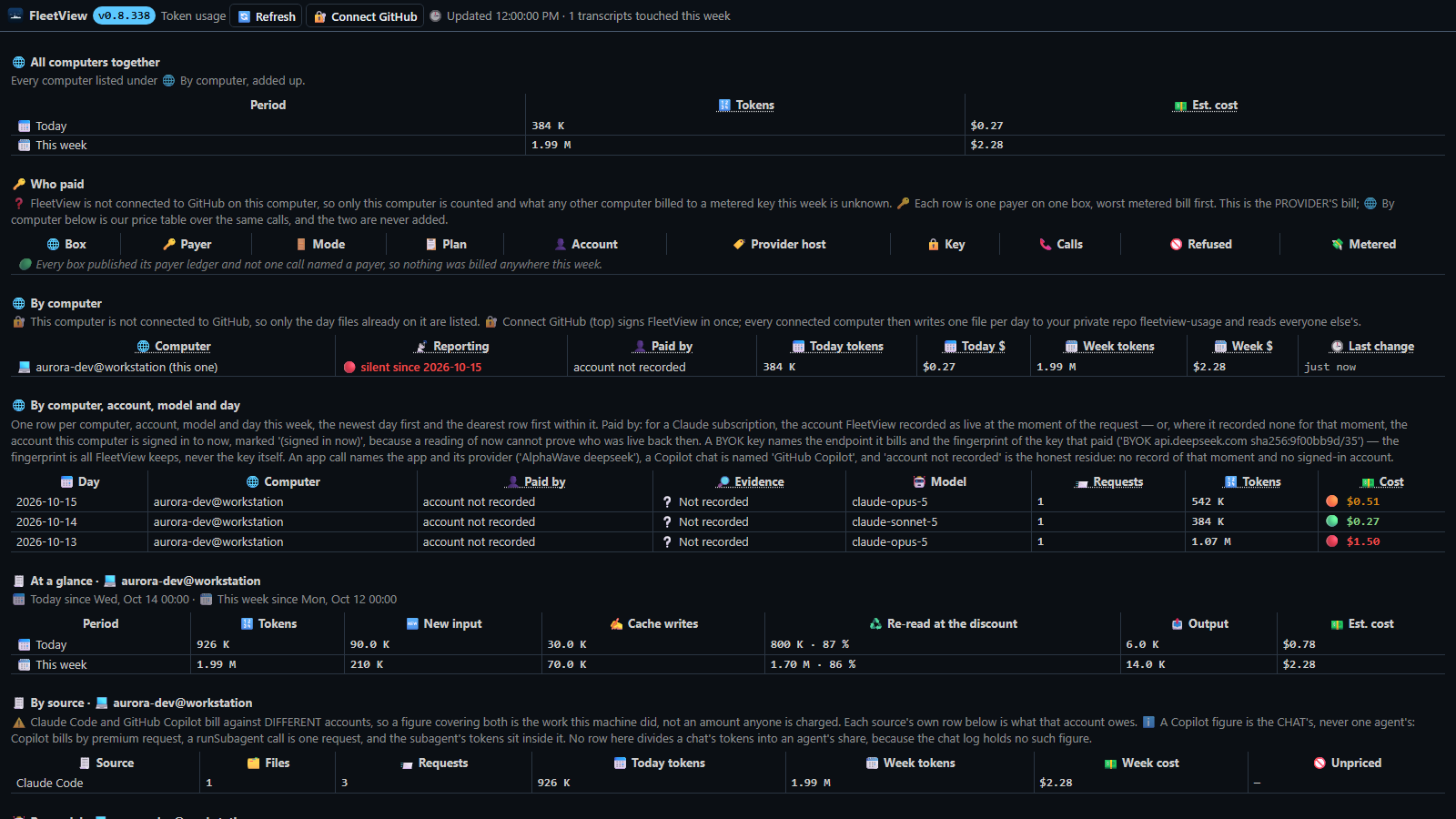
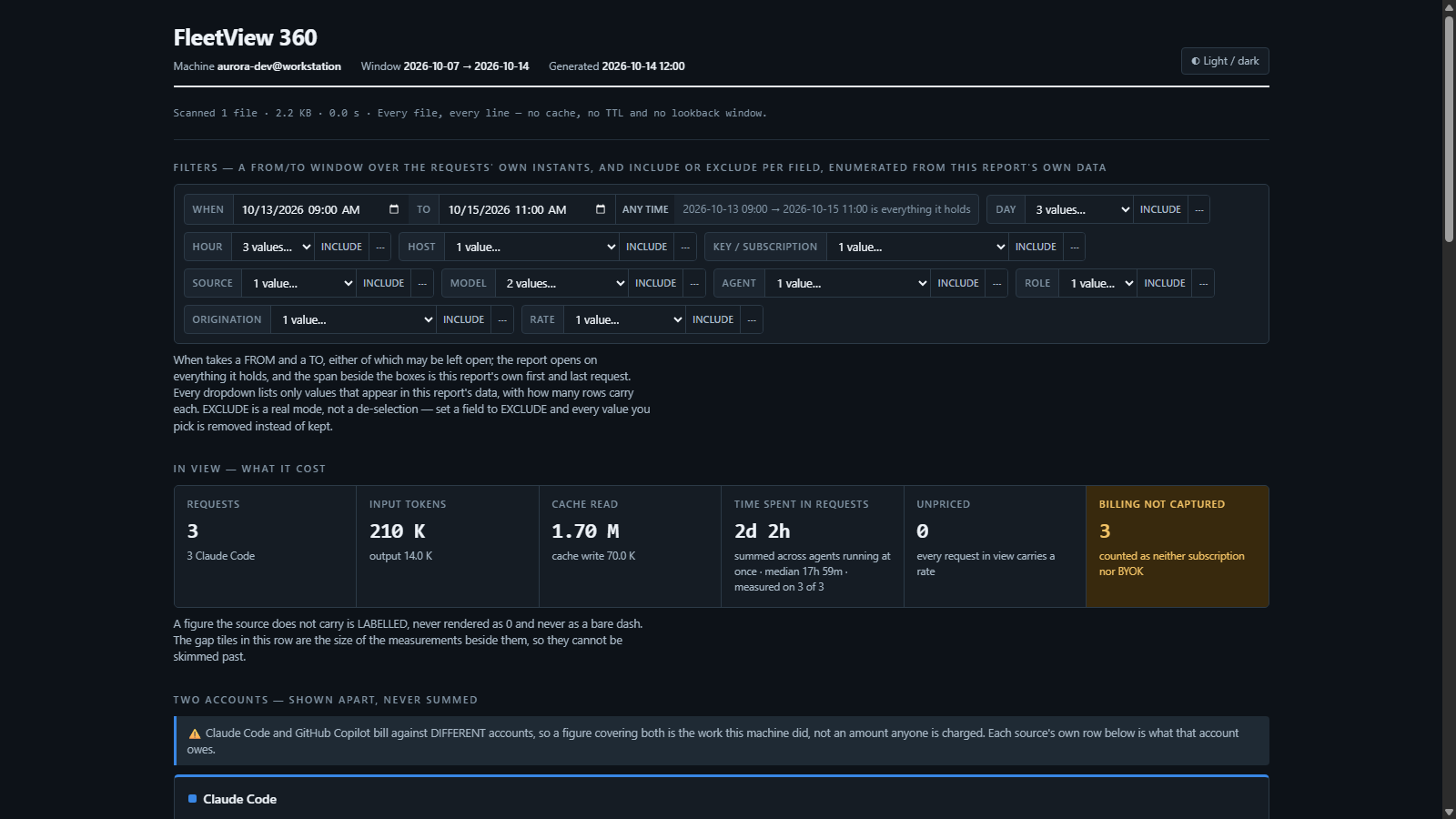
All five are rendered from the shipped panels in a headless browser over an invented fleet — no real session, folder, host or name in them.
The Fleet tab
The tab opens by itself when VS Code finishes starting. It is an editor tab, not
a sidebar view; FleetView: Show Fleet brings it back.
A session is a group row: a caret that collapses it, a live or idle dot, the
session name, the folder it runs in and its provider, and
🏃 N running · 💤 M standby counted over the rows actually shown. A session whose
own read failed says so on its header before those counts, because the counts are
the thing the failure makes untrue.
Under each session, one entry per agent. Every column sorts and resizes, and the
layout survives a reload:
| Column |
Reads |
| 🕐 Started |
when the agent began |
| 🔄 Last recycled |
when a warm one was last reused |
| 🧠 Expert |
the expert type, on a row that is one |
| #️⃣ Instance |
which of N instances of the same type this is |
| 🚦 Status |
🏃 Running · 💤 Standby · ❔ Presumed stopped · ⏹️ Stopped |
| 📝 Task |
the agent's description |
| 📋 Story |
the BullseyeBacklog story its own dispatch assigned it, clickable; an id merely mentioned is not one |
| 🤖 Model |
the model badge, orange when it changed mid-run |
| 🔢 Tokens · 📏 Context · 📂 Files |
what its own transcript recorded |
| 💰 Saved |
what reusing a warm conversation saved |
| 💸 Cost to wake |
what re-sending this conversation would cost |
| 🕒 Last active · 🔥 Temp |
the last touch, and minutes left warm |
| 🌿 Worktree |
the agent's own worktree branch |
| 🆔 Agent |
the id you paste back to the main agent |
☰ Columns hides or shows any of them, and a hidden column keeps working — a few
start hidden. The toolbar carries the four status toggles (🏃 Running · 💤 Standby ·
❔ Presumed · ⏹️ Stopped), each showing the count it is hiding, plus Only me
(ticked out of the box, so the roster opens on this window's own work),
Show empty (sessions with no rows to show), 🔄 Refresh and ☰ Columns.
The strip under the toolbar carries two different things and never confuses them.
🚨 is a read that FAILED: it names the file and the reason rather than rendering as
a count. ⏳ is a session file the sweep has not finished reading — nothing failed and
there is nothing to do, each refresh carries on with it, and the strip clears itself
the moment it finishes.
Select a row and use the buttons beside 🎯, which names the row they act on.
| Button |
Does |
| 📄 Output · 🔀 Diff · 🌾 Harvest |
Opens that panel on that tab — see below |
| 💬 Chat |
Opens a claude prompt on the agent's conversation, only while the row is 🏃 running or 🔥 warm. On a subagent it chats through a copy of its transcript, never the live agent |
| 📜 Logs |
FleetView's own output channel |
| 📄 TOKEN report |
Writes and opens the token usage report — see 📊 Usage below |
The PROGRESS line, and the check you can install
Every lane FleetView shows is asked to end each reply with one line:
PROGRESS: <n>% — ETA <m>m — <one clause on what is left>
The 📊 Progress column reads that line — the lane's own claim, never a measurement — and
it moves without anything being installed on your machine: the percentage and its countdown
come from the lane's own stated ETA against the clock, and when a lane states none at all the
column falls back to FleetView's own readings (the steps it has taken, the files it has written,
how long since anything moved). Asking for the line was measured failing — 2 of 98 replies
carried it when the requirement sat at the end of a brief — so a lane that is never made to
state anything still gets a moving column, just a less anchored one.
FleetView: 🔒 PROGRESS check (opt-in hook) — the button in the Fleet tab's title bar, or the
same command in the Command Palette — installs a small check into your own Claude Code settings
for the case where you want the guarantee rather than the request. A reply that does not END with
the line is refused the stop once and answered again with it, which is what makes a lane state
where it is.
|
|
| What it writes |
One Stop hook and one SubagentStop hook, appended to ~/.claude/settings.json (or your CLAUDE_CONFIG_DIR), and a copy of the check itself in this extension's own storage |
| What it does to the rest of your settings |
Nothing. Hooks are lists and they chain: the check is appended to whatever is registered for those events, and a settings file FleetView cannot read is refused by name rather than rewritten |
| Your own hooks |
They still run. Claude Code starts every hook registered for an event together, so this check refusing a stop cannot skip one of yours — measured with three Stop hooks registered, the middle one blocking, the other two still running to completion |
| Taking it back out |
The same command, which names the file and removes exactly the two entries it added |
Nothing is written to any machine until you press it.
🔒 Accuracy hooks — the sharper half, and what it costs
The column moves on its own. What sharpens it is a lane revising its estimate as it learns, and a lane
only does that when something asks it to: at the moment it stops, at the moment a subagent starts, and at the
tool calls that mean the size of the job has changed. FleetView installs that whole set when it starts.
|
|
| What it writes |
One entry for Stop, SubagentStop, SubagentStart and PostToolBatch, appended to ~/.claude/settings.json (or your CLAUDE_CONFIG_DIR), each running the same small script in this extension's storage |
| What it costs |
About 1,300 tokens per lane — a reminder the lane re-reads on every turn after it, roughly 1–2% of what that lane already spends. |
| What it does to the rest of your settings |
Nothing. Every hook of yours stays byte for byte where it was — comments, key order, indentation and line endings included — and a file FleetView cannot read is refused by name rather than rewritten |
Agent detail — Output · Diff · Harvest
Click a subagent to open its panel.
- Output — tails that agent's own JSONL transcript. The last 256 KB is read
up front, then appends stream in live; assistant prose,
🔧 tool calls and
↩︎ tool results are rendered apart from each other and non-JSON lines fall
through raw. It follows the tail and pauses the moment you scroll up.
- Diff —
git diff of the agent's worktree against
merge-base(HEAD, <default branch>), so committed and still-uncommitted work
both appear, untracked files included. It re-diffs every 6 seconds while the
agent is alive. Hover any changed line and click 💬 to draft a review comment
pre-filled with the agent id and file:line, then ⧉ Copy for main agent to
hand it over before the work is merged. An agent that never edits files, and a
worktree that has already been merged and pruned, each say so rather than
showing an empty diff. Rendering is capped at 60 files and 500 lines per file
(400 lines for a file the agent created).
- Harvest — what the subagent handed back and its terminal status, the main
agent's next turn, and the tool calls it queued off the back of it —
reconstructed from the parent session transcript, never the subagent's own.
Experts
An expert is a Claude Code agent definition in your repo, at
.claude/agents/sme-<area>.md, written for one area of the codebase. FleetView
shows it on the roster (the 🧠 Expert column), and adds four tools to every Claude
Code session on this computer, under the name fleetview:
| Tool |
Answers |
experts |
which experts and live instances exist, what files each area's own agents have already read, and what a fresh start costs |
recommend |
which expert owns the files a task touches, and how to get one — reuse a warm instance that already holds them, copy a running one, or start fresh — with what waking costs against what starting from nothing cost |
ask_expert |
passes the question to a warm session of that expert and returns what it answers; it says so when no warm session can take it |
answer_expert |
what the expert session calls to answer |
Every recommend answer also lists every idle instance of that expert, whether or
not you asked for it — it is a reading, not a refusal, and which lane the work goes
to is your call. FleetView registers these tools at activation, in your Claude Code
user settings, so a session started after that has them.
📊 Usage and 💰 budgets
📊 Usage (the status-bar 💰 item, or the command) adds up this week's
transcripts: today and this week by model, expert type, host, computer, session
and agent; the top consumers; what warm copies saved; and the prices used. The
first read of a week of transcripts takes about 40 seconds.
- 🔐 Connect GitHub — signs FleetView in to GitHub once per computer. Each
computer then writes its own day files to the private repo
fleetview-usage
and reads every other computer's, so every computer's usage is added up and named.
Until you sign in, the status bar reads Usage not syncing — sign in to GitHub;
clicking it runs the same sign-in. The repo is created, private, the first time.
fleetView.usage.repo points every computer at another repo instead: owner/name
(an organisation repo for a team) or a bare name under your account.
- Sources counted — Claude Code (main sessions and subagents), GitHub Copilot
(workspace chats and chats from a window with no folder), OpenAI Codex rollouts
under
~/.codex/sessions, and direct API calls your own scripts record.
- Direct API calls — a script that calls a model API itself appends one JSON
line per call to
~/.fleetview/app-usage/<user@host>/<YYYY-MM-DD>.jsonl
(~/.bullseye/app-usage/ is read too). Python can import
scripts/fleetview_usage.py and call record(...); any other language writes:
{"ts": <epoch ms>, "app": "...", "provider": "...", "model": "...", "inputTokens": 0, "cacheReadTokens": 0, "cacheWriteTokens": 0, "outputTokens": 0, "totalCostUsd": 0.0, "costKnown": false} — costKnown: false counts the call as unpriced, never $0.
- A computer with no VS Code publishes with
node vscode-extension/dist/publishUsage.js
from a clone. On Windows, scripts/register-usage-publish.ps1 schedules it every
15 minutes with no window; elsewhere add the cron line that script names. It signs
in with GH_TOKEN, the GitHub CLI, or the GitHub sign-in Git already keeps, and
reads the repo from FLEETVIEW_USAGE_REPO.
- 📄 TOKEN report (or
FleetView: 📄 TOKEN report) writes the same
figures to a standalone HTML file you can keep or send, and opens it in your
browser.
- 💰 Budgets — set a daily token or dollar budget per project in
fleetView.budgets. The 💰 status item then reads Budgets OK or names the
project that went over, turns red, and notifies you once per crossing per day.
Status bar
| Item |
Reads |
| 🚢 🏃 N · 💤 M |
Running and standby agents. Always visible, even at zero, mirrors the Only me scope so the count and the visible rows never disagree, and opens the Fleet tab when clicked |
| 💰 |
Today's budgets, shown only once you have set one |
When a subagent settles, a toast reports its outcome and duration with View
harvest and View output buttons that open the panel on that tab. Toasts are
raised only for sessions belonging to this window, so a busy machine does not spam
you from unrelated workspaces.
Commands
| Command |
Does |
FleetView: Show Fleet |
Reveal the Fleet tab |
FleetView: Refresh |
Re-read every source from disk, so a stale "still running" entry cannot survive |
FleetView: 📊 Usage |
Open the usage tab |
FleetView: 📄 Usage Report (HTML file) |
Write the usage report and open it in your browser |
FleetView: 🔒 PROGRESS check (opt-in hook) |
Install the PROGRESS check into your Claude Code settings, or take it back out — see above |
FleetView: Toggle Detailed Log (evidence behind each state change) |
Switch FleetView's log to the evidence behind each state change (file paths, raw readings, both timestamps behind a duration) and back |
FleetView: 🔄 Reload this window (the running chats come back) |
Save what every Bullseye extension was doing, reload the window, and bring the chats back with what they were doing — any agents under them are killed and have to be brought back. FleetView's Fleet and 📊 Usage tabs come back by themselves; the agent panel comes back where you were reading |
FleetView: DEV |
The DEV pulldown, in the Fleet tab's own toolbar. Only on a machine with this extension's own checkout open |
What it reads
| Source |
Used for |
~/.claude/sessions/*.json |
which main agents are alive right now |
~/.claude/projects/<enc-cwd>/<session>.jsonl |
session identity, terminal status, the harvest, story ids |
~/.claude/projects/<enc-cwd>/<session>/subagents/agent-<id>.jsonl and its .meta.json |
per-subagent transcript, worktree path, model |
<temp>/claude/<enc-cwd>/<session>/tasks/<id>.output |
subagent output on older Claude Code builds |
~/.claude.json, ~/.claude/settings.json, ~/.claude/.credentials.json |
which Claude account or BYOK endpoint this machine is using, for 📊 Usage |
VS Code's User/workspaceStorage/<id>/GitHub.copilot-chat/ and User/globalStorage/ (Code, Insiders and the other builds, on every OS) |
Copilot Chat sessions, turns and tool results |
VS Code's own logs/ folder |
when a Copilot window's extension host started |
VS Code's user settings.json (the build that is running) |
whether the 🚫 Exclude list could be read, for ⚙ Settings |
CODEX_HOME/sessions (~/.codex/sessions) |
Codex threads: turn state, model, tokens, answer |
.claude/agents/*.md in each repo FleetView sees |
which expert owns which area |
BACKLOG.md / BACKLOG_ARCHIVE.md above an agent's folder |
where a 📋 Story link lands, if you keep one |
~/.fleetview/app-usage/ and ~/.bullseye/app-usage/ |
per-call AI spend your own scripts record, for 📊 Usage |
.run/test-reports/*-spend.json in each open folder |
per-call spend a test fixer recorded, for 📊 Usage |
~/.bullseye/claude-accounts/, ~/.bullseye/claude-provider.json |
names for your Claude accounts and BYOK endpoints, if an account switcher keeps them there; without them the account's email is shown |
Every one of these is optional: a file or folder that is not there reads as "none", never as an error.
What it needs
Requires VS Code 1.101 or newer. Nothing else is required; each tool below only powers the part named beside it, and a
machine without it still shows the whole roster.
Tool on your PATH |
Powers |
Without it |
git |
🌿 Worktree, the Diff tab, the worktree band, what moved during a reload |
each says git could not be read, rather than showing a clean tree |
claude (the Claude Code CLI) |
⏹ Stop, 💬 Chat, clone, starting an expert, and the resume after a window reload |
the button fails with the command's own error; a reload's resume is reported 🔴 NOT started, with the one line to paste into the chat instead |
gh, or Git signed in to github.com |
📊 Usage sharing for the headless publisher (dist/publishUsage.js) |
that machine writes its own day files and says it is not syncing |
| Environment variable |
Effect |
CLAUDE_CONFIG_DIR |
where Claude Code's files are read and the hooks are written, instead of ~/.claude |
CODEX_HOME |
where Codex threads are read, instead of ~/.codex |
ANTHROPIC_BASE_URL, ANTHROPIC_API_KEY, ANTHROPIC_AUTH_TOKEN |
a BYOK provider is live: ⚙ Settings and 📊 Usage name it by its host, and the launches FleetView starts name a model that provider serves |
GH_TOKEN / GITHUB_TOKEN, FLEETVIEW_USAGE_REPO |
the headless publisher's GitHub sign-in and target repo |
What it writes
FleetView writes only inside your own machine's Claude Code and VS Code files:
- A copy of its own MCP server into this extension's VS Code storage folder,
and one
fleetview entry in your Claude Code user config naming it.
- The PROGRESS check — a copy of it in this extension's VS Code storage folder, and one
Stop plus one SubagentStop hook in your Claude Code settings naming it — only when you
press 🔒 PROGRESS check, and taken back out by the same command.
- The accuracy hooks — the same script, registered for
Stop, SubagentStop,
SubagentStart and PostToolBatch when FleetView starts. Nothing else in that settings file is
rewritten.
- Its own usage day files under
~/.bullseye/usage/, the identity ledger
~/.bullseye/identity-ledger.ndjson, and the report file under this extension's storage
folder when you ask for 📄 TOKEN report.
- Its own state under
~/.claude/fleetview/ (the reload snapshot, the resume briefs, rows
you dismissed) and the reload bridge's answers under ~/.bullseye/fleetview/reload-request/.
- The folder-trusted flag for one folder in
~/.claude.json, only when you 💬 Chat into a
folder Claude Code has not trusted yet.
Privacy
FleetView reads your machine and nothing else, with one exception you opt into: once you
sign in to GitHub, the 📊 Usage day files are exchanged with a private repo in your own
account (fleetview-usage, or the one fleetView.usage.repo names) over GitHub's API.
Without that sign-in FleetView makes no network calls; the only other socket is a local one
on this computer, between a Claude Code session asking its question and the FleetView MCP
answering it.
| |

