
BullseyeNotify
🔔 Your AI agent reaches you on desktop, Telegram, Slack, Discord, ntfy, Teams or
SMS — and you answer back. One stdio server carries the whole tool surface to
Claude Code, GitHub Copilot Chat and Codex; a panel in VS Code edits every setting;
and a status-bar bell never shows green over a channel that carries nothing.
What it does
An agent that works for ten minutes and then sits waiting for you is wasting both of
you. BullseyeNotify gives it a way out: an MCP server that delivers a message on
whatever channel you actually read, waits for your reply when it needs a decision, and
turns a normal message into a desktop notification only while you are at the keyboard.
The extension is the editor-side face of it. The notification server itself ships inside
this extension and is spawned by whichever MCP host asks for it — nothing runs until an
agent does.
What the extension adds
- MCP wiring, re-checked on every window start. It registers notify with every MCP
host that reads a config file it may write:
notify under mcpServers in
~/.claude.json for Claude Code, the same server under
contributes.mcpServerDefinitionProviders for VS Code / GitHub Copilot Chat in
agent mode, and the workspace's own .vscode/mcp.json with the same stdio entry.
All of them point at the server bundled inside this extension, mirrored outside the
versioned install folder so the path survives the next release and no agent depends on
a fetch from npm. A build that bundled no server registers nothing and says so, and the
npx and type: "http" entries earlier releases wrote are rewritten rather than
left behind. Running it on every activation — not just the first — is what lets a
machine registered by an older release converge on its own. A notify entry that
differs from ours is yours and is left untouched.
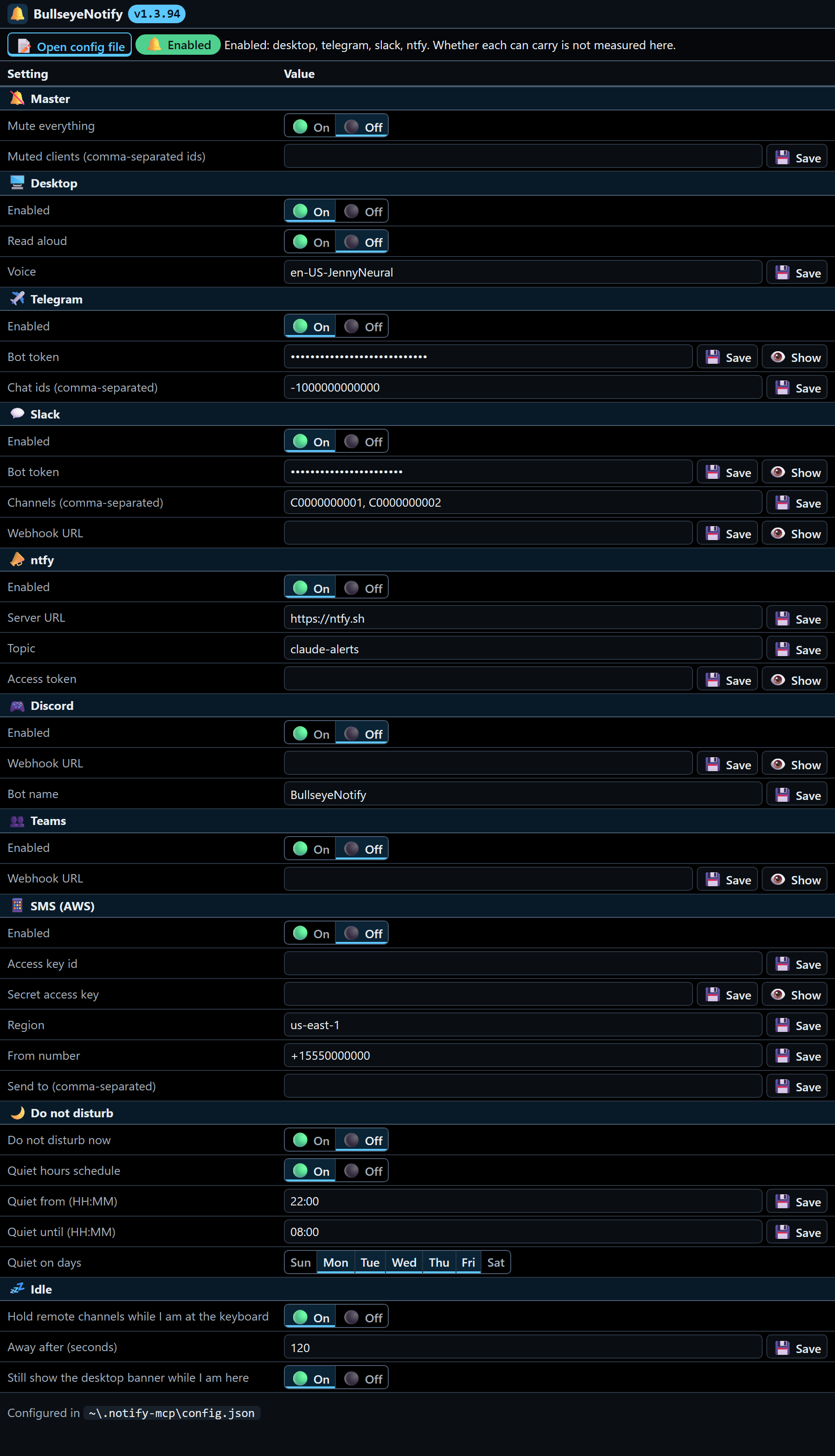
- A config panel in the activity bar, and as an editor tab. It edits every setting the
server reads — each channel and its credentials, Do Not Disturb and its quiet-hours
schedule, idle gating and the master mute — writing each one to
~/.notify-mcp/config.json,
the same file the server obeys. A save is proved, not assumed: the field is read straight
back and the panel says so, ✅ Saved desktop.enabled or ⚠️ Not saved — …. There is no
second source of truth and no setting the extension keeps to itself.
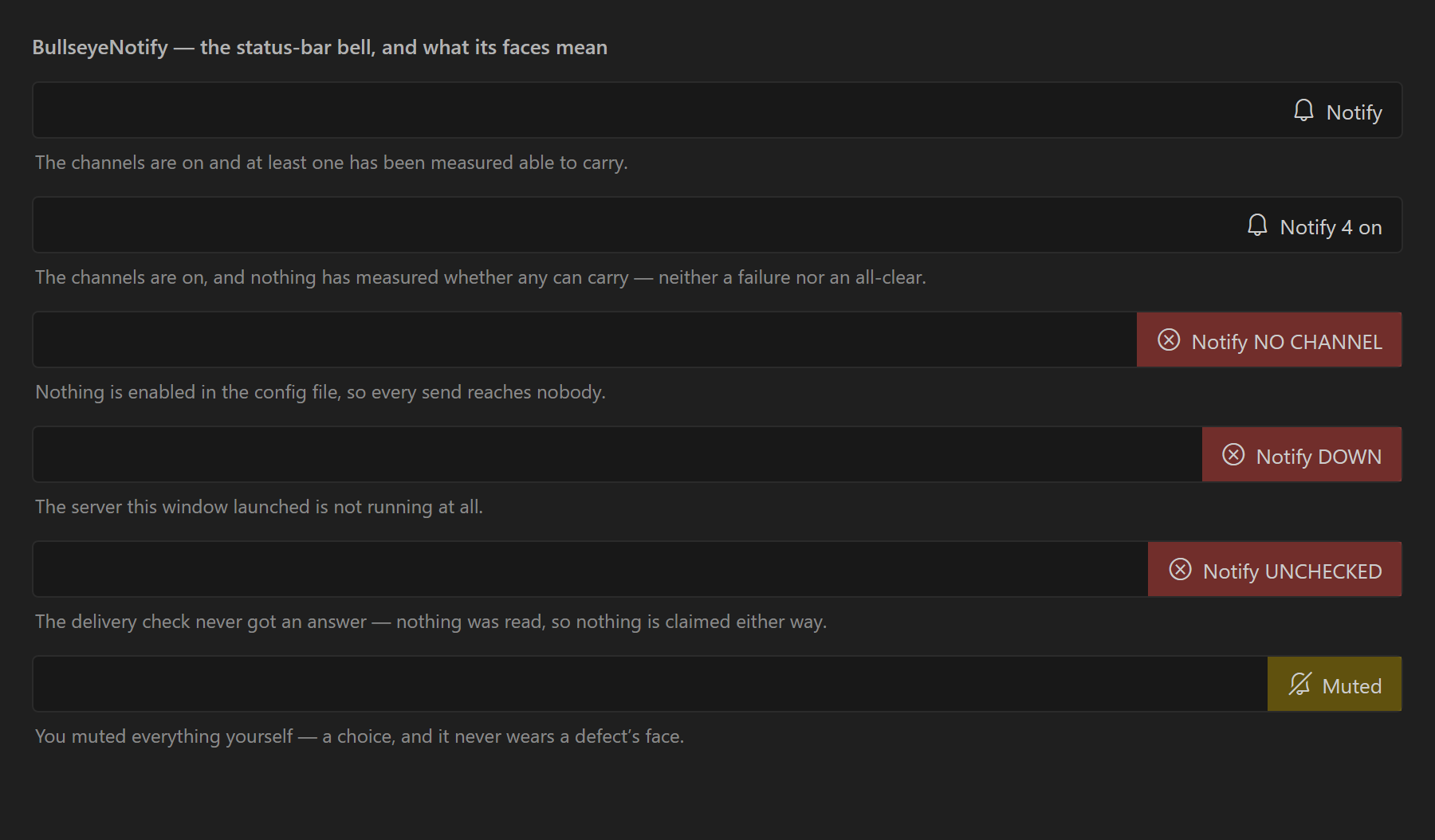
- A status-bar bell that never shows green over a channel that carries nothing,
refreshed every 10 s, with a face for every state it can be in. NO CHANNEL when the
config enables none, so every send reaches nobody; UNCHECKED when the config file
could not be read, because nothing was read and nothing is claimed; NO REPORT when the
server answered but said nothing about delivery; MCP OFF when its MCP endpoint is
disabled; DOWN when the server is not running; NOT VERIFIED when channels are on
and nothing has measured whether any can carry; MUTE UNREAD when the mute state came
back unreadable; a plain bell when it can really deliver; and the mute you chose yourself.
Click it to focus the panel.
Commands are contributed under the omniNotifyMcp. prefix: refresh the panel, open the
config file, open this README, re-run the MCP wiring, open the config panel as an editor
tab, and Reload. The panel also draws a DEV pulldown, which is the release
control shared by the Bullseye extensions rather than a notification setting.
Settings
Every notification setting lives in ~/.notify-mcp/config.json, and the panel is where you
edit it — each row saves to that file and reads it straight back. The extension contributes
no VS Code settings of its own.
Wiring an agent to it
The extension does this automatically for Claude Code, for VS Code / Copilot Chat in
agent mode, and for the workspace's own .vscode/mcp.json. For anything else, register
the same stdio server yourself — it is the copy the extension mirrors into
<globalStorage>/dist/index.mjs (see Where things live below):
{
  "mcpServers": {
    "notify": { "type": "stdio", "command": "node", "args": ["<globalStorage>/dist/index.mjs"] }
  }
}
Codex reads ~/.codex/config.toml, where the same command goes as:
[mcp_servers.notify]
command = "node"
args = ["<globalStorage>/dist/index.mjs"]
Claude Desktop, Cursor, Windsurf and Zed each want the same command under their own key.
There is no port to configure and no page to open — those earlier releases served a help
page at http://localhost:3737/help.html, which is gone with the HTTP server itself.
What the agent gets
Ten tools over one stdio server. The agent never picks a channel —
routing is entirely server-side.
| Tool |
What it does |
notify |
Send a message at low, normal or high priority. |
ask |
Send a question and block until you answer — reply in Telegram. |
poll |
Drain messages you sent while it was busy. |
wait_for_inbox |
Block up to 55 s and return the moment you type something. The delivery path that works in every MCP client, because the message comes back as a tool result. |
get_idle_seconds |
Seconds since your last keypress. Piggy-backs any pending messages. |
get_idle_config |
The idle-gating policy. Piggy-backs messages. |
get_delivery_status |
Whether you can actually be reached — { process, healthy, channels, carriage, reason } from real transport readings, not from config or from the process being alive. healthy is true only when every enabled channel has been measured able to carry. |
get_dnd_status |
Whether quiet mode, master mute or a per-client disable is suppressing right now. Piggy-backs messages. |
update_instructions |
Persist a behavioural rule into CLAUDE.md so it survives restarts and compaction. |
reply |
The Claude Code Channels return path, routed back through notify. |
Messages over 500 characters are split into numbered (1/N) chunks and delivered in
order, up to 5000 — the agent sends the whole thing in one call and never truncates.
How delivery is decided
Three switches suppress first: the master mute kills everything including urgent
messages; a per-client disable kills one agent; Do Not Disturb — manual or scheduled
quiet hours, per day of the week — kills everything below high.
Then idle gating: if you are at the keyboard, a normal message degrades to a desktop notification only rather than lighting up
your phone. Slack is deliberately exempt, so a channel log stays complete. SMS fires
only on high. high bypasses DND and idle gating entirely.
Cross-platform idle detection: Windows via GetLastInputInfo, macOS via ioreg, Linux
via xprintidle.
Channels
- Desktop — native toast, always silent: no sound plays with it. Optional text-to-speech reads the message
out loud in a neural voice, named by
desktop.ttsVoice in the config file, no API key.
- Telegram — two-way. The bot answers in-thread, tells you whether your message was
routed, broadcast or queued, and your replies land straight in the agent.
- Slack — bot token to any number of channels, or a single incoming webhook. A
shared channel also works as a cross-machine bus: address one agent with
@<name>,
ask clients to see who is connected, or leave it untagged to broadcast.
- SMS — AWS End User Messaging, on
high priority only.
- ntfy — a real ntfy server of your choosing, named by
ntfy.serverUrl (a
self-hosted one or https://ntfy.sh), so the ntfy mobile app gets push with nothing
in between.
- Discord — a channel webhook.
- Teams — Adaptive Card into a Workflows webhook.
Multiple agents, one server
Every session declares a tag — host plus project, or an explicit NOTIFY_MCP_TAG.
Untagged messages broadcast to all of them; @<tag> … goes to exactly one. In the
config file, clientAliases gives a tag a readable name and disabledClients silences
one agent.
License
MIT. Source and issues: https://github.com/menih/BullseyeNotif

