What is MeTTa LSP
MeTTa LSP is one analyzer exposed through several tools. The same code powers
the VS Code extension, stdio LSP server, command-line interface, MCP server,
debug adapter, generated docs, and browser IDE. A symbol should mean the
same thing in hover, diagnostics, trace output, docs, and an agent tool call.
The browser IDE runs the same
language server in a Web Worker. It provides a persistent multi-file workspace,
live diagnostics, completion, hover, navigation, rename, formatting, document
symbols, and guarded evaluation without a backend service.
The runtime is built on @metta-ts/core and @metta-ts/debug, so the server
runs on Node without a WASM dependency. Editor analysis does not evaluate user
code. Explicit run, trace, why, test, and visualise commands use the configured
runtime path and the guarded worker where appropriate.
The extension, CLI, stdio language server, MCP server, and docs tooling are
designed for Linux, macOS, and Windows. Editor-specific setup differs, but every
client launches the same Node stdio server and reads the same metta.*
settings.
Quick Start
Install the VS Code extension from the Marketplace:
code --install-extension MeTTaMesTTo.metta-ts-lsp
You can also install a downloaded GitHub release asset:
code --install-extension metta-ts-lsp-0.15.1.vsix
Build from this checkout when you want the CLI, MCP server, or another editor:
npm install
npm run compile
The build writes these entry points:
dist/server/server.js              stdio language server
dist/cli/cli.js                    metta-lsp CLI
dist/mcp/server.js                 MCP server
dist/debug/mettaDebugAdapter.js    debug adapter
Try the CLI from the checkout:
npm --silent run cli -- check examples/04-diagnostics.metta
npm --silent run cli -- trace examples/13-trace.metta "(sum-to 3)" --max 8
Package the extension locally:
npm run package
code --install-extension metta-ts-lsp-*.vsix
Use any stdio LSP client with:
node /path/to/metta-ts-lsp/dist/server/server.js --stdio
Features
Editor intelligence
The server implements the expected LSP surfaces for .metta files: hover,
completion, completion resolve, signature help, diagnostics, document symbols,
workspace symbols, definition, references, implementation, type definition,
declaration, rename, prepare rename, document highlights, linked editing,
document links, folding ranges, selection ranges, semantic tokens, call
hierarchy, inlay hints, code lens, code actions, organize imports, full
formatting, range formatting, and on-type formatting.
The VS Code extension adds status bar controls, settings quick-pick, run, trace,
and why commands, Test Explorer integration for assert forms, and a launch
configuration for stepping through reductions with the debug adapter.
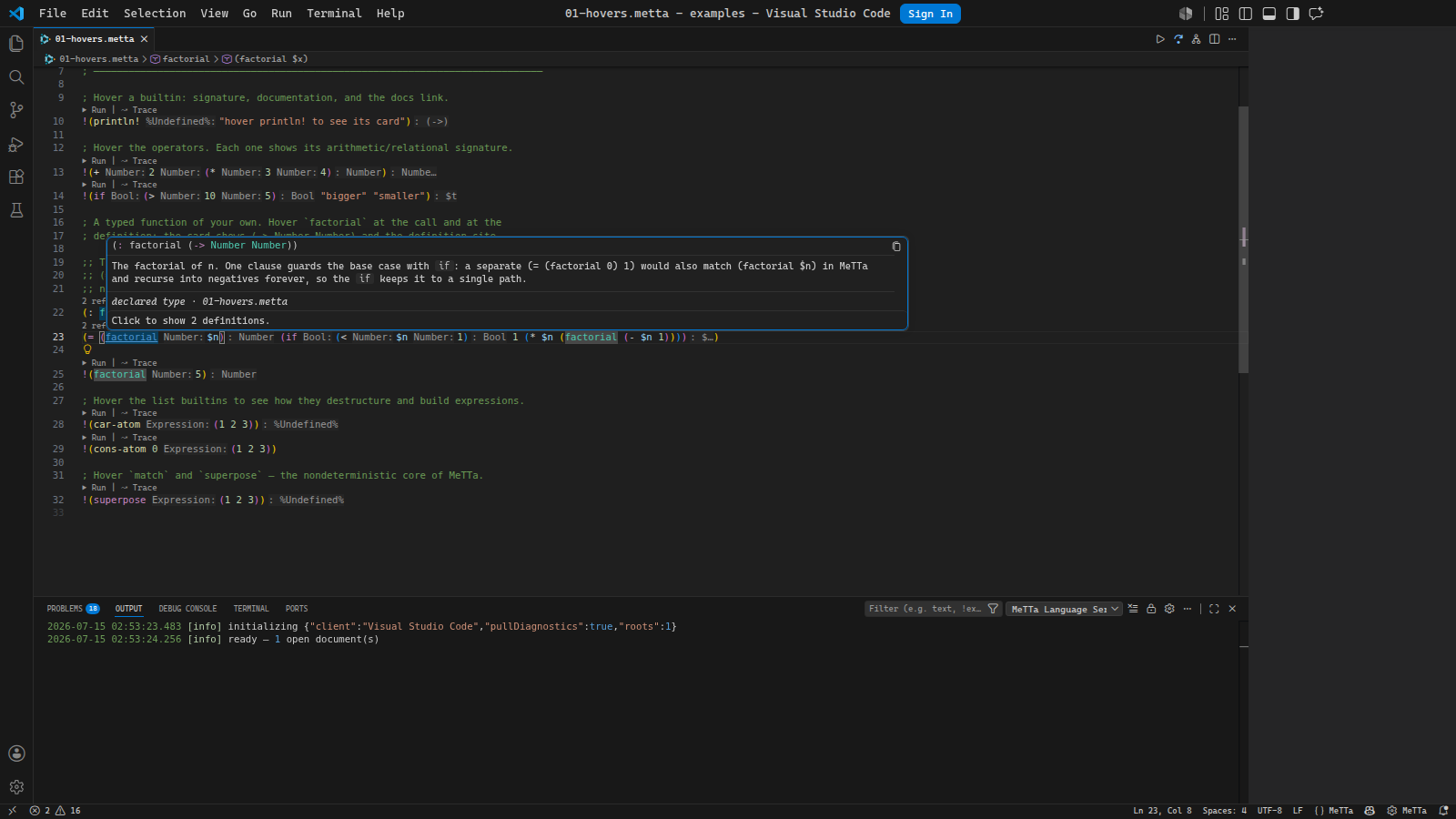
Hover any symbol for a rust-analyzer-style card: the signature, the type, where
it is defined, and a link to the definitions.
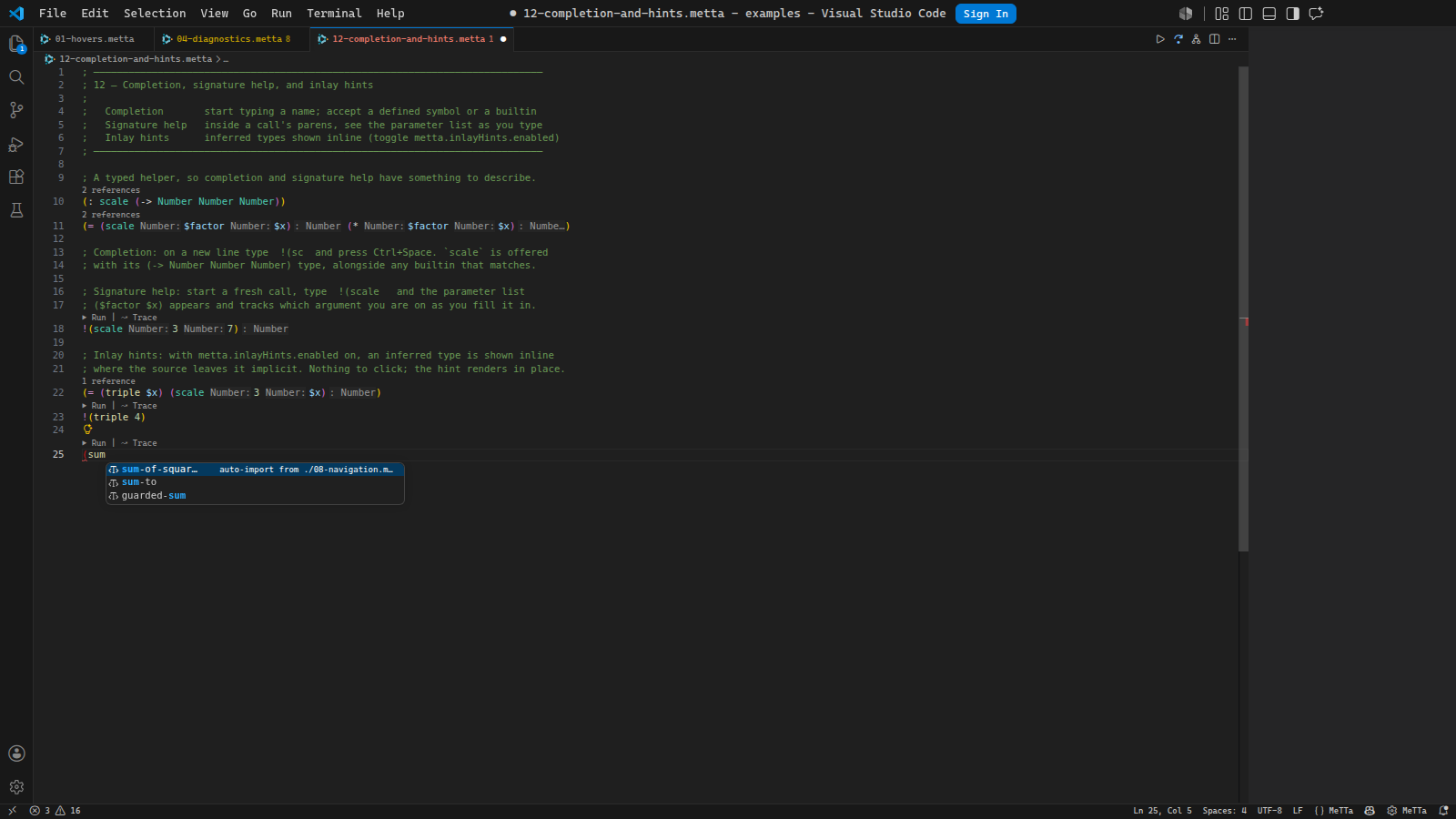
Completion offers workspace symbols and builtins as you type, and auto-imports
one from another module when you accept it.
Diagnostics and lint
Diagnostics cover syntax errors, duplicate definitions, unresolved symbols,
undefined types, unbound spaces, arity mismatches, literal type mismatches,
project lint rules, TypeScript host-bridge checks, and read-only Prolog parser
diagnostics for referenced .pl bridge files.
Every diagnostic carries its rule code, so you can read the exact rule that
fired and suppress it by name.
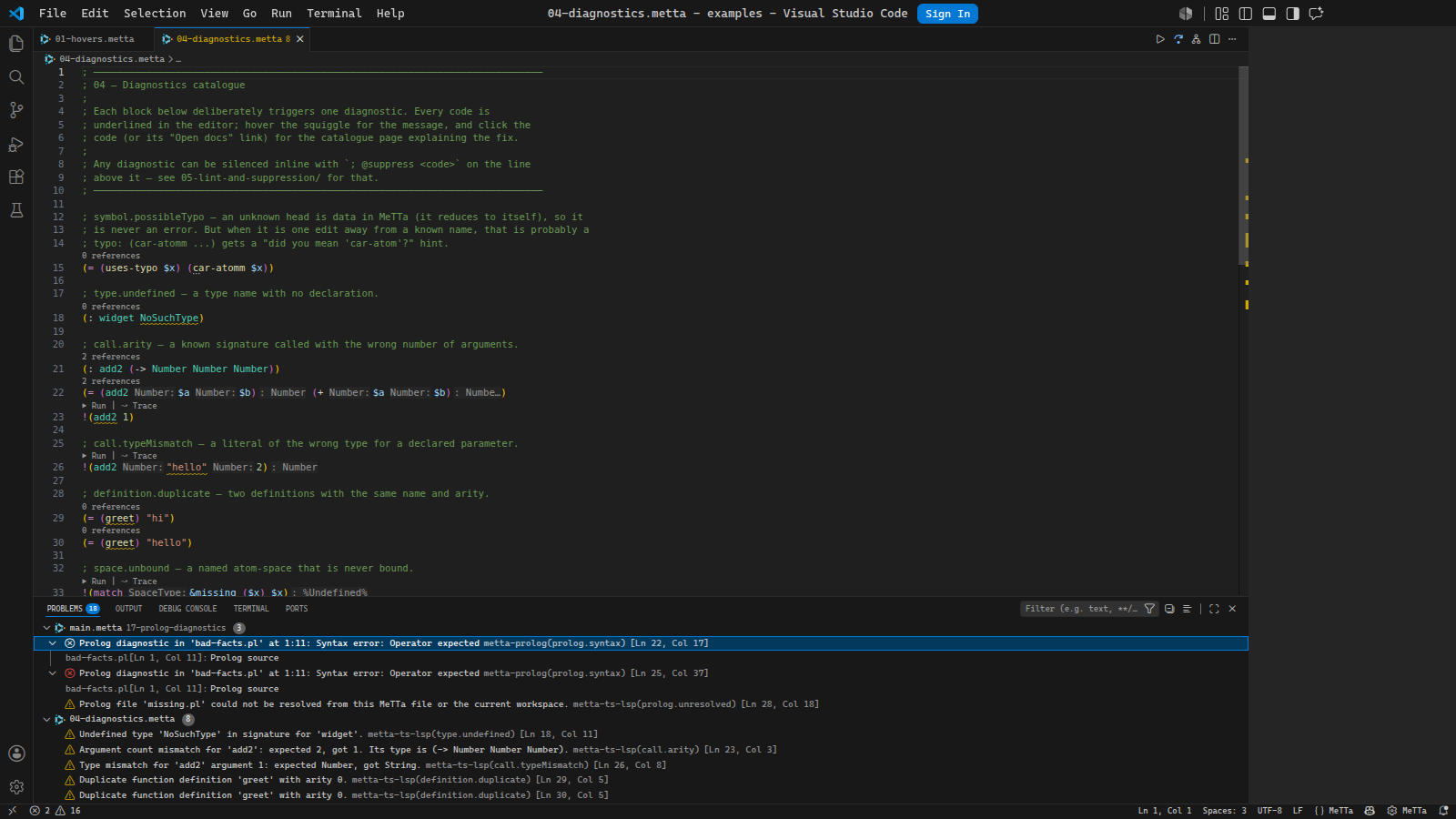
Suppressions are visible by design. Inline comments such as
; @suppress symbol.possibleTypo hide one diagnostic and get hover text that
shows what they suppressed. Project suppressions live in lint.metta as data,
using the same structural matcher as lint rules.
Run, test, trace, why, visualise
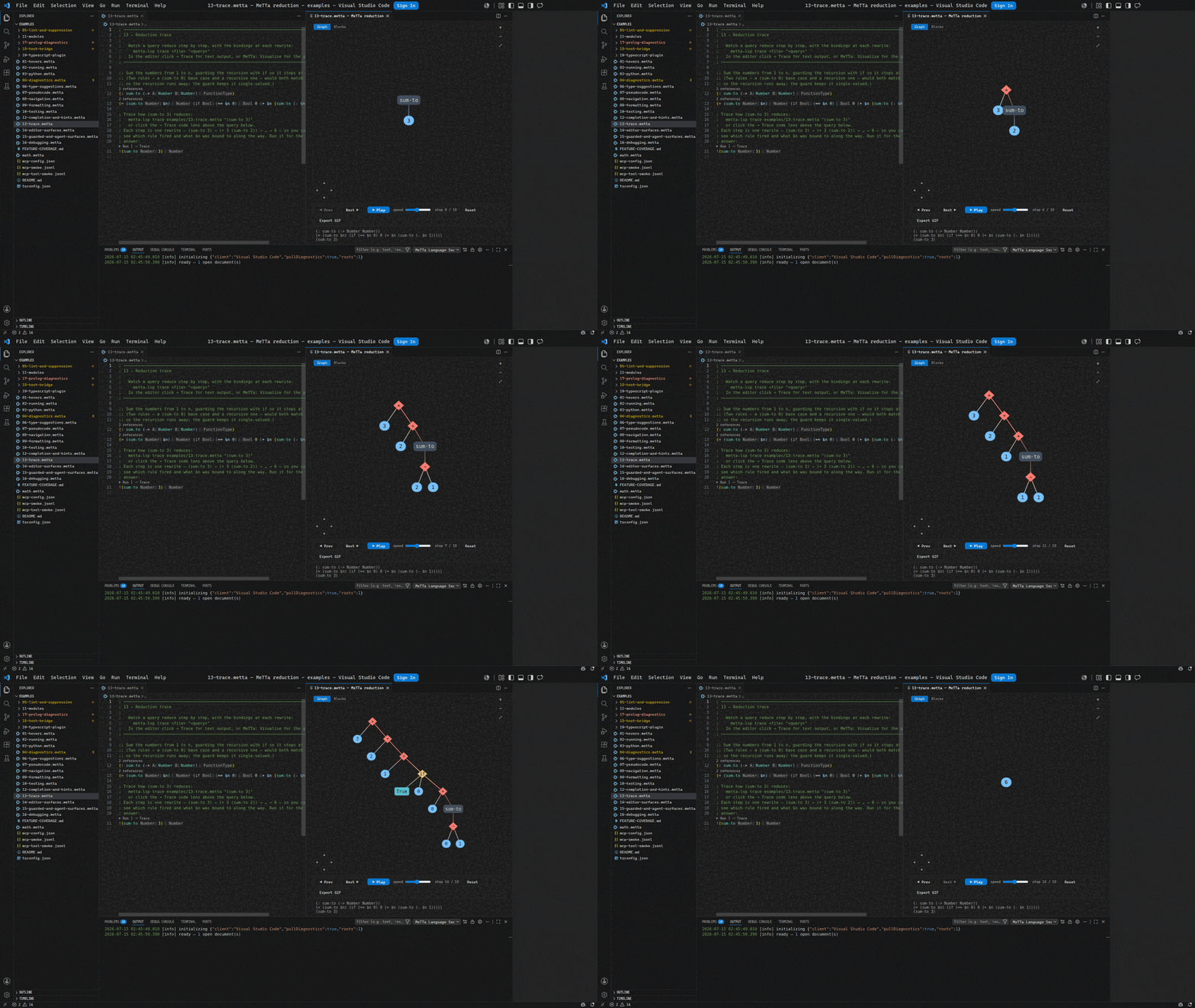
Visualise steps a query through its reduction as an interactive graph. Play it,
scrub it, or step one rewrite at a time, and switch between the graph and nested
blocks. Each frame is one settled reduction state, so you watch the term grow as
it recurses and collapse as it resolves.
Run commands evaluate top-level bang queries and print MeTTa syntax back to the
output channel or CLI.
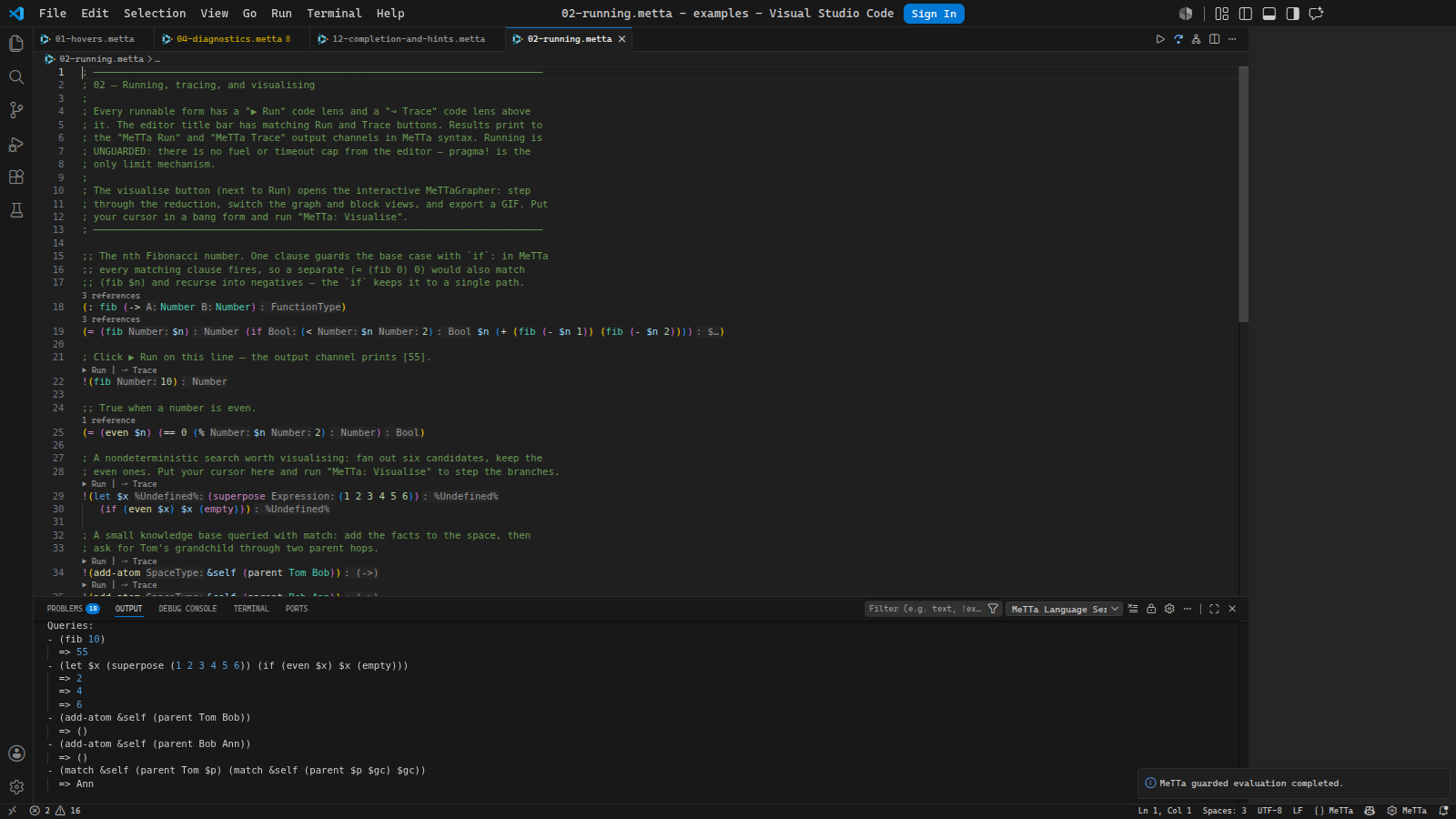
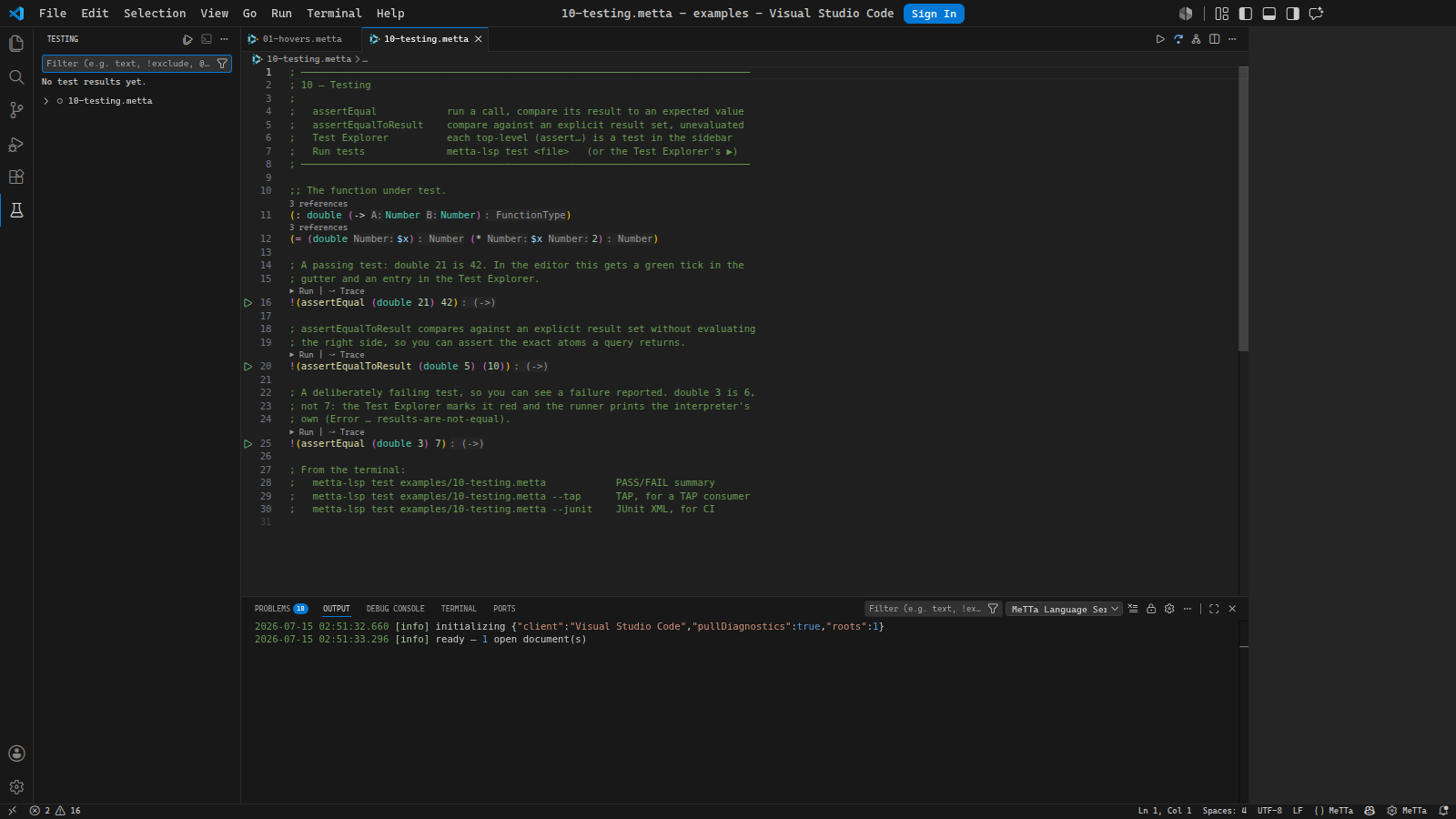
Test discovery turns each top-level assert form into a Test Explorer entry with
an inline run button in the gutter. Trace records each reduction step for a
query. Why explains the runnable form under the cursor with the @metta-ts/debug
engine trace: result atoms, grounded reducer counts, higher-order
specialization, overflow cut points, and the reduction count. Visualise writes
the interactive MeTTaGrapher view above.
Guarded evaluation runs in a stateless worker with fuel, timeout, output, and
stack limits. Unguarded run is available for trusted programs that intentionally
use host interop.
Syntax and semantic colours
The TextMate grammar handles comments, strings, escapes, numbers, variables,
documentation atoms, parentheses, operators, declarations, and builtins.
Semantic tokens add meaning on top of the grammar for control flow, binding,
pattern matching, modules, type operators, evaluation, quote control, effects,
arithmetic, comparison, logic, math functions, collection functions, predicates,
assertions, declarations, definitions, return types, default-library symbols,
deprecated symbols, and unresolved symbols.
VS Code themes can style those token types directly. When a theme does not, the
extension maps them back to familiar TextMate scopes.
TypeScript, Python, and Prolog surfaces
The TypeScript host bridge reads grounded operations registered from
@metta-ts/hyperon or the typed eDSL. Hover and go-to-definition on a grounded
atom can show the TypeScript signature, JSDoc, MeTTa type view, and host source.
The CLI exposes the same data with host-type.
The TypeScript language-service plugin gives MeTTa hover, completion, signature
help, and diagnostics inside MeTTa strings and templates in .ts files. Python
interop examples cover py-atom, py-call, and py-eval. Prolog diagnostics
parse referenced .pl files without consulting or executing them.
Search, rewrite, and docs
The structural search command treats MeTTa forms as data. $X captures one atom
and $$$Rest captures a sequence. Regex constraints can refine captures in
lint.metta, and replace can preview or write structural rewrites.
deduplicate finds repeated expression atoms after layout, comments, and
consistent logic-variable renaming are removed from the comparison. simplify
uses equality saturation and the visible MeTTa rules, then replays the original
and extracted result lists before it returns an edit. The same operations are
available as LSP requests, editor code actions, analyzer APIs, and MCP tools.
The docs generator builds a MeTTa API reference from workspace modules and host
operations. Hovers, CLI output, generated reference pages, and the browser docs
site all share the same rendering code for MeTTa docs.
Examples
Open examples/ as the VS Code workspace and walk the files in order. Each file
shows one surface and includes comments for the editor action or CLI command to
try. The complete checklist lives in
examples/FEATURE-COVERAGE.md.
| Example |
Surface |
01-hovers.metta |
Hovers for builtins and user symbols |
02-running.metta |
Run, trace, and visualise |
04-diagnostics.metta |
Diagnostics catalogue |
05-lint-and-suppression/ |
Lint rules, fixes, and suppression |
08-navigation.metta |
Definition, references, rename, and call hierarchy |
09-formatting.metta |
Full, range, and on-type formatting |
10-testing.metta |
Assert tests and Test Explorer |
13-trace.metta |
Reduction traces |
14-editor-surfaces.metta |
Semantic colours, symbols, links, folding, and selection ranges |
15-guarded-and-agent-surfaces.metta |
Guarded evaluation, CLI, and MCP |
16-debugging.metta |
Debug adapter |
17-prolog-diagnostics/ |
Prolog parser diagnostics |
18-host-bridge/ |
TypeScript grounded-operation host bridge |
19-typescript-plugin/ |
MeTTa inside TypeScript strings |
Command Line
The installed command is metta-lsp, which is the normal interface for scripts,
CI, agents, and local shells:
metta-lsp check examples/04-diagnostics.metta
metta-lsp trace examples/13-trace.metta "(sum-to 3)" --max 8
From an unlinked checkout, use the npm alias:
npm --silent run cli -- check examples/04-diagnostics.metta
To install the command globally from a checkout, run:
npm run compile
npm link
| Command |
What it does |
capabilities |
Prints the capability ledger and surface coverage. |
list stdlib [--json] |
Lists the default library, labeled extensions, and builtin modules. |
inspect <name> [--json] |
Shows a builtin or module's signatures, docs, parameters, return value, and source. |
check <file> [--json] [--show-suppressed] |
Runs parser, analyzer, lint, bridge, and optional diagnostics. |
symbols <file> [--json] |
Prints the document outline. |
hover <file> <line> <character> [--json] |
Shows hover text at a 1-based editor position. |
def <file> <line> <character> [--json] |
Goes to the symbol definition. |
host-type <file> <line> <character> [--json] |
Shows TypeScript host signature data for a grounded atom. |
explain <file> <line> <character> [--json] |
Renders the current form as mixfix notation. |
refs <file> <line> <character> [--json] |
Finds references for the symbol at a position. |
fmt <file> [--check] |
Formats a MeTTa file or checks whether it is formatted. |
lint <file> [--json] [--fix] |
Runs syntactic lint rules and optionally applies fixes. |
search <file> "<pattern>" [--json] |
Runs the structural pattern matcher. |
replace <file> "<pattern>" "<template>" [--write] |
Previews or applies structural rewrites. |
deduplicate <path...> [--json] [--min-atoms N] [--threshold PERCENT] |
Finds exact and alpha-equivalent MeTTa expression clones. |
simplify <file> [--json] [--proof] [--write] |
Previews or writes proof-replayed equality-saturation simplifications. |
test <file> [--json] [--tap] [--junit] |
Runs top-level assert forms under the guarded runtime. |
run <file> [--unguarded] |
Evaluates top-level bang queries. Use --unguarded only for trusted host interop. |
trace <file> "<query>" [--json] [--max N] |
Shows each reduction step for a query. |
visualise <file> "<query>" [--out file.html] [--block] |
Writes a reduction graph HTML view. |
doc [workspace] [--json] [--build] [--serve] [--open] [--port N] [--base PATH] |
Generates or serves MeTTa docs for a workspace. |
repl [file] |
Starts an interactive MeTTa REPL, optionally seeded with a file. |
lsp --stdio |
Starts the language server over stdio. |
mcp --stdio |
Starts the MCP server over stdio. |
Most read commands accept --json for scripts and agents.
List and inspect the default library known to MeTTa-LSP, including bundled host
bridges and modules supplied by the installed runtime:
metta-lsp list stdlib
metta-lsp inspect '+'
metta-lsp inspect json::json-encode --json
The list separates core globals, MeTTa-LSP extensions, host extensions, and
import-gated modules. Qualify an ambiguous name with global:: or <module>::.
Suppression example
; @suppress symbol.possibleTypo
!(cdr-atomm 2)
Project suppression lives in lint.metta:
(suppress (legacy $$$) symbol.possibleTypo)
A custom rule can add a regex constraint:
(lint-rule capitalized-function-name
  (pattern (= ($Func $$$Args) $$$Body))
  (metavariable-regex $Func "^[A-Z]")
  (message "function {$Func} starts with a capital letter")
  (severity warn))
Check a file and include suppressed diagnostics:
metta-lsp check examples/05-lint-and-suppression/demo.metta --show-suppressed
Trace example
(: sum-to (-> Number Number))
(= (sum-to $n) (if (== $n 0) 0 (+ $n (sum-to (- $n 1)))))
metta-lsp trace examples/13-trace.metta "(sum-to 3)" --max 8
0  (sum-to 3)
1  (if (== 3 0) 0 (+ 3 (sum-to (- 3 1))))
2  (if False 0 (+ 3 (sum-to (- 3 1))))
3  (+ 3 (sum-to (- 3 1)))
4  (+ 3 (sum-to 2))
5  (+ 3 (if (== 2 0) 0 (+ 2 (sum-to (- 2 1)))))
6  (+ 3 (if False 0 (+ 2 (sum-to (- 2 1)))))
7  (+ 3 (+ 2 (sum-to (- 2 1))))
8  (+ 3 (+ 2 (sum-to 1)))
... truncated at 8 steps
Agent Setup
Claude Code, Codex, and generic MCP clients use the MCP server:
npm run compile
npm run setup:mcp -- --claude --codex
The setup script registers metta-lsp as a stdio MCP server pointing at
dist/mcp/server.js. It also installs the shipped metta-lsp skill for Claude
Code and Codex, including its agent metadata. Agents can call tools such as
lsp_diagnostics, lsp_hover, lsp_workspace_symbols, and
lsp_guarded_evaluate, or the operation-dispatched lsp tool.
Run the setup script with no flags to print snippets:
npm run setup:mcp
Claude Code:
claude mcp add -s user metta-lsp -- node /path/to/metta-ts-lsp/dist/mcp/server.js
Codex, in ~/.codex/config.toml:
[mcp_servers."metta-lsp"]
command = "node"
args = ["/path/to/metta-ts-lsp/dist/mcp/server.js"]
startup_timeout_sec = 120.0
Generic MCP client:
{
  "mcpServers": {
    "metta-lsp": {
      "command": "node",
      "args": ["/path/to/metta-ts-lsp/dist/mcp/server.js"]
    }
  }
}
Agent responses are compact by default. Symbol, location, and call-hierarchy
results are grouped by file and use row arrays:
{
  "fields": ["name", "kind", "line", "char"],
  "count": 2,
  "files": [{ "path": "math.metta", "rows": [["inc", "function", 3, 5]] }]
}
Pass "resultFormat": "lsp" when an agent needs raw LSP protocol objects.
OmegaClaw
OmegaClaw uses its Python plugin loader rather than MCP client config:
npm run compile
npm run setup:omegaclaw -- /path/to/OmegaClaw-Core
The installer registers the external omegaclaw/plugin/metta_lsp.py through
OmegaClaw's config/plugins.yaml. The plugin loader calls
loadOmegaClawPlugin(), and the Python bridge stays in this repository.
OmegaClaw's current plugin API has no skill-registration callback. The installer
therefore copies one MeTTa wrapper file and adds reversible managed import and
getSkills blocks. It writes a receipt and removes legacy copied bridge files
when upgrading an earlier installation.
Remove the overlay with:
npm run setup:omegaclaw -- /path/to/OmegaClaw-Core --uninstall
Editor Setup
VS Code users install the extension. Other editors launch the same stdio server:
node /path/to/metta-ts-lsp/dist/server/server.js --stdio
Use that command in Neovim, Helix, Emacs, Sublime Text, Kate, Zed, or any other
LSP client that supports stdio servers. Settings live under the metta section.
The server reads settings through workspace/configuration,
workspace/didChangeConfiguration, or initializationOptions, depending on the
client.
Common settings:
{
  "metta.docs.baseUrl": "https://mestto.github.io/MeTTa-LSP/",
  "metta.inlayHints.enabled": true,
  "metta.pseudocode.enabled": false,
  "metta.diagnostics.semanticLint": false,
  "metta.workspace.maxFiles": 4000,
  "metta.workspace.maxFileBytes": 5242880
}
Automatic workspace scans skip source files larger than 5 MiB. Open documents
are still indexed, so you can inspect a large generated file without making
every language-server or MCP startup parse it.
The docs site has copyable setup snippets for VS Code, Neovim, Helix, Emacs,
and Sublime Text at
docs-site/lsp/editors.md.
Documentation
The public docs site is built from docs-site/. It covers the LSP overview,
CLI, MCP setup, editor setup, lint rules, suppression, structural search and
rewrite, mixfix pseudocode, diagnostics, browser IDE, visual editor, runtime
playground, builtins reference, and generated MeTTa API pages.
Generate the reference pages:
npm run docs:builtins
npm run docs:metta
Document portable MeTTa APIs with structured @doc, @desc, @params, and
@return atoms beside a type declaration. MeTTa-LSP also uses contiguous ;;
comments directly above a declaration or definition as local fallback docs.
The CLI documentation contains the
exact syntax, generation flags, and official MeTTa reference links.
Use the CLI docs command when you want to generate, build, or serve docs from a
workspace root:
metta-lsp doc examples --json
metta-lsp doc examples --build
metta-lsp doc examples --serve --open --port 5173
Development
Useful checks:
npm run typecheck
npm run test
npm run test:emacs
npm run smoke:tool
npm run smoke:all
npm run verify:strict
npm run smoke:tool compiles the MCP server and runs the checked
examples/mcp-tool-smoke.jsonl request stream. npm run smoke:all also checks
parser behavior, guarded safety, DAP, Python interop, DSL helpers, capability
drift, setup scripts, and the MCP smoke streams.
npm run test:emacs and npm run verify:strict require Emacs 29.1 or newer. CI installs the terminal-only
emacs-nox package.
Build the release artifact:
npm run package
Publish future Marketplace updates through GitHub Actions:
git tag v0.15.1
git push origin v0.15.1
The VS Code Marketplace workflow builds the VSIX, uploads it to the GitHub
release for the tag, and publishes the same package to the Visual Studio
Marketplace. Add a repository secret named VSCE_PAT once, using a Marketplace
PAT with Manage scope for the MeTTaMesTTo publisher.
Check the Alloy model:
npm run alloy
License
Apache-2.0. See LICENSE.