Count tokens for 96 AI models directly in your editor — exact wherever a model's tokenizer is published (GPT-5.6 and earlier, Llama, Gemini, DeepSeek, Qwen, Mistral and more), clearly labelled estimates where it is not (Claude, Grok, GPT-6 and a few others).
Installation
Launch VS Code Quick Open (Ctrl+P), paste the following command, and press enter.
The ultimate AI token counter for your IDE.
Token counting for 96 models — exact where the tokenizer is public, honestly labelled where it is not.
Optimized for developers building with LLMs.
LLM Tokenizer gives you instant visibility into your token usage directly within your IDE. Whether you're optimizing prompts, estimating API costs, or ensuring your context window limits aren't exceeded, LLM Tokenizer removes the guesswork.
Check Context Limits: Know instantly if your file fits within the context window of your favorite AI model.
Estimate Costs: Get a clear sense of input token volume before sending requests to expensive APIs.
Optimize RAG Pipelines: Analyze folder-level token counts to better chunk your knowledge base.
Stop copying and pasting into web calculators. Get precise counts right where you code.
Features
🎯 Core Features
Exact counts, not guesses: 61 of the 96 supported models are tokenized with the model's own tokenizer. The rest are clearly marked with ≈.
Real-time Token Count: The active file's token count in the Status Bar
Context Limit Warnings: Indicators at 80% and 100% of the model's usable input limit
Project-wide Counting: Workspace totals with caching, cancellation, and multi-root support
Multi-file Selection: Select multiple files or folders in the explorer for a batch count
Folder Analysis: Right-click a folder to count recursively
Selection Counting: Count only the text you highlighted
Runs off the UI thread: Tokenizing happens in a worker thread, so the editor never blocks
Persistent Preferences: Your model choice is remembered
Claude Code usage (optional, off by default): how many tokens Claude Code processed, by day, project, session and model, read from its own records on your machine. See Claude Code Usage.
🔒 Privacy
Your code never leaves your machine. There is no telemetry and no network
request that contains file contents. The only network access is a one-time
download of a model's vocabulary file from huggingface.co, which you can turn
off with llm-tokenizer.downloadTokenizers; a repository's own settings can
turn it off for that repository, never back on. Claude Code usage, if you turn it
on, reads Claude Code's own session records on this machine and sends nothing
anywhere.
⚙️ Configuration
llm-tokenizer.defaultModel: Model used until you pick one
llm-tokenizer.statusBarDisplay: "file", "project", or "both"
llm-tokenizer.ignoreGitignoredFiles: Exclude gitignored files from folder and workspace totals
llm-tokenizer.enableProjectScan: Turn off workspace-wide counting on very large repositories
llm-tokenizer.downloadTokenizers: Allow the one-time tokenizer download that makes counts exact
llm-tokenizer.enableClaudeCodeUsage: Read Claude Code's session records to show its usage (off by default)
llm-tokenizer.claudeCodeDataDirectory: Claude Code's configuration folder, when Claude Code's own rules would not find it
llm-tokenizer.showClaudeCodeUsageInStatusBar: Show the live context of the Claude Code session in this workspace (off by default)
Supported Models
96 models across 13 providers. Every id is checked against the provider's own
documentation, and models that a provider has retired are removed. A model you
picked from the status bar is migrated automatically; an old id in the
defaultModel setting keeps working, though VS Code flags it until you update
it.
Where a provider serves the model, the id is the string its API accepts, which
is not always the marketing name — Mistral Large 3 is mistral-large-2512,
MiniMax M3 is MiniMax-M3, capitals included, and Tencent's Hy3 is hy3, never
hunyuan-hy3. Open-weight models with no first-party API (Llama, Muse Glimmer,
Gemma 4 E4B) use a lowercase form of their Hugging Face name, shortened for
Llama: llama-4-scout is Llama-4-Scout-17B-16E-Instruct.
¹ After a one-time tokenizer download, from the commit of the vocabulary's
repository that this version names, and checked against its hash: a later
change upstream changes no count until a new version moves to it.
² Google's SDK does not map these releases to a published vocabulary yet, so
they fall back to a character estimate.
³ OpenAI has not published which encoding the GPT-6 models use — tiktoken's
own model table stops at gpt-5 — so they are estimated rather than counted
with an encoding they may not use. They move to exact as soon as that mapping
ships.
⁴ Previews whose tokenizer is not published yet: Mistral has announced Large
4's open weights but not released them, and MiniMax does not say whether M3.1
reuses M3's vocabulary.
⁵ Zhipu publishes no tokenizer for GLM-5-Turbo and does not say which
vocabulary it shares with the rest of GLM-5.
Usage
Basic Operations
Open a file: Token count appears in Status Bar (bottom right)
Click Status Bar item to change model
Right-click a single file → Count Tokens (shows a popup notification with the token count)
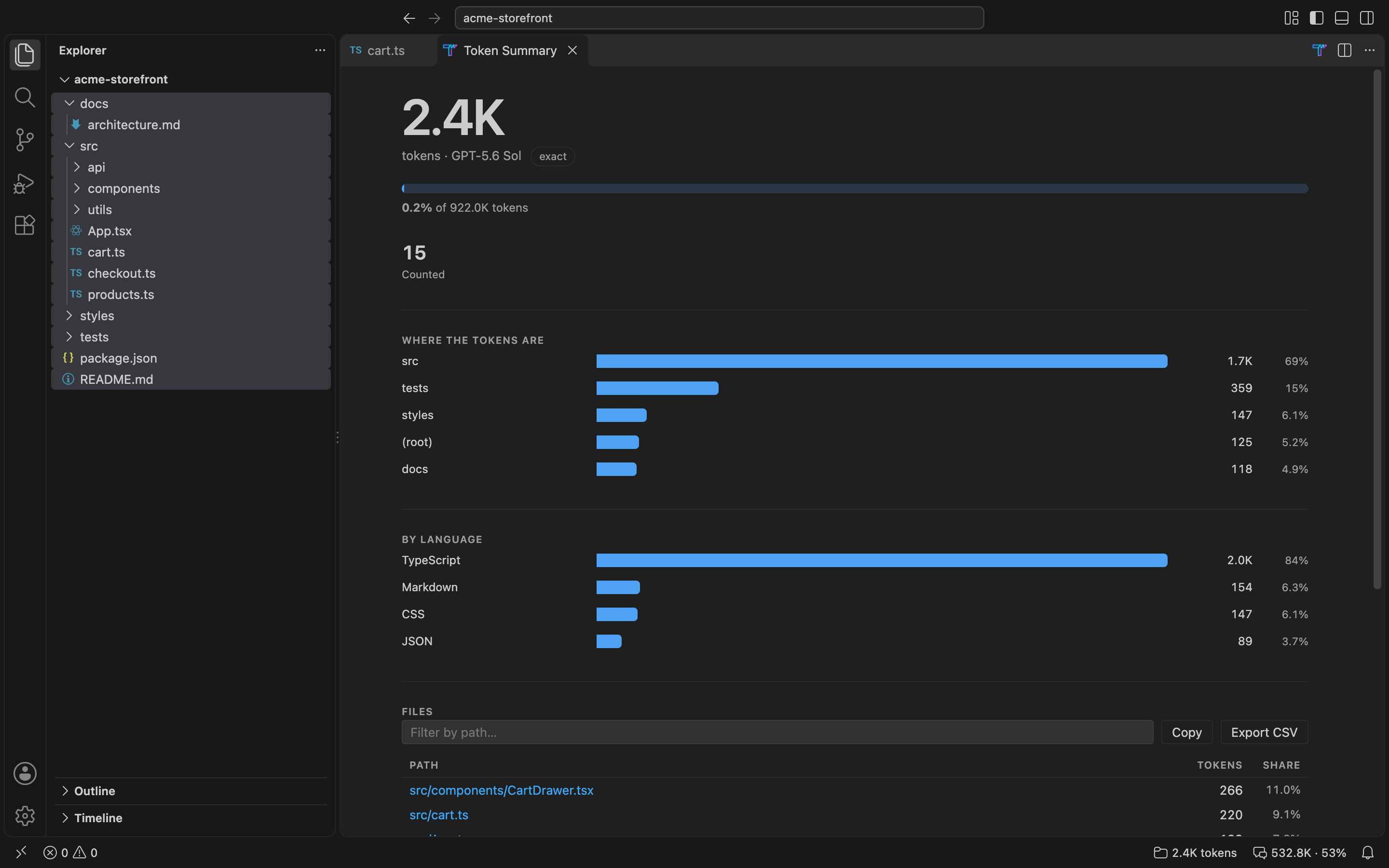
Right-click a folder (or multiple files) → Count Tokens (opens a summary showing where the tokens are, by folder and by language)
Select text in editor → Count Tokens to count only the selection
Configuration
Open Settings (Ctrl/Cmd+,) and search for "LLM Tokenizer":
Default Model: the model used until you pick one from the status bar
Status Bar Display: "file", "project", or "both" (default "both")
Ignore Gitignored Files: exclude .gitignore matches from counts (on by default)
Enable Project Scan: turn off workspace-wide counting on very large repositories
Download Tokenizers: allow the one-time download that makes counts exact
Enable Claude Code Usage, Claude Code Data Directory and Show Claude Code Usage in Status Bar: see Claude Code Usage
Context Warnings
Normal: under 80% of the model's usable input limit
Warning: 80–99%
Error: at or over 100%
A leading ≈ means the count is an estimate rather than an exact tokenization.
Claude Code Usage
How many tokens Claude Code processed, read from the session records Claude
Code keeps on your machine. It is off by default: turn on
Enable Claude Code Usage in Settings, then run Show Claude Code Usage,
or, while it is on, click the LLM Tokenizer T at the top right of an
editor.
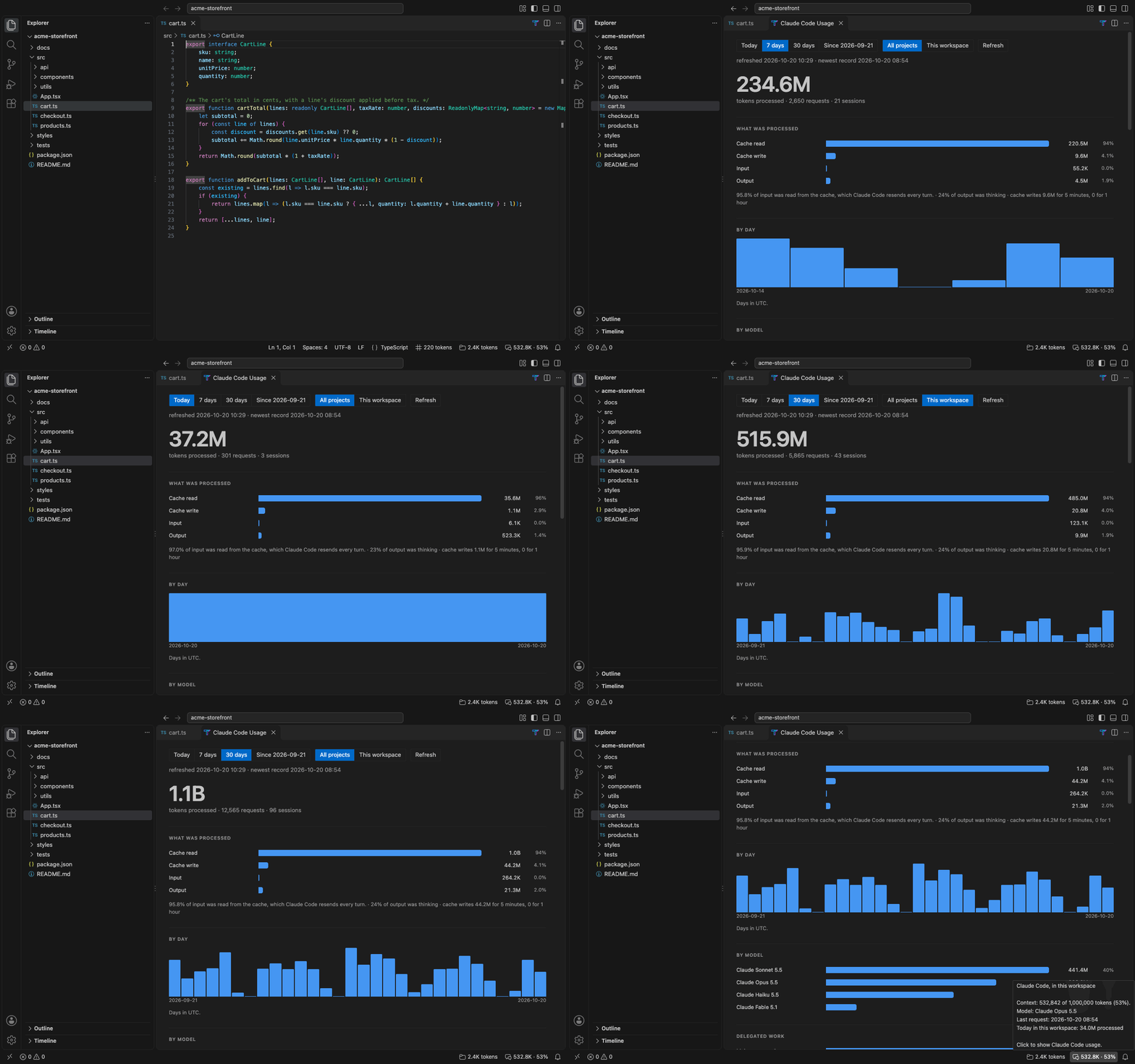
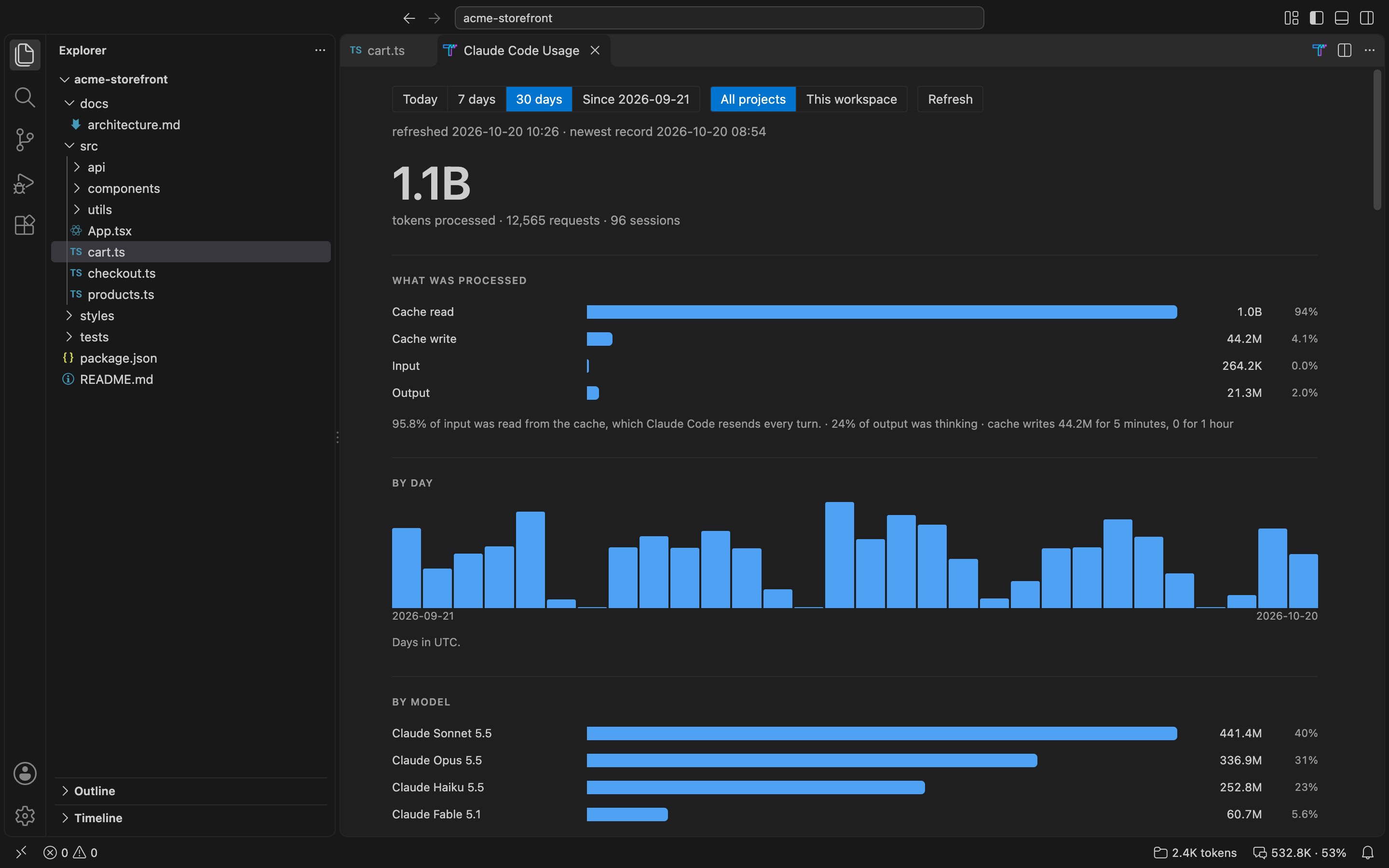
The panel shows today, the last 7 or 30 days, or everything since the
history starts, for all projects or for this workspace:
tokens processed, split into input, cache writes, cache reads and output,
with how much of the input was read from the cache;
a column per day, in your time zone;
models, the main conversation against subagents and workflows, and effort;
projects and sessions, sortable, and the usage limits you reached;
diagnostics: what was read, what was skipped and why, and where from.
Processed is everything a request sent or received: input, cache writes,
cache reads and output. Cache reads are most of it, because Claude Code sends
the conversation again with every turn and the cache serves it. A total marked
≥ is a lower bound: some request did not report every counter.
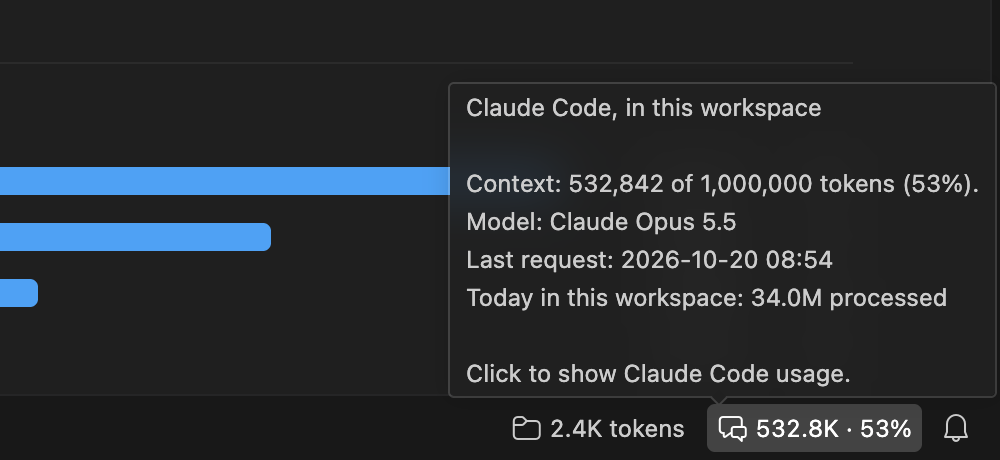
The status item (Show Claude Code Usage in Status Bar) shows how full
the context of the Claude Code session running in this workspace is, as a
share of the model's window where that window is known, amber from 80%. The
window follows Claude Code's own rules: Opus 4.6 and Sonnet 4.6 run in 1M
when a record names [1m], or when the session has held more than 200K;
CLAUDE_CODE_DISABLE_1M_CONTEXT holds every model to 200K when it is set in
the editor's environment, in Claude Code's Environment Variables setting,
or in the env of the organization's managed settings files, and holds a
data folder's own sessions when it is set in that folder's settings.json.
A project's own .claude/settings.json is not read, nor are policies
delivered by MDM, the Windows registry or as server-managed settings. A context larger
than the window a model was thought to have is shown with a ?, and no
colour. It reads Claude Code's running-session files too.
Export CSV copies to the clipboard, per day and model, every count a
hand-made cost calculation needs: requests, input, cache writes (5-minute and
1-hour), cache reads, output, thinking, web searches and fetches. Rows are apart
by what a request's price depends on besides its model: its speed (fast is
billed higher), where it ran (us is billed higher), and its prompt size (up to
100,000 tokens, up to 200,000, or more: Claude Haiku 5.5 prices a request over
100,000 higher). Its notes say how to read each of those. It gives no prices.
Copy copies the sessions, for a spreadsheet.
What is kept, and where. A database in this extension's own storage
(the claude-code-usage folder in VS Code's global storage for LLM
Tokenizer) keeps:
each request's token counts, model, effort, speed, where it ran, time and
Claude Code version, and its ids: message, request, session, and the
subagent or workflow run it came from;
the folder each session started in;
each transcript's path, size, file id and how far it was read, with a hash
of the last 64 bytes read, to tell what changed;
compactions' sizes, and the usage limits reached, with when they reset;
the window's process id and this machine's name, which each import writes
so that two windows never import at once.
Prompts, responses, thinking and tool inputs or results are never kept, and
nothing is sent anywhere. The history outlives Claude Code's own records,
which Claude Code deletes after 30 days by default. A history that can no
longer be read is set aside, left as it is, and a new one started, and the
panel says so until it is cleared. Clear Claude Code Usage History
removes the history and any copy set aside, and leaves nothing of either
readable on disk. What another window still holds, a copy it has open or a
read it has not finished, goes once that window lets go of it, the next
time any window uses the history; Clear says when a copy has to wait.
Anything still on disk is read again at the next refresh. The panel also
remembers its range, its scope and your time zone, in the editor's own
state.
Its settings are machine settings, so a repository's settings cannot turn it
on or point it at another folder. In a dev container, though, the container's
settings can come from the repository's devcontainer.json.
Before uninstalling, run Clear Claude Code Usage History: the editor
may leave this extension's storage on disk after the extension is gone.
What it counts, and what it cannot see
Only the machine the extension runs on: other computers and claude.ai are
not seen. In a remote window that is normally the remote host, and the
panel names it.
Nothing Claude Code had already deleted before the first import.
Sessions run with CLAUDE_CODE_SKIP_PROMPT_HISTORY, which keeps no
transcripts at all.
-p and Agent SDK runs that CLAUDE_CODE_TRANSCRIPT_LOCAL_GC trimmed.
Requests that never reach a transcript, such as title generation and
possibly compaction.
A request refused at a usage limit carries no tokens: it is listed as a
limit reached.
Records dated more than a day after this machine's clock, which only a
wrong clock writes: they are kept, and counted once this clock reaches
them.
The records' format is internal to Claude Code and may change with it; the
diagnostics say when lines could not be read.
Accuracy
There are three tiers, and the status bar tells you which one you are in.
Two vocabulary formats are published in the wild — a Hugging Face
tokenizer.json, and a bare tiktoken rank table (Moonshot ships the latter) —
and both are read.
Tier
Shown as
Method
Models
Exact, offline
12,340
OpenAI's own BPE, bundled
Every OpenAI model tiktoken maps (all but GPT-6)
Exact after one download
≈ → 12,340
The model's published vocabulary (~3–35 MB, cached)
Claude, Grok, GPT-6, closed Qwen, recent Gemini, GLM-5-Turbo, the Mistral Large 4 and MiniMax M3.1 previews
Why some models are only estimated. Anthropic and xAI do not publish a
tokenizer for any current model, and Anthropic's own guidance is not to
approximate Claude with OpenAI's tokenizer, which
it says
undercounts Claude by about 15–20% on typical text, and by much more on code or
non-English input. An honest estimate is better than a confident wrong number,
so those models are marked rather than dressed up.
Where a close relative publishes a vocabulary, the ratio is measured on it,
over this repository's own code and docs, and rounded down: o200k_base for
GPT-6, Gemma's vocabulary for recent Gemini, the open Qwen3.6 vocabulary for
closed Qwen, and the family's published vocabulary for GLM-5-Turbo and the two
previews. That puts the total for the measured files slightly high, but a
single file can still read well below its real count, by up to a third.
Claude's two ratios come from Anthropic's own figures for its two tokenizers.
Grok is the exception: xAI has published tokenizers only for Grok-1 and
Grok-2, none for a current model, so its ratio is inferred rather than
measured, and it is the least reliable number here.
One limitation worth stating plainly: the measured ratios come from English
prose and code, and every ratio is applied per UTF-16 code unit, so an estimate
for CJK text reads substantially low. Exact models are unaffected — this only
applies to counts already shown with a ≈.
Known limitation: only the .gitignore at the root of each workspace
folder is read, plus .git/info/exclude. Nested .gitignore files deeper in
the tree are not applied.
Versions before 2.0 approximated every non-OpenAI model, with cl100k_base
and a fudge factor or a flat characters-per-token figure. Measured on this
repository's own code and docs, that undercounted Gemini on JSON by 16.5%, and
Mistral on TypeScript by 7.5% (21% on the worst file) — errors in the direction
that tells you your prompt fits when it does not.