Route Scout — VSCode extension
Find where each OpenAPI endpoint is used, right inside your editor.
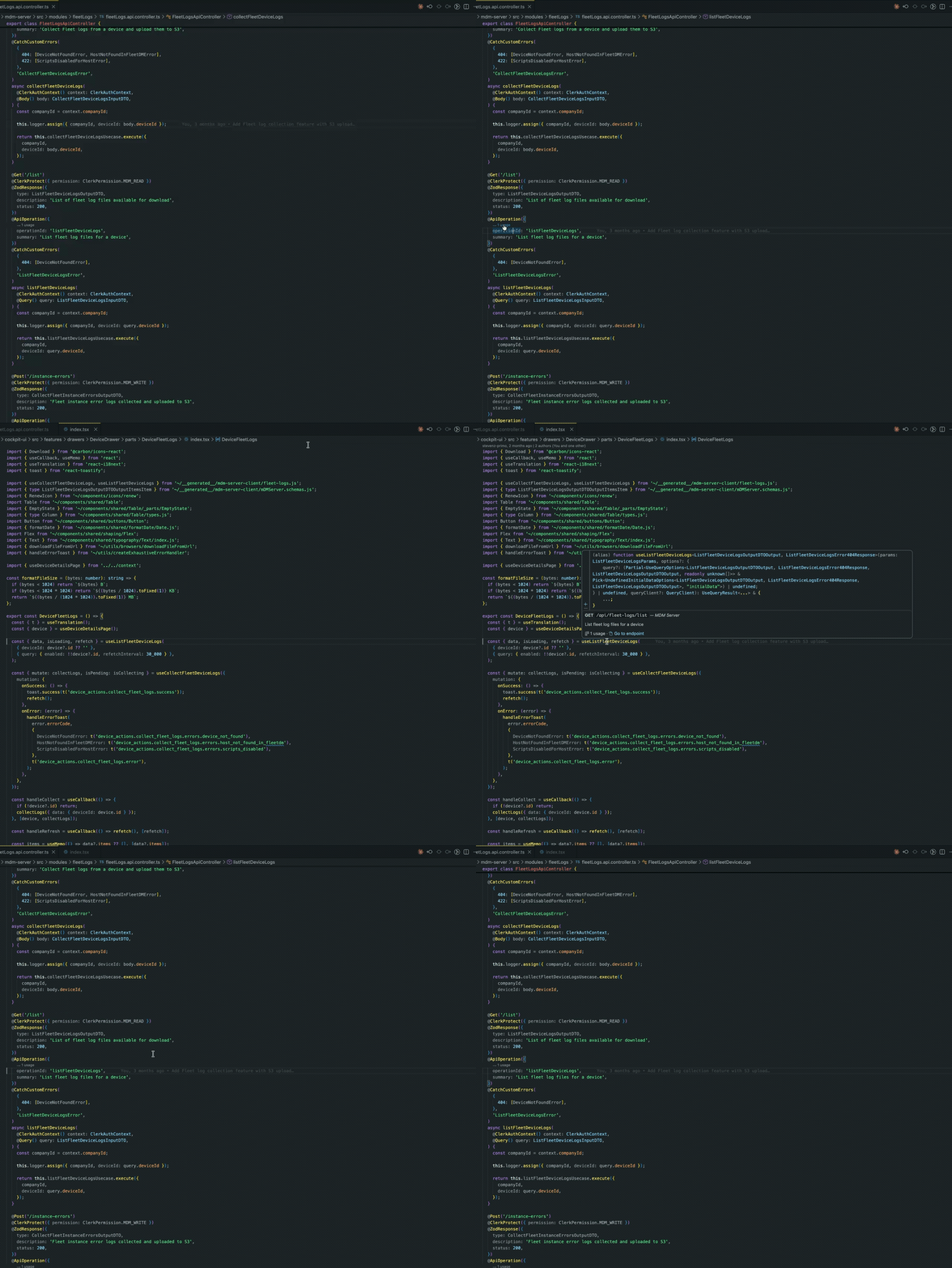
- CodeLens on specs and NestJS
@ApiOperation decorators: every operation gets a ⟶ N usages
lens. Click it to jump to any call site.
- Cmd/Ctrl+Click on an operation (its
operationId line) → Go to Definition jumps straight to the
usage, or peeks a list when there are several.
- Hover on a usage in your code (a
use… hook, a client call) → see the endpoint (method, path,
summary, server, usage count) and an "Open in spec" link — reverse navigation, code → spec.
- Go to Endpoint — right-click a usage (or run the command) to jump from a call site to its
operation. With
routeScout.definitions set (globs of files that declare operationIds, e.g. NestJS
**/*.controller.ts), it lands on the controller; otherwise on the generated spec.
- Endpoints view (bottom panel): browse every spec → operation → usage, grouped by server / tag /
method (nestable), and spot unused endpoints at a glance.
- Find Endpoint command: fuzzy-search across all operations, then jump to a usage.
- Initialize Config command: scaffold a
routescout.config.json for your repo.
Route Scout is spec-agnostic and framework-agnostic — you tell it which specs, which sources, and how a
usage looks.
Configuration
All settings live under routeScout.* and are per-workspace-folder.
| Setting |
What it does |
routeScout.specs |
Globs selecting your OpenAPI spec files. |
routeScout.sources |
Globs selecting the source files scanned for usage. |
routeScout.exclude |
Globs excluded from discovery. |
routeScout.usage |
How an endpoint appears in code — a list of matchers (see below). |
routeScout.clients |
Generated API clients — restrict usages to real client calls and attribute them per server (see below). |
routeScout.ignoreImports |
Mask import / export … from before matching (default true). |
routeScout.ignoreLines |
Regexes for extra lines to skip. |
routeScout.definitions |
Globs of files that declare operationIds (controllers) — for Go to Endpoint. |
routeScout.configFile |
Path to a JSON config file that replaces the settings above. |
routeScout.rebuildOnSave |
Re-index when a spec/source file is saved (default true). |
routeScout.groupBy |
Ordered grouping dimensions for the view (server / tag / method). |
Usage matchers
Each matcher's template is expanded per operation. Placeholders:
{operationId}, {OperationId}, {operationId:camel|pascal|kebab|snake|constant}, {method},
{METHOD}, {path}, {pathRegex}.
"routeScout.usage": [
  // A function named after the operationId (openapi-generator, orval, …)
  { "kind": "symbol", "template": "{operationId}" },
  // A react-query / swr / vue-query hook
  { "kind": "symbol", "template": "use{OperationId}" },
  // Raw fetch() calls keyed by URL path
  { "kind": "regex", "template": "fetch\\(['\"]{pathRegex}['\"]" }
]
symbol matches a whole identifier (fast, precise for generated clients).regex matches a regular expression against each line; values are auto-escaped, {pathRegex}
turns {param} segments into [^/]+.files (optional) restricts a matcher to the files it makes sense in — a substring or glob, e.g.
"files": "crons.json". Also keeps the scan fast: a scoped matcher is skipped outright elsewhere.
Generated clients (clients)
By default every matcher hit counts as a usage. That's fine until the same operationId lives on
several endpoints — two servers, or an api + internal channel — because a matcher can't tell which
one a call targets, so both get the same inflated count. And a method named after an operationId (a NestJS
controller, a local service) gets counted even though it's a definition, not a call.
Declaring your generated API clients fixes both: a call then counts only if it goes through a
declared client, and it's attributed to that client's spec.
"routeScout.clients": [
  // module: import-path substring(s)/glob(s) identifying the client.
  //   - bare/alias imports are matched against the specifier as written
  //   - relative imports are matched against the resolved repo path
  // spec: the spec filename this client talks to.
  { "spec": "mdm-server-openapi.json", "module": ["mdm-server-client", "providers/mdmServer/__generated__"] },
  { "spec": "company-server-internal-openapi.json", "module": "providers/companyServer/__generated__" }
]
- A symbol call (an imported hook/function like
useGetThing() / getThing()) counts only when that
identifier was imported from a client → attributed to that client's spec.
- A property-access call (
api.getThing(...), matched by a \.{operationId}\( regex) counts for the
client(s) the file imports from.
- Anything not linked to a client — a controller method, a look-alike local function — is ignored.
- Leave
clients empty to keep the default "every hit counts" behavior.
Files that call endpoints without importing anything (files)
Some callers aren't code: a cron manifest, a gateway route table, an HTTP-file collection. They name an
endpoint by path (or operationId) with no import to link them to a client, so client gating would drop
them. Declare them with files instead of (or alongside) module — the whole file is then bound to
that spec, and every matcher hit inside it counts:
"routeScout.clients": [
  {
    "spec": "mdm-server-openapi.json",
    "module": ["mdm-server-client", "providers/mdmServer/__generated__"],
    "files": "apps/mdm-server/crons.json"
  }
]
Add the file to routeScout.sources (it isn't a .ts) and a matcher for how it names endpoints —
scoped with files so it doesn't run over your whole codebase:
"routeScout.sources": ["apps/**/src/**/*.{ts,tsx}", "apps/*/crons.json"],
"routeScout.usage": [
  // …your existing matchers
  { "kind": "regex", "template": "\"path\"\\s*:\\s*\"{path}\"", "files": "crons.json" }
]
Use {path} (exact) rather than {pathRegex} here: {pathRegex} turns /runs/{id} into /runs/[^/]+,
which would also swallow a sibling route like /runs/dispatch-sync. Matchers are line-based, so a
manifest that puts the HTTP method on another line (or in a defaults block) is matched on path alone —
if the same path exists under two methods, both endpoints get the hit.
Using Orval? Your per-app orval.config.* already maps each spec (input) to a
client directory (output) — that's exactly one clients entry each.
Commands
- Route Scout: Find Endpoint / Show Usage
- Route Scout: Rebuild Index
The engine is @route-scout/core;
there's also a route-scout CLI
for CI and dead-endpoint reports.

