RouteLens is a VS Code extension for visualizing, navigating, copying, and documenting API routes inside the editor.
Developers

|
Maria Clara Monteiro
Lead developer and maintainer
|
What It Does
- detects routes across supported back-end frameworks
- shows routes in the Activity Bar side panel
- opens the source file and line for each route
- copies route, method + route, or full URL
- generates
API_ROUTES.md, requests.http, and openapi.yaml
Guide
Requirements
- Visual Studio Code
1.90.0 or newer
- Node.js and npm for local development
- Docker, optional, to run the PHP Slim demo API
- TypeScript
- Node.js
- VS Code Extension API
@vscode/vsce for .vsix packaging- GitHub Actions for automated checks
- Docker Compose for the optional PHP Slim example
Features
- Multi-framework route detection
- Activity Bar route tree
- Route navigation to source file and line
- Route, method + route, and full URL copy actions
- Markdown route documentation generation
.http request file generation- OpenAPI YAML generation
- Internal API preview for testing endpoints
Commands
| Command |
Description |
RouteLens: Refresh Routes |
Scans the workspace again and refreshes the route tree. |
RouteLens: Detect Frameworks |
Detects supported frameworks from project files and dependencies. |
RouteLens: Open Route |
Opens the source file at the route declaration line. |
RouteLens: Copy Route |
Copies only the route path. |
RouteLens: Copy Method + Route |
Copies the HTTP method and path together. |
RouteLens: Copy Full URL |
Copies the route with the configured base URL. |
RouteLens: Generate API_ROUTES.md |
Generates Markdown documentation for detected routes. |
RouteLens: Generate requests.http |
Generates executable HTTP requests. |
RouteLens: Generate openapi.yaml |
Generates an OpenAPI YAML specification. |
RouteLens: Open API Preview |
Opens the internal API preview for testing endpoints. |
Extension Settings
routelens.baseUrl: base URL used when copying full URLs and generating docs, HTTP requests, OpenAPI specs, and preview calls.routelens.groupByResource: groups routes by the first path segment inside each source file.routelens.enabledFrameworks: controls which scanners are active.
How It Works
- Open a back-end project in VS Code.
- RouteLens scans supported files in the workspace.
- Enabled framework scanners extract methods, paths, handlers, source files, and line numbers.
- The extension groups routes by framework, file, and resource.
- The side panel lets you navigate, copy, document, export, and preview the detected API routes.
Demos
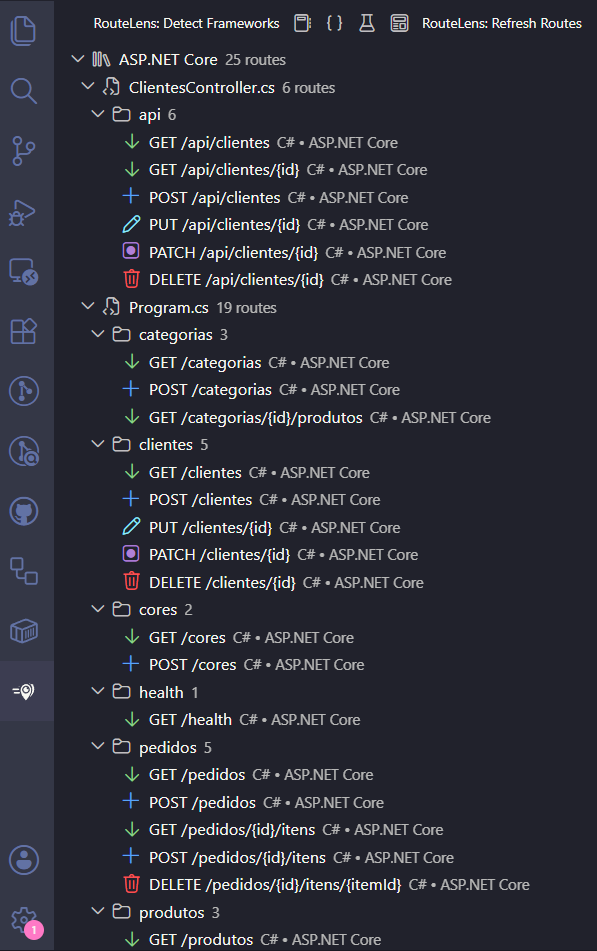
Supported Frameworks
- PHP Slim
- Express.js
- Laravel
- FastAPI
- Spring Boot
- ASP.NET Core
Docs
| |