Agent Flow Studio
Visualize and edit GitHub Copilot customization files as a live graph inside VS Code.
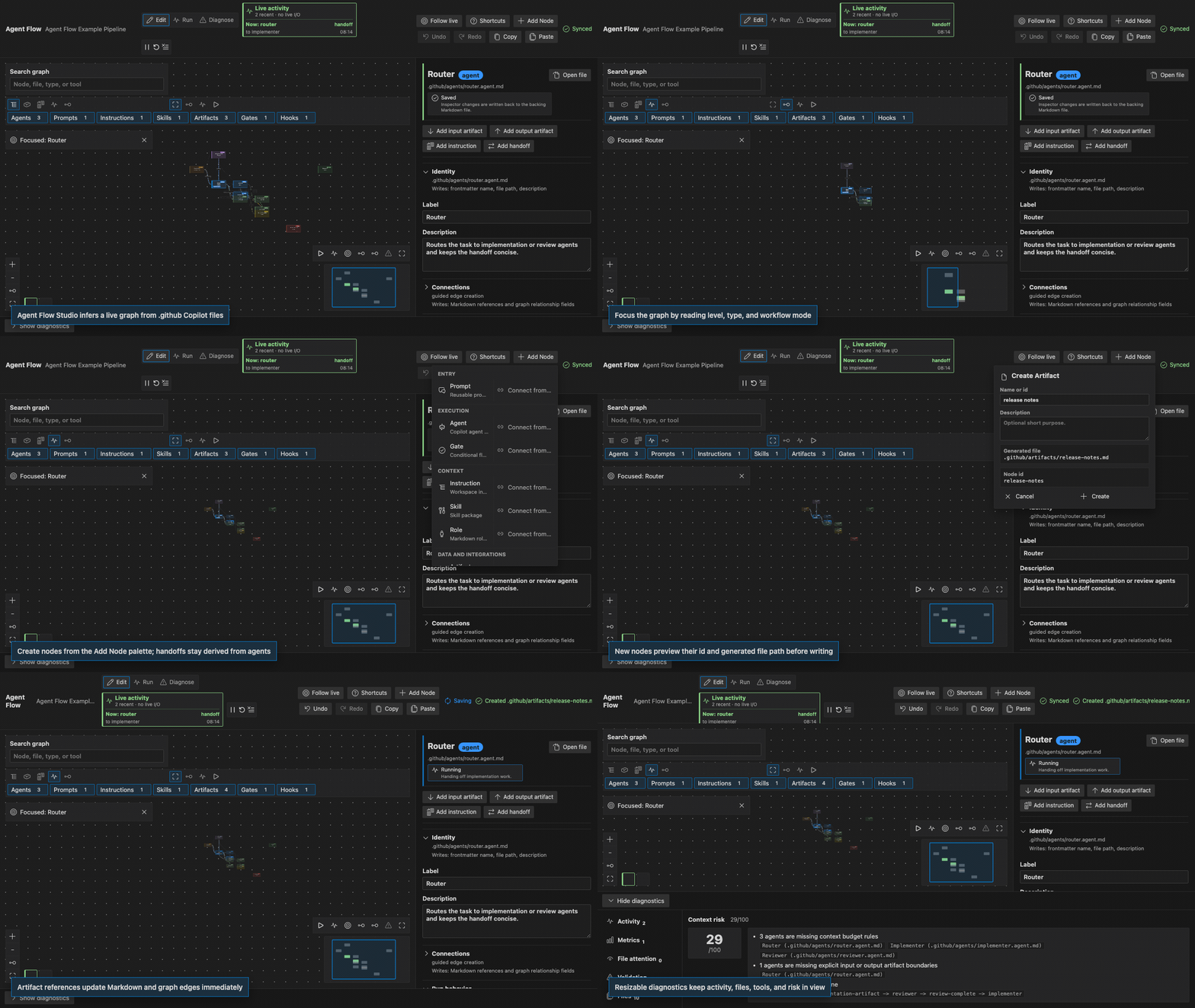
Agent Flow Studio is a local, file-based editor for .github agent, prompt, instruction, skill, role, and artifact files. It helps teams understand how Copilot customization files reference each other, edit those files safely, and spot context or routing problems before they become hard to reason about.
The extension does not execute pipelines, call Copilot agents, read private Copilot internals, send telemetry, or depend on a backend service. It manages local workspace files only.
Features
- Open a live graph inferred from
.github Markdown and YAML files.
- Focus the graph by full view, selected neighborhood, active run, or execution path while keeping type filters available.
- Edit node metadata, tools, handoffs, artifacts, intent-card references, and Markdown from a VS Code themed inspector.
- Treat materialized handoff nodes as derived, read-only graph projections; click them to edit the source agent routing.
- Auto-save webview edits directly back to the relevant Markdown files.
- Keep graph edges synchronized with Markdown references, handoffs, and artifact usage.
- Show short-lived live node and edge activity, replay recent events, and inspect sanitized GitHub Copilot debug logs when Copilot file logging is enabled.
- Choose language model tools from VS Code's registered tool list.
- Show token estimates per node and resizable diagnostics for activity, validation, files, tools, and context risk.
- Create starter agents, prompts, instructions, skills, roles, artifacts, gates, hooks, and MCP server nodes.
- Use context menu entries on supported
.github files to open, scan, validate, or generate Agent Flow files.
Next Release Highlights
- The first graph open now frames the meaningful starter flow before secondary support nodes so default pipelines read clearly at a glance.
- Handoff nodes now match the standard node size in the graph and open their source agent instead of exposing a separate editable inspector.
- The Add Node palette creates persisted node types only; handoffs are managed from agent frontmatter.
- The configuration inspector and diagnostics panel can be resized for long Copilot debug logs, validation lists, and dense routing forms.
- The preview media has been refreshed to show the current graph controls, activity HUD, inspector, Add Node flow, and diagnostics surface.
Quick Start
Agent Flow Studio requires VS Code 1.120.0 or newer.
- Open a workspace in VS Code.
- Run
Agent Flow: Create Default Pipeline from the Command Palette.
- Run
Agent Flow: Open Pipeline.
- Click a node to edit its configuration.
- Connect nodes or update references in the inspector to change the underlying Markdown.
Changes made in the graph are written to the matching file immediately. When adding a node, Agent Flow previews the lower-case id and generated file path before writing. The graph layout is inferred automatically from the current workspace files.
Supported Files
.github/agents/**/*.agent.md                 custom agent files
.github/prompts/**/*.prompt.md               reusable prompt files
.github/instructions/**/*.instructions.md    custom instruction files
.github/skills/**/SKILL.md                   Copilot skill files
.github/roles/**/*.role.md                   reusable role files
.github/artifacts/**/*.md                    explicit artifact handoff files
Agent Flow Studio preserves frontmatter where possible and omits optional YAML fields when they are empty.
Common Workflows
- Use agent nodes to manage model, target environment, invocation settings, tools, handoffs, and subagents.
- Click derived handoff nodes to jump to the source agent Routing section where the handoff is defined.
- Use prompt and instruction nodes to keep reusable guidance visible in the graph.
- Use artifact nodes to make inputs and outputs explicit between agents, prompts, instructions, and skills.
- Use role nodes for reusable role descriptions that can be referenced from Markdown.
- Use diagnostics when you need validation details, a file inventory, tool coverage, or a context risk summary.
Keyboard shortcuts
Arrow keys: move selection to the nearest node.Enter: open the selected node.F: fit the graph.Backspace/Delete: remove the selected node.Cmd/Ctrl+C and Cmd/Ctrl+V: copy and duplicate nodes.Cmd/Ctrl+Z and Cmd/Ctrl+Y: undo and redo.?: show the shortcut reference.
Documentation
Limitations
- Agent Flow Studio manages local files only. It does not run agents or execute workflows.
- The tool picker reflects tools registered in the current VS Code session. Saved tools that are not currently registered are still shown so they can be reviewed or removed.
- Markdown round-tripping is optimized for Agent Flow reference blocks, frontmatter, headings, lists, emphasis, inline code, fenced code blocks, and links. Arbitrary Markdown extensions may not preserve every editor detail.
| |

