Skip to content
| Marketplace
Sign in
Visual Studio>Tools>Toon
Toon

Toon

Mads Kristensen

|
22 installs
| (0) | Free
A Visual Studio extension that provides comprehensive support for .toon files, including syntax highlighting, error detection, and code generation from JSON files.
Download

Toon for Visual Studio

Build GitHub Sponsors

Download this extension from the Visual Studio Marketplace or get the CI build


A Visual Studio extension that provides comprehensive support for .toon files, including syntax highlighting, error detection, and code generation from JSON files.

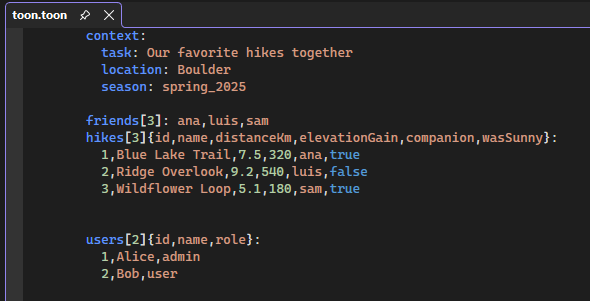
Screenshot

Uses the Toon Tokenizer NuGet package

What is TOON?

TOON (Token-Oriented Object Notation) is a line-oriented, indentation-based format that encodes JSON data with explicit structure and minimal quoting. It's designed to be:

  • More compact than JSON - Especially for arrays of uniform objects (no repeated keys)
  • LLM-optimized - Reduces token count for prompts and AI interactions (up to 60% fewer tokens)
  • Human-readable - Structured like YAML but with deterministic formatting
  • Lossless - Perfectly round-trips to and from JSON

Perfect for LLM prompts, configuration files, and data interchange where token efficiency and readability matter.

Example: JSON vs TOON

JSON (verbose, repeated keys):

{
  "users": [
    {"id": 1, "name": "Alice", "role": "admin"},
    {"id": 2, "name": "Bob", "role": "user"},
    {"id": 3, "name": "Charlie", "role": "user"}
  ]
}

TOON (compact, tabular format):

users[3]{id,name,role}:
  1,Alice,admin
  2,Bob,user
  3,Charlie,user

The TOON format eliminates repeated keys in arrays, making it ideal for structured data with uniform objects.

Features

Syntax Highlighting

Full syntax highlighting support for .toon files that follows the official TOON specification, making it easy to read and edit TOON files directly in Visual Studio. Colors distinguish between property names, values, array definitions, and structural elements.

JSON to TOON Generator

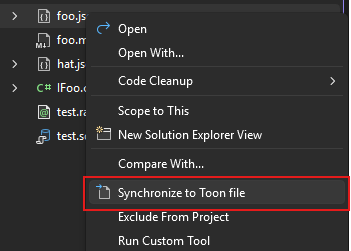
Automatically encode your JSON files to compact TOON format using the built-in Custom Tool. Simply set the Custom Tool property of a .json file to ToonGenerator, and Visual Studio will automatically create and maintain a corresponding .toon file. Just right-click and hit the command Synchronize to TOON file.

Sync

This will nest the generated .toon file under the source JSON file in Solution Explorer for easy access.

Nested

Error Detection

Real-time syntax validation with inline error messages and warnings displayed in the Error List window. Hover over any error to see detailed information about what went wrong.

Error

Editor Features

  • Line numbers
  • Code completion
  • Dropdown navigation bars
  • Preview support
  • Full integration with Visual Studio's editor infrastructure

Getting Started

Opening TOON Files

Simply open any .toon file in Visual Studio, and the extension will automatically provide syntax highlighting and error detection.

Generating TOON from JSON

  1. Right-click on a .json file in Solution Explorer
  2. Select Properties
  3. Set the Custom Tool property to ToonGenerator
  4. Save the file

Visual Studio will automatically encode your JSON to TOON format and nest the generated .toon file under your source JSON file. The file stays synchronized whenever you modify the source JSON.

Use Cases

  • LLM Prompts: Reduce token count when sending structured data to AI models
  • Configuration Files: More readable than JSON, more structured than YAML
  • Data Interchange: Compact format that maintains full JSON compatibility
  • API Responses: Minimize bandwidth while keeping data human-readable

Requirements

  • Visual Studio 2022 (17.0 or later)
  • Supports both x64 and ARM64 architectures

Learn More

  • TOON Specification - Official format specification
  • ToonTokenizer NuGet Package - The .NET library powering this extension
  • Reference Implementation - TypeScript reference implementation

How can I help?

If you enjoy using the extension, please give it a ★★★★★ rating on the Visual Studio Marketplace.

Should you encounter bugs or have feature requests, head over to the GitHub repo to open an issue if one doesn't already exist.

Pull requests are also very welcome, as I can't always get around to fixing all bugs myself. This is a personal passion project, so my time is limited.

Another way to help out is to sponsor me on GitHub.

  • Contact us
  • Jobs
  • Privacy
  • Manage cookies
  • Terms of use
  • Trademarks
© 2025 Microsoft