TAMLFull language support for TAML (Tab Annotated Markup Language) files including syntax highlighting, error detection, document formatting, code folding, and navigation bar support. |

TAML Language Support for Visual Studio
Full language support for TAML (Tab Annotated Markup Language) files in Visual Studio.
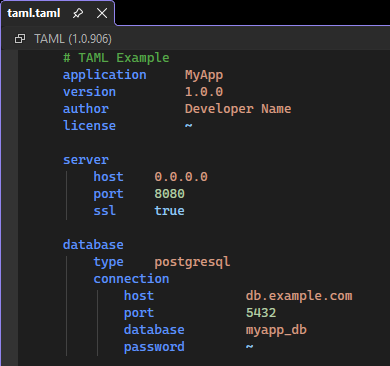
What is TAML?TAML is a minimal, tab-based markup language designed for simplicity and readability:
ExampleFeaturesSyntax HighlightingFull syntax highlighting support for
IntelliSenseGet completion suggestions for TAML's special values when typing in value positions:
Press Ctrl+Space in any value position to see available completions. Error DetectionReal-time syntax validation with inline error messages and warnings displayed in the Error List window. Hover over any error to see detailed information about what went wrong. Detects issues per the TAML specification:
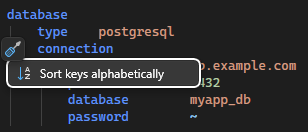
Document FormattingFormat your TAML documents with Edit > Advanced > Format Document (Ctrl+K, Ctrl+D) or format just a selection with Format Selection (Ctrl+K, Ctrl+F). The formatter ensures consistent tab-based indentation and proper key-value alignment. Sort KeysPlace your cursor on any key that has child keys and use the lightbulb menu (Ctrl+.) to sort child keys alphabetically. This helps maintain consistent ordering in configuration files.
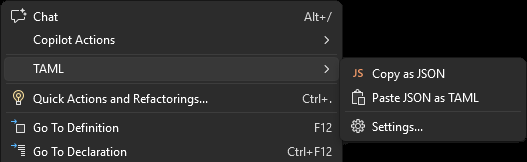
JSON ConversionRight-click in a TAML file to access the TAML context menu with conversion options:
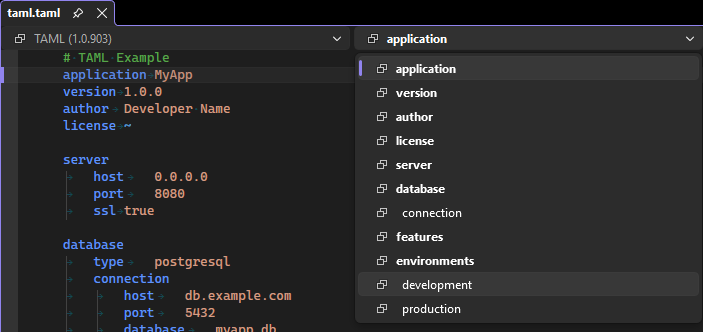
Navigation BarThe editor navigation bar shows a hierarchical dropdown of all keys in your document. Click any key to jump directly to it. Keys with children are displayed with indentation to show the document structure.
Document OutlineOpen the Document Outline window (View > Other Windows > Document Outline or Ctrl+Alt+O) to see a hierarchical tree view of all keys in your TAML file. Double-click or press Enter on any key to navigate to it. The outline automatically stays in sync with your cursor position in the editor. Outlining/Code FoldingCollapse and expand nested sections using the outlining (code folding) feature. Keys with nested children can be collapsed to hide their contents. Auto-IndentationWhen you press OptionsConfigure the extension behavior via Tools > Options > TAML > General. Validation
Formatting
Getting StartedSimply open any Requirements
Learn More
How can I help?If you enjoy using the extension, please give it a ★★★★★ rating on the Visual Studio Marketplace. Should you encounter bugs or have feature requests, head over to the GitHub repo to open an issue if one doesn't already exist. Pull requests are also very welcome, as I can't always get around to fixing all bugs myself. This is a personal passion project, so my time is limited. Another way to help out is to sponsor me on GitHub. |