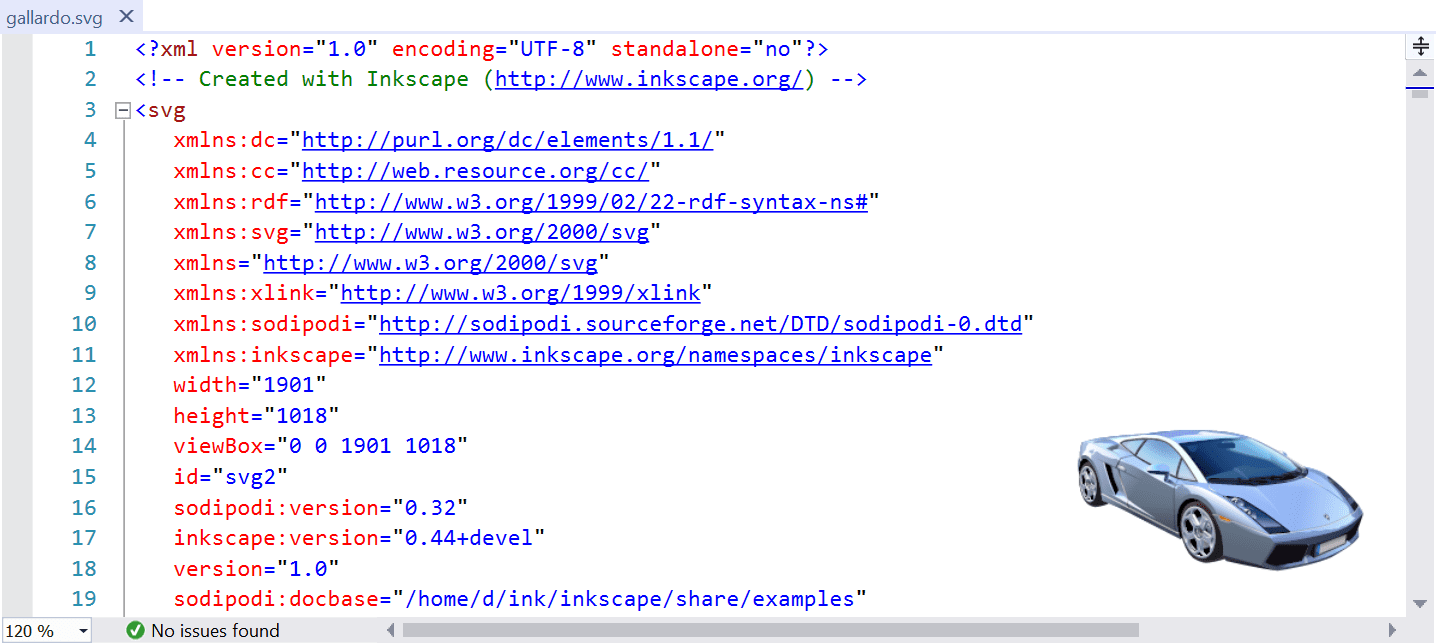
SVG ViewerMakes it much easier to work with SVG files by showing a live preview in the bottom-right corner of the code window |

SVG Viewer
Download the extension from the Visual Studio Marketplace or get the latest CI build A Visual Studio extension that makes working with SVG files easier by providing a live preview, IntelliSense, and custom file icons. FeaturesLive PreviewRenders a live preview of the SVG file being edited, positioned in a corner of the editor window.
The preview updates automatically as you type, providing instant visual feedback on your changes. Interactive features:
Configurable OptionsCustomize the preview behavior via Tools → Options → SVG Viewer → General:
Error VisualizationWhen your SVG contains syntax errors, the preview shows a clear error indicator with details in the tooltip:
IntelliSenseEnhanced IntelliSense support for SVG files with schema-based completions.
This works by opening SVG files in the HTML editor, which has built-in schema information for SVG elements and attributes. File IconsSolution Explorer displays custom icons for SVG files:
PerformanceThe extension is designed to be lightweight and responsive:
License |