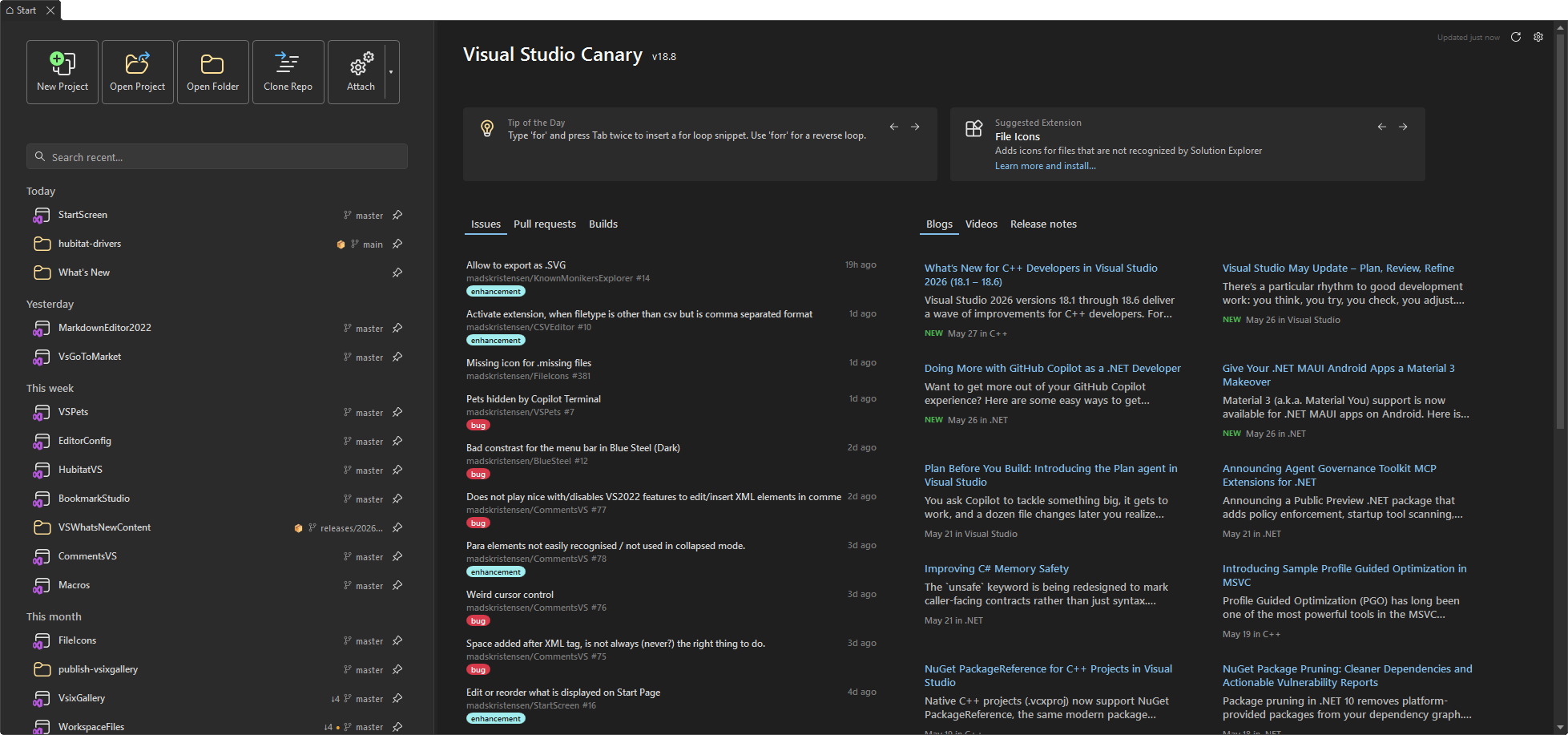
Start ScreenA modern start screen for Visual Studio with recent projects, developer news, daily tips, and quick actions. |

Start Screen for Visual Studio
Download this extension from the Visual Studio Marketplace or get the latest CI build from Open VSIX Gallery. Your first five seconds in Visual Studio should feel fast. Start Screen replaces the default launch experience with a clean, modern dashboard that gets you into code immediately - no clicking through menus, no waiting.
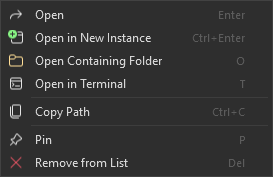
Get to work in one clickOpen a recent solution, create a new project, open a project or folder, clone a repo, or attach and reattach to a process - all from a single, focused screen. The action bar puts every common workflow front and center so you never have to dig through File or Debug menus again. Your recent projects, superchargedStart Screen doesn't just list your recent files. It understands how you work: Find anything instantly. Type a few characters and the search filter narrows your list in real time. Pin the projects you care about most so they always float to the top. See your Git status at a glance. Every repo shows its current branch, ahead/behind counts, uncommitted changes, and the last commit time - all loaded in the background so the UI stays snappy. Hover for the full picture, or spot a detached HEAD before you accidentally commit to nowhere. Stay organized. Projects are grouped by when you last touched them - Today, This week, This month - so yesterday's prototype doesn't bury this morning's deadline. Right-click for power moves. Open the containing folder, launch a terminal, pull the latest Git changes, copy the path, pin, unpin, or remove - all from a context menu with keyboard shortcuts.
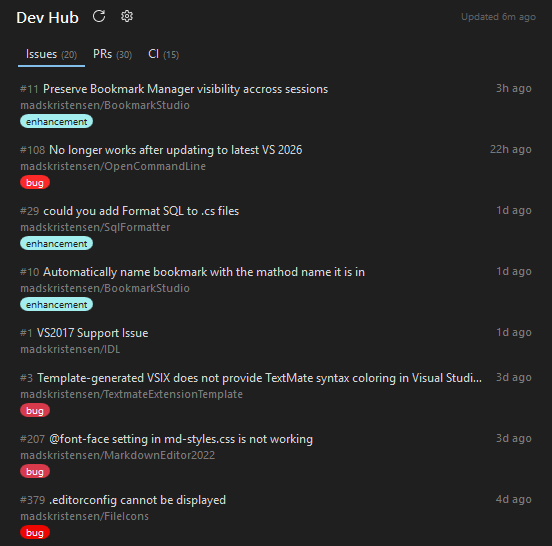
Developer news, built right inA curated feed of engineering news from the Visual Studio Blog, .NET Blog, and more lives right next to your project list. It refreshes in the background and caches locally, so it's always ready and never slows you down. Want different sources? Drop your own RSS or Atom feeds into a simple JSON file and Start Screen picks them up automatically - no restart needed. Full JSON schema validation is included so you get IntelliSense while editing. YouTube video feedThe latest videos from the Visual Studio YouTube channel are shown in the Videos tab of the News panel, right next to the Blogs tab. Each video displays a thumbnail, title, and publish date - videos published in the last three days get a "NEW" badge so you never miss fresh content. A green dot appears on the Videos tab whenever new videos arrive in a refresh, and clears once you view the tab. The feed is cached locally and refreshes automatically every four hours. Click the refresh button next to the News header to force an update at any time. Drag and dropDrop a solution, project, or folder from File Explorer directly onto the Start Screen to open it. You can also drag pinned items to reorder them - a visual indicator shows exactly where the item will land. Dev HubThe Dev Hub panel shows your open pull requests, assigned issues, and recent builds from GitHub and Azure DevOps - right next to your project list. Data loads in the background and is cached locally so the UI stays responsive.
Scope to a repositoryRight-click any pull request, issue, or build and choose Scope to <repo> to filter all three Dev Hub tabs down to that single repository. While scoped, right-click any item and choose Show all repositories to clear the scope and see everything again. The scope is not saved between sessions, so reopening the Start Screen always starts with the full view. Custom search query (GitHub)By default the Dev Hub shows issues and pull requests that "involve" your GitHub
account. Click the gear icon next to the Dev Hub header to enter a custom
GitHub search query. The extension prepends Use the Example - show open issues across multiple orgs: Example - only issues assigned to you: Example - issues in a single org: Leave the field empty to restore the default behavior ( The custom query applies to the Issues and Pull requests tabs. The Builds tab always fetches from your recently pushed repositories and is not affected by the query.
Display optionsClick the gear icon next to the Dev Hub header to open its settings, where the Display section lets you tailor the layout:
Hiding the Dev HubIf you don't use the Dev Hub, you can hide it. Click the settings (gear) button in the top-right of the Start Screen and uncheck Show Dev Hub. The News section expands to use the freed-up space. Re-check the box at any time to bring it back. Tip of the dayEvery time Visual Studio starts, a short productivity tip appears at the bottom of the Start Screen. The tips rotate daily and cover navigation shortcuts, editing tricks, refactoring commands, and other features you might not know about. No configuration required - just glance down and learn something new.
Have a tip to share? Open an issue with your suggestion or submit a pull request directly to tips.txt. Suggested extensionsRight next to the Tip of the Day, Start Screen showcases a curated extension from the Visual Studio Marketplace. The suggestion rotates daily and highlights free, open-source extensions that enhance your development workflow.
Extensions you've already installed show an "Installed" badge. Extensions you haven't tried yet display an "Install" link that takes you straight to the Marketplace page. Want to suggest an extension? Submit a pull request to extensions.json. We're looking for extensions that are:
Keyboard-first designEvery part of Start Screen is navigable without a mouse. Open the Start Screen any time from File > Start Screen or press Ctrl+Shift+Alt+Backspace. Recent solutions / folders
Dev Hub
News feed
YouTube videos
Action bar
Looks right at homeStart Screen inherits your Visual Studio theme - Light, Dark, Blue, or whatever you're running. No jarring color mismatches, no extra configuration. It just blends in. Install it
It works out of the box. Feed preferences and pinned items are persisted automatically. Get involvedFound a bug? Have an idea? Head to the issue tracker - pull requests are always welcome. |