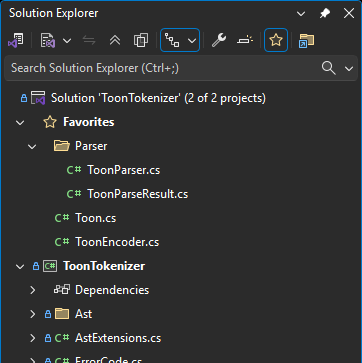
Pin your most important files to the top of Solution Explorer, whether they're in your solution or anywhere else on disk. Stop digging through folders.
This extension adds a Favorites node to Solution Explorer where you can organize quick links to the files you use most, including files outside your solution. Built in response to a highly-requested feature from the Visual Studio community.
Quick Start
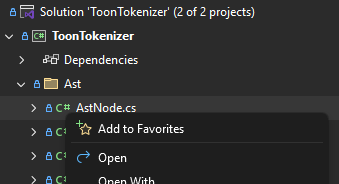
Right-click any file or folder in Solution Explorer → Add to Favorites
Find your pinned files in the Favorites node at the top
Features
Feature
Description
Pin Files
Double-click to instantly open your most-used files
Pin Folders
Add entire folders with their contents to Favorites
Add External Files
Browse and add files from anywhere on disk
Add Folder from Disk
Browse and add any disk folder, recursively adding all its contents
File Explorer Integration
Right-click files and folders in the File Explorer extension to add them to Favorites
Virtual Folders
Organize favorites into custom folder hierarchies
Drag & Drop
Drag files from Solution Explorer onto Favorites, or rearrange within
Team Sharing
favorites.json lives in your solution folder—commit it to share with your team
Toggle Visibility
Hide/show Favorites from the Solution Explorer toolbar
Missing File Detection
Visual indicators when files have been moved or deleted
Add Files and Folders
From Solution Explorer: Right-click any file or folder → Add to Favorites
From File Explorer extension: Right-click any file or folder in the File Explorer tree → Add to Favorites
From Disk (file): Right-click the Favorites node or any folder → Add File... to browse for a file anywhere on your system
From Disk (folder): Right-click the Favorites node → Add Folder from Disk... to browse for a folder — all files are added recursively, preserving the directory structure
Organize with Virtual Folders
Create folders to group related favorites. Nest them as deep as you need.
Drag & Drop Support
Drag files from Solution Explorer directly onto the Favorites node
Move files between folders
Rearrange the hierarchy however you like
Toggle Visibility
Use the toolbar button to show or hide the Favorites node when you need more space.
File Context Menu
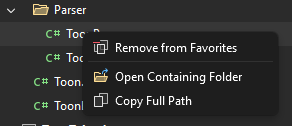
Right-click any favorite for quick actions:
Remove from Favorites
Open Containing Folder
Copy Full Path
Team or Personal
Favorites are stored in favorites.json in your solution directory.
Share with team: Commit the file to source control