Skip to content
| Marketplace
Sign in
Visual Studio>Tools>Postfix Templates
Postfix Templates

Postfix Templates

Mads Kristensen

madsk.net
|
9 installs
| (0) | Free
Postfix code templates for C# - type an expression followed by .if, .var, .not and more to quickly transform it.
Download

Postfix Templates for Visual Studio

Build GitHub Sponsors

Download this extension from the Visual Studio Marketplace or get the latest CI build from Open VSIX Gallery.


Stop writing boilerplate. Type what you mean, then let the template finish the thought.

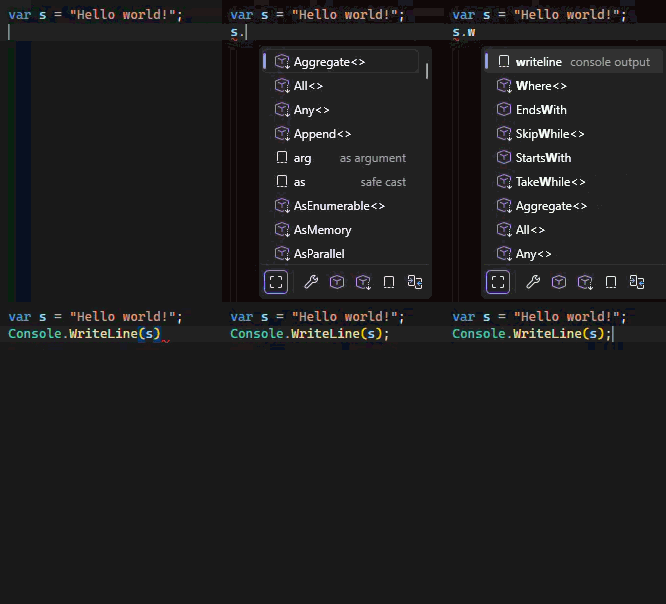
Writeline

Postfix Templates adds 40+ code completion shortcuts for C#. Type an expression, press ., and pick a template from IntelliSense to instantly transform it into a full statement or common pattern - no snippets to memorize, no extra keystrokes.

How it works

  1. Write any C# expression.
  2. Press . and choose a postfix template from the completion list.
  3. The expression is automatically wrapped or transformed.

For example, typing isValid.if expands to:

if (isValid)
{
}

Templates are context-aware - they only appear when applicable to the expression type. Boolean templates show up for boolean expressions, enumerable templates for collections, and so on.

Templates

Template Applies to Description Example
.if Boolean Checks boolean expression to be 'true' expr.if → if (expr) { }
.else Boolean Checks boolean expression to be 'false' expr.else → if (!expr) { }
.not Boolean Negates boolean expression expr.not → !expr
.while Boolean Iterates while boolean expression is 'true' expr.while → while (expr) { }
.assert Boolean Asserts boolean expression with Debug.Assert expr.assert → Debug.Assert(expr)
.conditional Boolean Wraps expression with ternary conditional operator expr.conditional → expr ? trueValue : falseValue
.var Any Introduces variable for expression expr.var → var x = expr;
.return Any Returns expression from current function expr.return → return expr;
.switch Any Produces switch statement expr.switch → switch (expr) { }
.switchexpr Any Produces switch expression expr.switchexpr → expr switch { }
.par Any Parenthesizes current expression expr.par → (expr)
.cast Any Surrounds expression with cast expr.cast → ((SomeType) expr)
.is Any Checks expression type with pattern matching expr.is → expr is SomeType name
.as Any Casts expression using safe 'as' operator expr.as → expr as SomeType
.arg Any Surrounds expression with invocation expr.arg → Method(expr)
.to Any Assigns current expression to a variable expr.to → lvalue = expr;
.field Any Introduces field for expression expr.field → _field = expr;
.prop Any Introduces property for expression expr.prop → Property = expr;
.discard Any Discards expression result expr.discard → _ = expr;
.lambda Any Wraps expression in a lambda expr.lambda → x => expr
.writeline Any Writes expression to console output expr.writeline → Console.WriteLine(expr)
.trycatch Any Wraps expression with try/catch block expr.trycatch → try { expr; } catch { }
.throwifnull Any Throws if expression is null expr.throwifnull → ArgumentNullException.ThrowIfNull(expr)
.null Nullable Checks expression to be null expr.null → if (expr == null) { }
.notnull Nullable Checks expression to be not null expr.notnull → if (expr != null) { }
.foreach Enumerable Iterates over enumerable collection expr.foreach → foreach (var item in expr) { }
.for Enumerable Iterates over collection with index expr.for → for (var i = 0; i < expr.Length; i++)
.forr Enumerable Iterates over collection in reverse expr.forr → for (var i = expr.Length-1; i >= 0; i--)
.throw Exception Throws expression of 'Exception' type expr.throw → throw expr;
.using Disposable Wraps resource with using statement expr.using → using (expr) { }
.lock Reference type Surrounds expression with lock block expr.lock → lock (expr) { }
.await Awaitable Awaits expressions of 'Task' type expr.await → await expr
.yield Any (iterator) Yields value from iterator method expr.yield → yield return expr;
.parse String Parses string as value of some type expr.parse → int.Parse(expr)
.tryparse String Tries parsing string as value of some type expr.tryparse → int.TryParse(expr, out var value)
.notempty String Checks if string is null or empty expr.notempty → if (string.IsNullOrEmpty(expr)) { }
.notwhitespace String Checks if string is null or whitespace expr.notwhitespace → if (string.IsNullOrWhiteSpace(expr)) { }
.new Type name Produces instantiation expression for type SomeType.new → new SomeType()
.typeof Type name Wraps type with typeof() expression SomeType.typeof → typeof(SomeType)
.nameof Type name Wraps expression with nameof() SomeType.nameof → nameof(SomeType)
.inject Type name Introduces primary constructor parameter IDependency.inject → (IDependency dependency)

Configuration

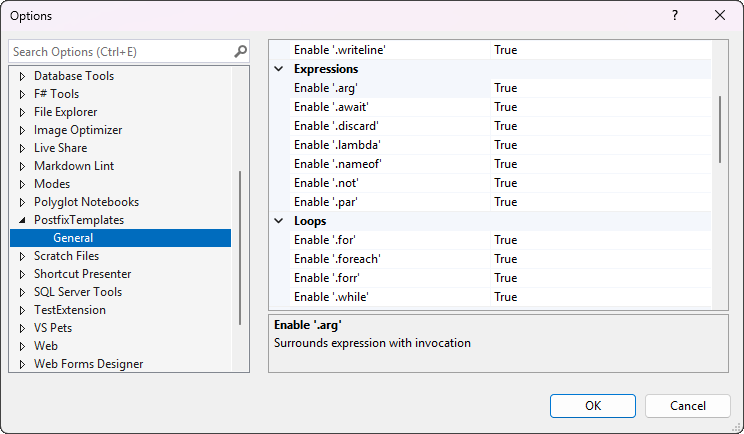
Each template can be individually enabled or disabled from Tools -> Options -> Postfix Templates -> General. Turn off the ones you don't need to keep the completion list focused.

Settings

Custom Templates

You can define your own postfix templates by placing a .postfix.json file in your solution root directory (next to the .sln file). This lets teams share project-specific templates via source control.

File format

{
  "$schema": "https://raw.githubusercontent.com/madskristensen/PostfixTemplates/refs/heads/master/postfix-template-schema.json",
  "templates": [
    {
      "name": "log",
      "description": "Logs expression with ILogger",
      "body": "_logger.LogInformation({expr})",
      "suffix": "logging",
      "appliesTo": "any"
    }
  ]
}

Each template object supports these properties:

Property Required Description
name Yes The trigger text shown in IntelliSense (e.g., log)
body Yes The output text. Use {expr} as a placeholder for the original expression
description No Description shown in the completion tooltip. Defaults to the name
suffix No Short text shown to the right of the completion item. Defaults to custom
appliesTo No Restricts when the template appears. Defaults to any

Expression types for appliesTo

Value Shows when
any Any expression (default)
boolean Boolean expressions
string String expressions
nullable Nullable or reference types
enumerable Collections and arrays
exception Exception types
disposable IDisposable types
awaitable Task and awaitable types
referenceType Reference types

Example

A .postfix.json for an ASP.NET Core project might look like:

{
  "$schema": "https://raw.githubusercontent.com/madskristensen/PostfixTemplates/refs/heads/master/postfix-template-schema.json",
  "templates": [
    {
      "name": "log",
      "description": "Log with ILogger",
      "body": "_logger.LogInformation({expr})",
      "suffix": "logging"
    },
    {
      "name": "ok",
      "description": "Wrap in Ok result",
      "body": "Ok({expr})",
      "suffix": "action result"
    },
    {
      "name": "tolist",
      "description": "Convert to List",
      "body": "{expr}.ToList()",
      "suffix": "LINQ",
      "appliesTo": "enumerable"
    }
  ]
}

Templates are automatically reloaded when the file changes. Add the $schema property to get IntelliSense and validation while editing the file.

Contribute

Check out the issue tracker for ideas, bugs, and feature requests. Pull requests are welcome.

  • Contact us
  • Jobs
  • Privacy
  • Manage cookies
  • Terms of use
  • Trademarks
© 2026 Microsoft