Open Command Line

Download this extension from the Visual Studio Marketplace
or get the CI build.
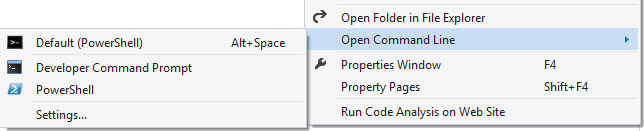
Opens a command line at the root of the project, folder, or solution. Supports all popular consoles including CMD, PowerShell, Windows Terminal, Nushell, Git Bash, and many more. Also provides syntax highlighting, IntelliSense, and execution of .cmd, .bat, .ps1, and .nu files.
Features
Context Menu Commands
Right-click on any project, solution, folder, or file in Solution Explorer to open a command line at that location.
Keyboard Shortcuts
| Shortcut |
Command |
Ctrl+Alt+. |
Open default command line |
Alt+Shift+, |
Open Developer Command Prompt |
Alt+Shift+. |
Open PowerShell |
Ctrl+Shift+X |
Execute current batch/script file |
You can customize these shortcuts in Tools → Options → Environment → Keyboard. Search for commands starting with OpenCommandLine.OpenDefault.
Built-in Presets
The extension comes with presets for popular command line tools:
- cmd - Windows Command Prompt
- Developer Command Prompt - VS Developer Command Prompt with build tools in PATH
- PowerShell - Windows PowerShell
- PowerShell Core - Cross-platform PowerShell (pwsh.exe)
- PowerShell ISE - PowerShell Integrated Scripting Environment
- Nushell - Modern shell with structured data support (nu.exe)
- Windows Terminal - Modern Windows Terminal
- Git Bash - Git for Windows Bash shell
- posh-git - PowerShell with Git integration
- cmder - Portable console emulator
- ConEmu - Windows console emulator
- Babun - Cygwin-based shell
- Custom - Configure your own command and arguments
Configurable Options
Open Tools → Options → Environment → Command Line to configure:
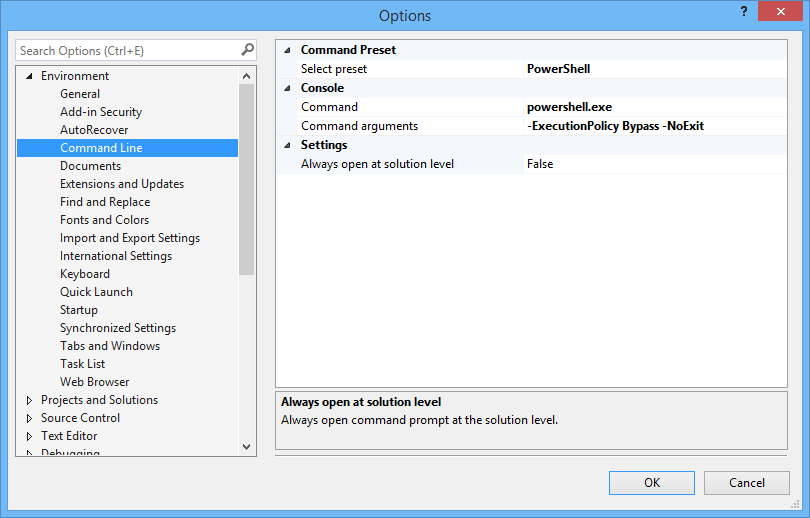
- Select preset - Choose from built-in presets or create a custom configuration
- Friendly name - Display name shown in the context menu
- Command - Path to the executable
- Command arguments - Arguments passed to the command
%folder% - Current folder path%configuration% - Active build configuration (Debug/Release)%platform% - Active build platform (x86/x64/AnyCPU)
- Always open at solution level - Always open at the solution root regardless of selection
- Open files at project level - Open at project root when a document is active
- Open at Git repository root - Always open at the Git repository root folder
- Run as Administrator - Launch terminals with elevated (Administrator) privileges
Execute Script Files
Execute .cmd, .bat, .ps1, and .nu files directly from the context menu or with Alt+Shift+5.
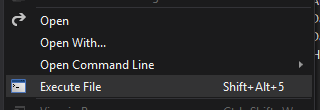
PowerShell scripts run with -ExecutionPolicy Bypass for convenience.
Requirements
- Visual Studio 2022 (17.0 or later)
Contribute
If you find this extension useful, please:
License
Apache 2.0


