
Refract — AI Context & Prompt Trajectory EngineTrajectory-aware AI prompt refiner & failure-spiral rescuer for VS Code Chat & Copilot. Grounds vague prompts in active files, compiler diagnostics, and terminal errors in <5ms (100% local, zero extra token cost). Installation Launch VS Code Quick Open ( Ctrl+P), paste the following command, and press enter.Copied to clipboard |

💠 RefractAI Context & Prompt Trajectory Engine for VS Code Chat, GitHub Copilot & Google Antigravity Stop "prompt fluffing." Start Context & Trajectory Engineering. ⚡ What Is Refract?Most prompt extensions treat prompt refinement like copywriting—taking a 6-word developer thought ("fix the auth bug") and inflating it into a 200-word generic essay ("Act as a 10x Senior Engineer...") without knowing your conversation history, open editor files, or live compiler errors. Refract is different. Like an optical prism (
🧠 How It Works, Data Privacy & LLM ArchitectureIn 4 Short Bullets
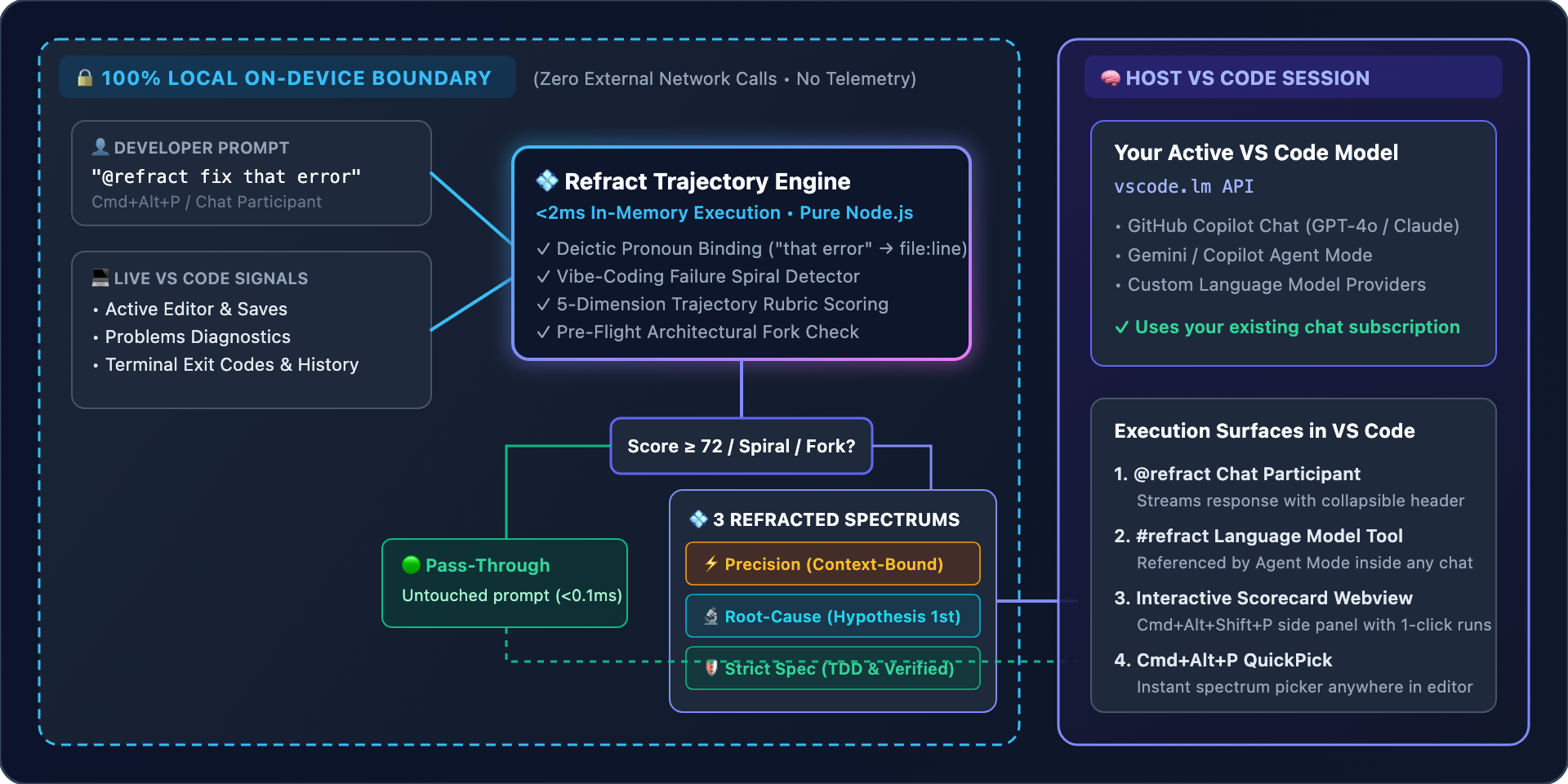
🔒 Data Privacy & LLM Boundary Diagram
🤖 At a Glance: Data Privacy & Which LLM Refract Uses
💻 System Requirements & Pre-Flight ChecksRefract is designed so end-users need zero extra software installed, while contributors have clear build checks:
Automated Pre-Flight Check Commands📋 VS Code Quick Cheatsheet1. Chat Participant Commands (
|
| Command in VS Code Chat | What It Does | Example |
|---|---|---|
@refract <prompt> |
Grounds your prompt against active files & diagnostics and executes it with your selected Chat model. | @refract fix the error in this handler |
@refract /refract <draft> |
Scores your prompt across the 5-Dimension Rubric and shows 1-click follow-up buttons for ⚡ Precision, 🔬 Root-Cause, and 🛡️ Strict Spec. | @refract /refract make this async and handle timeouts |
@refract /check <draft> |
Opens the Interactive 5-Dimension Trajectory Scorecard Webview panel beside your editor. | @refract /check add caching to the user endpoint |
@refract /mode [mode] |
View or switch operating mode (auto-intercept, coach, or slash-only). |
@refract /mode coach |
@refract /doctor |
Displays live runtime health, bound workspace files, and active Problems count. | @refract /doctor |
2. Language Model Tool (#refract in Any Chat)
Type #refract inside any standard Copilot / Agent Mode chat prompt to let the model invoke the refract_prompt tool and ground your request in active workspace diagnostics.
3. Keyboard Shortcuts & Command Palette (Cmd+Shift+P)
| Shortcut (macOS) | Shortcut (Windows / Linux) | Command Palette Title | What It Does |
|---|---|---|---|
Cmd + Alt + P |
Ctrl + Alt + P |
💠 Refract: Refract Prompt (3 Spectrums)... |
Pops up an instant input + QuickPick with your 5-Dimension Score and 1-click execution for ⚡ Precision, 🔬 Root-Cause, or 🛡️ Strict Spec. |
Cmd + Alt + Shift + P |
Ctrl + Alt + Shift + P |
💠 Refract: Open Interactive Trajectory Scorecard |
Opens the visual 5-Dimension Scorecard Webview beside your active editor. |
| (Status Bar Click) | (Status Bar Click) | 💠 Refract: Switch Operating Mode... |
Click 💠 Refract: Auto in the bottom-right status bar to refract a prompt or switch modes. |
⚙️ Configuration & Custom Team Rules
VS Code Settings (settings.json)
{
  "refract.mode": "auto-intercept",
  "refract.scoreThreshold": 72,
  "refract.rescueFailureSpirals": true,
  "refract.alwaysIncludeRules": [
    "Preserve public TypeScript interfaces",
    "Run unit tests after modifying handlers"
  ]
}
Shared Team Config (.agents/refract.json or .vscode/refract.json)
Commit .agents/refract.json or .vscode/refract.json to your repository so both VS Code and Google Antigravity teammates automatically share the same project rules and score thresholds!
🌿 Repository Branch Structure
| Branch | Target Platform | Status |
|---|---|---|
main |
Core trajectory engine & cross-platform overview | ✅ Active |
antigravity-extension |
Google Antigravity Native Plugin (plugin.json, hooks.json, skills/, rules/) |
✅ Ready (v1.0.0) |
vscode-extension |
VS Code Extension (package.json, src/extension.js, @refract, #refract, Cmd+Alt+P, .vsix) |
✅ Ready (v1.0.0) |
📄 License
MIT