Project Studio
One trustworthy timeline for your projects — human work, AI-agent execution, and Git history.
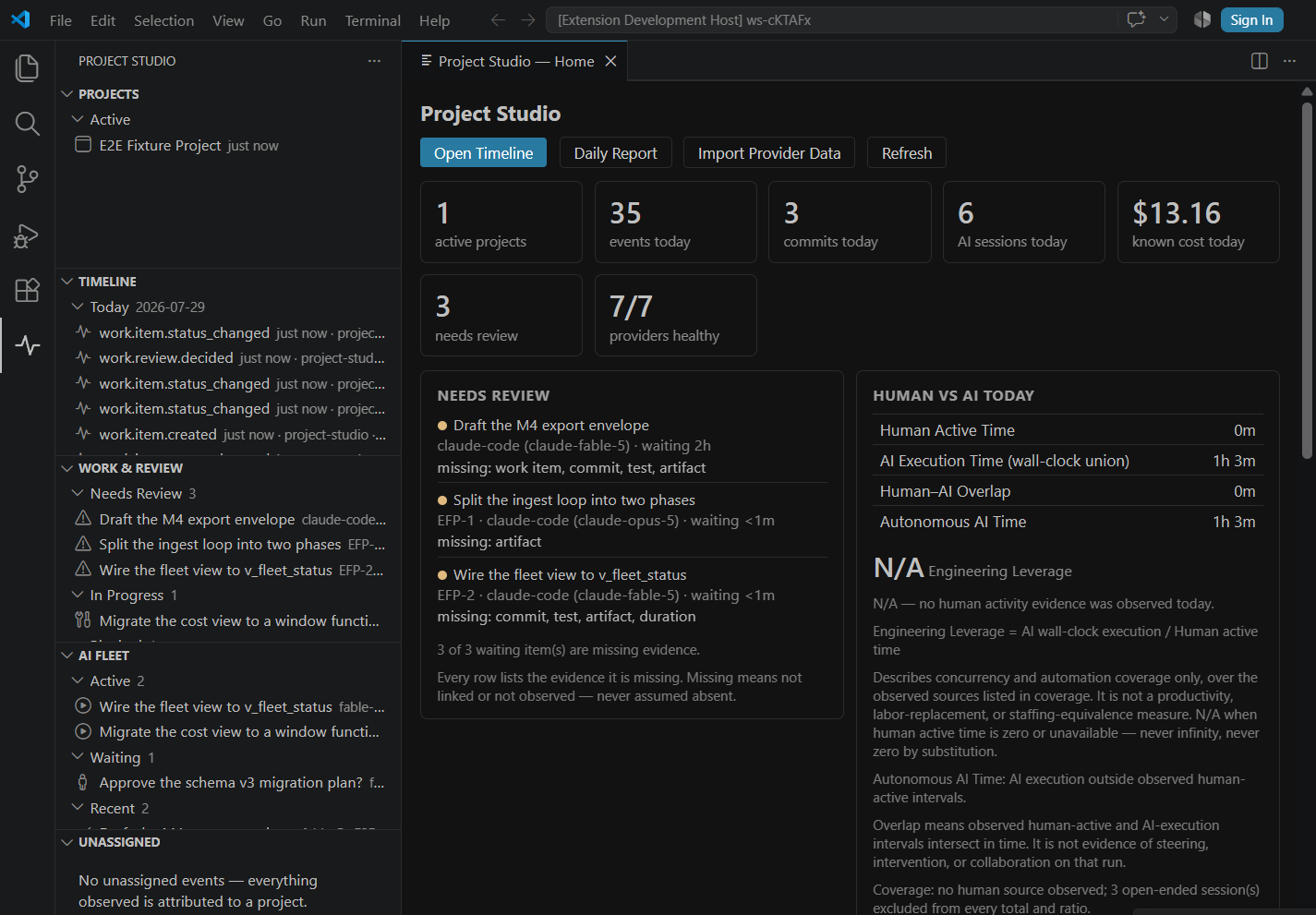
Project Studio is a local-first VS Code extension — the Human + AI Project Operating System.
It reads the evidence your work already produces, keeps it in one SQLite database on your
machine, and never sends it anywhere.
CYOD × BYOM — Connect Your Own Data × Bring Your Own Model. A Lynx DI Studio.
The problem
Your project's real history is scattered across places that do not talk to each other. Some of it
is in Git. Some of it is in the editor you actually worked in. And an increasing share of it is
inside AI coding-agent sessions — Claude Code, Codex, Gemini — each with its own transcript
format, its own token accounting, and no idea that the other two exist.
So the questions that matter get answered by memory and guesswork:
- What actually happened on this project last week — and who or what did it?
- How much of that was me, and how much was an agent running on my behalf?
- What did the agent work cost, and which project should it be charged to?
- Which agent sessions are still waiting on me right now?
- Where is the evidence for any of it?
The usual answer is a dashboard product that wants your source code, your prompts, and a cloud
account. That is a bad trade for a question that can be answered entirely on your own machine.
The solution
Project Studio observes the artifacts already sitting on your disk — VS Code activity, local Git,
and AI coding-agent session files — and normalizes them into a canonical, evidence-backed event
timeline with durable project attribution.
From that one timeline you get:
- a unified project timeline across human and agent work,
- an AI Fleet view of every agent session and what it is waiting on,
- token and cost accounting with budgets, labeled as estimates and versioned,
- an unassigned-attribution queue with one-click corrections that become durable rules,
- work items with a human review queue, human-vs-AI time separation, deterministic daily
reports, and basic project health (landing in the next release — see Roadmap),
- and a read-only agent surface so your own coding agent can query all of it.
No account. No cloud. No telemetry. No network calls at all.
Why it's different
The trust model is the product. Most tooling in this category earns its answers by taking your
data. Project Studio earns them by taking almost nothing:
|
Project Studio |
| Where your data lives |
One SQLite file in the extension's global storage, on your machine |
| Network egress |
Zero — enforced by an automated egress-sentinel test in CI, not a policy page |
| Account required |
None |
| Telemetry |
None |
| Before you opt in |
Fully dormant — nothing collected, nothing written, no files created |
| Prompts / responses / file contents |
Never collected |
It is readable by your agent, not just by you. Project Studio ships a read-only MCP server, a
pre-approved SELECT-only query command, and generated agent map files — all over the same stable
views. Your coding agent can ask "what happened on this project yesterday?" and get
a provenance-labeled answer.
It refuses to make things up. Unknown values stay unknown. Estimates say they are estimates and
carry the price table version they were computed from. There is no productivity score and no
composite agent ranking, because the data does not support one. That is a deliberate design
constraint, not a missing feature — see Honest by construction.
How it works
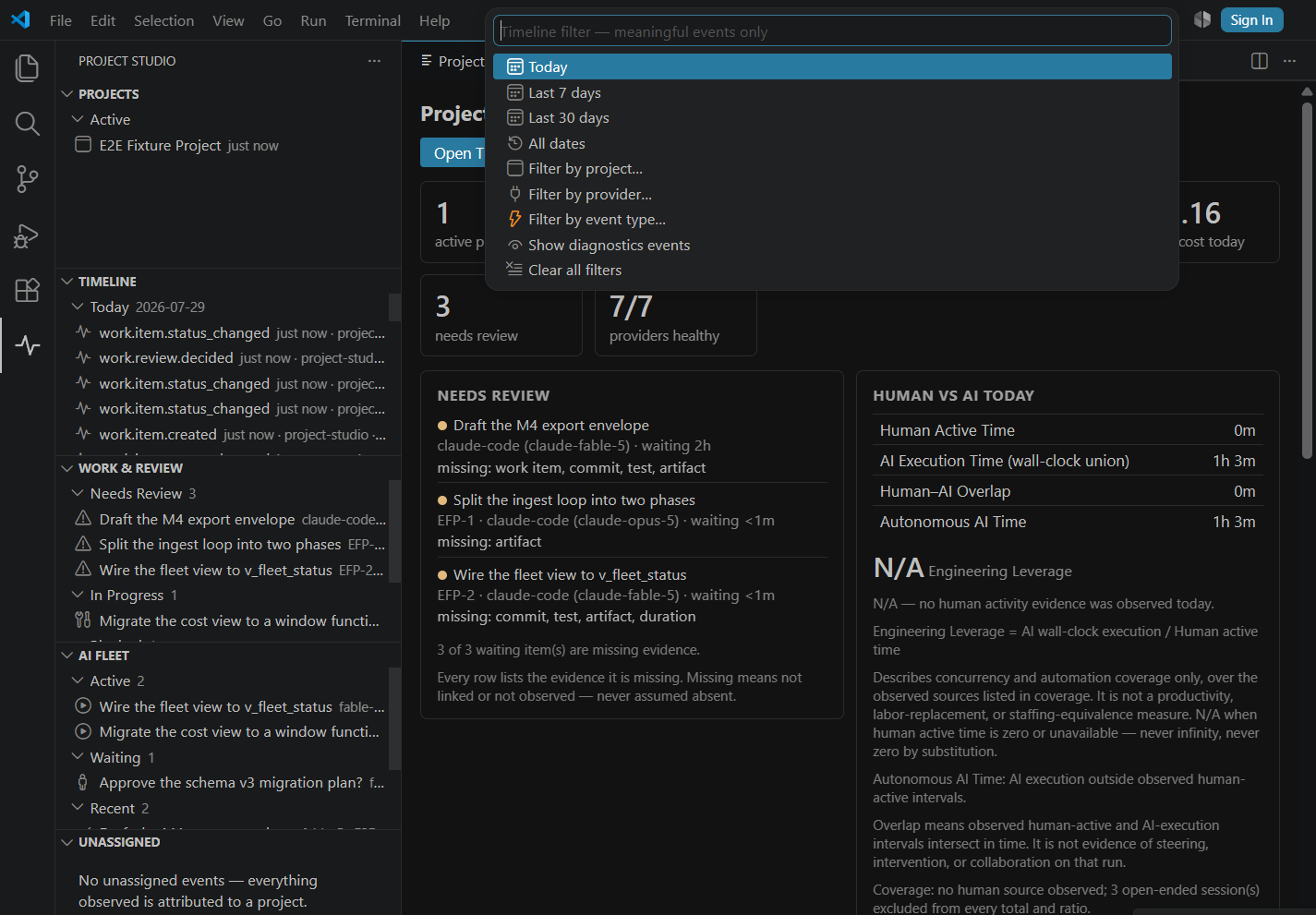
- You register a workspace. Until you do, the extension does nothing at all. Registration maps
the workspace's folders, Git repositories, and remotes to a durable project identity that
survives restarts and path changes.
- Providers read local evidence. Built-in providers observe VS Code activity, import local Git
history, and read AI-agent session files where those tools already store them —
~/.claude, ~/.codex, ~/.gemini, plus a generic JSONL file-drop for anything else. All
read-only; Project Studio never writes into another tool's data directory.
- Events are normalized and attributed. Every event lands in the timeline with its source,
its identity method, and an attribution confidence. Confident events attach to a project.
Everything below the threshold goes to the Unassigned queue rather than being guessed — one
click assigns it and creates a durable correction rule for next time.
- Views read stable SQL views. The dashboard, the trees, the MCP server, the CLI, and the
pre-approved query command all read the same
v_* views. There is no second source of truth
and no privileged path.
Features
Unified timeline
Meaningful VS Code activity, Git commits, and agent sessions in one ordered, filterable view —
filter by project, provider, event type, or date range. Every row carries attribution confidence
and the evidence behind it.
AI Fleet
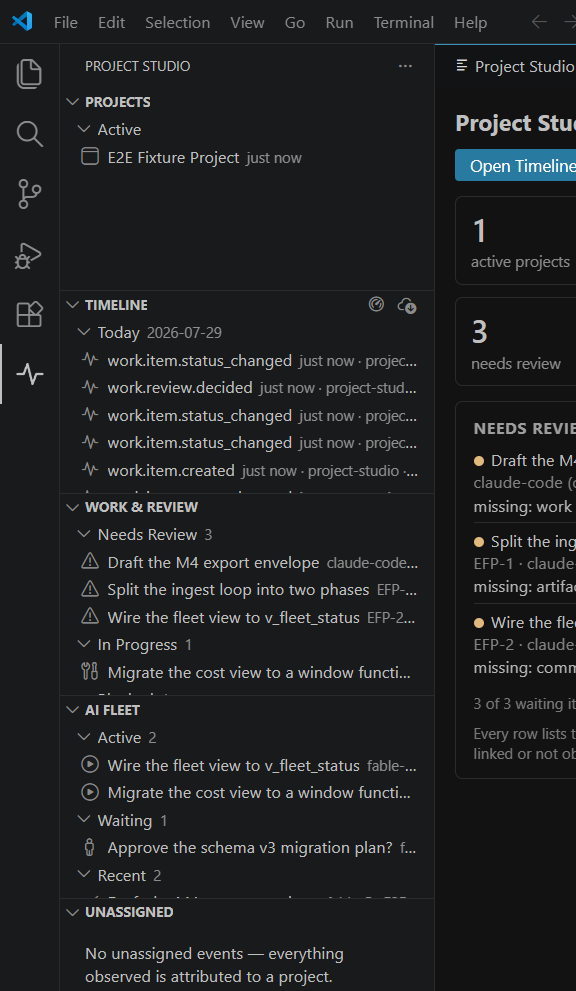
Every agent session across every provider, grouped Active / Waiting / Recent / Failed, with the
distinction that actually matters: needs you is flagged separately from waiting on a tool. A
disconnected provider is shown as a disconnected provider, never as an idle agent. Subagent
sessions are linked to their parent. Stale data is labeled stale instead of being presented as
current.
Usage, cost, and budgets
Per-provider, per-model token usage and cost estimates, with project and provider budgets and
deduplicated threshold alerts. Every cost figure carries a price-table version and a
calc-type label — reported, estimated_api, allocated_subscription, local_compute, or
unknown — and every result restates that these are operational guidance, not invoice data. An
unknown model is never silently priced.
Projects and attribution
Your portfolio grouped by recency with honest empty states, and an Unassigned queue for events
that could not be confidently attributed. Assigning one event teaches the system a rule rather than
just patching a row.
Provider activity
Side-by-side activity totals per provider — sessions, run-state breakdown, failures, tokens,
estimated cost — over a date range you choose. Deliberately no composite score and no ranking:
these are counts, and the columns reconcile with the usage and cost figures.
Agent access surface
- Generated project maps —
AGENTS.md, CLAUDE.md, and GEMINI.md written into your repo,
with a hard rule: Project Studio never overwrites a file that is not ours, and a marked section
is preserved for your own notes.
- A pre-approved read-only query command —
.project-studio/bin/query.mjs, which your agent
can run without permission prompts because it is SELECT-only, row-capped, and read-only enforced
at the database connection level.
- A local MCP server, bundled in the VSIX (see below) — set it up with
Project Studio: Set Up Agent Access, which stages the server into your workspace and writes
an
.mcp.json entry only if one is not already there.
Every agent-facing result carries provenance and freshness labels. The entire v1 agent surface is
read-only — an agent can read your project history, and cannot change it.
Honest by construction
These are enforced rules in the product, not aspirations. They are listed here as features, because
honest measurement is the whole thesis:
- Unknown stays unknown. A missing value renders as an em dash (—), never as a fabricated zero.
Token sums preserve nulls rather than collapsing unknowns into totals.
- Estimates are labeled and versioned. Every cost number carries its calc type and price-table
version, and says out loud that it is guidance, not invoice data.
- An unknown model is never silently priced. It is reported as unpriced.
- AI execution time is never labeled human developer hours. The two are separated and stay
separated.
- No productivity score. No composite agent ranking. Provider comparison shows activity totals
only.
- Every report claim cites its evidence. Generated reports carry the event ids behind each
statement, so any number can be traced back to the rows that produced it.
- Low-confidence attribution goes to a queue, not to a guess.
Model Context Protocol (MCP) — agent access to your data
Project Studio bundles a local, read-only MCP server in the extension. Run
Project Studio: Set Up Agent Access and your coding agent can query your project history
directly. It speaks stdio, runs on your machine, and reads the same stable views the UI does.
| Tool |
What it answers |
list_projects |
Registered projects with status, objective/milestone, and last activity |
project_summary |
One project's header: activity by day, provider coverage, freshness |
timeline |
Filtered event timeline by project, provider, type, or date range |
recent_events |
The "what just happened" shortcut — most recent events, newest first |
list_sessions |
Agent sessions with provider, model, run/review state, duration, and token sums |
session_detail |
One session in full: events, per-record cost labels, and child subagents |
usage_cost |
Token and estimated-cost rollups grouped by project, provider, model, or day |
fleet_status |
Current fleet state per session, with run state, review state, and provider health |
provider_activity |
Per-provider activity totals for a date range — counts only, no ranking |
provider_health |
Per-provider import health: enabled state, last run, errors, counters |
db_info |
Database path, schema version, view catalog version, and row counts |
These cover work items, the review queue, human-vs-AI time, project health, and the daily report
as well.
Privacy
Specific, checkable claims — not a posture statement.
What it reads (all local, all read-only)
- VS Code activity in workspaces you have registered.
- Local Git history via
git on your PATH.
- AI-agent session files where those tools already write them (
~/.claude, ~/.codex,
~/.gemini, or paths you override), plus an optional generic JSONL file-drop.
What it stores
- One SQLite database in the extension's global storage directory on your machine. That is the
whole footprint, plus any agent-map files you explicitly ask it to generate in your repo.
What is never collected — at any level
- Prompts. Model responses. File contents. Keystrokes. Screenshots. Clipboard contents.
Dormant until you say otherwise
- Before you run Register Current Workspace, the extension collects nothing, writes nothing,
and creates no files. Registration is the gate, and onboarding discloses what each level means
before you choose.
Collection levels
| Level |
What is collected |
| 0 |
Disabled — nothing collected |
| 1 |
Session identity and attribution evidence only |
| 2 (default) |
Level 1 plus usage counters and normalized file-path metadata |
Level 2 is the default and is applied only after the onboarding disclosure. You can lower the level,
pause collection, or delete the data at any time.
Zero network egress
- Project Studio makes no network calls. Not for updates, not for analytics, not for cost lookups —
the price tables ship with the extension. This is verified by an automated egress-sentinel
test that fails the build if any network capability is reachable from the shipped code paths.
And on AI
- Project Studio does not call a model. It observes the agents you already run, and it does not
need a key, a token, or a subscription to do it. Bring your own model; it stays yours.
What is read versus what is stored
Project Studio reads your agent tools' local transcript files — ~/.claude, ~/.codex,
~/.gemini — and those files contain your prompts and the models' replies. It stores only
metadata from them: session identity and timing, model names, token counts, and normalized file
paths. Prompt text and model responses are parsed and discarded, never written to the database, at
the default collection level. Nothing is uploaded anywhere in any case.
Reading is machine-wide: agent history is imported for every project on this machine, and any
workspace where you enable agent access can query all of it. If that is not what you want, turn a
provider off with its *ImportEnabled setting, or lower projectStudio.collectionLevel.
Getting started
- Install Project Studio from the Marketplace.
- Open a workspace — a folder with your project in it.
- Run
Project Studio: Register Current Workspace from the Command Palette. Nothing is
collected before this step.
- Choose a collection level when prompted (Level 2 recommended; Level 1 and Disabled are
available, and you can change it later in Settings).
- The initial Git import runs, backfilling repository history — 90 days by default — so the
timeline has something real in it immediately.
- The dashboard opens. It also auto-opens once per workspace, and every Project Studio view has
a dashboard button in its title bar, so you are never more than one click away.
- Optional but recommended: run
Project Studio: Set Up Agent Access so your coding agent
can query the timeline through MCP and the pre-approved read-only query command.
Key commands
All available from the Command Palette under Project Studio.
| Command |
What it does |
Open Home |
Open the dashboard |
Register Current Workspace |
Register this workspace as a project — the opt-in gate |
Open Timeline |
Open the filterable unified timeline |
Import Provider Data |
Run a provider import now |
Refresh Providers |
Re-scan providers for new local session data |
Generate Agent Map |
Write/refresh AGENTS.md / CLAUDE.md / GEMINI.md project maps |
Set Up Agent Access |
Configure the local MCP server and the pre-approved query command |
Generate Project Manifest |
Emit the project manifest for this workspace |
Open Diagnostics |
Provider health, database info, and import counters |
Work-item, report, and export commands arrive in the next release.
Requirements
|
|
| VS Code |
1.130 or newer, desktop |
| Git |
On your PATH, for repository history import |
| Native modules |
None |
| External services / account |
None |
| Platforms |
Windows supported today. macOS and Linux experimental — the full unit and golden suite runs green on Linux in CI, but platform entries are pending. |
Settings
| Setting |
Default |
Effect |
projectStudio.collectionLevel |
2 |
0 disabled · 1 identity and attribution evidence only · 2 adds usage counters and normalized file-path metadata |
projectStudio.gitBackfillDays |
90 |
Days of Git history imported when a repository is first registered |
projectStudio.claudeImportEnabled |
true |
Import Claude Code sessions and usage (local transcripts, read-only) |
projectStudio.claudeHome |
"" |
Override the Claude Code data directory; empty uses ~/.claude |
projectStudio.codexImportEnabled |
true |
Import Codex sessions and usage (local rollout files, read-only) |
projectStudio.codexHome |
"" |
Override the Codex data directory; empty uses ~/.codex |
projectStudio.geminiImportEnabled |
true |
Import Gemini CLI sessions and usage (local chat files, read-only) |
projectStudio.geminiHome |
"" |
Override the Gemini CLI data directory; empty uses ~/.gemini |
projectStudio.genericLocalImportEnabled |
true |
Import generic local-agent JSONL event drops from Project Studio's own spool directory |
Work, review, and reports
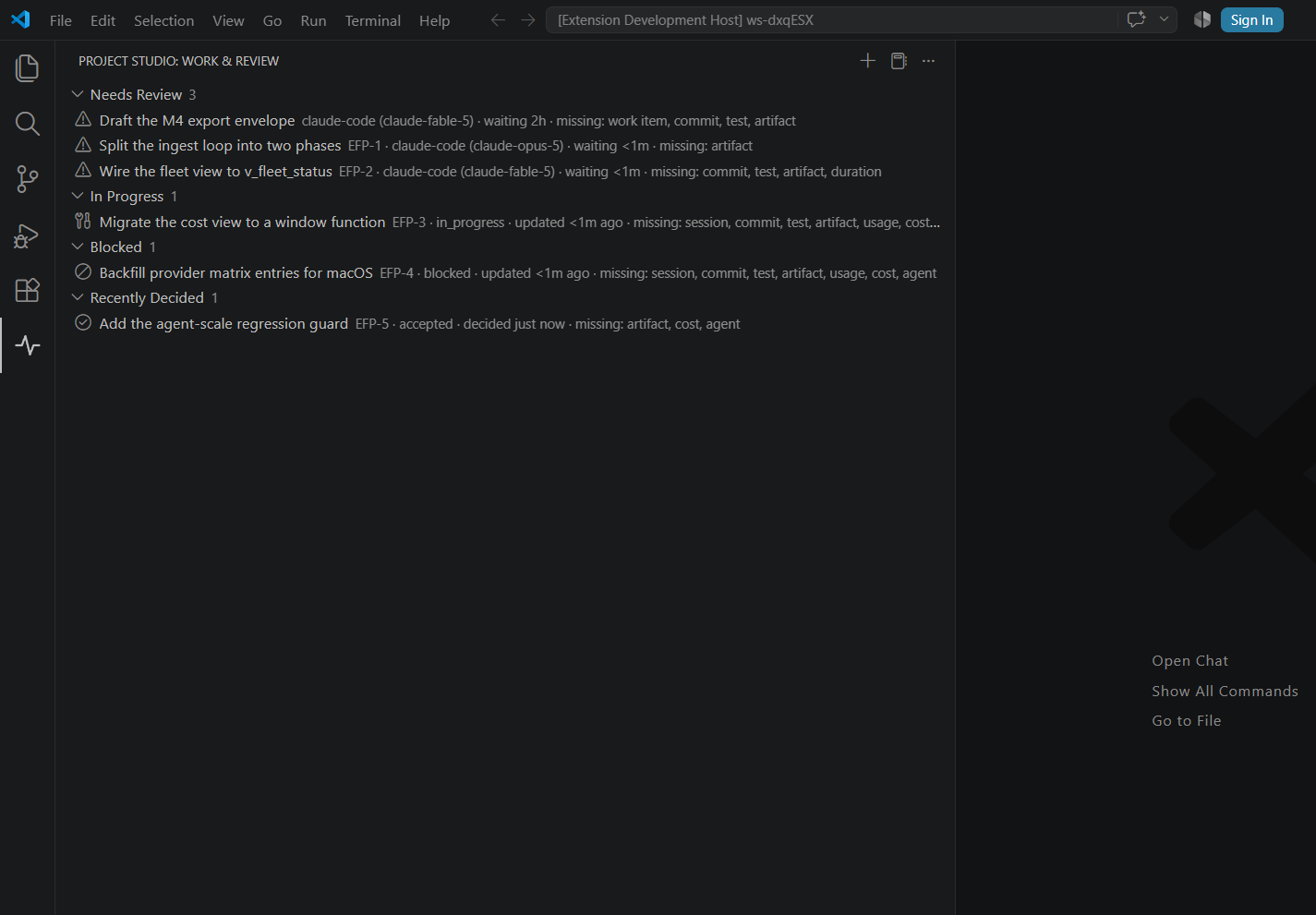
Assign work to a human or an AI contributor, link the sessions and commits that did it, and then
decide: accept, request revision, or reject. A review-ready agent result moves its work item to
review — never to done. Only an explicit human acceptance completes work, and every decision is
an append-only audit row.
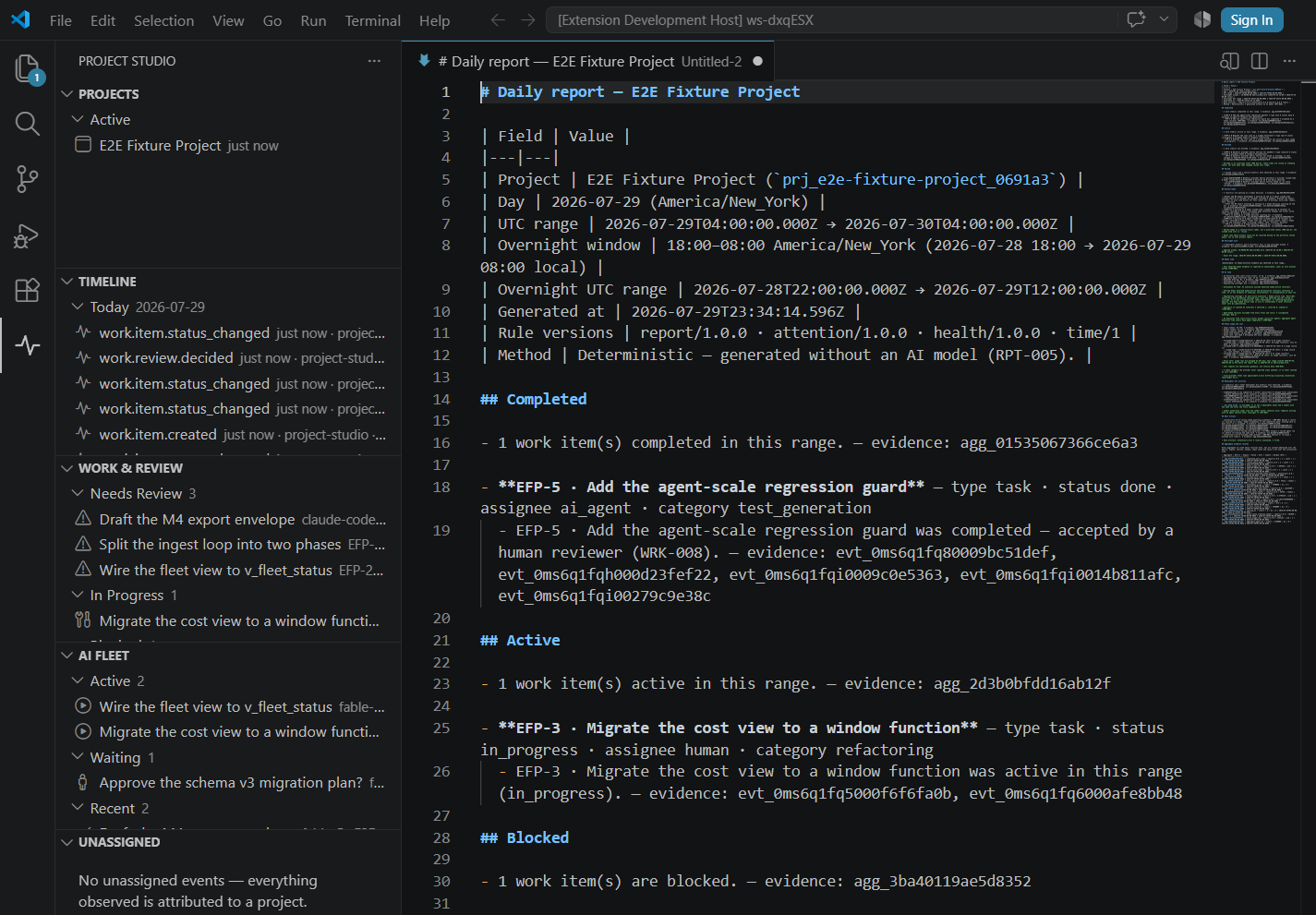
The daily report is generated locally with no model involved, and every claim carries the event ids
behind it — so any number in it can be traced back to the evidence that produced it.
Human active time, AI execution, their overlap, and autonomous AI time are computed from merged
intervals and labeled separately. AI execution is never presented as human developer hours, and
leverage reads N/A rather than infinity when the denominator is unavailable.
Roadmap
Shipped in 0.4.0: work items with a human review queue, human-vs-AI time separation,
deterministic daily reports with cited evidence, project health, and export/deletion — plus the MCP
tools that expose them.
Next: a GitHub read provider (pull requests, reviews, checks), weekly and monthly reports, and
optional local-model runtimes.
Placeholders in the UI say so honestly rather than showing empty charts.
Support
Bugs and feature requests: github.com/LynxDI/project-studio/issues
License
Project Studio is proprietary software, licensed and not sold. See
LICENSE for terms and
NOTICE for third-party components and
their licenses.
Screenshots on this page use synthetic fixture data — never real user data. See
media/README.md.
Trademarks
Claude and Claude Code are trademarks of Anthropic, PBC. Codex is a trademark of OpenAI. Gemini is
a trademark of Google LLC. Visual Studio Code is a trademark of Microsoft. Project Studio is an
independent product of Lynx DI and is not affiliated with, endorsed by, or sponsored by any of
them; those names are used only to identify the tools whose local data Project Studio can read.

