Tax Studio for VS Code
Turn a messy folder of tax documents into a clean, fully-sourced planning estimate and review package — privately, on your own machine.
lynxdi.com/tax ·
Marketplace





The problem
Every tax season starts the same way: a scramble.
W-2s, 1099s, 1098s, K-1s, brokerage summaries, mortgage statements, donation receipts,
bank statements — they trickle in over weeks from a dozen portals, inboxes, and envelopes.
Each one lands with a name like document(3).pdf, in no particular order, in no particular
folder.
Before anyone can actually file, someone has to grind through the boring, error-prone part
by hand:
- figure out what each document is, whose it is, and which tax year it belongs to,
- rename and sort them so they're findable — this year and next,
- read the numbers off every form and re-type them, box by box, into a return,
- then double-check nothing got fat-fingered, and notice what's still missing.
That sorting-reading-retyping grind is where the hours go, and where the costly mistakes creep
in. The filing itself is the easy twenty minutes at the end — if the data in front of you is
clean, complete, and you actually trust it.
The solution
Drop everything into one folder and let Tax Studio do the tedious 90%.
It reads each document, figures out the type, the taxpayer, and the tax year, files it into a
clean year-first library, and pulls out every value that matters. Then it ties each number back
to the exact spot on the page it came from — so you can trust it at a glance instead of
re-checking it by hand. It even tells you what's still missing compared with last year.
What's left is the part that was never the problem: reviewing a clean, verified summary and
filing it — yourself, with your return software, or by handing your CPA a package they can act
on immediately.
The core document and calculation pipeline runs on your machine. Network access is limited to
actions you explicitly start, such as downloading synthetic samples, using a configured remote
receipt-extraction endpoint, or asking your separately subscribed coding agent about the workspace.
  input\  ──▶  classify  ──▶  extract (deterministic-first)  ──▶  library\<year>\<taxpayer>\<category>\
 (inbox)        (doc type,       (values + source anchors)          (renamed, deduped, hash-verified)
                 taxpayer,                    │
                 tax year)                    ▼
                                      SQLite evidence graph  ──▶  Review · Planning estimate · FDX / CPA export
Why it's different
- Hours of sorting collapse to seconds. Documents are classified and filed automatically,
taxpayer entities create themselves from the paperwork, and every value you'll need to file
is pulled out for you — no manual re-typing.
- Every number is verifiable. Each extracted value carries a source anchor — the
document, page, region, and form field it came from. Click a value; the original PDF
highlights exactly where it lives. No black-box guesses to second-guess.
- Local-first, private by default. Your documents stay in your folder. The entire
pipeline — classification, extraction, the SQLite evidence database, PDF preview — runs
offline. No account, no server, no telemetry. The only optional network touchpoint is a
consent-gated AI tier that is off by default (and can be pointed at a fully-local model).
- Deterministic-first extraction. Tax Studio reads structured data straight from the PDF
before it ever reasons about text. An AI model is the last resort, not the first.
- Your files are never altered. Originals are copied and renamed into the library by the
normalizer with a post-move hash re-verify; the original bytes are left untouched.
- Review-ready output. Export FDX (Financial Data
Exchange) JSON, a clearly labeled planning-estimate PDF, or a foldered CPA review package. These
are review and transfer artifacts—not a filed return, IRS approval, or an e-file transmission.
- Agent-ready. The workspace is self-describing and ships a read-only MCP server, so any
coding agent (Claude, etc.) can safely query your tax data — and propose corrections through
one scoped, audited write path.
Tax Studio implements the architecture of US provisional patent 64/115,885, "In-Situ,
Model-Independent Document Intelligence with Source-Role-Validated Evidence Grounding,
Region-Level Selective Invalidation, and Evidence-Bound Deterministic Generation."
How it works
- Open a folder in VS Code and initialize it — each folder is an independent tax
workspace (open a different folder in another window for a different taxpayer).
- Drop documents into the workspace's
input\ inbox (or point Tax Studio at external
input folders — originals stay put, copies are filed).
- Classify & File. Tax Studio detects the document type, the taxpayer, and the tax year,
then files it into
library\<year>\<taxpayer>\<category>\ with a clean, human-readable name.
Taxpayers auto-create from the documents themselves — zero setup.
- Review extracted values side-by-side with the source PDF; approve, correct, or flag.
- Export FDX JSON, a planning-estimate PDF, or a CPA review package when you're ready to
continue in separate filing software or hand the evidence to a qualified professional.
Features
Ingest & organize
- Zero-setup inbox → library. Documents are classified and filed automatically; taxpayer
entities are created from the documents (individuals,
Joint, and Business\<Name>\).
- Year-first library —
library\<year>\<taxpayer>\<category>\ — with human-readable file
names (2025 - 1099-DIV - Example Brokerage - x1234.pdf).
- Returns & planning trees you manage yourself:
returns\<year>\<taxpayer>\draft|final\
and planning\<year>\. Filed returns are indexed as prior-year evidence but never renamed.
- Multiple input folders — add external drop zones; originals are kept, copies are filed.
- Exact-duplicate detection, expected-but-missing document checks (vs. the prior year),
and year-over-year inventory diffs.
- Two views of the tree: disk-aligned by section, or pivoted by taxpayer — toggle from
the title bar.
Tax Studio tries the cheapest, most reliable method first and only escalates when it must.
The tier order is fixed:
| Tier |
Method |
Notes |
| T0 |
Embedded FDX |
structured data already inside the PDF |
| T1 |
AcroForm form packs |
fillable form fields → confidence 1.0 |
| T2 |
Digital text |
PyMuPDF words → page text + full-text search |
| T3 |
Positional anchors |
box-position extraction (W-2 in v1) |
| T4 |
Tables |
tabular layouts |
| T5 |
OCR |
scanned pages with no text layer (Tesseract) |
| T6 |
AI (LLM) |
consent-gated, off by default; values must re-anchor to source |
Bundled form packs cover common forms — W-2, the 1099 family (INT/DIV/B/R/NEC/MISC/OID),
1098/1098-T/1098-E, 5498, 1095-A/B/C, and 1040 / Schedule B — each mapping a form box to a
semantic key, an FDX path, and a plain-English description. Need a form that isn't here?
Open an issue with the form name — mapping a
fillable AcroForm is a data change, not a code change.
Evidence graph with source anchors
Every extracted value becomes an assertion in a local SQLite evidence graph, bound to a
source anchor (document · version · page · region · form field). When a source document
changes, Tax Studio selectively invalidates only the assertions that depended on the
changed region — preserving your human review and corrections everywhere else.
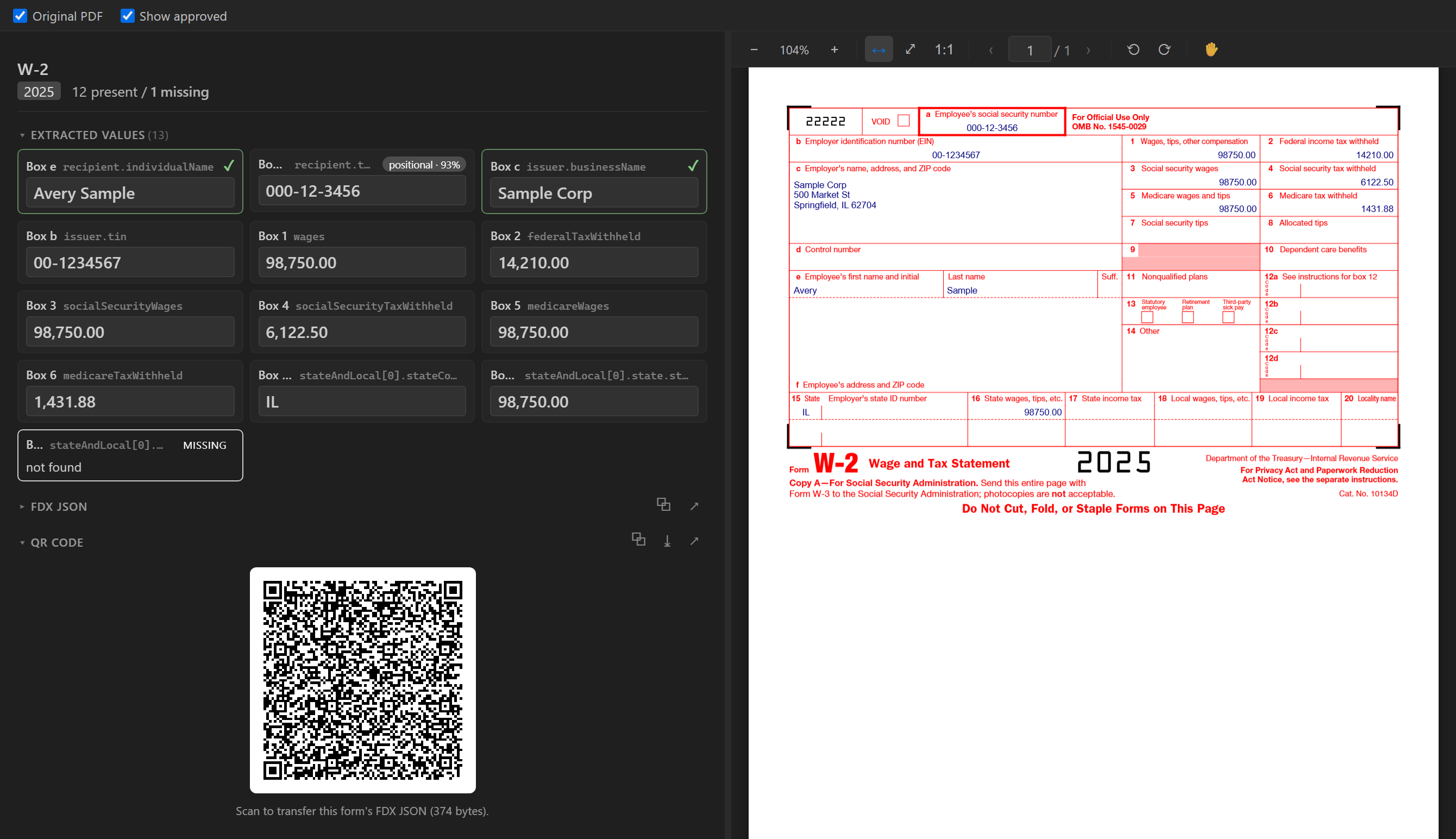
Document Review panel
Open any filed document into a split view: the extracted values on the left — the assembled
FDX data, plus a scannable QR of it — beside the original PDF on the right. Click a value to
highlight exactly where it came from on the page. Values are editable inline — a correction
is saved to the database while the machine's original value is preserved as history, and
re-extraction conflict-checks instead of overwriting. Fields a form pack expected but that came
back empty are flagged in red.
Intake worksheet
A per-year, schema-driven intake worksheet (filing status, dependents, income, deductions,
credits, estimated payments, and more) with a sliding Yes/No toggle and auto-fill from last
year's answers — a guided way to make sure nothing is missing before you file.
Analytics & planning
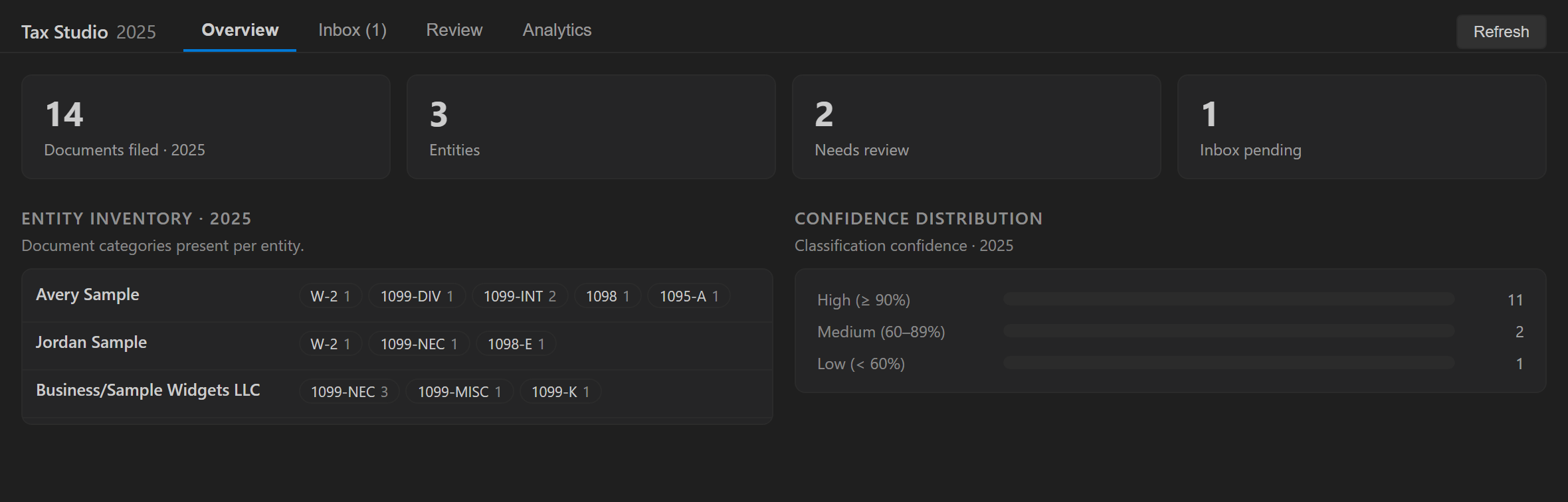
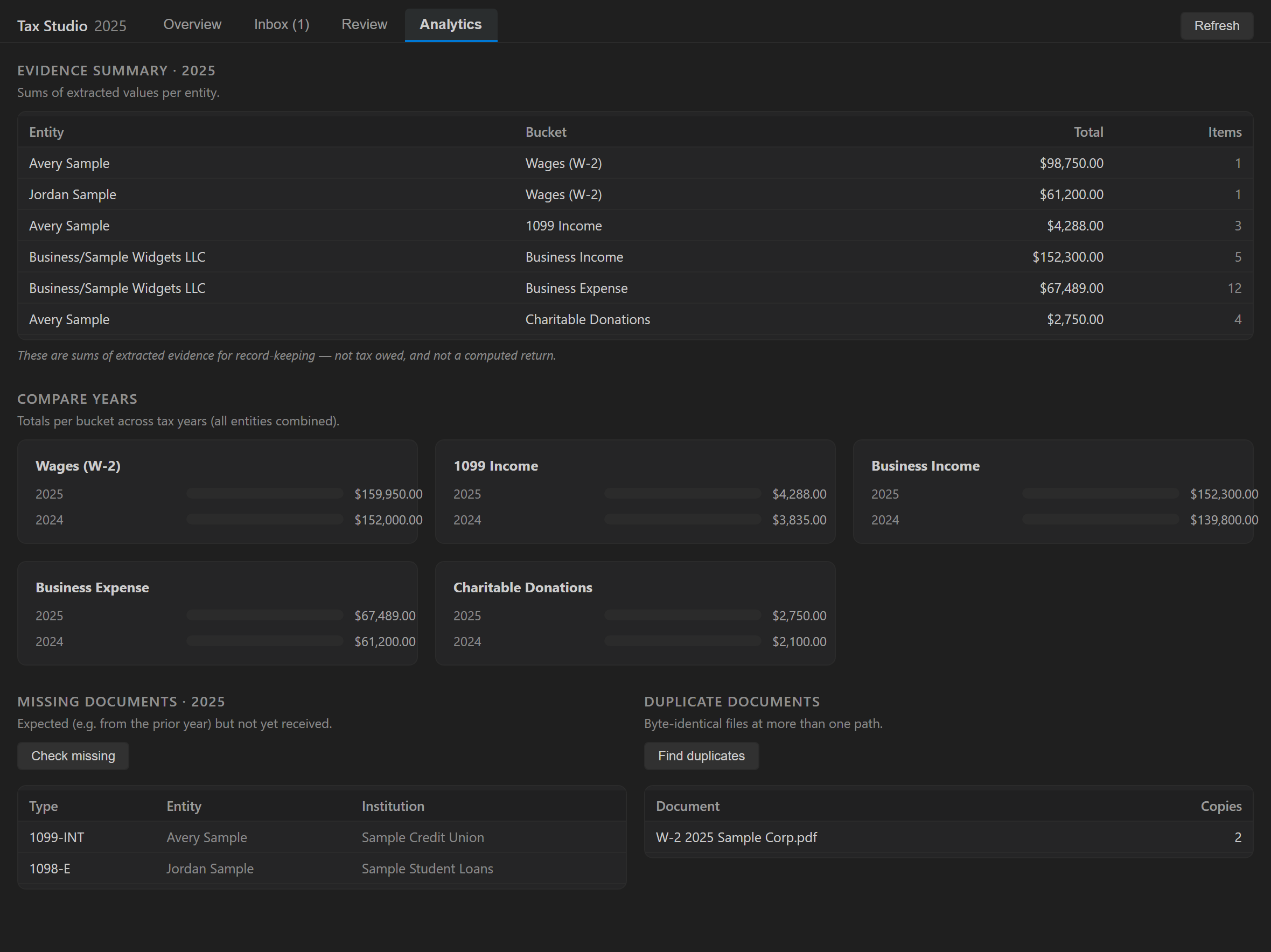
Per-taxpayer / per-year rollups of the extracted evidence (W-2 wages, 1099 income by type,
business income vs. expense, donations), a document checklist, duplicates, needs-review counts,
and a starter CPA-questions doc. Totals roll straight up from the documents you've filed — a
clear, verifiable picture of your year before you file.
Export
- FDX JSON (independently-written, FDX-shaped schemas; targets FDX v6.5.0), per
taxpayer and year.
- CPA review package — a foldered handoff of the reviewed data and its provenance.
Model Context Protocol (MCP) — agent access to your tax data
Tax Studio ships a read-only MCP server so a coding agent can query your evidence graph
without ever reading the extension's source or touching raw files. Set Up MCP for This
Workspace writes an .mcp.json and stages the server; it opens tax.db read-only and
answers over stable views. It reads the database through Node's built-in node:sqlite — the
native SQLite module is never exposed to the agent surface.
Every tool is read-only except one scoped, audited correction path:
| Tool |
Purpose |
list_documents |
filed documents, scoped by year / taxpayer / doc type |
search_evidence |
full-text (FTS5 bm25) search over page text → doc + snippet |
get_assertion |
extracted value(s) with source anchors (corrections win) |
get_source_anchor |
the page / region / form-field anchor + library path for one value |
open_source_region |
a document's path plus every anchored value to reveal |
compare_periods |
inventory diff between two tax years (new / gone / changed) |
identify_duplicates |
documents whose identical bytes are filed at more than one path |
identify_expected_missing_documents |
expected-but-not-yet-received docs for a year |
explain_form_field |
a semantic key's box label + plain-English description |
correct_assertion |
(write) correct a value or fill a missing field — the machine's original text is preserved; the correction wins |
The working folder also generates byte-identical AGENTS.md / CLAUDE.md / GEMINI.md from
the live database schema, so any agent can operate on your data read-only without guessing.
Privacy & AI
- No document content ever leaves your machine unless you explicitly turn on the
receipt vision tier.
lynxTax.allowRemoteExtraction is off by default (machine-scoped — a workspace can
never enable it). With it on and lynxTax.receipt.vlmEndpoint set, receipt page images
go to that OpenAI-compatible endpoint — point it at a model you host (e.g. a GPU box
on your LAN) or a cloud provider (LYNXTAX_VLM_API_KEY).- The vision tier only runs on receipts, and any value it returns must re-anchor to source
text or it's confidence-capped and flagged for review.
- Tax Studio runs only in a trusted workspace (it reads your documents, runs a local
Python sidecar, and loads a native SQLite module).
- Full trust model — originals-never-altered, working-folder confinement, the read-only
agent surface, and interpreter pinning are documented in
docs/security.md.
Getting started
- Install the extension and open the folder you want to use as a tax workspace.
- Run Tax Studio: Initialize Tax Workspace… (or click Initialize This Folder in the
Tax Workspace view). This scaffolds
input\, library\, returns\, planning\,
exports\, and a hidden .tax\ (the database, derived text, and logs).
- (Optional) Run Load Sample Documents… to fetch a synthetic Jane/John Doe demo bundle
(obviously-fake identities) into
input\.
- Drop your own PDFs / images / CSV / OFX / QFX into
input\.
- Run Classify & File Inbox Documents and open the Dashboard.
Key commands (Command Palette → "Tax Studio")
- Initialize Tax Workspace…, Load Sample Documents…
- Scan Inbox, Classify & File Inbox Documents, Process This Document…
- Open Dashboard, Preview Document, Open Tax Worksheet…
- Approve Extracted Value, Flag for Review, Reclassify Document…, Show Evidence in Source
- Find Duplicate Documents, Compare Tax Years…, Check Expected-but-Missing Documents
- Export FDX JSON…, Export CPA Review Package…
- Set Up MCP for This Workspace, Set Up Extraction Backend (Python), Regenerate Working-Folder Agent Map
Requirements
- VS Code ≥ 1.102, Node ≥ 20 (bundled with VS Code's runtime).
- Python ≥ 3.10 (optional but recommended) for deep PDF inspection, table extraction, and
OCR. Run Set Up Extraction Backend (Python) to create a managed virtual environment
(installs PyMuPDF); OCR additionally uses a system
tesseract binary. Without Python,
AcroForm and digital-text extraction still work — you just won't get OCR or table tiers.
Settings
| Setting |
Default |
What it does |
lynxTax.currentTaxYear |
0 (auto) |
Which year is treated as current (Jan–Apr → prior year). |
lynxTax.treeGrouping |
section |
Organize the tree by disk section or by taxpayer. |
lynxTax.autoProcessInbox |
false |
Classify & file automatically as documents appear. |
lynxTax.openDashboardOnStartup |
true |
Open the dashboard when a workspace loads. |
lynxTax.allowRemoteExtraction |
false |
Allow the consent-gated receipt vision tier (machine-scoped). |
lynxTax.receipt.vlmEndpoint / .vlmModel |
(empty) |
OpenAI-compatible endpoint + model for receipt vision. |
lynxTax.pythonPath |
(managed venv) |
Interpreter for the extraction backend. |
lynxTax.ocrEnabled |
true |
OCR scanned pages that have no text layer. |
lynxTax.generateAgentMap |
true |
Keep the working folder's agent map in sync with the schema. |
lynxTax.demoDataUrl |
Lynx CDN |
Manifest URL for Load Sample Documents. |
lynxTax.logLevel |
info |
Detail written to the Output panel and log file. |
Roadmap
Tax Studio currently turns raw documents into sourced evidence, review artifacts, and a
clearly labeled planning estimate. It does not file or transmit a tax return.
- IRS MeF qualification and transmission (future; unavailable today) — official form
schemas, business-rule validation, IRS ATS qualification, operational controls, and a separate
certificate-holding transmitter are all required before any filing claim. The VS Code extension
does not transmit returns.
- Real IRS form packs & year-versioned packs (in progress) — fill/read the official IRS
AcroForm PDFs; select the correct pack for each document's tax year so history years use that
year's form.
- Transactions & reconciliation — populate the transaction ledger, OFX/CSV import mapping,
and receipt ↔ transaction matching.
- More form packs — K-1 and beyond.
- Broader AI tier rollout and near-text (fuzzy) duplicate detection.
- In-situ mode — index documents in place, without copying them into a library.
The disclosed techniques are domain-general (the patent covers legal, insurance, medical,
mortgage, education, compliance, and more); tax is the first shipping embodiment.
Important disclaimer
Tax Studio is a document-organization and data-analytics tool provided for informational and
educational purposes only. It is not tax, legal, accounting, or financial advice, and it
is not a substitute for a qualified professional.
All generated tax results are planning estimates. Tax Studio is not IRS-approved filing software
and does not submit, transmit, or file returns.
- Extracted values and totals are derived from your own documents and may contain errors —
always review them against your originals before relying on them.
- Nothing in Tax Studio constitutes a recommendation about how to file, what to claim, or what
you owe. Consult a licensed tax professional for guidance on your specific situation.
- The software is provided "as is," without warranty of any kind. You are solely
responsible for the accuracy, completeness, and lawful use of anything you file or submit to
any tax authority.
About
Tax Studio is developed by Lynx DI. See lynxdi.com/tax.
Built on the architecture of US provisional patent 64/115,885. Third-party product and company
names are trademarks of their respective owners, used for identification only.
License
Copyright © 2026 Lynx DI. Licensed under the GNU Affero General Public License, version 3 or
later (AGPL-3.0-or-later) — see LICENSE.
This is free software: you may use, study, share and modify it. If you run a modified version to
provide a service over a network, the AGPL requires you to offer that version's source to its
users. Bundled third-party components remain under their own licenses (see NOTICE).

