
TI-Basic Plus CEVS Code language support for (e)Z80 TI-BASIC Installation Launch VS Code Quick Open ( Ctrl+P), paste the following command, and press enter.Copied to clipboard |

TI-Basic Plus CE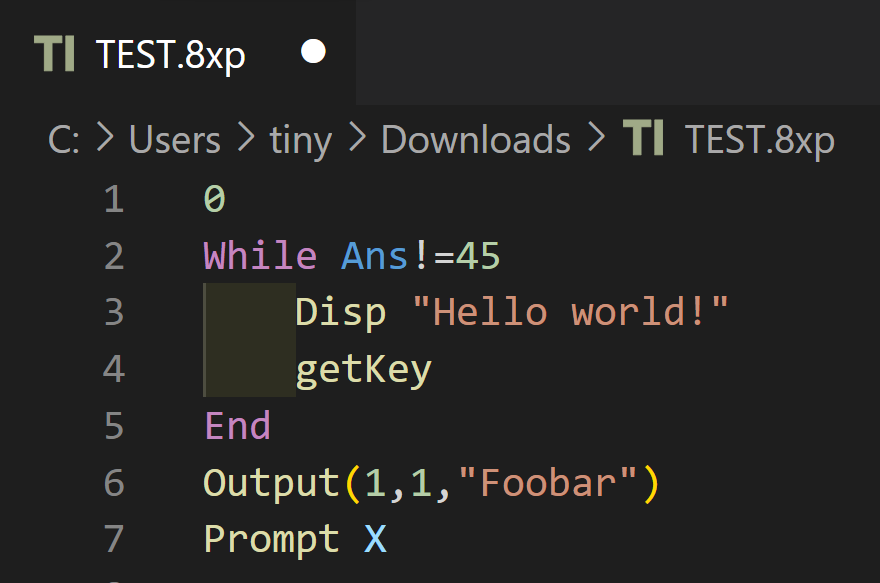
AboutThis extension provides syntax highlighting, snippets (provided by Hamburger317), TI-BASIC program import and export, and an integrated CEmu calculator for the (e)Z80 TI-BASIC language. Import and export use an Emscripten build of tivars_lib_cpp, courtesy of Adriweb. Thanks to nineteendo for helping debug and improve the highlighting. The extension is intended for TI-84 Plus CE/83 Premium CE calculators, though it may work with others. InstallationDownload a Using CEmuOpen a FAQ
ImportingTo import a TI-BASIC program from your calculator, you'll first need to transfer it to your computer using software such as TI-Connect CE or TiLP. Now, create a new file in VS Code and press ctrl + shift + P to bring up the VS Code Command Palette. Search for and select "Import TI-BASIC Program":
This will bring up a window where you can select the program you wish to import, using your system file manager. Select a file, and you're good to go! ExportingTo export a TI-BASIC program to a file you can transfer to your calculator, first open the file in VS Code. Next, press ctrl + shift + P to bring up the VS Code Command Palette. Search for and select "Export TI-BASIC Program":
This will allow you to name and save the file. You can now use a program like TI-Connect CE or TiLP to transfer the exported file to your calculator. ReleasesReleases are built automatically when a version tag is pushed. Update the version in BugsIf you find a bug or want something added, be sure to make an issue and let me know! © Copyright 2023 - 2026 TIny_Hacker |

