Logicommerce Studio
Work with LogiCommerce headless front-office projects in a local Dev Container environment, reusing the same structure and workflows as the official LogiCommerce front-office template.
This extension automates the common workflow for LogiCommerce front-office development:
- Quickly initialize a local Dev Container environment.
- Add, manage, and switch between multiple commerce projects with ease.
- Access convenient helper commands both inside and outside the Dev Container.
- Effortlessly open your local commerce, copy its URL, and edit configuration settings as needed.
Requirements
- Docker installed and running.
- VS Code with:
- Dev Containers extension (formerly Remote - Containers).
There is no mandatory project structure required to start using this extension.
You can start from an empty folder and let the extension create what it needs.
Main commands
Host only
LogiCommerce Studio: Initialize Environment
Initialize a local Dev Container setup and prepare the folder to host LogiCommerce frontoffice code.
LogiCommerce Studio: Add Commerce
Assistant to add a new commerce under commerces/ and clone its repository.
LogiCommerce Studio: Switch Commerce
Switch the active commerce by updating www and core symlinks.
After switching, the extension can prompt you to rebuild and enter the Dev Container.
LogiCommerce Studio: Rebuild and enter Dev Container
Trigger “Rebuild and Reopen in Container” for the current workspace.
Inside the Dev Container
LogiCommerce Studio: Create local configuration files
Assistant to generate PHP config files needed only for local development.
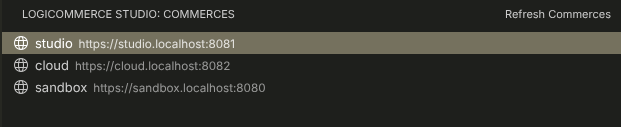
LogiCommerce Studio: Focus on Commerces View
A dedicated view to manage configuration files for each defined environment. Easily open, copy the local commerce URL, and edit configuration settings as needed.
LogiCommerce Studio: Switch Commerce
Switch the active commerce while working inside the Dev Container.
LogiCommerce Studio: Exit Dev Container to Host
Reopen the current folder on the host, leaving the Dev Container session.
Compatibility with frontoffice-dev
This extension is fully compatible with the public frontoffice-dev template if you follow that model:
If your project has been created following the frontoffice-dev structure, Logicommerce Studio will detect and reuse it and will keep the www symlink and core assets pointing to the correct locations.
If you reuse your old workspace:
On Host
- If you manage the lc folder manually, clone the latest versions of the SDK, framework, and PHP plugin from GitHub to keep it up to date.
- Add the extension to your
devcontainer.json.
"customizations": {
  "vscode": {
    "extensions": [
      ...
      "logicommerce.logicommerce-studio-extension"
    ]
  }
}
Inside Dev Container
Notes
VS Code may show a standard Dev Containers notification such as:
Folder contains a Dev Container configuration file. Reopen folder to develop in a container.
You can ignore that notification and instead use:
LogiCommerce Studio: Rebuild and enter Dev Container (from the host)LogiCommerce Studio: Exit Dev Container to Host (from inside the Dev Container)