
DeepSeek MobyAI coding assistant for VS Code, powered by DeepSeek Installation Launch VS Code Quick Open ( Ctrl+P), paste the following command, and press enter.Copied to clipboard |

DeepSeek Mobyv0.9.1
An AI coding assistant for VS Code.
Quick Start · Features · Configuration · Commands · FAQ · Under the Hood Validated primarily on the maintainer's development environment — coverage across OSes, VS Code versions, and model configurations is still expanding. Reproducible bug reports are very welcome on the issue tracker.
Quick Start1. InstallFrom VSIX: download the From source: Windows only: install Git for Windows — Moby runs AI-generated shell commands through Git Bash. Linux/macOS use the system shell as-is. 2. Connect a modelPick either path — a DeepSeek account is not required if you bring your own model. Option A — DeepSeek: get a key from platform.deepseek.com, then run DeepSeek Moby: Set API Key from the Command Palette ( Option B — your own model (local or hosted): run DeepSeek Moby: Add Custom Model and pick a template — Ollama, LM Studio, llama.cpp, vLLM, OpenAI, Kimi, Gemini, GLM, Groq, OpenRouter — or point it at any OpenAI-compatible endpoint. Local models need no API key at all. Full walkthroughs: docs/guides/custom-models.md. 3. ChatClick the Moby whale in the activity bar, type, press Enter. Two decisions worth making early:
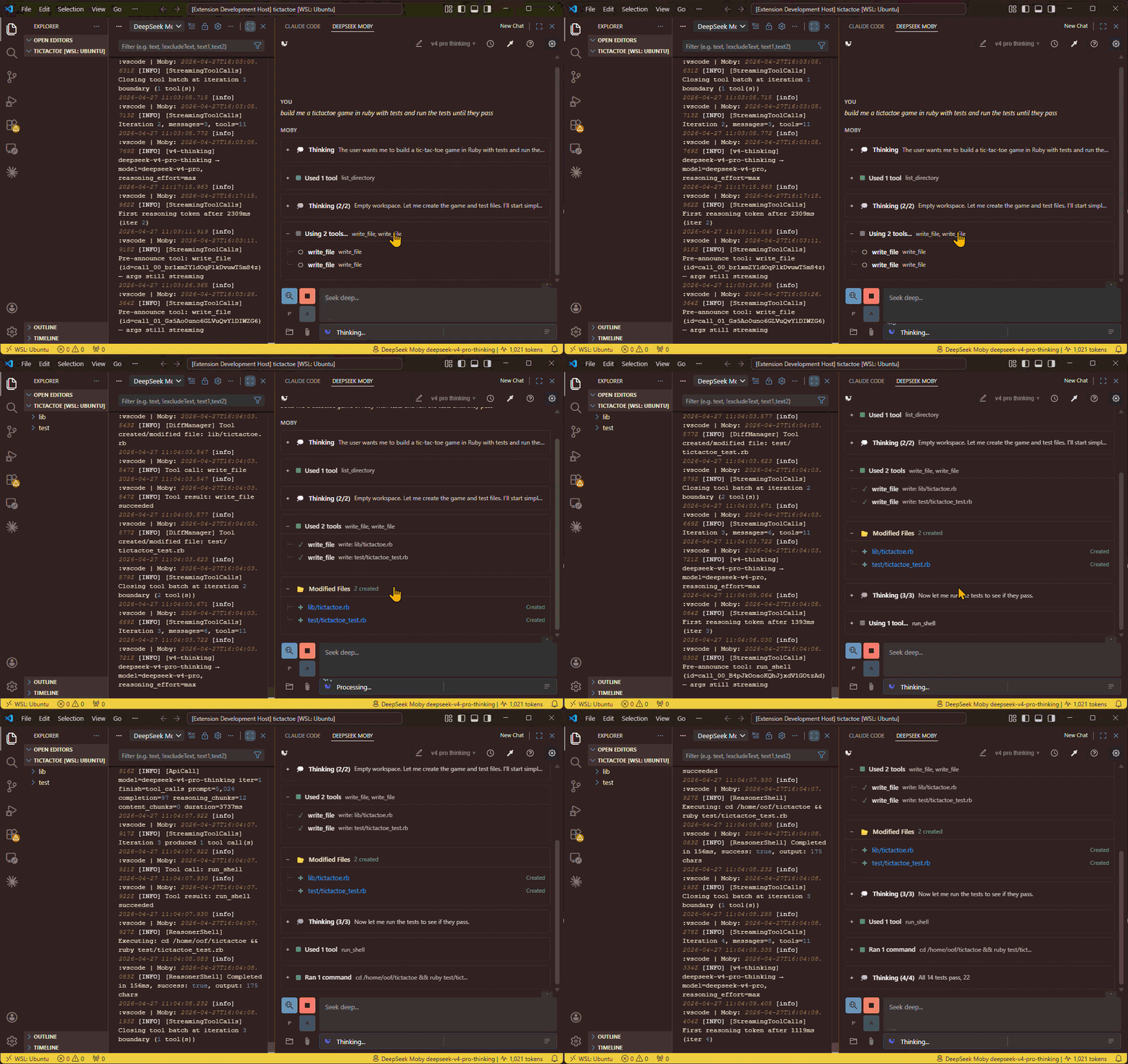
FeaturesAgentic codingThe model doesn't just answer — it reads your files, searches your workspace, navigates code by symbol, runs shell commands, and edits, all mid-conversation as it reasons.
† DeepSeek retired V3 and R1 upstream in August 2026; the Code edits you controlThree modes, switchable mid-session from the toolbar:
Edits that can't be matched exactly are refused, not force-applied — the model re-reads and retries instead of corrupting your file. Auto mode adds a safety net: files are checkpointed before each edit, validated against your project's own build afterward, and reverted on regression. (How it works.) ImagesAttach a screenshot, ask about it, and the model answers. Works out of the box with your DeepSeek key — DeepSeek's own vision model ( Moby gets there by routing, not pretending: a vision model describes the image, and the main model reads that description, clearly labelled as second-hand. If the vision model is turned off or fails, the model says it cannot see the image and names the setting to fix — it never silently guesses.
Setup: none for DeepSeek. To use a different vision backend, add a model under custom models declaring Web searchReal-time search woven into the conversation. Two backends:
Modes: auto (the model decides when to search — recommended), manual (only when you toggle it), off. Results are cached, and a digest subagent can condense them before they reach the main model. Draw from your phoneStart Drawing Server launches a local server with a QR code — open it on a phone or tablet:
Sessions that persistEvery conversation is saved automatically to a local encrypted database:
Bring your own modelAny OpenAI-compatible endpoint registers as a first-class model next to the built-ins — same chat, same edit modes, same tools where supported:
Templates for common setups ship in the Add Custom Model picker; end-to-end examples in docs/guides/custom-models.md. MCP serversMoby is an MCP client. Declare stdio servers under
Tools only; MCP prompts and resources are not wired up yet. stdio only — no HTTP/SSE transports. Typing
|

| Setting | Default | Description |
|---|---|---|
moby.model |
deepseek-v4-pro-thinking |
Active model — any built-in or custom model id. |
moby.editMode |
manual |
How code changes apply: manual, ask, or auto. |
moby.webSearchMode |
auto |
off, manual, or auto (the model decides). |
moby.customModels |
[] |
Your registered OpenAI-compatible models. |
moby.subagents |
{} |
Per-role model routing, e.g. {"image-describe": "kimi-vision"}. |
moby.mcpServers |
{} |
MCP servers to spawn, e.g. {"pharos": {"command": "pharos", "args": ["mcp"]}}. User settings only — workspace values are ignored. |
moby.requestTimeoutMs |
60000 |
Abort an API request after this long. Raise for slow providers — reasoning and vision models routinely take 30s+. |
Full settings reference (all 35)
Model selection
| Setting | Default | Description |
|---|---|---|
moby.model |
deepseek-v4-pro-thinking |
Active model. Built-ins: deepseek-v4-pro-thinking, deepseek-v4-flash-thinking, deepseek-chat, deepseek-reasoner. Also accepts any custom model id. |
moby.customModels |
[] |
Array of custom OpenAI-compatible models to register alongside the built-ins. |
moby.modelOptions |
{} |
Per-model reasoning options keyed by model id — thinking (on/off) and thinkingLevel (whatever the model declares). Usually set from the model picker rather than by hand. |
moby.temperature |
0.7 |
Creativity (0–2), for models that accept it. R1 rejects it always; V4 rejects it only while thinking, so it applies again with Thinking off. A custom entry can pin its own via temperatureFixedValue. |
Token / iteration limits
| Setting | Default | Description |
|---|---|---|
moby.maxTokensV4ProThinking |
65536 |
Max output tokens for V4 Pro. API cap: 384,000. |
moby.maxTokensV4FlashThinking |
65536 |
Max output tokens for V4 Flash. API cap: 384,000. |
moby.maxTokensChatModel |
8192 |
Max output tokens for the Chat style (deepseek-chat). Range: 256–8,192. |
moby.maxTokensReasonerModel |
65536 |
Max output tokens for the Reasoner style (deepseek-reasoner). Range: 256–65,536. |
moby.maxToolCalls |
100 |
Tool call iteration limit (native-tool models). 100 = no limit. |
moby.maxShellIterations |
100 |
Shell command iteration limit (Reasoner). 100 = no limit. |
moby.maxFileEditLoops |
100 |
Continuations after R1 produces file edits. 100 = no limit. |
Editing & shell
| Setting | Default | Description |
|---|---|---|
moby.editMode |
manual |
How code changes apply: manual, ask, or auto. |
moby.allowAllShellCommands |
false |
Bypass command approval entirely. Disables the safety blocklist. |
moby.editSafety.checkpoint |
true |
Auto mode: snapshot each file before an auto-applied edit so a batch can be reverted. |
moby.editSafety.validate |
auto |
Auto mode: validate after an edit batch against your own toolchain. auto discovers the check command (dotnet / npm / make / cargo / go); off disables. |
moby.editSafety.validateTimeoutMs |
60000 |
Hard timeout for the post-apply check. A timeout counts as inconclusive, not a regression. |
moby.editSafety.maxRepairAttempts |
3 |
How many times one file may revert with the same build error before the turn halts. |
moby.editSafety.onInconclusive |
commit |
When validation can't run: commit applies with a note, halt stops the turn. |
moby.editSafety.verifyOnStop |
true |
Don't accept a model-declared "done" when the last build verdict was a regression or a written file reads back empty. |
Images & subagents
| Setting | Default | Description |
|---|---|---|
moby.subagents |
{} |
Per-role subagent routing, e.g. {"image-describe": "my-vision-model"}. Value is a registered model id or "off". The model must declare the role in subagentRoles. |
moby.subagents.webSearchDigest.maxResults |
5 |
Output cap for the web-search digest subagent (1–20). Also exposed as a slider in the web-search popup. |
moby.requestTimeoutMs |
60000 |
Milliseconds before an API request is aborted. Raise for slow providers — reasoning models and vision backends routinely take 30s or more. Applies to every endpoint, custom models included. |
MCP
| Setting | Default | Description |
|---|---|---|
moby.mcpServers |
{} |
Stdio MCP servers to spawn, keyed by name ([a-zA-Z0-9-], max 32 chars). Each entry takes command (required), args, env, cwd, and enabled. Read from user settings only — a workspace value is ignored with a warning, because an entry is a command Moby executes. Per VS Code profile. See MCP servers. |
Web search
| Setting | Default | Description |
|---|---|---|
moby.webSearchMode |
auto |
off, manual (user toggle only), or auto (LLM decides). |
moby.webSearch.provider |
tavily |
Backend: tavily (hosted) or searxng (self-hosted, free). |
moby.webSearch.searxng.endpoint |
"" |
Base URL of your SearXNG instance (e.g. http://localhost:8080). |
moby.webSearch.searxng.engines |
["google","bing","duckduckgo"] |
SearXNG engines to query. Empty = instance default. |
moby.tavilySearchDepth |
basic |
Tavily depth: basic (1 credit) or advanced (2 credits). |
moby.tavilySearchesPerPrompt |
1 |
Max Tavily searches per prompt request. |
UI & observability
| Setting | Default | Description |
|---|---|---|
moby.showStatusBar |
true |
Show status bar with token usage. |
moby.autoSaveHistory |
true |
Automatically save chat history. |
moby.logLevel |
WARN |
Extension log level: DEBUG, INFO, WARN, ERROR, OFF. |
moby.webviewLogLevel |
WARN |
Webview console log level: DEBUG, INFO, WARN, ERROR. |
moby.tracing.enabled |
true |
Enable trace collection for debugging. |
moby.devMode |
false |
Enable developer tools (inspector panel). |
Commands
Open the Command Palette (Ctrl+Shift+P) and search "Moby".
Setup & models — Open Chat · New Chat · Switch Model · Set API Key · Set Tavily API Key · Set SearXNG Endpoint · Add Custom Model · Set / Clear Custom Model API Key
Sessions — Show Chat History · Export All Chat History · Import Chat History · Export Current Session · Clear All Chat History
Editing & shell — Accept Changes · Reject Changes · Show Pending Diffs (Ctrl+Shift+D) · Command Rules
Drawing — Start Drawing Server · Stop Drawing Server
MCP — MCP Servers (status + enable/disable) · Refresh MCP Servers
Diagnostics & maintenance — Statistics · Show Log · Export Logs · Manage Database Encryption Key · Refresh LSP Availability · Export Turn as JSON (Debug) · Export Session (Test Fixture)
Commands are also reachable from the commands popup in the chat panel, or by typing / in the composer.
Troubleshooting & FAQ
"The model says it can't see my image." Image description is off or the vision call failed. Check Settings → Image Description (Vision) — the default is DeepSeek's own vision model and needs only your DeepSeek key; the message names the reason (turned off, call failed, unusable response). See Images.
"Shell commands fail on Windows." Install Git for Windows — Moby runs commands through Git Bash for POSIX compatibility (heredocs, pipes, grep).
"Moby won't start / SQLITE_NOTADB / 'file is not a database'." The encrypted history file is corrupt or the encryption key changed (keychain wipe, OS reinstall). Moby auto-recovers the harmless cases and refuses to touch files that may hold real history — the database recovery guide walks through both.
"Turns die mid-response on my slow provider." Raise moby.requestTimeoutMs (default 60s). Reasoning and vision models routinely take 30s+ before answering.
Which model should I pick? V4 Pro for real work, V4 Flash when you want the same reasoning cheaper. V3 and R1 still function but are a generation behind. For fully-local or another provider, see Bring your own model.
Filing a bug? Run Moby: Export Logs and attach the relevant snippet — it bundles extension, trace, and webview logs in one file. More detail: logging guide.
Deeper guides: custom models · shell execution & approval · web search · drawing server · database recovery
Privacy & Security
- No telemetry — data leaves your machine only for the model endpoints you configure: the DeepSeek API, Tavily or your SearXNG instance if web search is on, any custom model you register, and the vision provider you point
image-describeat. Attached images go to that vision provider and nowhere else — never to the main model - API keys live in VS Code's SecretStorage (OS keychain when available)
- Conversations are stored locally in an AES-256 encrypted SQLite database (SQLCipher, the library Signal uses), with a key-management UI for viewing or regenerating the key
- Shell commands are gated by the approval system with user-editable rules
- Shadow DOM isolation keeps other extensions from reading or manipulating chat content
- Works without a workspace — a folder is not required for activation
Under the Hood
For the curious and for contributors. Full documentation lives in docs/architecture/, with significant decisions recorded as ADRs.
┌─────────────────────────────────────────────────┐
│  VS Code Extension (Node.js)                     │
│  ┌─────────────┐  ┌──────────────────────────┐  │
│  │ API Client   │  │ Managers                  │  │
│  │ (DeepSeek +  │  │  ├─ RequestOrchestrator   │  │
│  │  custom)     │  │  ├─ DiffManager           │  │
│  └─────────────┘  │  ├─ WebSearchManager      │  │
│                    │  ├─ FileContextManager    │  │
│  ┌─────────────┐  │  ├─ CommandApprovalMgr    │  │
│  │ SQLCipher DB │  │  ├─ PlanManager           │  │
│  │ (Encrypted)  │  │  └─ SettingsManager       │  │
│  └─────────────┘  └──────────────────────────┘  │
│         ↕ postMessage                            │
│  ┌───────────────────────────────────────────┐   │
│  │  Webview (Browser)                         │   │
│  │  Actor system on Shadow DOM —              │   │
│  │  EventStateManager pub/sub, virtualized    │   │
│  │  turn list, per-component shadow roots     │   │
│  └───────────────────────────────────────────┘   │
└─────────────────────────────────────────────────┘
- Event-sourced persistence — conversations are append-only event logs in SQLCipher (WAL mode for crash safety). This is what makes forking zero-copy (a join table, not a data copy), crash recovery lossless, and history restore render-identical to the live stream
- Actor-model UI — every component owns a shadow root with its own styles and lifecycle; communication is pub/sub. No global CSS, no DOM conflicts with other extensions
- Streaming pipeline — a transform buffer flushes safe content immediately while holding back structures that might still change (fences,
<shell>tags) until they close - Context management — a WASM tokenizer counts exactly; when a conversation outgrows the model's window, oldest messages drop first and compressed summaries stand in for them. Runs silently
- Vision by digest routing — image bytes go only to the configured vision subagent; the main model receives labelled text. Two renditions from one decode: a ~1024px copy for the vision call (never stored) and a 512px archive (the only stored copy, content-addressed and shared across forks). See ADR 0014
- Edit safety — checkpoint, atomic batch apply, post-apply validation against the project's own build, revert-on-regression: ADR 0006
Requirements for building from source: Node.js 20.x+, VS Code 1.85.0+.
Roadmap
- Expanded sub-agent routing — web-search digestion and image description already offload to a model of your choice; a file-digest role and broader concurrent fan-out are planned
- MCP prompts and resources — the client ships with tools support; server-provided prompts would appear under
/and resources under@, reusing the composer surface - Plugin system — extensible tool definitions for domain-specific workflows
- Per-turn lazy event load — on-demand hydration of very large session histories