Skip to content
| Marketplace
Sign in
Visual Studio Code>Programming Languages>OTel SemConv v2New to Visual Studio Code? Get it now.
OTel SemConv v2

OTel SemConv v2

Liudmila Molkova

|
8 installs
| (0) | Free
Language support (go to definition, find references, hover, diagnostics, outline, symbol search) for OpenTelemetry semantic conventions definition/2 YAML files.
Installation
Launch VS Code Quick Open (Ctrl+P), paste the following command, and press enter.
Copied to clipboard
More Info

OpenTelemetry Semantic Conventions (definition/2)

IDE language support for OpenTelemetry Weaver semantic-convention YAML files that declare file_format: definition/2 (schema).

Navigate and validate a semantic-convention registry the same way you would a codebase — jump to where an attribute is defined, find everywhere it's used, and catch broken references as you type.

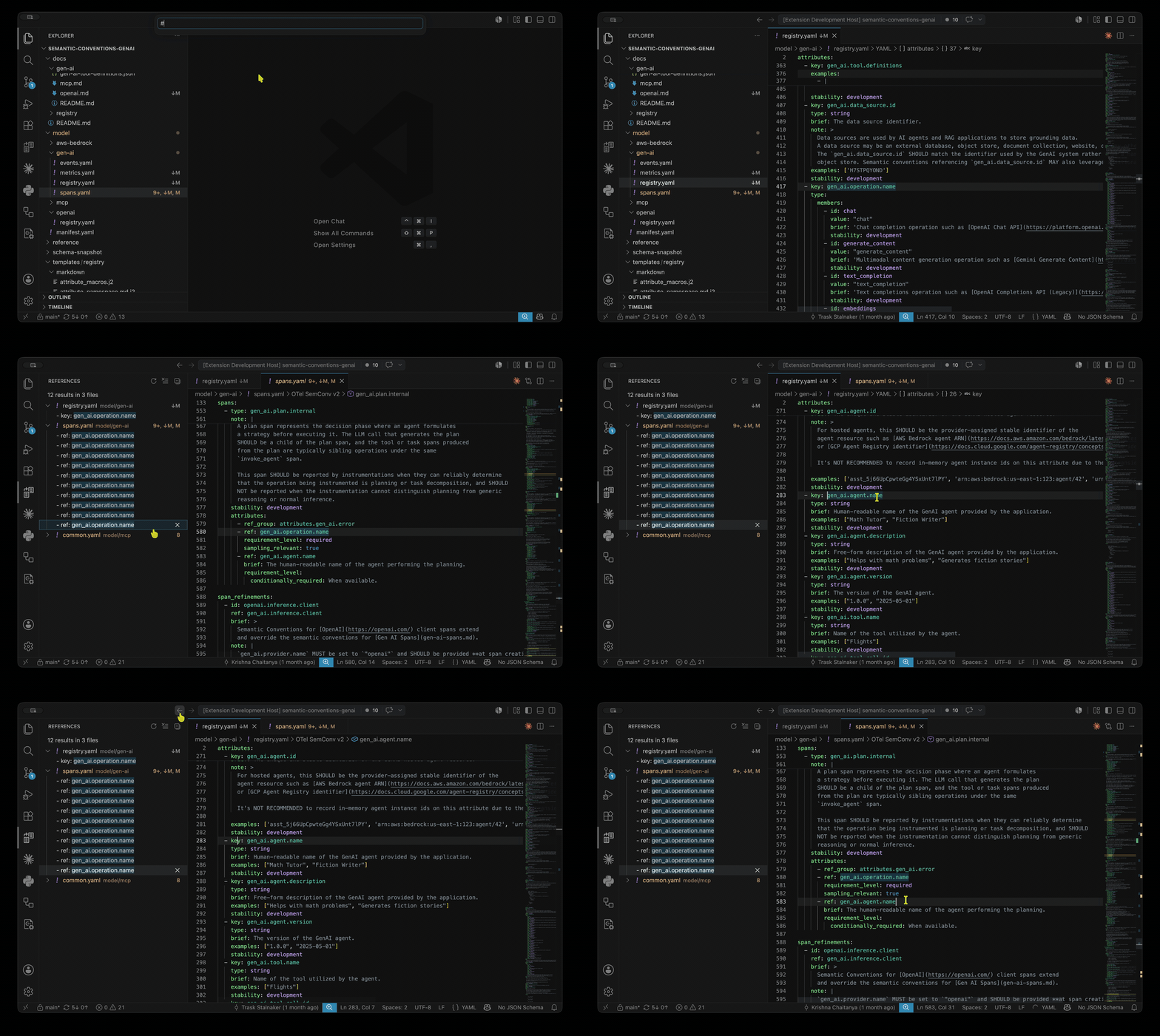
Demo

Unofficial. This is an unofficial project and is not endorsed by the OpenTelemetry project.

Built for registries authored with Weaver, such as semantic-conventions-genai.

Features

  • Go to Definition — jump from a ref to the entity that defines that id.
  • Find All References — from any id to every place it is referenced.
  • Hover — an entity's details, or a schema field/enum value's description and allowed values, straight from the official schema.
  • Diagnostics — unresolved references and duplicate definitions flagged inline.
  • Validate with Weaver — run SemConv: Check Registry with Weaver (or let it re-check on save) to validate the whole registry with weaver registry check and see its schema, cross-file resolution, and policy findings as diagnostics. A .weaver.toml found by walking up from the registry, including any custom Rego policies it declares, is applied. Needs Weaver (see below); toggle with semconv.check.enabled.
  • Outline & symbol search — per-file outline plus "Go to Symbol in Workspace" across the whole registry.
  • Rename — rename an attribute, signal, or refinement and update every reference across the registry, including backtick- or {}-wrapped mentions of the id in brief / note prose. The old id is kept as a deprecated renamed_to stub so existing telemetry stays documented; internal attribute groups are renamed in place without one.
  • Markdown weaver snippets — go to definition, find references, rename, and unresolved-reference diagnostics work on the ids inside <!-- weaver ... --> snippet queries in your docs (e.g. select(.name == "gen_ai.evaluation.result")), navigating straight to the defining YAML. The autogenerated snippet body is left to weaver to regenerate.
  • Ask about your conventions in chat — each registry in the workspace is exposed to Copilot agent mode as a Weaver MCP server, so you can search conventions, look up attribute/metric/span details, and validate telemetry samples in natural language. Needs Weaver (from semconv.weaver.path, PATH, or the otel/weaver Docker image) and VS Code 1.101+; disable with semconv.mcp.enabled. Using another agent that reads its own config (Claude Code, Antigravity, Cursor)? Run SemConv: Add Weaver MCP Server to Agent Config (or accept the prompt) to wire the same server into that agent's MCP config file.

What links to what

Definition id field Reference Resolves to
attribute key ref attribute
attribute_group id ref_group attribute_group
entity / span type entity_associations[] entity
event / metric name *_refinements[].ref the matching signal
enum member id (inline)

Files are recognized by content, not by file name: definition files declare file_format: definition/2, and a registry manifest is identified by its schema_url (with no file_format). The extension indexes every definition file in your workspace folder, so navigation works across the whole registry; manifest files get field hover and dependency diagnostics. Markdown files are scanned for <!-- weaver ... --> snippet directives, whose ids link back to the YAML.

Requirements

  • VS Code 1.101 or newer.
  • A workspace folder containing definition/2 semantic-convention YAML files.
  • The Weaver integrations (registry check, MCP server) additionally need Weaver on PATH, a semconv.weaver.path, or Docker (to run the pinned otel/weaver image).

Installation

  • Marketplace: search for OTel SemConv in the Extensions view and install.
  • From a .vsix: download the package, then run Extensions: Install from VSIX… from the Command Palette.

No configuration is required — open a folder with semantic-convention files and the features above work automatically on YAML files.

Settings

Setting Default Description
semconv.trace.server off Log the communication between VS Code and the language server (off / messages / verbose). Useful when reporting an issue.
semconv.weaver.path "" Path to the weaver executable for the MCP server and registry check. When empty, weaver is looked up on PATH, then run via the pinned otel/weaver Docker image.
semconv.mcp.enabled true Expose each registry in the workspace to Copilot agent mode via weaver registry mcp.
semconv.check.enabled true Validate each registry with weaver registry check on save (a .weaver.toml found by walking up from the registry, including its policies, is applied). Run manually with SemConv: Check Registry with Weaver.

Limitations

Not yet supported: completion in ref:, cross-registry resolution, and the legacy definition/1 (groups:) format.

Contributing

Bug reports and contributions are welcome — see CONTRIBUTING.md for the development setup, architecture, and tests.

  • Contact us
  • Jobs
  • Privacy
  • Manage cookies
  • Terms of use
  • Trademarks
© 2026 Microsoft