Agent History
Every agent session, one board. Search, locate, and reopen every Claude Code and Codex
session — without leaving your editor. 100% local, read-only, no account, no telemetry.
Why
Your agent sessions pile up across terminal windows, IDE tabs, and thousands of transcript files.
Some are finished, some are waiting on you, some are still running — and the one useful thing you
remember is a phrase someone typed three weeks ago. Agent History reads what the agents already
wrote to disk and makes it searchable, locatable, and re-openable.
What you get
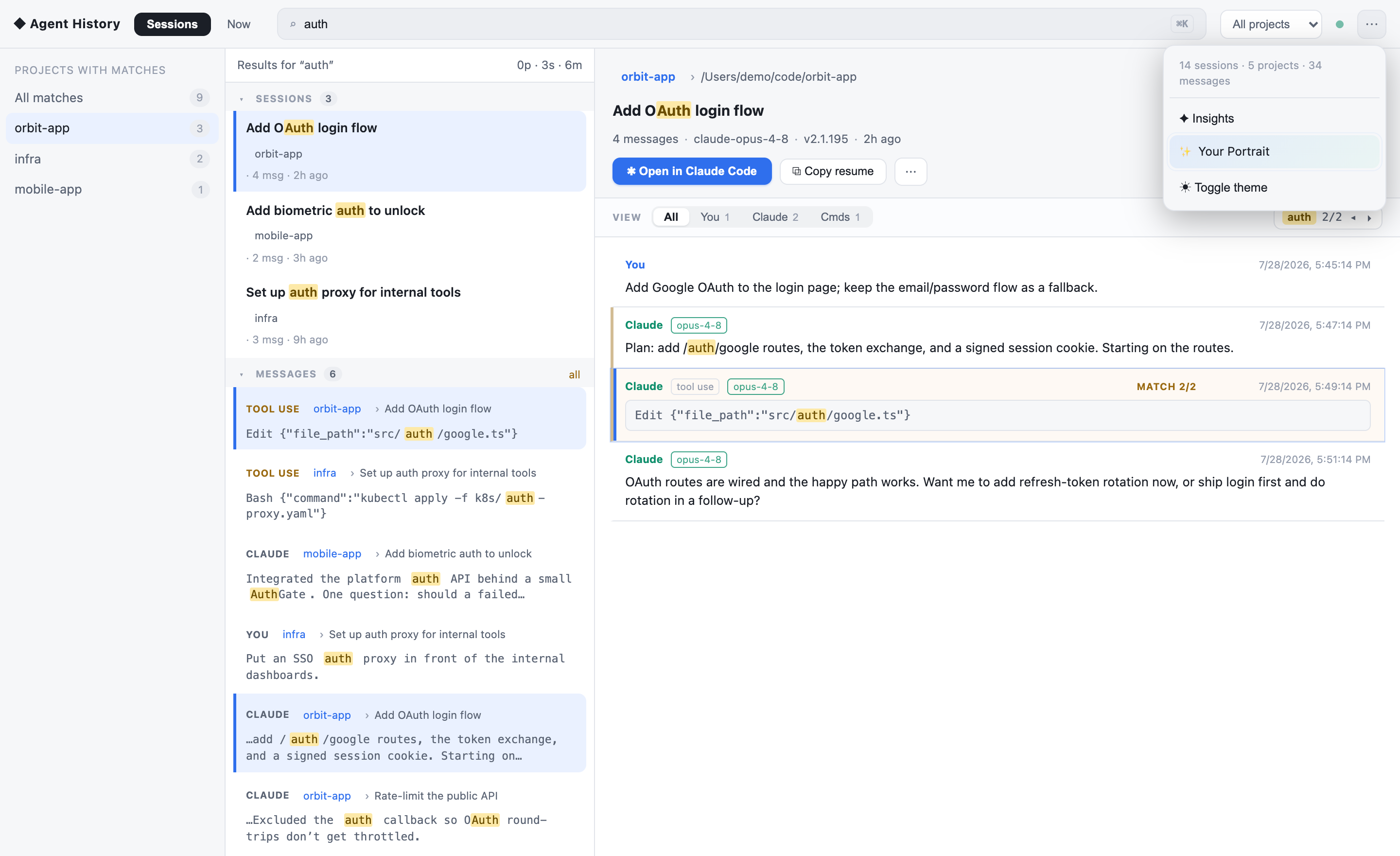
- Search everything — full-text (BM25) across every message: your prompts, the agent's
output, the commands it ran, and tool results. Filter by project, session, or message type.
- Locate the exact message — a hit shows
project › session › message and jumps you straight
to it, keyword highlighted, with a ◂ n/m ▸ navigator through the matches in that session.
- Act on it — one click reopens the session in Claude Code (it focuses the right window and
resumes there), or copies the resume command, the folder path, or the message text.
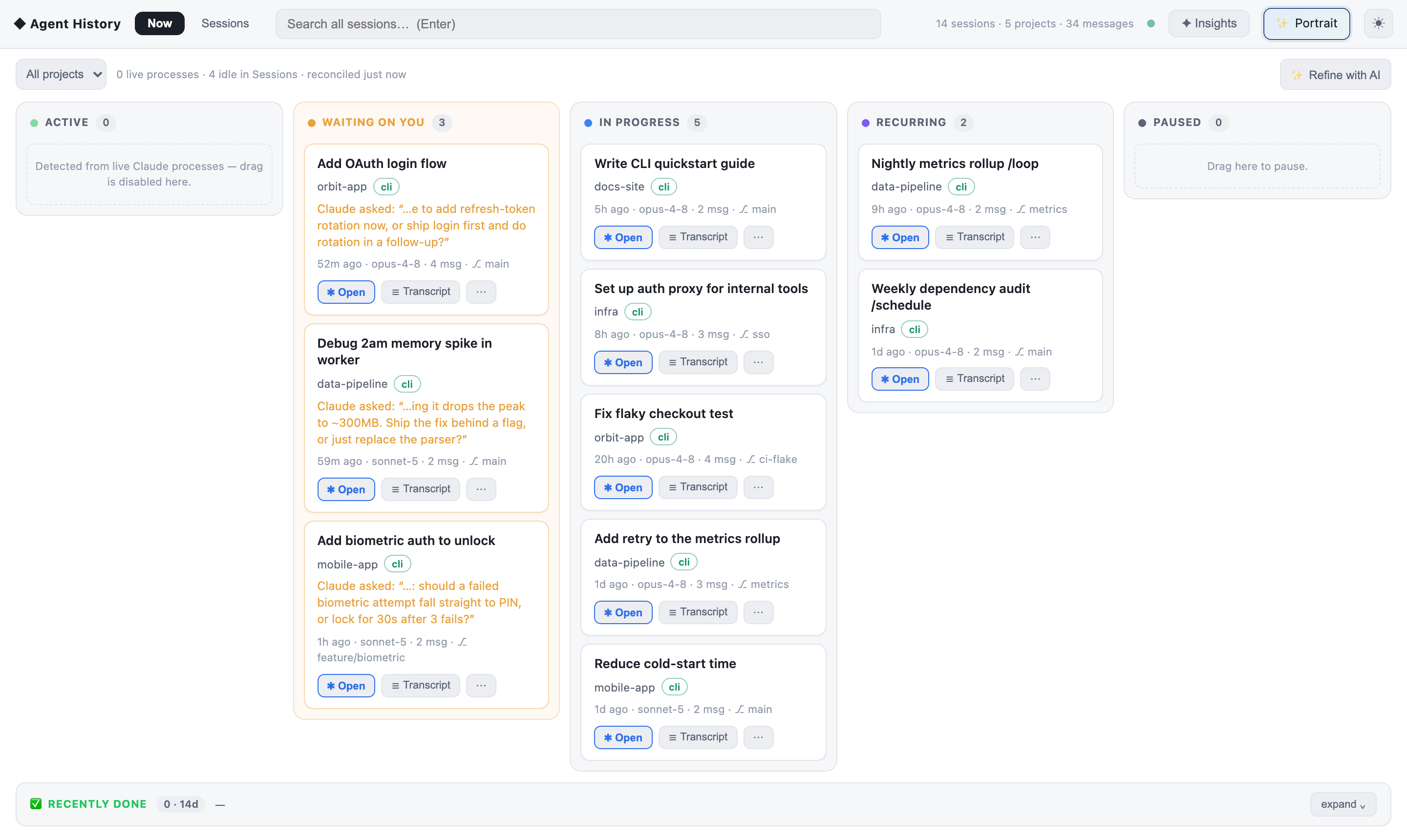
- A "Now" board — your sessions as live task cards: Active (detected from real processes),
Waiting on you, In progress, Recurring, Paused.
- History that outlives cleanup — Claude Code prunes transcripts after ~30 days; anything
indexed once stays searchable here.
Requirements
- Node.js 20+ on your PATH — the extension runs the indexer as a normal Node process
(
npx agent-history-cli), which is also what keeps the native SQLite module working.
- Existing Claude Code and/or Codex history on this machine.
Nothing else. No API key, no sign-in, no configuration.
Getting started
- Install the extension and reload the window.
- Click the Agent History icon in the activity bar.
- It starts the local service automatically and indexes your sessions (about 20s the first time
for a few hundred sessions; instant afterwards — it's incremental).
- Type in the search box.
The panel is workspace-scoped by default; toggle the filter icon in the view title to see every
project. The ⤢ action opens the same dashboard in a browser when you want the full
three-pane layout.
What it reads
| Source |
Location |
| Claude Code (CLI + IDE extension) |
~/.claude/projects/**/*.jsonl |
| Claude desktop (Cowork / local agents) |
~/Library/Application Support/Claude/… |
| Codex (CLI / ChatGPT desktop) |
~/.codex/sessions/** |
All read-only. Agent History never modifies a transcript.
Privacy
- Local only. The index is a SQLite file in
~/.claude/.agent-manager/. No server, no account,
no telemetry, and no network calls for any core feature.
- AI features are opt-in and metered. "Refine with AI" runs through your own logged-in
claude or codex CLI, tells you exactly how many calls it will make before running, is capped
per day, and sends only short conversation excerpts — never tool output.
Settings
| Setting |
Default |
Description |
agentHistory.port |
4600 |
Port for the local service |
agentHistory.nodePath |
node |
Absolute Node path if node isn't on your editor's PATH (common with nvm) |
agentHistory.scopeToWorkspace |
true |
Start scoped to the open workspace folder |
agentHistory.serviceEntry |
"" |
Point at a local checkout instead of the published CLI |
Also available as a CLI
npx agent-history-cli
Same app in your browser, plus search, status, retro, and an MCP server that lets your
agents search your own history:
claude mcp add -s user agent-history -- npx agent-history-cli mcp
Troubleshooting
- Panel says the service is unavailable — usually
node isn't on the editor's PATH (common on
macOS GUI launches with nvm). Set agentHistory.nodePath to an absolute Node 20+ path.
- No sessions found — the panel names the directory it scanned. If your transcripts live
elsewhere, set
CLAUDE_TRANSCRIPT_PATH.
MIT licensed · Source, issues, and the CLI ·
Not affiliated with Anthropic or OpenAI; it reads only your own local files.

