SmartFix for ABAP
Auto fix ATC findings, pragmas and modern syntax for SAP ABAP in VS Code.
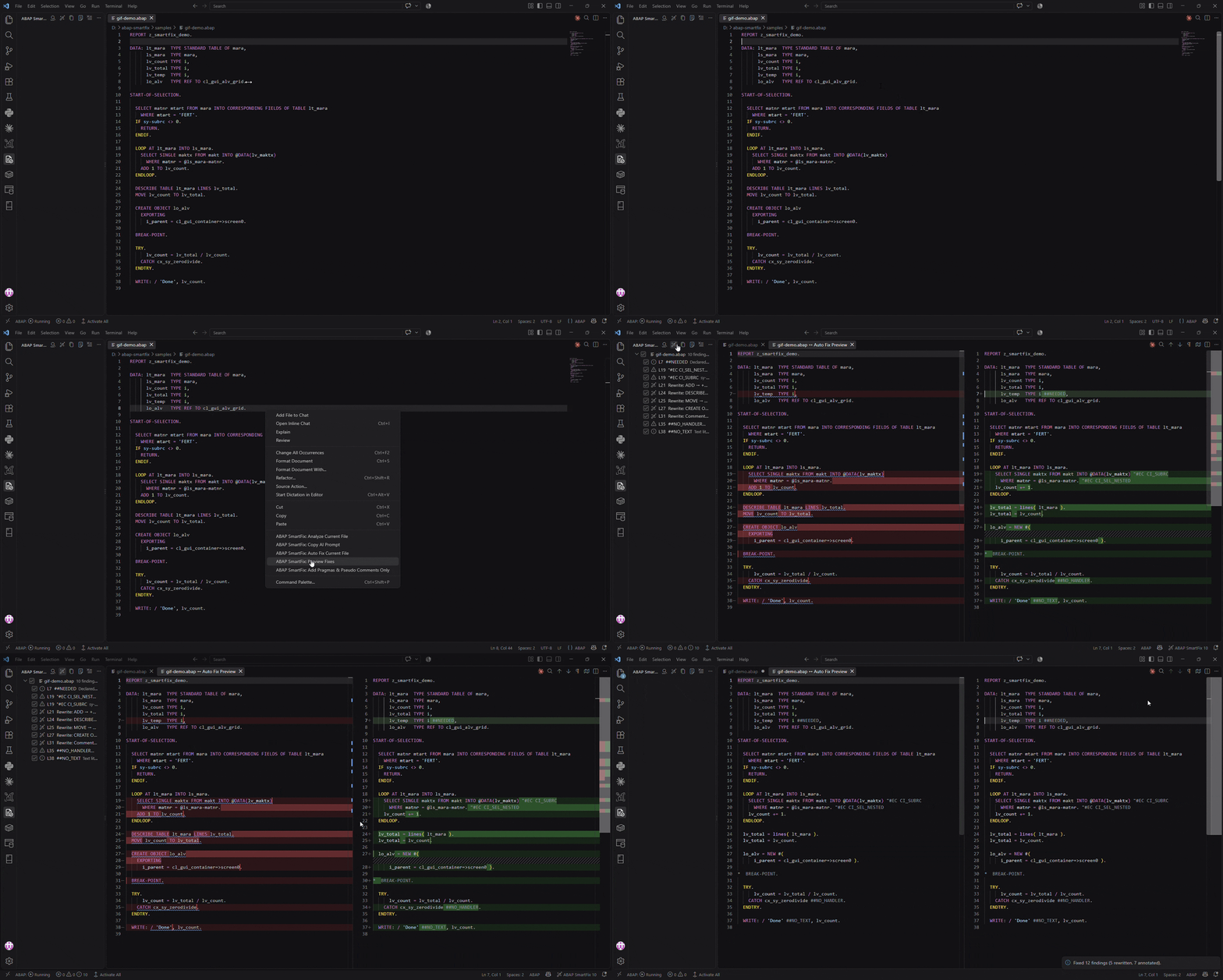
SmartFix for ABAP finds ATC and Code Inspector findings in your ABAP code and:
- rewrites the code where a safe fix exists, for example
MOVE a TO b → b = a
- adds the right pragma (
##…) or pseudo comment ("#EC …) for the rest
- marks what must be fixed by hand, and can copy a prompt for your AI assistant
ATC in your SAP system
With ABAP Development Tools for VS Code, SmartFix for ABAP runs ATC in your SAP system first and fixes exactly what ATC reports. This is on by default and can be switched off in the sidebar … menu.
Files not opened from ADT, such as abapGit .abap files, are checked from the source code instead.
Requirements
- VS Code 1.80 or later
- Recommended: ABAP Development Tools for VS Code, logged on to your SAP system
- Nothing to install in the SAP system
Getting started
Everything starts from the right-click menu in the editor. The recommended way is Preview Fixes: you see every change before the file is touched.
- Open an ABAP program, class or include.
- Right-click in the editor and choose SmartFix for ABAP: Preview Fixes.
ATC runs, the findings are listed in the SmartFix for ABAP sidebar, and a diff opens: your code on the left, the fixed code on the right. The secondary side bar closes, so the diff gets more room.
- Review the diff. Click a finding in the sidebar to jump to it. Uncheck a finding to skip it; the diff updates right away.
- Click Auto Fix Current File (the wand at the top right of the diff) and confirm. The fixes are applied and the diff is replaced by the fixed file.
- Save the file. SmartFix for ABAP offers to run ATC again to confirm.
One Ctrl+Z undoes a whole fix. Files are never saved automatically.
| Menu item |
What it does |
Changes the file |
| Analyze Current File |
Runs ATC and lists the findings in the sidebar and the Problems panel |
No |
| Fix Findings in Selection… |
Shown only when code is selected: pick which findings of the selected lines to fix |
Yes |
| Copy AI Prompt |
Copies the findings, with the source, as a prompt for your AI assistant |
No |
| Auto Fix Current File |
Fixes every finding checked in the sidebar, after a confirmation. The confirmation can also open the preview |
Yes |
| Preview Fixes |
Analyzes, then shows the original and the fixed code side by side |
No |
| Add Pragmas & Pseudo Comments Only |
Like Auto Fix, but never rewrites code: only adds pragmas (##…) and pseudo comments ("#EC …) |
Yes |
You do not need to run Analyze first: every menu item analyzes the file itself.
Other ways to fix:
Ctrl+. on a reported line fixes that line; you can choose between a rewrite and an annotation.- Hover over a reported line to see why it is reported and how it can be fixed.
- The sidebar has buttons to fix one finding, one file, or every analyzed file.
Settings
| Setting |
Default |
What it does |
abap-smartfix.atc.enabled |
true |
Run ATC in the SAP system and fix what it reports |
abap-smartfix.atc.checkVariant |
DEFAULT |
ATC check variant; DEFAULT is the system's default |
abap-smartfix.fixMode |
auto |
auto, rewrite (also rewrites that need review) or suppress (annotations only) |
abap-smartfix.suppressStyle |
rule |
Prefer pragma or pseudo comments |
abap-smartfix.disabledRules |
[] |
Rules to turn off |
abap-smartfix.tokenOverrides |
{} |
Annotation names of your own system |
abap-smartfix.bufferedTables |
[] |
Buffered tables to know without ATC (the ones ATC reports are remembered) |
abap-smartfix.preview.closeSecondarySideBar |
true |
Close the secondary side bar when a preview opens |
abap-smartfix.hover |
true |
Explain reported lines on hover |
Run SmartFix for ABAP: Show Rules to see every rule.
Known limits
- One file at a time; includes and called programs are not followed.
- Without ATC, a
JOIN with a buffered table is only found for tables ATC has reported before or that you list in bufferedTables.
- Annotations only hide a finding. Real problems, such as a
SELECT in a loop, are better fixed in the code.
Privacy
SmartFix for ABAP runs inside VS Code and sends no code or data anywhere. ATC and dictionary lookups go through ABAP Development Tools to your own SAP system. The AI prompt is only copied to your clipboard when you ask for it.
Trademarks
SAP and ABAP are trademarks or registered trademarks of SAP SE. SmartFix for ABAP is not affiliated with or endorsed by SAP SE.
License
MIT License © 2026 Lewie Lin. See LICENSE, which also includes the notice for the part taken from SAP abap-cleaner (Apache License 2.0).

