MeOS — Membrane OS


Markdown⊕ — Markdown, plus.
MeOS speaks Markdown⊕: plain Markdown, extended with membranes (the ⊕). A membrane is just a comment — so a Markdown⊕ document stays 100% valid Markdown, and the very same notation works in code. Markdown gave you formatting; Markdown⊕ adds structure, navigation, and bookmarks that bring you back — without touching your data.
A new world — where comments become commands.
It never stains your code or your manuscript — not by a millimeter.
The lightest OS. Warp anywhere and jump both ways with the Hyper TOC.
Your code undergoes cleavage (卵割) and becomes a single living organism.
The ultimate environment for creation!!!
And the future is in view: every membrane on Earth, connected.
I, My, MeOS 🐣
Ai, Mai, MeOS 🐥
You(AI) & I(LAI) 🐔
NEW in v4.1 — hang a clock on a membrane, and it comes to find you
A membrane is a place you decided to come back to. v4.1 lets you write the time you meant to come back,
on the membrane itself:
<!-- Mew!UFC ⏰ 18:30 -->
<!-- Mew!UFC ⏰ 2026-09-27 09:00 -->
<!-- Mew!UFC ⏰ 09:00 ↺5m -->
<!-- Mew!UFC ⏰🔐 2026-09-03 12:10 ↻15 -->
How precisely you write it says what kind of plan it is. A time alone means today — or tomorrow if it has
gone. A date means that day. Nothing has to be remembered about where you put it, because it is written where
it belongs, and it travels with the file.
Add an arrow and it repeats — and the arrow says which way time runs. ↺ turns anticlockwise for a
countdown: ↺5m every five minutes, ↺8h every eight hours, ↺30d every thirty days, ↺50/10 alternating
fifty minutes and ten. ↻ turns clockwise for a stopwatch: ↻15 climbs from zero for fifteen minutes,
goes back to zero and measures again. Both ring at the same instants; only the figure is read the other way
round, and neither stops until you stop it. The time you write is the origin and never moves — every bell
is counted on from it, so nothing is stored twice and the day you started stays in the file.
Setting one is a small panel under ⏰▾: the origin (with its weekday, and it may be in the past for a
repeat), how long each turn lasts, which way it runs, and 🔐 if this one must not be droppable. Turn the drums,
or double-click one and type. Everything the panel writes goes on the line, where you can also just type it
by hand — on a phone, in any editor, with no MeOS at all.
When the time comes MeOS brings you to that membrane, so write the next job inside it — and once it has
moved you, ↩ Back appears in the status bar at the bottom of the window, naming the membrane you were in,
to put you back where the bell found you. Set from Pseudo-WYSIWYG the clock holds that membrane in Pseudo
view instead: you cannot get back to the raw data, so your own 👻 answers stay hidden until the bell — a
test paper you cannot walk out of.
The bell counts you down the way it is called at an archery line. Three seconds of sound a minute out,
five at thirty, and from ten seconds it does not stop — then a high, clear tone at the moment itself. Near is
louder than far, and the silences between are what let each one land. A repeating clock goes quiet after it
rings, so a bell every minute never becomes a bell that never stops.
⏰ also keeps the next five clocks, soonest first. A row is the membrane's name — choose it and you are
there, on the line the clock is written on, because anyone can set one by accident and finding it should not
be a search. The one the ⏰ button is counting keeps its figure beside it so you can see which row that number
belongs to. ☑ and ☐ let a clock rest without losing what it was set for, Stop in the last minute is a pause
and not an ending, and Undo puts it straight back. Times far off read ≈4y 23:55.17 — roughly when, and
still alive; that is all a four-year plan needs to say.
Tag & Go is a door you can open anywhere. Write a tag — #eyedrops — in a membrane's opening comment
while you are making the membrane, and later that tag calls every one of them to the door. Pick one and you
warp there. Hang a ⏰ on it while you are there, or set no clock at all and use the door as a table of
contents.
So Tag & Go is an H-TOC wearing a ⏰ mask. And once a clock is on a membrane, you do not have to go to it —
it comes and gets you.
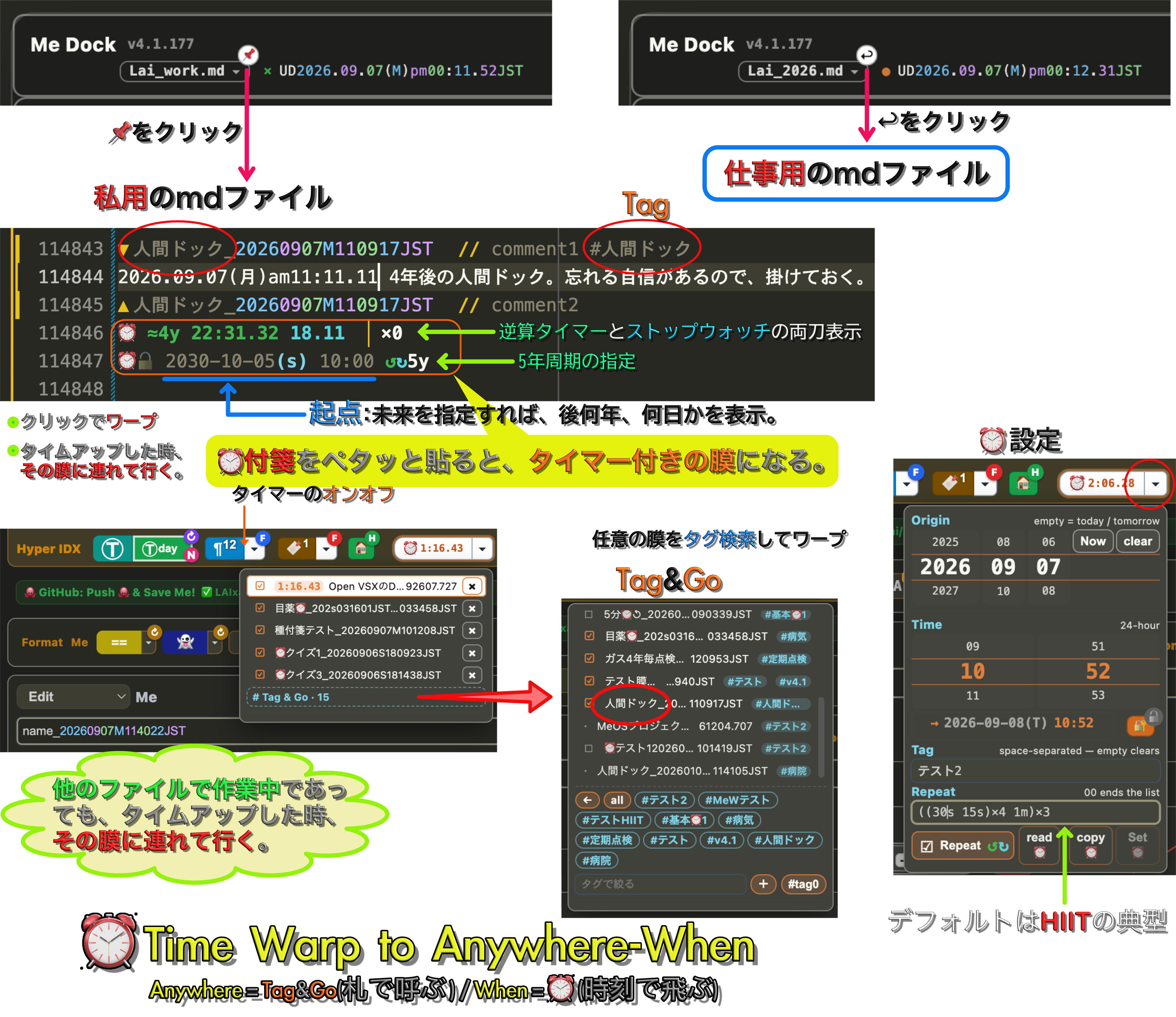
NEW in v4.1 — stick a ⏰ note on a membrane, and the timer brings you back to it. Write the origin where the time goes (2030-10-05 10:00 ↺↻5y): an arrow is the direction, the figure is the length of one turn, and (…)×N is how many turns — so ↺(3m 1m)×3 is a boxing round and ↻((30s 15s)×4 1m)×3 is a HIIT set. The origin is never rewritten when the bell rings, so what you set is still there years later; the running figure is drawn, not stored. One minute out it sounds for three seconds, thirty seconds out for five, and from ten seconds it does not stop — then MeOS carries you to the membrane itself, where what you meant to do is already written. The ⏰ list is a table of contents with a time axis, and Tag&Go narrows it to one #tag — Anywhere = Tag&Go, When = ⏰.
v4.0 finishes the idea. Every mark you write is real Markdown — headings, lists, bold, highlight,
strikethrough, links. Everything MeOS needs sits in an HTML comment on the line below — a folding
comment, which MeOS keeps folded out of sight, so your sentence stays whole and the page reads clean.
## Morning  2026.08.09
<!-- Mew!FC H2 (white/green)//[]tip= -->
- first item
<!-- Mew!FC - (white/purple)//[]tip= -->
1. second item
<!-- Mew!FC -1.(white/green)//[]tip= -->
Warp to [the design note]() from any word.
<!-- Mew!FC [](https://github.com/LAIxai/MeOS/blob/HEAD/design_20260809S101533JST) -->
(Those comment lines are folded away as you read — each says what the line above it is, and nothing else.)
Open that file anywhere else and you get an H2, an ordered list, and a link label. Nothing is broken,
nothing is proprietary. Open it in MeOS and the comments disappear: you read prose, and the words are live.
- Warp anywhere —
[label]() plus one comment jumps to a membrane by name, or opens a URL.
The destination never sits inside your sentence, so the text after a link stays on the same line.
- Numbers that never rot — ordered lists are written
1. every time (Markdown's own escape hatch).
MeOS counts them on screen, so inserting a line in the middle never renumbers your file.
- Sub-numbering without indenting — write the same
-1.1 on every line of a sub-level and MeOS renders
1.1, 1.2, 1.3, indented. -1a gives you 1a, 1b, 1c (the Figure 1a style). Nothing in the file
ever holds a number, so nothing can go stale. A blank line starts a new list; a sentence in between does not.
- Long instructions leave the line — a line that ends in a pile of comments still wraps on those
hidden characters, pushing your own words onto the next screen line. So move them out: write
<!-- Mew!FC … --> on the line below, and the sentence stays whole. FC = Folding Comment —
MeOS folds those lines away by default, so the page reads clean. Put the cursor on the line and it
opens; switch to Raw and everything opens. Skipped line numbers are not deleted lines — they are
the receipt that your file is untouched.
- Nothing to keep in sync — an instruction says what kind of thing it is, never which one:
A↑1(white/green) means "a superscript", exactly the way -1. means "a numbered item".
Repeats are matched in the order they appear, so editing your text never breaks the instruction,
and the file holds no label or number that can go stale. Write A↑1#2(…) only when you mean the
second one.
A spec line carries everything the line holds — the heading, the superscripts, and the highlight or
strikethrough sitting in the middle of your sentence — one comment per instruction, so the number of
boxes is the number of instructions: <!-- Mew!FC ~~(red/) --><!-- Mew!FC ==(white/yellow) -->.
Those inline ones matter most: their comment sits between your words, not at the end, so every
character after it gets pushed along. One checkbox decides the form — Me Dock's Format ▼ →
□ Folding Comment(FC) below. It sets what you write from now on; what is already written is left
exactly as it is. A spec line is ordinary text, so you can reorder or delete the boxes right where they sit.
- Superscripts don't ambush your prose —
x↑2 and (a+b)↑2 render, but 、↑2 or 🐱↑3 stay as
plain text, because a superscript needs something it can sit on. Want one anyway? Name it in a comment
on the line below: <!-- Mew!FC A↑1(white/green) -->. Want the opposite — a real arrow sitting next to a
real superscript? Say not: <!-- Mew!FC A↑1(white/green) ↑↓not --> means "colour the first one,
leave the second alone". Same rule as everywhere else in MeOS — plain text by default, the comment is
the command — so you never need an escape character.
- Accents, with the recipe — write
a↑<(..)>, press the superscript button, and the text becomes the
real letter ä. The name draws the shape: <(..)> two dots · <(.)> one dot · <(--)> a bar ·
<(^)> a hat · <(o)> a ring · <(v)> a check · <(~)> a tilde · <(')> an acute.
This is the one place MeOS works the other way round: it does not hide anything, it makes the character
— Unicode already has â, x̂ and θ̂ as standard letters, and covering standard letters with a private
notation would make us the bad guy. The recipe stays in the comment
(<!-- Mew!FC a↑👒<(..)> (white/orange) -->), so later you can copy it and redo the same letter with a
different mark. Prime a↑', degree x↑o and negative exponents 10↑-3 stay ordinary superscripts.
- Highlight rides on standard Markdown —
==highlight== is in neither CommonMark nor GFM, so outside
MeOS the == shows up bare. It was the last mark still doing that. Now the button writes
***highlight*** with <!-- Mew!FC ***not (white/yellow) --> below: inside MeOS a highlight, outside
bold+italic — broken in neither. == is still read, it is simply no longer written.
not means "do not let this mark claim its usual meaning" — the same word as ↑not, and it works on
*, ** and ***. Add not to something you already wrote in bold and it turns plain without touching
a single character of your text.
- Mew! 🐱 — every MeOS comment starts with
Mew!, so grep Mew! finds all of them.
Still have the old notation? Press ↻ to see where it is for five seconds, press 🐱 to convert
what is on your screen. One click, one undo — your 100k-line past is never rewritten in one go.
- Your token, watched — the GitHub push row shows how many days your access token has left, at the right
edge where you can see it even with the panel folded. When it expires, the disconnect button turns into
a one-press fix.
- Three ways to look at a membrane — and a clock on it — every membrane decides for itself how much of the
raw source it shows: 👁🥩 Normal (decorated, and the line under your caret opens up raw), Raw🥩 (this
membrane shows its raw data, while the rest of the file stays exactly as it was), Pseudo👁 Pseudo-WYSIWYG
(nothing raw at all — the caret stops opening the source, 👻 stays hidden, and even a plain strikethrough
disappears: the finished text, the way a reader will meet it). A membrane that says nothing follows the one
around it, so a setting on the outermost membrane reaches everything inside — and the choice is saved in the
file's own mMETA membrane, so it travels with the file and is still there tomorrow.
Then put ⏰ on a membrane: minutes, or a time such as
18:30. Set from Pseudo-WYSIWYG it holds that
membrane — no way out until the time is up — and the answers are already in the file, hidden in 👻, so the
moment the bell rings you mark your own work: one file is the question paper, the answer sheet and the
answer key, and it can be sat again tomorrow. Set from any other view it is simply a bell — write the
next job inside a membrane and MeOS brings you to it when the time comes. The schedule lives in the place it
is about, the way a 👻 note does; once it has moved you, ↩ Back appears in the status bar and returns you
to whatever you were doing.
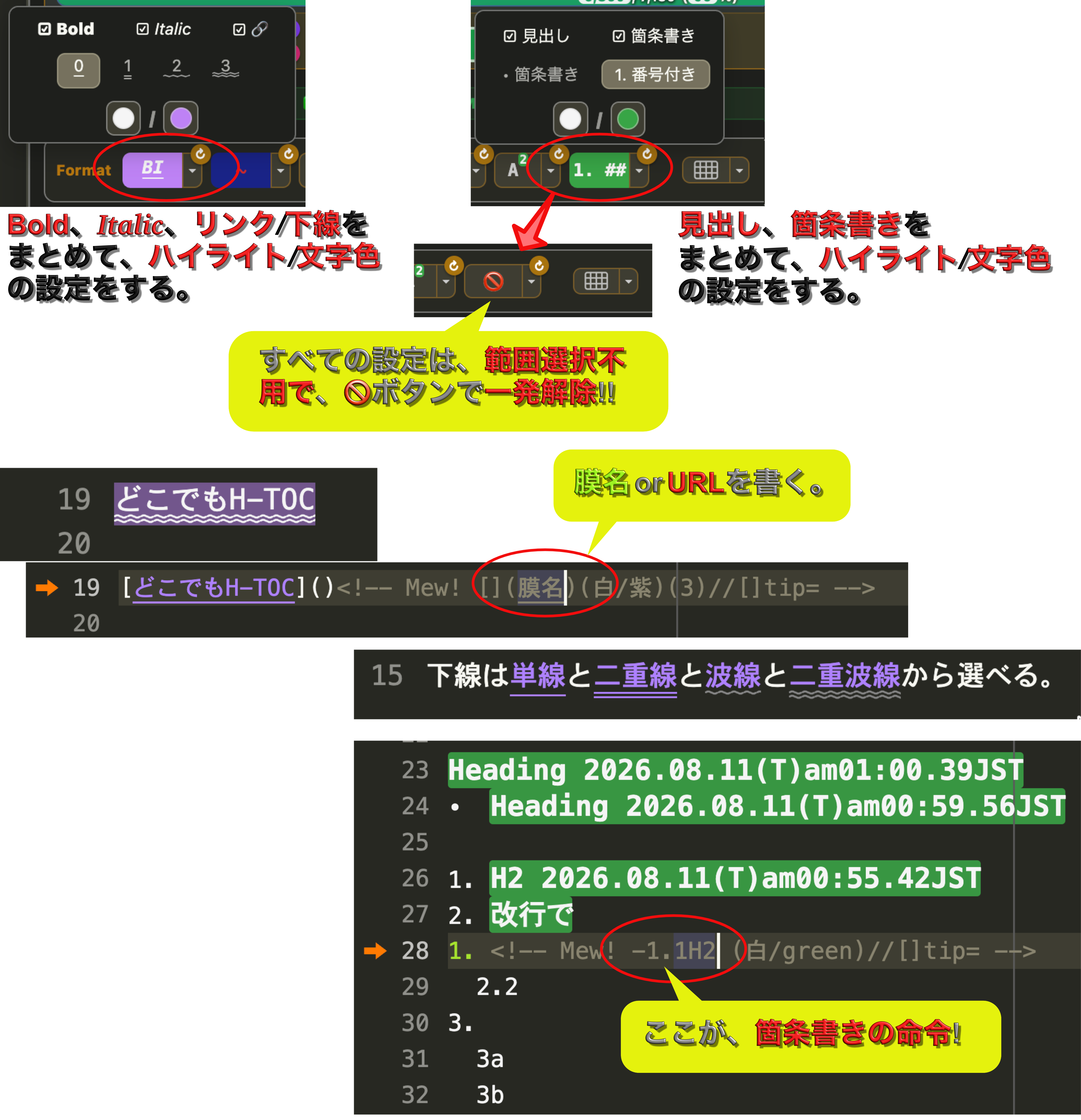
NEW in v4.0 — the comment is the command, and the data is still plain Markdown. A heading, a numbered list that sub-numbers itself, a link that warps by membrane name — every instruction sits in an HTML comment at the end of the line, so it never comes between your words. Put the cursor on a line (the orange arrows) and MeOS hands that line back to you raw: that is the whole file, valid Markdown everywhere else on Earth. Bold / italic / link and heading / bullet each collapse into one button, and 🚫 takes any of it back with no selecting — just put the cursor inside.
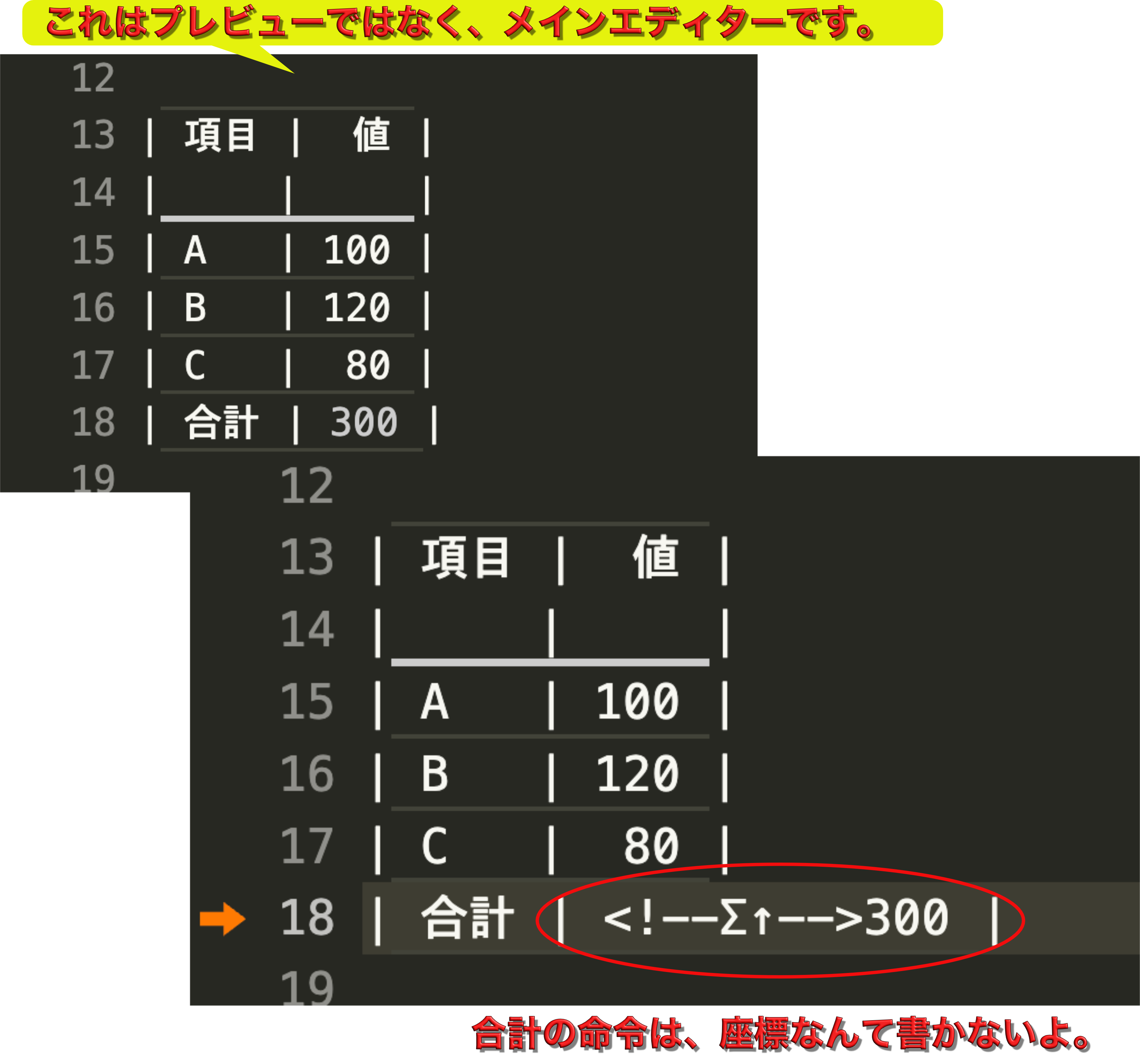
NEW in v3.1 — spreadsheet totals without cell addresses. Sum and product by direction, not coordinates: <!--Σ↑--> sums the column above, <!--Π←2--> multiplies the two cells to the left. No SUM, no B2:B4. The formula hides in a comment; the result stays plain text in the cell, so it reads on GitHub and with grep — all in the main editor, not a preview.
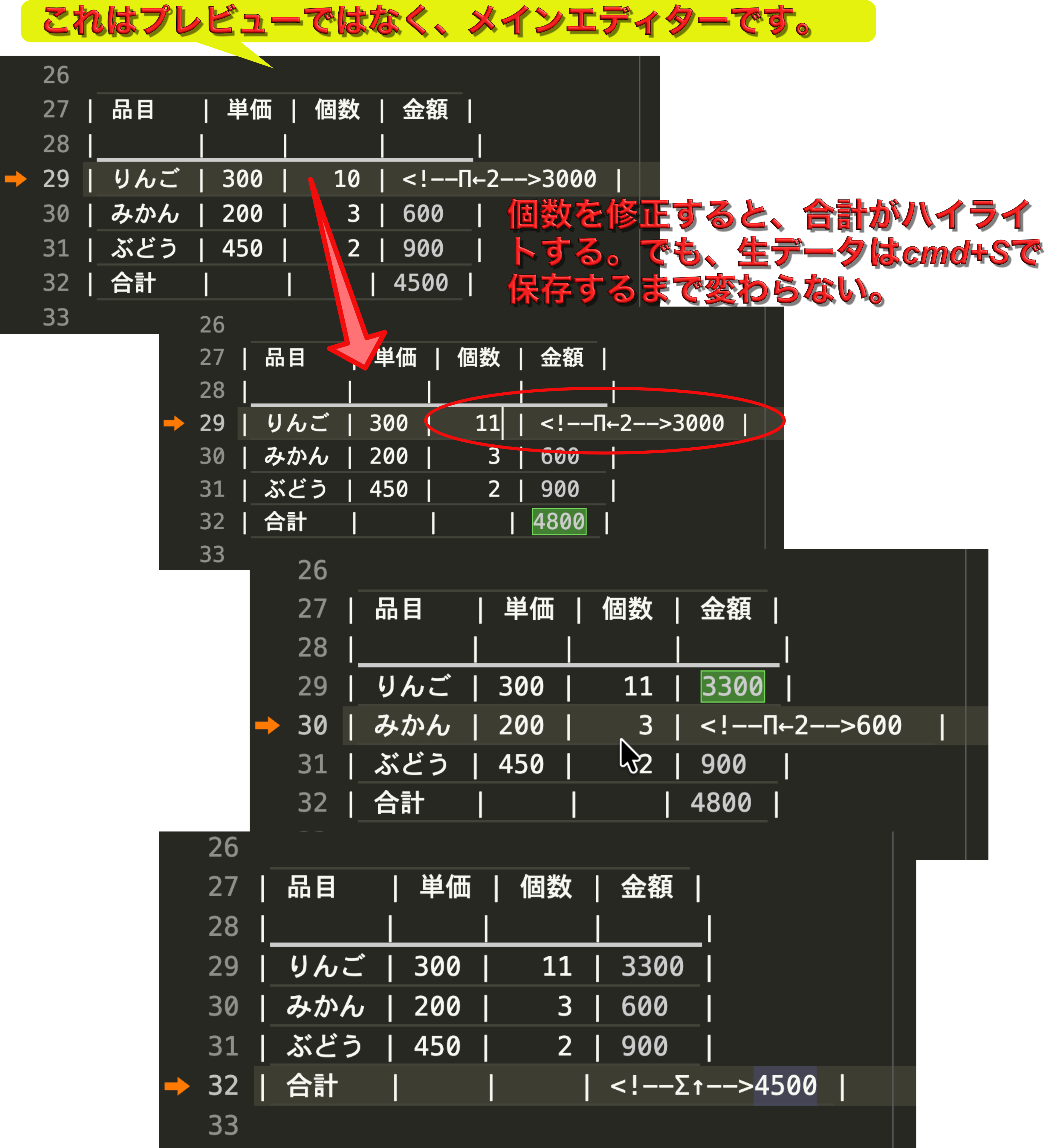
Auto mode — totals move as you type, the file stays clean. Edit a quantity and the row's amount and the grand total update live on screen; the .md is untouched until you save (Cmd+S), which bakes the results in and flashes the changed cells green. Manual mode (recompute on ▦, Excel-style) is one option away.
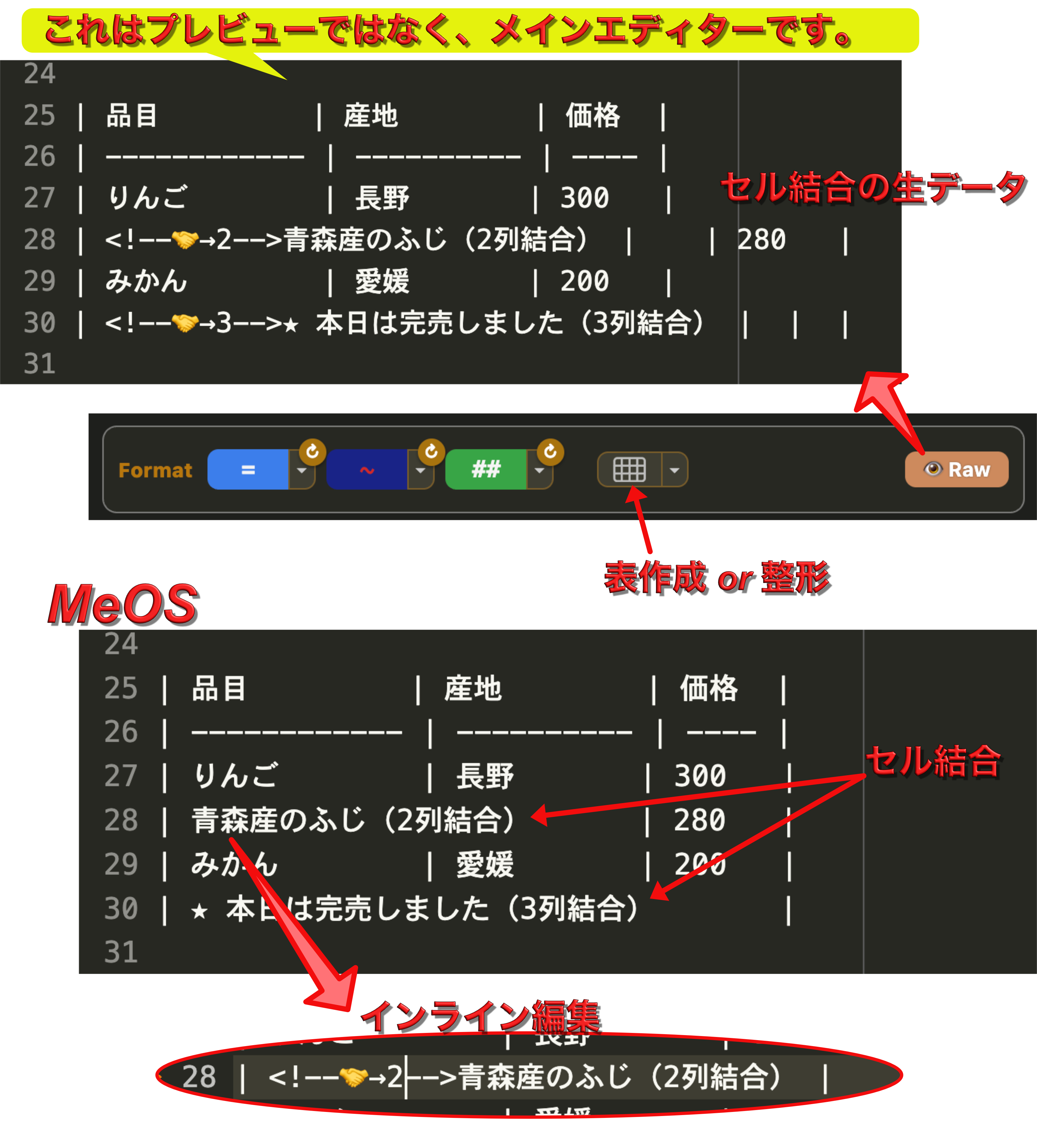
NEW in v3.0 — tables that never touch your data. GFM has no colspan / rowspan; MeOS adds them with one HTML comment (<!--🤝→2-->). The cell count never changes, so the file stays valid GFM and the marker is invisible on GitHub. The merge shows in the main editor — not a preview pane; put the cursor on the row and the raw marker returns for inline editing.
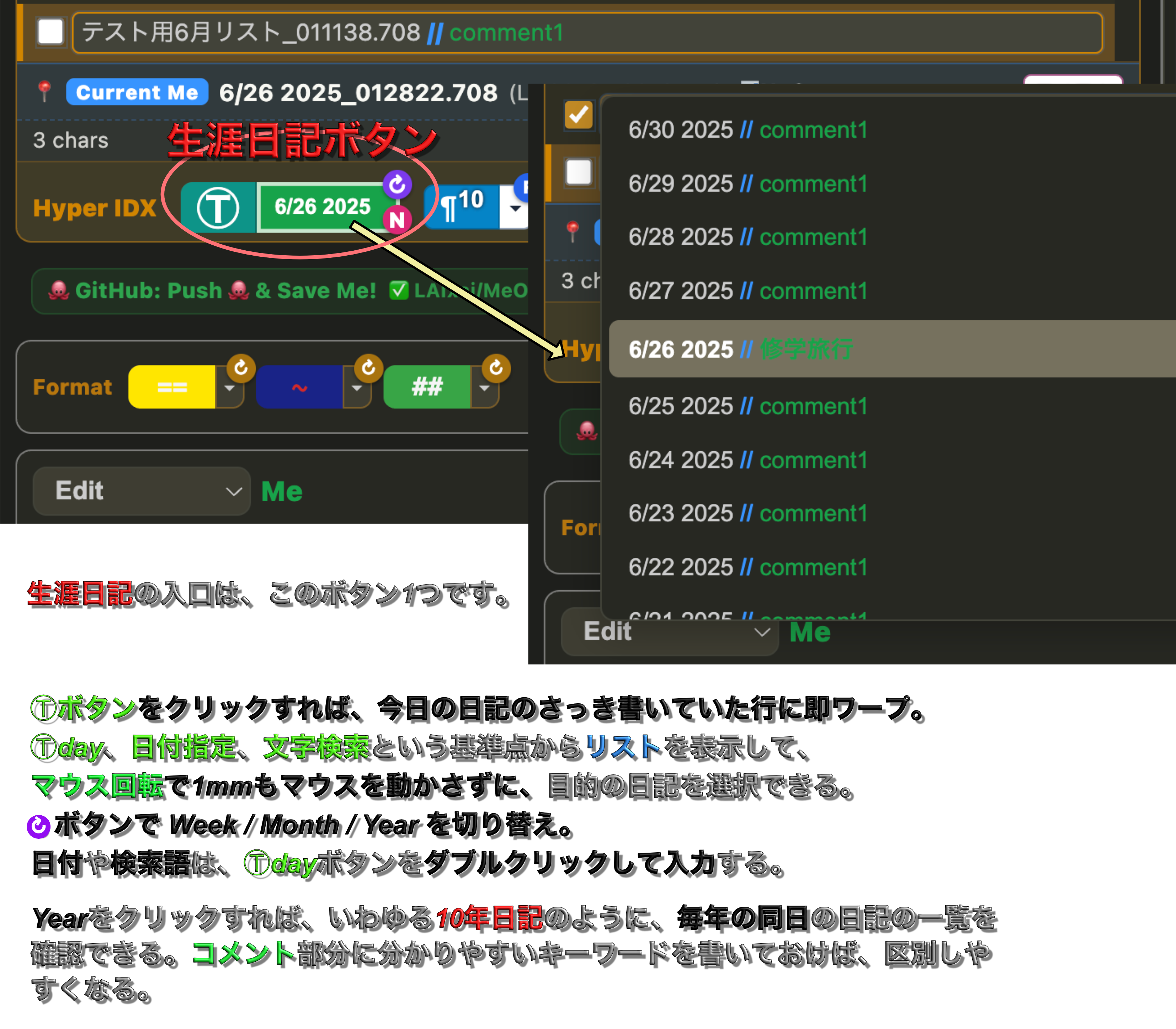
In v2.0 — your whole life's diary, from one button. The right Ⓣday is a polymorphic base point: type a date to warp there, a word to search by meaning, or T for today — then ↻ threads a day across Week / Month / Year (a 10-year diary). All structure lives in comments, so it never touches your prose.
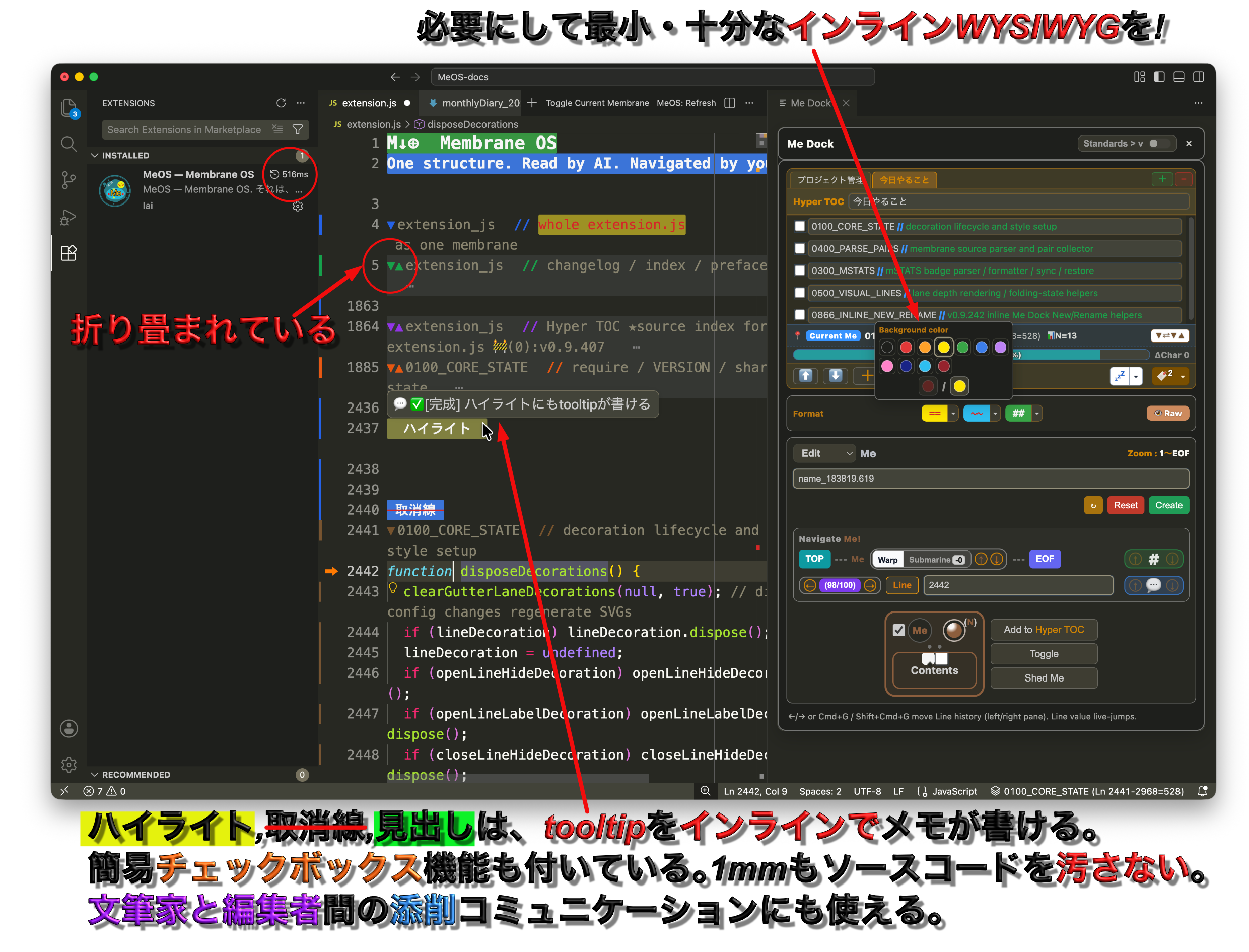
The whole picture. Editor = strata of membranes · right = the Me Dock cockpit.
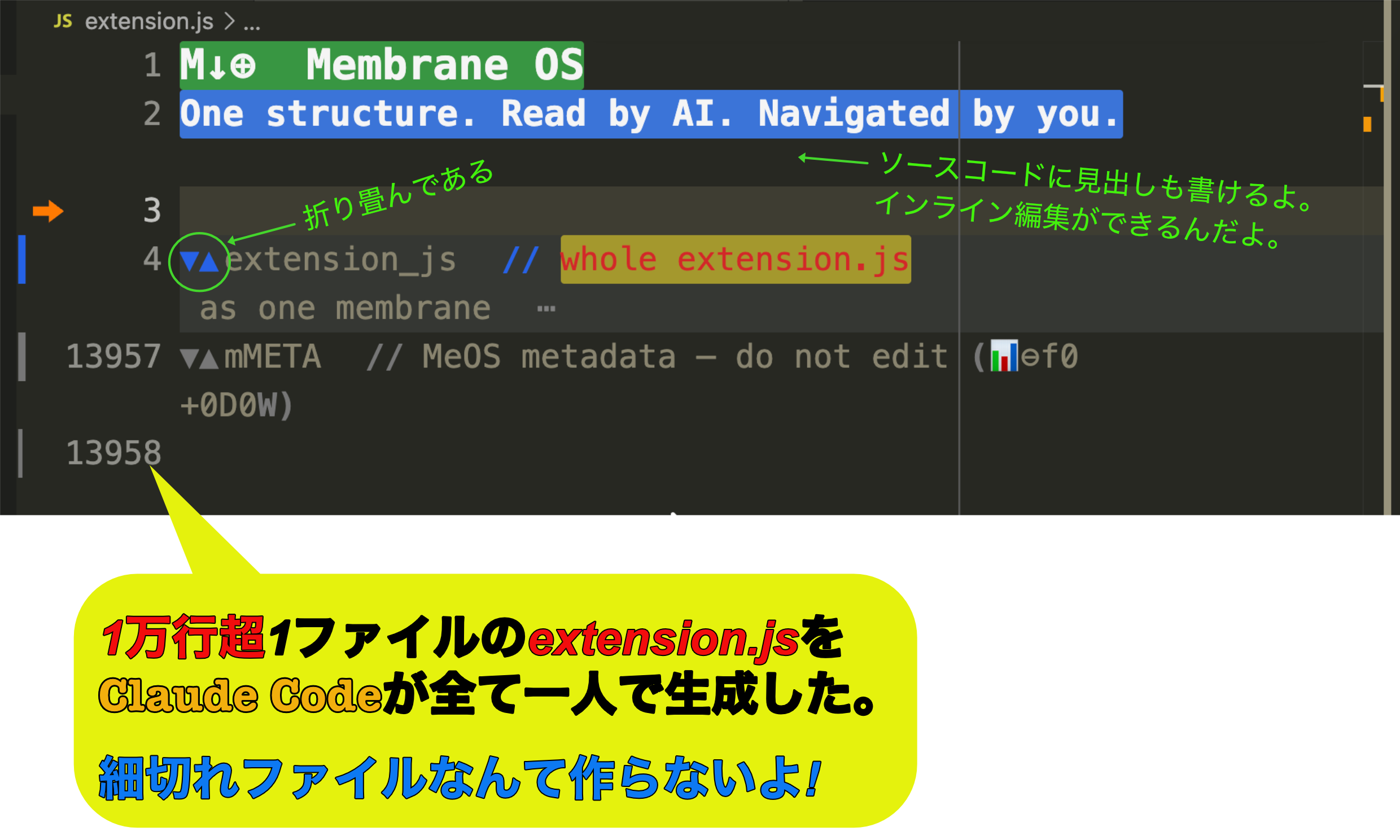
Line 4 → 13,957. 13,956 lines inside a single membrane — generated by AI, in one file.
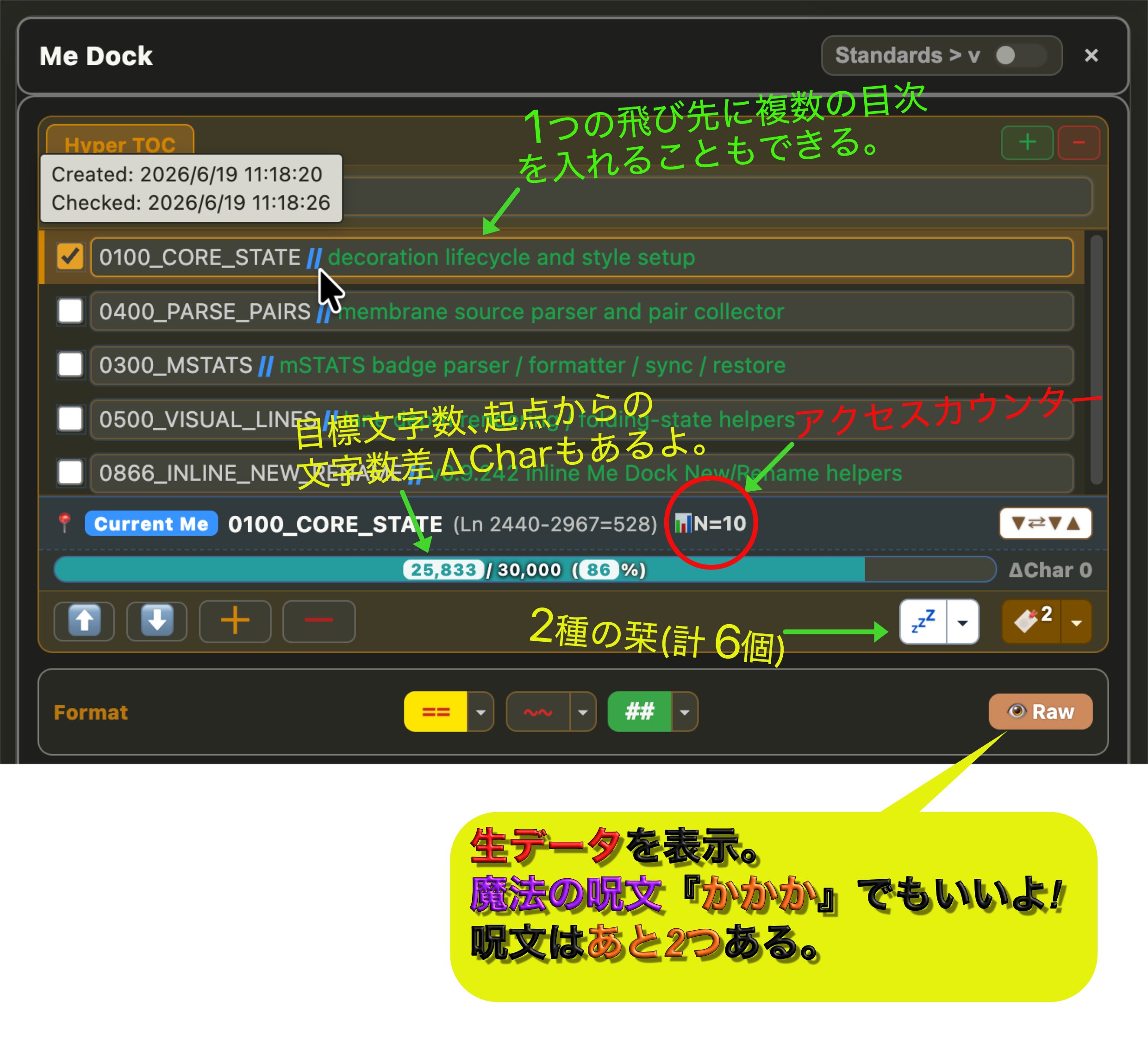
The cockpit. Hyper TOC · Current Me · bookmarks · 📊 access counter.
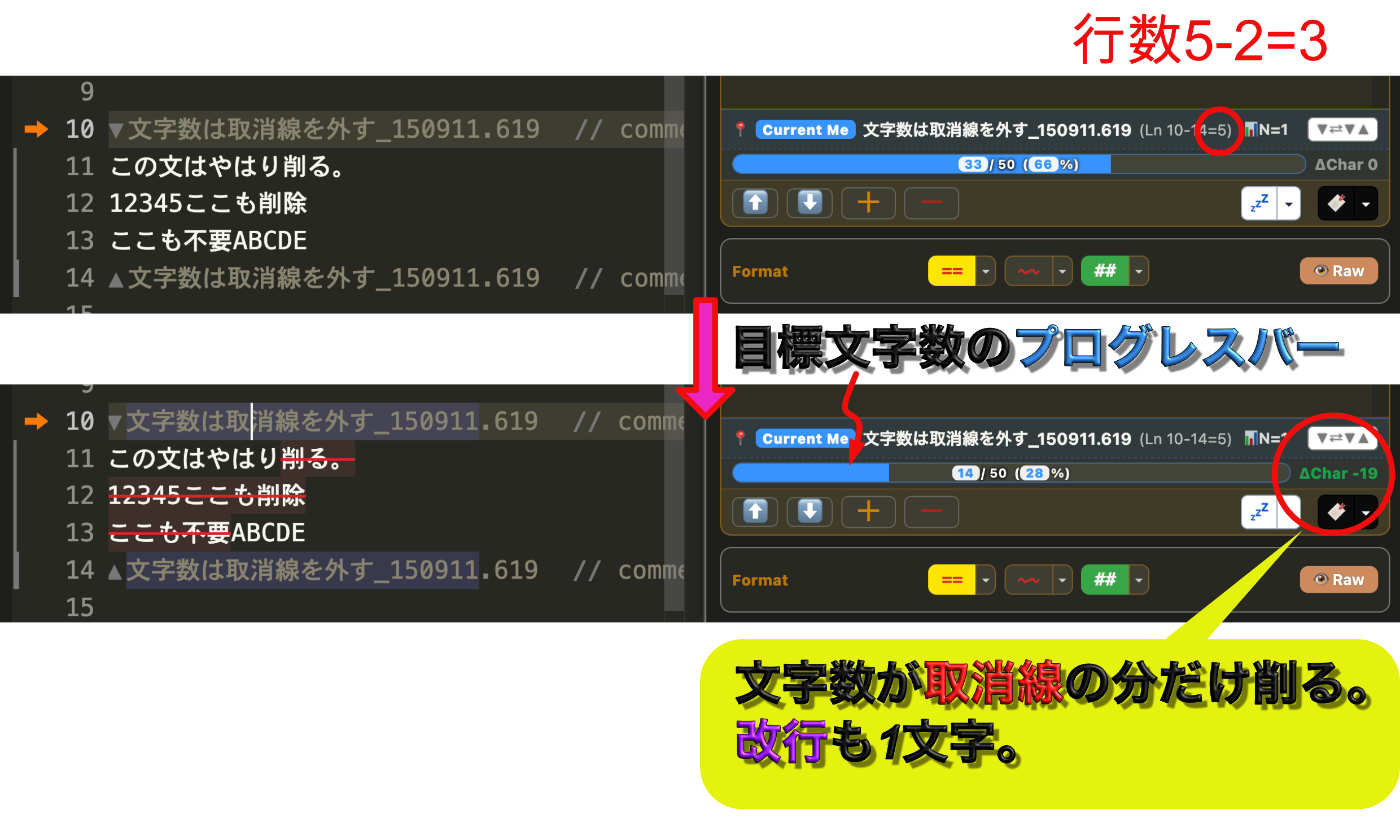
Soft delete. Struck-through text is excluded from the count — see what you cut before you cut it.
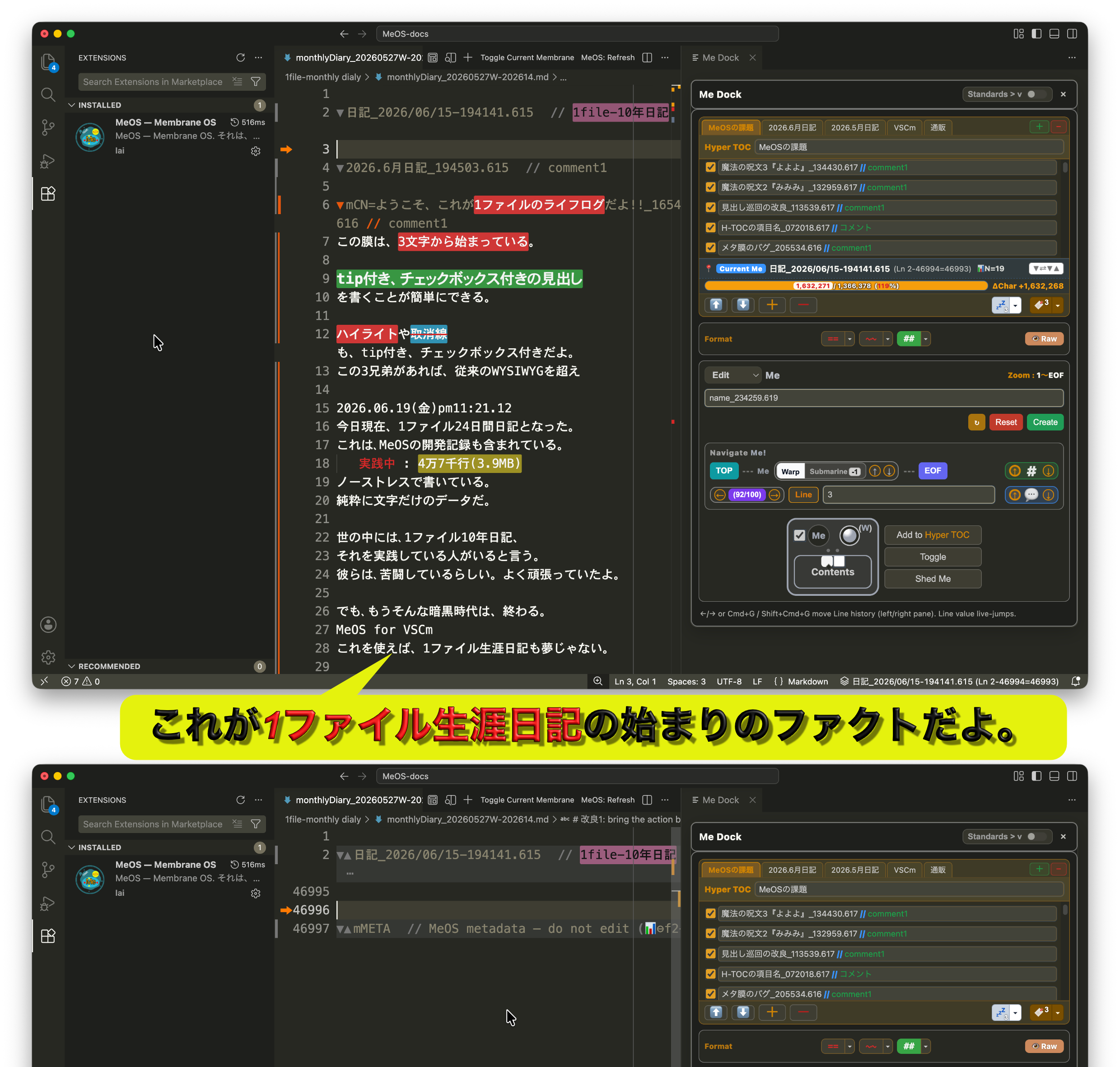
One file, a whole life. From line 1 to line 46,997 — all inside one membrane.
MeOS for VSCm — Fold Membrane, Warp Anywhere
Part of MeOS™ for anywhere — the universal membrane notation.
Abbreviated as μOS (read: mu-OS / mi-OS / me-OS).
"micro-OS" on the surface — membraneOS at the root.
VSCm = VSCodium folded. The middle odiu is collapsed (just as MeOS folds membrane content), leaving the final m — the same m that begins membrane. The host editor renamed by its own guest notation: self-referential, compact, and symbolic.
The VSCm implementation of MeOS. MeOS notation itself is editor-independent; future implementations may target Joplin, Cursor, Obsidian, or any editor that supports comments.
The Crux of Membrane Notation
A membrane is a comment — so it leaves your original data as it is.
That is the crux of Membrane notation.
More than a boundary, a membrane has its own functions — comments (semantic metadata) create structure, like a cell membrane.
VSCodium meets Me.
It becomes MeOS — the Brain Editor.
Beyond Hyperlink — Navigate by Name, Return by Bookmark
Membrane names are proper nouns. Type a name in a TOC or a checklist — or search your whole workspace for it — and jump straight to that membrane.
🔖 Bookmarks bring you home. Drop up to three "place" bookmarks; one click flies you to your Front Anchor — the very line you're writing now. With two bookmarks, it becomes a bidirectional jump: leap there, and back, again and again.
Me (Membrane) transforms VSCodium into a Brain Editor for writers, developers, researchers, and AI.
Membrane structure introduces named, foldable, navigable thought architecture into code and text:
- Fold beyond headings
- Jump instantly by membrane name — from TOCs, checklists, or workspace search
- Return anywhere with bookmarks — three place markers and a one-click Front Anchor
- Use membrane names as proper nouns for workspace-wide discovery
- Build AI-readable and human-readable structured memory
- Transform notes, code, and knowledge into MeOS
This extension itself was co-created with AI trained to use membrane notation.
Once experienced, VSCodium can evolve from a code editor into a note system, thought system, and Brain Editor.
MeOS imagines a future where editors, note apps, and even operating systems become membrane-native.
MeOS := VSCodiuM = VSCodium + Membrane
Hyperlink connected pages.
Membranes connect meaning — by name, from anywhere.
MeOS for anywhere  ← the universal notation (parent brand)
MeOS for VSCodium  := μVSCodium      (this implementation, folded form)
MeOS for Mac       := μMac           (future)
MeOS for Phone     := μPhone         (future)
MeOS for Pad       := μPad           (future)
MeOS for OS        := μOS            (the OS layer, where the abbreviation folds into itself)
MeOS is the legal/registered name. μOS is the abbreviation /
stylized form, used for logos, titles, and folded forms (μVSCodium,
μMac, μPhone). Both refer to the same notation; the choice is visual.
Read the prefix μ as "μ" (mu), "mi", or "me" — your call.
The Greek letter is the folded form (written, compact).
The spoken word is the unfolded form (mePhone, miPhone, μPhone).
The meaning is 「私の」 — mine, one with me.
μ is simply the Greek letter that corresponds to English m.
Both descend from Phoenician mem (𐤌, "water" — the sound of waves).
The shift m → μ is not a substitution to a foreign symbol; it is the same
letter, traced back to its foundational form. Latin m, Greek μ,
Cyrillic м — all carry the same sound across scripts.
Apple's i prefix marked devices for the individual.
The μ prefix marks devices structurally aligned with the self.
Where i pointed outward at "the individual customer",
μ points inward at "the self that has folded into the device".
μ is also the SI symbol for micro — the smallest meaningful unit,
the most compact carrier of meaning. A perfect membrane.
And μ is the first letter of Greek μέμβρανα (membrana, "membrane")
itself. The glyph structurally encodes its own meaning — μOS reads
as "micro-OS" on the surface, but unfolds to membraneOS at its root.
License & Trademark
Notation — Public Domain
The MeOS notation specification (membrane syntax, cross-reference ⇄,
Me notation ⇒, badge format, depth markers, etc.) is dedicated to
the public domain. The notation is intended to become a universal
technical convention, in the spirit of open scientific terms like
iPS, DNA, JSON, and YAML.
Anyone may implement, document, teach, fork, or extend the MeOS
notation in any editor, language, framework, or system without
permission, attribution, or fee. Derivative notations are welcome.
Software — MIT License
This VSCodium extension's source code is released under the MIT
License. See LICENSE in the repository root. The extension is
freely available for use, study, modification, and redistribution.
Trademark — Common-Law ™ (Unregistered)
MeOS™ and μOS™ are unregistered common-law trademarks
asserted by 川嶋俊克 (Toshikatsu Kawashima) as of 2026.05.16,
with prior art established via this repository's GitHub commit history.
The following name variants are also asserted as part of the MeOS™
family, primarily as defensive prior-art declarations against
squatting in first-to-file jurisdictions (notably China):
| Script |
Variants |
| Latin / Greek |
MeOS™, μOS™ |
| Chinese (semantic) |
微OS™ (micro-OS), 膜OS™ (membrane-OS) |
| Chinese (phonetic) |
美OS™, 妙OS™, 米OS™ (≈ "mee-OS" sounds) |
| Japanese |
ミーオス™, ミューオス™, メオス™ |
| Korean |
미OS™ (mi-OS) |
Implementation naming pattern: MeOS for [target] (e.g., MeOS for
VSCodium, MeOS for Mac, MeOS for Phone).
No formal trademark registration is currently pursued. The intent
mirrors the iPS / JSON / Markdown model: the term is open, the
implementation is free, the brand is identifiable.
You are explicitly permitted to:
- Use the names MeOS and μOS to refer to the notation and
its compatible implementations (e.g., "MeOS for Vim", "a μOS
extension", "MeOS notation").
- Build, distribute, and sell compatible implementations under
derived names such as "MeOS for [your target]".
- Teach, write about, demonstrate, and discuss the notation freely.
You are asked not to:
- Apply the name MeOS or μOS to products that are
incompatible with the published notation specification —
use a different name in that case.
- Imply official endorsement or affiliation when none exists.
Formal trademark registration may be pursued in the future only
for defensive purposes (preventing third-party squatting, e.g.,
in first-to-file jurisdictions). Such registration, if it happens,
will not restrict legitimate free use described above.
Acknowledgments — Conceptual Lineage
MeOS stands on the shoulders of:
- Gheorghe Păun (1998) — Membrane Computing / P systems. The
first formal use of "membrane" as a computational primitive.
MeOS approaches the same word from a different direction: not as
a model of computation, but as a model of human and AI thought
structure.
- Shinya Yamanaka (2006) — iPSC. The lowercase i,
consciously inspired by Apple's naming, became a universal
scientific term without trademark restriction. MeOS adopts the
same open-term model.
- Steve Jobs / Apple (1998) — the i prefix. The precedent
for a single-letter folded brand carrier that becomes its own
era. MeOS's μ continues this lineage, traced back through
Latin m to Phoenician mem (𐤌, "water").
Features
- Plain Markdown, always (v4.0) — headings, lists, bold, highlight, strikethrough and links are written as
real Markdown; MeOS reads its own settings from a folding comment on the line below. Your file renders correctly
on GitHub, in any editor, and in any Markdown tool — with or without MeOS installed.
- A clock on a membrane (v4.1) — write
<!-- Mew!UFC ⏰ 18:30 --> under a membrane and MeOS brings you
back to it at that time; ↺5m returns every five minutes, ↻15 measures fifteen and starts again. The
schedule lives in the place it is about, so there is nothing to remember about where you filed it, and it
travels with the file. The countdown is called in stages, like an archery line.
- Tag & Go (v4.1) — put
#eyedrops in a membrane's opening comment and it joins that tag's list, clock or
no clock; choose a row to warp there, tick its box to start the clock written on it. The ⏰ is the face of it
because a clock explains itself; what is underneath is a way back into your own writing.
- Warp anywhere (v4.0) — turn any word into a jump to a membrane by name, or to a URL, without putting the
destination in the middle of your sentence.
- Mew! 🐱 (v4.0) — one signature makes every MeOS comment grep-able, and the cat converts old notation
screen by screen, at your pace. Marks are off by default; ↻ shows them for five seconds.
- Membranes — comment-based structure that leaves your source untouched (decoration-only). Fold a huge file into a clean skeleton in one keystroke.
- Hyper TOC (H-TOC) — jump anywhere from an outline panel. One structure: read by AI (in-source, grep-able) and navigated by you (the panel).
- Current Me — always know which membrane the cursor is in; 3-point jump (open ⇔ close ⇔ cursor).
- Zoom Me! — focus into a sub-region, then return.
- Writer formatting — highlight / strikethrough / headings with text & background colors and
//comments (editor⇄author notes), via one-tap buttons.
- 🔖 Bookmarks — leap there, and back — up to 3 "place" bookmarks with a one-click Front Anchor (the line you're writing right now). Two bookmarks make a bidirectional jump: there, and back, again and again. A safety net so you never lose your home.
- ▶◀ Reference marks (point membranes) — named, grouped, grep-able in-text bookmarks that live in your text and travel with Git. Create a group via Edit▾ → Reference (pick a canonical symbol: ※ † ‡ * §), issue marks with the 💤 button (one click parks a "do it later" point; the new mark becomes F), and cycle a group with the ※ button (one click jumps to F, click again to walk the group). Footnotes (†n) are simply the most classic use of reference marks — the mark sits in the text, the explanation lives with the mark.
- Three views, one per membrane (v4.0) — 👁🥩 Normal (decorated; the caret line shows its raw data) · Raw🥩 (this membrane shows its raw source — membrane lanes and all decoration step aside — while every other membrane keeps its own setting) · Pseudo👁 Pseudo-WYSIWYG (nothing raw at all; 👻 and plain strikethroughs disappear, so a draft reads the way a reader will meet it). A membrane with no setting of its own follows the one enclosing it, and a setting is only written when it differs from what encloses it. Saved in the file's own mMETA membrane, so it travels with the file through Git. (The
kakaka spell still works — it now toggles Raw for the membrane you are in.)
- ⏰ A clock on a membrane (v4.0) — set it from ⏰ ▾: a date wheel on top, a time wheel below, or just type
18:30. How precisely you write it says what kind of plan it is — a time alone means today (or tomorrow if it has passed), a day and month means this year, a full date means that one day. From Pseudo-WYSIWYG the clock holds the membrane: no way out until the time is up, and because the answers are already in the file — hidden in 👻, exactly where you wrote them — one file becomes the question paper, the answer sheet and the answer key. The bell rings, the membrane returns to Normal, and you mark your own work; tomorrow the same file is a test again, or a memory sheet. From any other view it is a bell instead: write the next job inside a membrane, set a time, and MeOS brings you to it when the time comes — the schedule lives in the place it is about, the way a 👻 note does, and ↩ Back appears in the status bar to take you home. It rings out loud as well as on screen, it counts down in the membrane's own closing comment (so it is waiting for you exactly where you finish), ⏰ lists every clock you have running and jumps to any of them, and it is kept in the file, so it survives a restart and travels with the file.
⚙️ Recommended setting: "editor.wrappingIndent": "none"
Keeps wrapped lines flush, so they sit cleanly next to the gutter membrane lanes.
📌 Membrane lanes & wrapped lines — a quirk with an upside.
Membrane lanes are drawn in the gutter (glyph margin), which keeps the text area completely untouched — most importantly, CJK / IME input stays perfectly smooth (no caret wedging). One side effect: the current editor API renders a gutter decoration only on the first visual row of a wrapped line, so the lane shows a small break wherever a line wraps.
Many find this useful rather than annoying: the break quietly marks two things at a glance — the start of each membrane, and any unusually long paragraph (the rare line that wraps). In prose, most lines fit on one row, so a break stands out exactly where the text is dense. Like the rest of MeOS, the shape stays constant; only the signal changes.
Prefer a perfectly continuous lane? Set "laiMembrane.gutterLanes": false to draw it inside the text instead — at the cost of some IME friction (so the gutter is the default).
A note for VSCodium / VS Code maintainers: an API to let glyph-margin / gutter decorations span all visual rows of a wrapped line (as breakpoints and folding controls already do internally) would let MeOS offer both a perfectly continuous lane and clean IME input. We'd love to see it. 🙏
Markdown⊕ — Welcome to the New World
Markdown⊕ — the lightness of Markdown, with usability that leaves WYSIWYG far behind.
Your notes stop scattering. One file: a one-month diary, or a ten-year one. Goodbye to the sea of endlessly fragmented files. At last, a file becomes truly your own.
Wherever your data lives, warp to it in an instant through one entrance — the Hyper TOC. With three "anywhere bookmarks," flip between three jobs at full speed. Stride through gigantic data, stress-free.
The tool that always seemed like it should exist — yet never did. Step in once, and no one goes back to the old world. The old friction vanishes as if it had never existed — a comfortable lifelog life awaits.
And this is a fact: one AI wrote this membrane-structured code, and another AI took over and carried on without ever getting lost.… Put that structure to work as AI training data, and it could raise AI performance dramatically — that possibility, too, is here.
— One last thing. This extension — a single file of over 10,000 lines — was generated almost entirely by AI.… With no spec and no design document, I produced it in just one month.
— A collaboration between You(AI) & I(LAI).
Markdown⊕ ― 新世界へようこそ(日本語)
Markdown⊕ ― Markdown の軽快さはそのままに、WYSIWYG をはるかに凌ぐ快適さを。
ノートは、もう散らばらない。1ファイルで、1ヶ月日記も、10年日記も。 無数に分割されたファイルの海に、グッバイ。やっと、ファイルが"自分の所有物"になる。
データがどこにあっても、Hyper TOC という入口から一瞬でワープ。**3つの「どこでも栞」**で、3つの作業を高速に行き来する。巨大なデータの中を、ノーストレスで闊歩する。
ありそうで、手に入らなかったツール。一度足を踏み入れたら、もう旧世界には戻れない。あの不自由が、まるで嘘のように――快適なライフログ生活を。
そして、1つのAIが膜構造で書いたコードを別のAIが迷うことなく引き継ぐことができた。これは事実です。…この構造を AI の学習データに活かせば、AIの性能を飛躍的に引き上げることができる――そんな可能性も秘めている。
― 最後にひとつ。1ファイル1万行を超えるこの拡張機能は、ほぼすべて AI が生成した。…私は仕様も設計書も書かずに、わずか1ヶ月でプロデュースした成果です。
― AIと私(LAI)の共作。
🥷 魔法の呪文『かかか』(kakaka)
かかか(kakaka でも可)と打つ。それだけで、今カーソルのいる膜が Raw ―― 生データに切り替わる。打った文字は自ら消える。
生のマークアップを覗きたいときに。呪文をもう一度唱えれば、その膜は元に戻る。膜の外で唱えれば、ファイルの地が切り替わる ―― 従来どおりの「全体を素のエディタに」も、そのまま生きている。
そして ―― かな漢字変換は、Raw モードにするまでもなく快適だ。 装飾はすべてガター(行番号の脇)に描かれ、本文に指一本触れない。東アジア圏(CJK)の積年の悩みは、もう終わっている。
ボタンも、メニューも、ショートカットもいらない。ストレスフリー!
Type kakaka to show the raw source of the membrane you are in — cast it again to put it back. Outside every membrane it switches the whole file, exactly as it always did. (CJK input is already smooth without it: decorations live in the gutter, never touching your text.)
Reading — the story so far
MeOS is being built in the open, one idea at a time. Each of these is a short piece on one thing it does and
why it does it that way.
Changelog
Full version history: see CHANGELOG.md.

