Skip to content
| Marketplace
Sign in
Visual Studio Code>Other>Sweep — AI Tools CleanerNew to Visual Studio Code? Get it now.
Sweep — AI Tools Cleaner

Sweep — AI Tools Cleaner

L1r1h28

|
1 install
| (0) | Free
Scan and clean Antigravity, Codex, Claude Code, Windsurf, Kiro, and Trae caches vs conversations.
Installation
Launch VS Code Quick Open (Ctrl+P), paste the following command, and press enter.
Copied to clipboard
More Info

Sweep — AI Tools Cleaner (VS Code Extension) 🧹

English | 繁體中文 | 简体中文

Visual Studio Code & Cursor extension for inspecting storage footprint and cleaning caches vs. conversation history for modern AI coding tools.

License: MIT VS Code Engine

sweep-aicleaner brings the power of Sweep directly into your IDE. Quickly discover how many gigabytes are consumed by background AI caches, IndexedDB stores, and agent session databases without leaving your editor.


🌟 Key Features

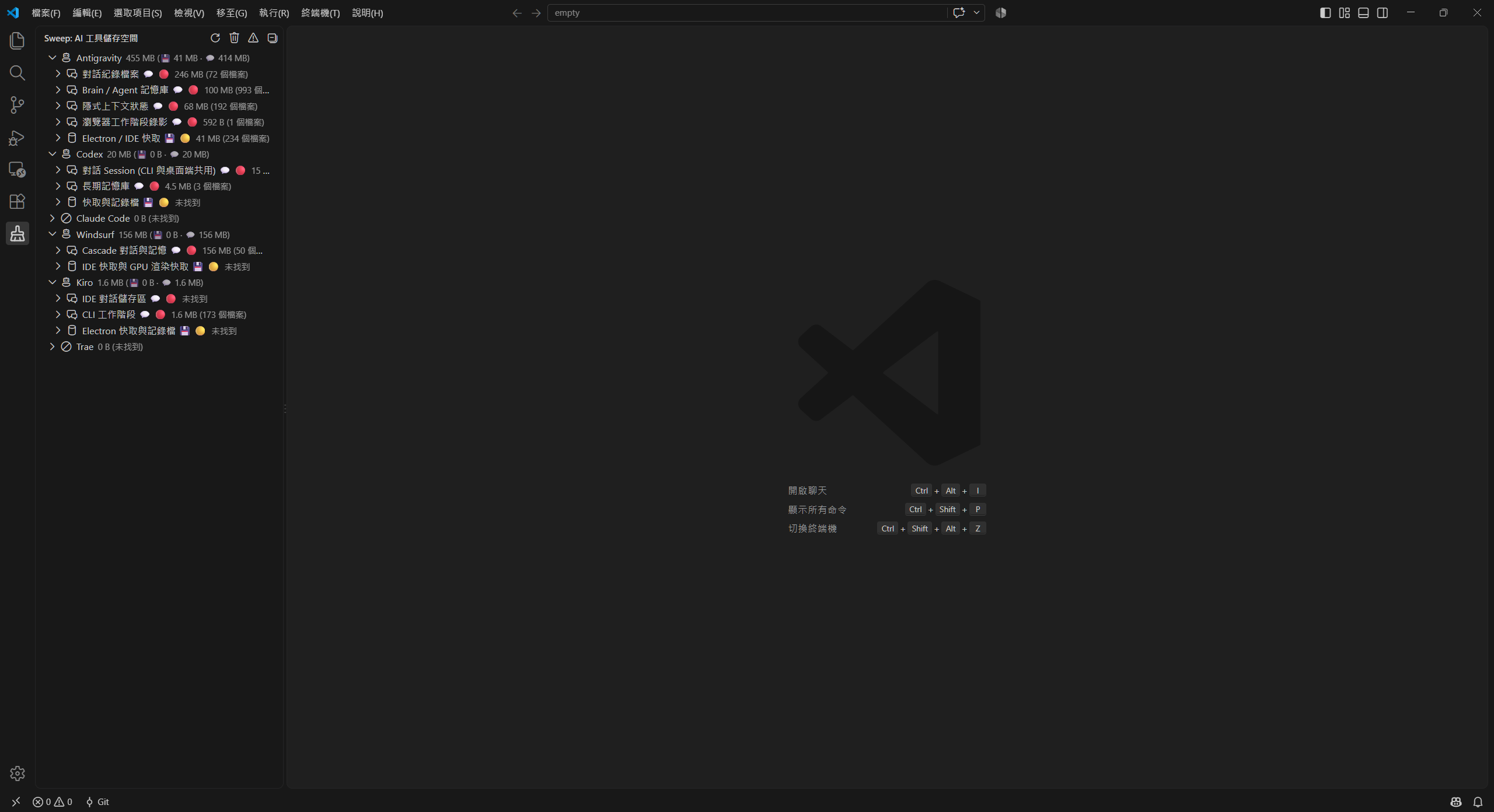
  • 📊 Activity Bar Integration: Dedicated Sweep broom icon in the Activity Bar for storage inspection.
  • ⚡ Safe Cache Clearing: One-click cleanup for Electron cache, GPU cache, and knowledge graph indexes without losing chats.
  • 💬 Conversation & Agent State Management: Granular control over conversation records with high-risk warning confirmation and automatic backups.
  • 👁️ Uninstalled Tools Filter: Quick toggle to hide uninstalled or 0-byte AI tools ($(eye)).
  • 📁 Custom Path Picker: Configure custom AI tool storage folders directly through the native folder picker ($(folder-library)).
  • 🛡️ Whitelist & Non-Deletion Protection: Permanently protect important project workspaces, paths, or session IDs with visual shield indicators ($(shield)).
  • 📦 Backup & Instant Restoration: Automatic snapshots in ~/.sweep/backups/ and one-click rollback.
  • 🤖 Comprehensive Tool Support: Works across 15 product lines including Antigravity, OpenAI Codex, Claude Code/Desktop, Windsurf & Cascade, AWS Kiro, and ByteDance Trae.

Sweep Extension Overview

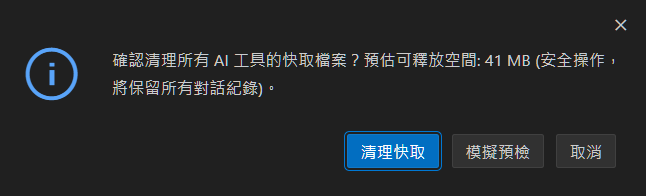
Safe Cleanup & Confirmation Modal:

Clean Cache Confirmation Dialog


🛠️ Contributed Commands

Command Title Category Description
sweep.scan Sweep: Scan storage Scan Scans and computes disk consumption across AI tools.
sweep.dryRun Sweep: Dry-run all Inspection Runs a non-destructive simulation to estimate recoverable space.
sweep.cleanCache Sweep: Clean all cache (safe) Clean Purges Electron, GPU, and IndexedDB caches safely.
sweep.cleanConversations Sweep: Clean all conversations (destructive) Clean Cleans transcripts and session databases (with confirmation).
sweep.cleanCacheForTool Sweep: Clean cache for this tool Clean Cleans cache for the selected AI tool.
sweep.cleanConversationsForTool Sweep: Clean conversations for this tool Clean Cleans conversations for the selected AI tool.
sweep.cleanSessionsOlderThan Sweep: Clean conversations older than... Filter Clean Clean sessions older than specified duration (e.g., 30d, 2w).
sweep.cleanLargeSessions Sweep: Clean large conversations (>50MB)... Filter Clean Clean conversation sessions exceeding size threshold.
sweep.pickSessionsToClean Sweep: Pick conversations to delete... Interactive Multi-select specific sessions via QuickPick to clean.
sweep.cleanSingleSession Sweep: Delete this conversation session Tree Action Deletes an individual conversation session from the tree view.
sweep.exportSession Sweep: Export conversation (Markdown / JSON) Export Exports chat history to a readable Markdown or JSON document.
sweep.listBackups Sweep: View backup history Backup Lists local snapshots in ~/.sweep/backups/.
sweep.restoreBackup Sweep: Restore from backup... Restore Restores conversations and caches from a previous snapshot.
sweep.openBackupFolder Sweep: Open backup folder Backup Reveals ~/.sweep/backups/ in system file manager.
sweep.pruneBackups Sweep: Prune expired backups... Backup Purges backup snapshots older than 14 days to reclaim space.
sweep.addToWhitelist Sweep: Add to Whitelist (Protect) Whitelist Protects selected project, path pattern, or session from deletion.
sweep.removeFromWhitelist Sweep: Remove from Whitelist Whitelist Unprotects item, restoring normal cleanup actions.
sweep.openConfigFile Sweep: Open config file Config Opens ~/.sweep/config.json for manual editing.
sweep.toggleHideUninstalled Sweep: Toggle Hide Uninstalled Tools View Toggles whether uninstalled or empty tools are hidden in tree view.
sweep.addCustomPath Sweep: Add Custom Path Config Interactively select and configure a custom storage directory for any tool.

🛡️ Whitelist & Exclusion Protection

Items marked with a Shield ($(shield)) badge are protected by whitelist rules:

  • Non-Deletion Guarantee: Whitelisted sessions, projects, and custom paths are automatically skipped during batch clean, duration filter clean, and single-item cleanup.
  • Context Actions: Right-click any conversation session or storage path in the Sweep Tree View to Add to Whitelist or Remove from Whitelist.
  • Protected Badge: Protected sessions display [🛡️ Whitelisted] with green shield icons, and individual deletion buttons are disabled.

⚙️ Extension Settings

Setting Type Default Description
sweep.customPaths object {} Custom storage paths for AI tools (e.g. { "claude-code": ["D:\\custom\\.claude"] }).
sweep.excludePatterns array [] Glob patterns of session files or directories to protect from deletion (e.g. ["**/keep-*/**"]).
sweep.whitelistProjects array [] List of project/workspace names permanently protected from conversation cleanup.
sweep.backupBeforeClean boolean true Automatically backup conversation sessions to ~/.sweep/backups/ before deletion.
sweep.hideUninstalledTools boolean true Hide AI tools that are not installed on this machine or have 0 bytes of data.

📦 Installation

Option 1: Direct Download (.vsix)

Download sweep-aicleaner-1.2.0.vsix directly from GitHub Releases, then install via command line or IDE UI:

# In VS Code:
code --install-extension sweep-aicleaner-1.2.0.vsix

# In Cursor:
cursor --install-extension sweep-aicleaner-1.2.0.vsix

Or open your editor, go to Extensions (Ctrl+Shift+X / Cmd+Shift+X), click ... at the top right, and select Install from VSIX....


Option 2: Build & Package from Source (.vsix)

# 1. Install dependencies from workspace root
npm install

# 2. Package the extension
npm run pack --workspace=sweep-aicleaner

🏗️ Architecture

The extension is bundled using esbuild into a single, self-contained CommonJS file (dist/extension.js), consuming @l1r1h28/sweep-core while keeping Node.js built-ins external for maximum compatibility across VS Code versions.


📄 License & Acknowledgments

  • MIT © L1r1h28
  • Icons based on Lucide, ISC License.
  • Contact us
  • Jobs
  • Privacy
  • Manage cookies
  • Terms of use
  • Trademarks
  • Your Privacy Choices
  • Consumer Health Privacy
© 2026 Microsoft