🌿 Branch Cleaner
Branch Cleaner is a Visual Studio Code extension that brings a Git Cleaner (gitcleaner)-style workflow into the editor: run Cleanup Branches, review local branches that look like cleanup candidates, and see whether each one is merged into your repo’s default integration branch—so you can decide what to remove without switching tools. It uses the same Git integration as VS Code (vscode.git); it does not delete remote branches.
✨ Features
- 🔍 Cleanup candidates — Local branches are offered for review when they look “abandoned” in the gitcleaner sense: no upstream, missing tip on the upstream ref, or the upstream is not on the
origin remote. Your current branch is never listed.
- 🎯 Baseline branch — Merge hints are computed against the default integration branch derived from
origin (preferring origin/HEAD, with sensible fallbacks when that symref is missing).
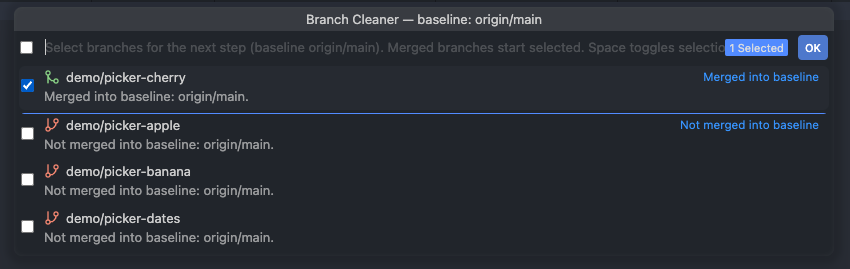
- 🏷️ Merge labels — Each candidate is grouped and labeled as merged into baseline, not merged into baseline, or could not verify merge (when the check is inconclusive).
- 🖼️ Review UI — A multi-select Quick Pick lists candidates with short explanations. Merged branches start selected; Space toggles selection; Esc cancels with no changes.
🚀 How to use
- 📁 Open a folder that contains a Git checkout (not only loose files).
- 🔌 Ensure the built-in Git extension is enabled (this extension depends on
vscode.git).
- ⌨️ Open the Command Palette and run Git: Cleanup Branches.
- ✅ In the picker, adjust the selection if needed, then confirm. (Deletion of selected branches is not performed in this version.)
If no candidates match the rules, you’ll see an informational message instead of the picker.
⚙️ Requirements
- 💻 VS Code
1.96.0 or newer (see engines.vscode in package.json), or Cursor on a build whose underlying VS Code engine meets that minimum.
- 📂 Git installed and available to VS Code’s Git support (same prerequisite as using Git in the editor).
- 🧩 Node.js is not required to use the extension; it is only needed to build from source.
🔒 Privacy
The extension runs entirely in your workspace and talks to Git through VS Code’s APIs. It does not include telemetry and does not send branch names or repository data to external services.
📦 Install
- 🛍️ Marketplace: search for Branch Cleaner by publisher Kvintus in the Extensions view.
- 📦 VSIX: build a package locally (see below), then use Extensions: Install from VSIX….
🛠️ Development
Prerequisites: Node.js 20+.
npm install
npm run compile
npm run compile runs tsc --noEmit and esbuild, producing dist/extension.js.
For iterative work:
npm run watch
Run unit tests:
npm run test:unit
Production bundle (typecheck + minified output):
npm run package
Build a VSIX (example filename):
npm run compile
npx --yes @vscode/vsce@3.7.1 package -o branch-cleaner.vsix
Publisher id for the Marketplace is set in package.json (publisher). Source repository: github.com/momentum/vscode-branch-cleaner.
📄 License
MIT

