Smali Language Support (SLS)
Language support for .smali files in Visual Studio Code.
This extension is built for large decompiled Android projects and focuses on fast navigation, workspace indexing, and practical reverse-engineering workflows.
Built for multi-dex Android reverse-engineering workflows in VS Code.
Features
- Go to Definition for:
- classes
- fields
- methods
- registers (
v0, p1, etc.)
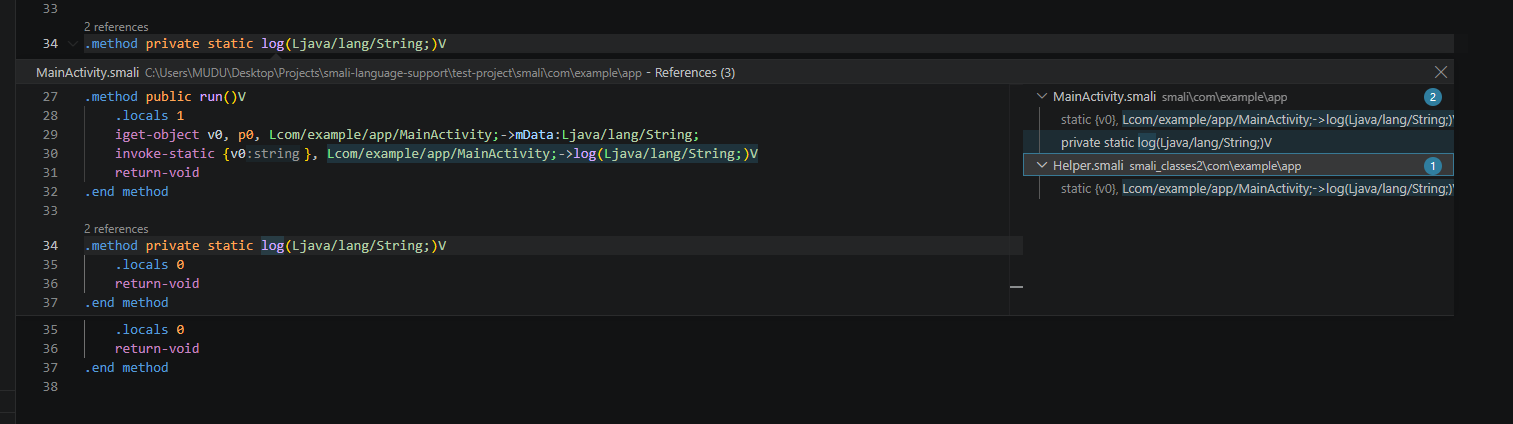
- Find References across the workspace
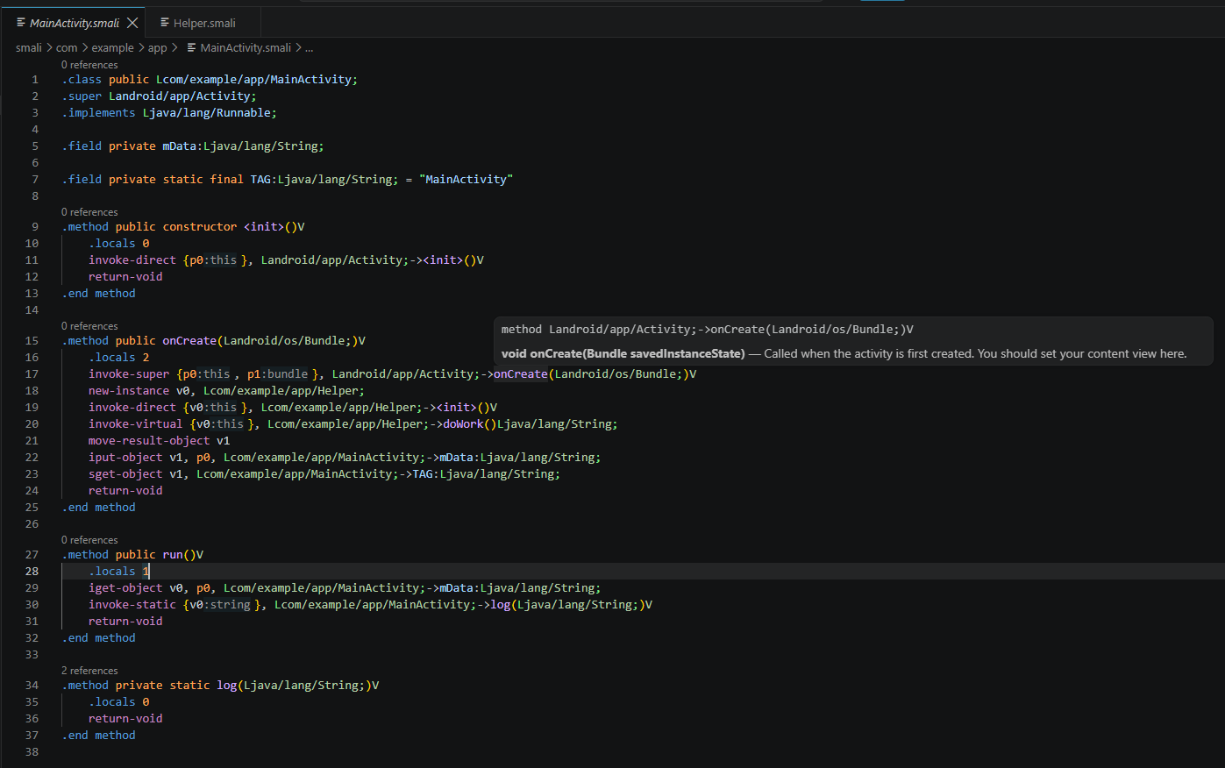
- Hover information for:
- Smali opcodes
- workspace symbols
- many Java / Android SDK symbols
- Code completion for Smali symbols and opcodes
- Rename support
- Outline / Document Symbols
- Call Hierarchy
- Semantic highlighting
- Inlay hints for:
- invoke parameter labels
- hex-to-decimal values (for example
0x22 = 34)
- Informational reference count CodeLens
- Background workspace indexing with progress reporting
- Incremental reindexing after file changes
- Disk-backed cache stored inside
.vscode/.smali-cache/
- Manual reindex command:
Smali: Reindex Workspace
Preview
Usage example
Open a .smali workspace and use:
- F12 for Go to Definition
- Shift+F12 for Find References
- hover for SDK and opcode help
- inline hints for registers, parameters, and hex values
Hover and inlay hints
References view
Designed for large projects
The extension is built to work well with multi-dex Smali trees such as:
smali/smali_classes2/smali_classes3/- and other nested Smali folders
It indexes the workspace in the background, keeps the UI responsive, and reuses cache data on later opens.
What you can do
Navigate registers
Examples:
const/4 v0, 0x0
sput-boolean v0, Lcom/example/app/TaskListener;->running:Z
- Trigger Go to Definition on
v0 to jump to its assignment
- Trigger Find References on
v0 to see where it is used inside the method
Navigate methods and fields
invoke-static {v0}, Lcom/example/app/TaskListener;->checkApi(Landroid/app/Activity;)V
- Go to the target method definition
- Find all call sites across the workspace
See SDK / external symbol help
When a symbol is not defined inside the current workspace, hover still provides useful information when the symbol is recognized from the Java / Android SDK knowledge base.
Example:
invoke-direct {v0}, Ljava/util/Random;-><init>()V
Hovering Ljava/util/Random; or its members can show contextual information instead of failing navigation silently.
Read numeric values faster
Hex literals get decimal inlay hints:
const/16 v0, 0x22 ; shows: = 34
.array-data 4
    0x1f5            ; shows: = 501
    0x1f9            ; shows: = 505
.end array-data
Commands
Smali: Reindex Workspace
Clears cached index data and rebuilds the workspace index from scratch.
Use this if:
- a decompiled project changed heavily outside VS Code
- you want to discard old cached data
- you want to force a clean full scan
Installation
Build VSIX
npx @vscode/vsce package
This creates a file like:
smali-language-support-sls-1.0.0.vsix
Install from terminal
code --install-extension .\smali-language-support-sls-1.0.0.vsix --force
Install from the VS Code UI
- Open Extensions
- Click the
... menu
- Choose Install from VSIX...
- Select the generated
.vsix file
Install in WSL
Run the same install command from a WSL terminal attached to VS Code:
code --install-extension .\smali-language-support-sls-1.0.0.vsix --force
After installation
- Open a folder containing
.smali files
- Wait for background indexing to finish
- Use:
- F12 for Go to Definition
- Shift+F12 for Find References
- hover for opcode / symbol information
- Ctrl+Shift+P ->
Smali: Reindex Workspace
Cache location
The extension stores index cache data inside the workspace:
.vscode/.smali-cache/
This keeps cache files out of the project root and allows faster reopen/index cycles.
Notes
- This extension is intended for Smali reverse-engineering and decompiled Android projects.
- External framework classes are not treated as workspace errors.
- Background indexing reports progress in the VS Code UI.
Development
npm install
npm run compile
Requirements
- Visual Studio Code
^1.75.0
License
MIT

