🎃 Halloween Theme
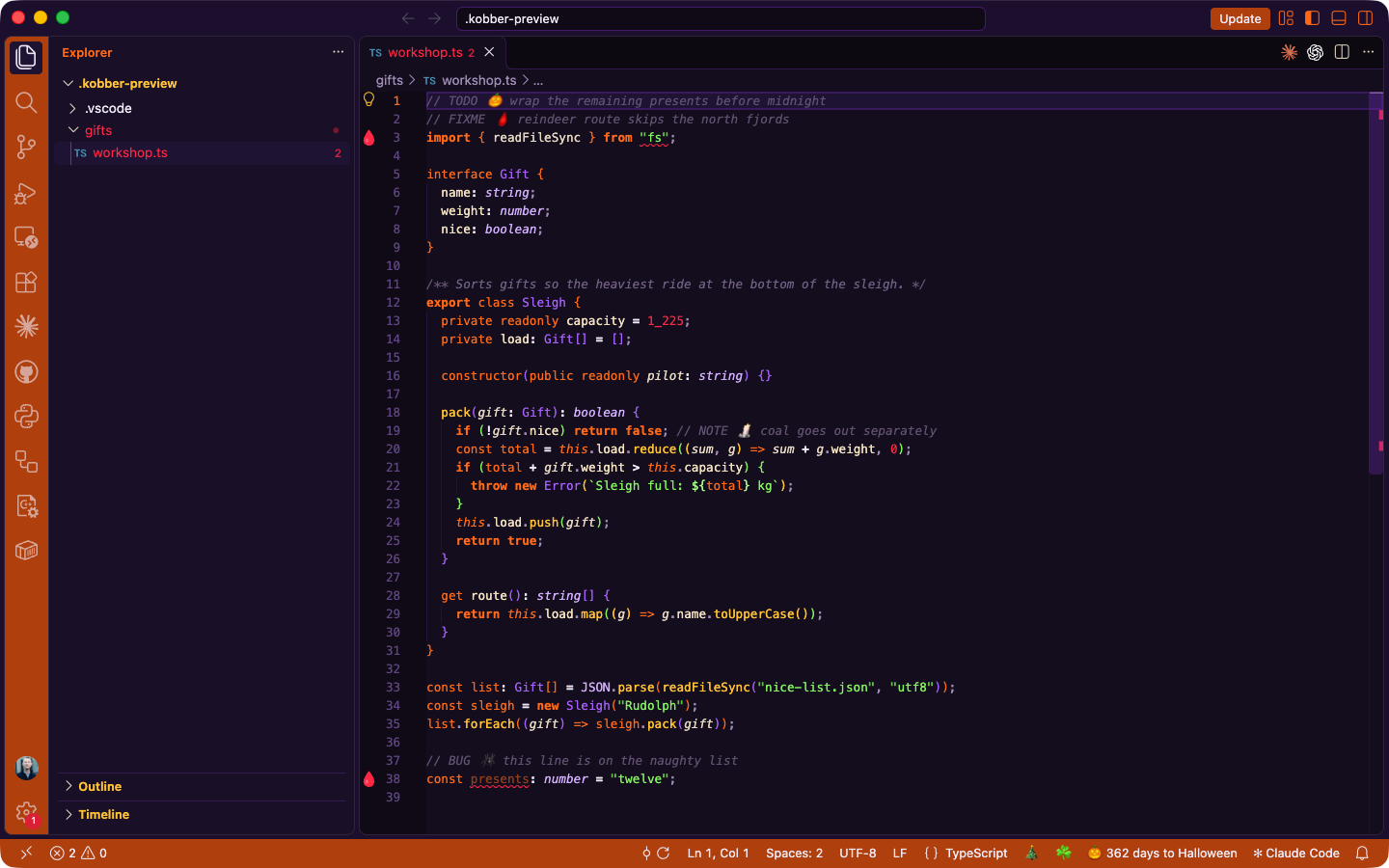
A spooky VS Code color theme inspired by Halloween — jack-o'-lanterns, witches, and slime on a midnight-purple night.
Color Palette
| Role |
Color |
| Background |
#14091F — midnight purple |
| Activity Bar / Status Bar |
#B8490B — pumpkin |
| Keywords |
#FF7518 — pumpkin orange (bold) |
| Strings |
#8DF56B — slime green |
| Functions |
#FFC93C — candy corn yellow |
| Types / Classes |
#B26CFF — witch purple |
| Numbers |
#FF2E4D — blood red |
| Comments |
#6B5B7B — graveyard grey (italic) |
| Variables |
#E8DCC8 — bone |
| Foreground |
#F2ECF7 — ghost white |
Spooky Details
- Semantic highlighting on:
self/cls glow pumpkin, dunder methods witch purple, deprecated symbols struck through in blood red
- Ghost text (inline suggestions) and dead code fade into the shadows
- Bracket pairs cycle pumpkin, witch purple, slime, candy corn, blood, ghost teal
- Docstrings whisper in dim italic; string quotes dim to swamp green
- Menus, pickers, hovers haunted purple borders and shadows
- Diff / merge / git in slime and blood; tests pass slime, fail blood
- Terminal 16-color palette: blood, slime, candy corn, witch purple, ghost teal, bone
Effects
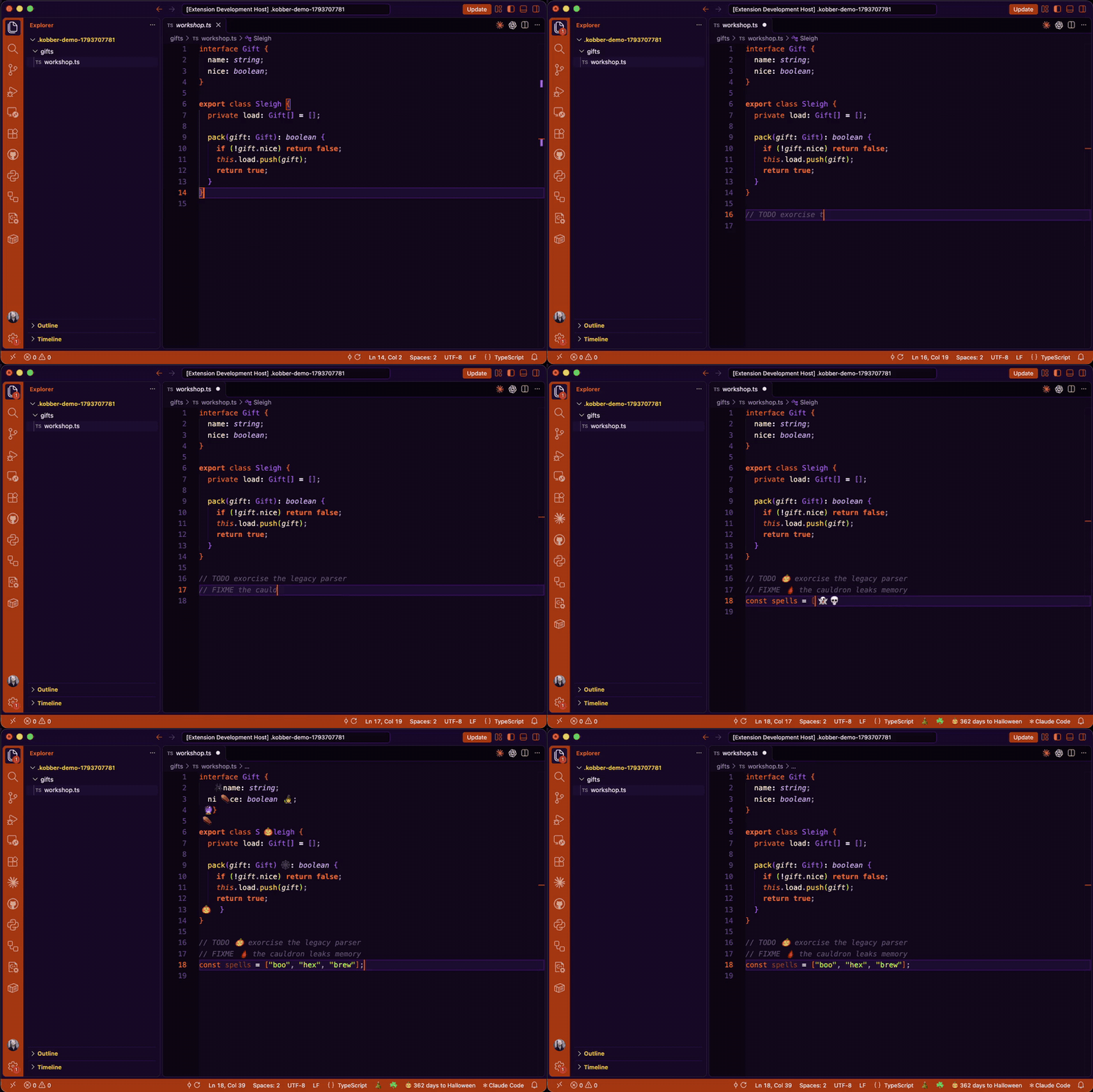
Effects only run while 🎃 Halloween is the active color theme (setting halloween.onlyWhenThemeActive).
| Effect |
What happens |
Setting |
| Typing pops |
Every 4th keystroke a 🎃 👻 🦇 🕷️ 💀 pops after the cursor and vanishes |
halloween.typingEffects.* |
| Comment emojis |
🎃 TODO, 🩸 FIXME, 🕷️ BUG, 👻 HACK, 💀 XXX, 🕯️ NOTE, 🕸️ DEPRECATED / @deprecated |
halloween.commentEmojis.enabled |
| Gutter icons |
Blood drip on error lines, cobweb on warning lines |
halloween.gutterIcons.enabled |
| Status bar |
🎃 40 days to Halloween, click to cycle installed Kobber themes |
halloween.statusBar.enabled, halloween.cycleThemes |
| Save messages |
Occasional "👻 Saved... for now." in the status bar |
halloween.saveMessages.enabled |
| Snippets |
spooky banner, pumpkin ASCII art, rip tombstone TODO (any language with line comments) |
|
Commands (Cmd+Shift+P): Halloween: Summon Spirits, Halloween: Toggle Typing Effects, Halloween: Cycle Color Theme.
Neovim
Same palette as a Neovim colorscheme, with a matching lualine theme, in neovim/. One-liner install and lazy.nvim spec in its README.
Installation
From VSIX (manual)
- Download the
.vsix file
- Open VS Code → Extensions (
Ctrl+Shift+X)
- Click
... → Install from VSIX...
- Select the file and reload
From source (development)
cd vscode-themes
code .
# Run and Debug → "Halloween Theme" → F5 to launch Extension Development Host
# Then: Command Palette → Color Theme → 🎃 Halloween
Build VSIX
npm install -g @vscode/vsce
cd halloween-theme
vsce package
License
MIT
| |

