
KlaatAI — AI Coding AssistantAI-powered coding assistant with live code changes, tool execution (read/write/grep/shell), and inline diffs — directly inside VS Code. Installation Launch VS Code Quick Open ( Ctrl+P), paste the following command, and press enter.Copied to clipboard |

KlaatAI — AI Coding Assistant for VS Code
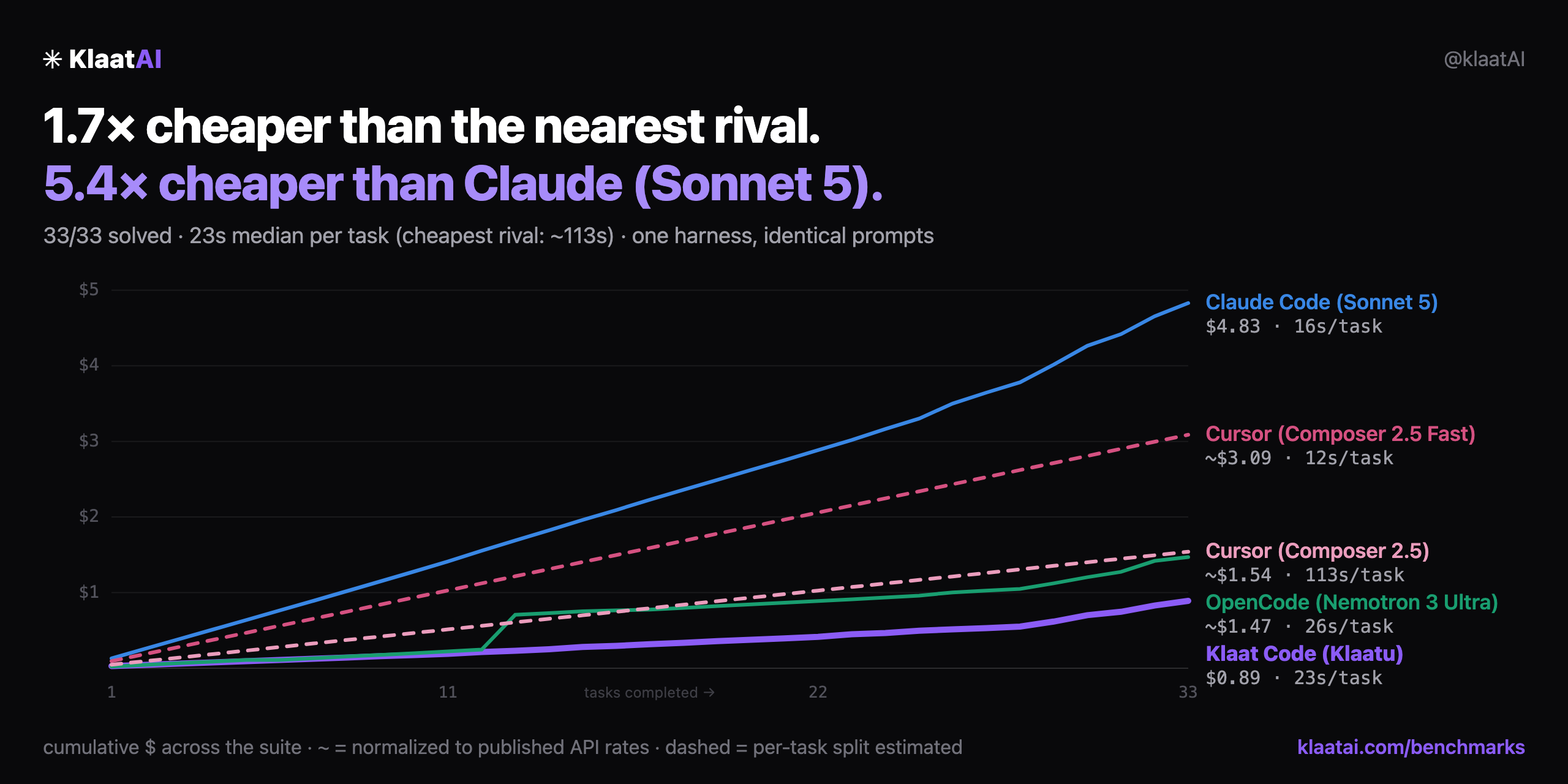
Same 33-task suite, one harness, identical prompts. Full methodology: klaatai.com/benchmarks Why KlaatAI?
FeaturesAgentic ChatOpen the KlaatAI sidebar ( 30+ built-in tools:
Four agent modes for different workflows:
Enrich prompts with @-mentions:
Drag & drop files from the OS or VS Code explorer, or paste screenshots directly into chat. Inline Edit —
|
| Tier | Best for | Example models |
|---|---|---|
| Auto | Default — picks the right tier per task | Automatic |
| Fast | Quick Q&A, simple questions | GPT-4o-mini, Claude Haiku |
| Code | File changes, tool use | GPT-4o, Claude Sonnet |
| Reason | Complex architecture, debugging | Claude Opus, DeepSeek-R1 |
| Heavy | Large-scale reasoning | Frontier models |
| Titan | Frontier escape hatch — pick it by name, or let Auto escalate into it from Heavy | Kimi K3 (2.5T) |
The ladder is Nano → Fast → Code → Reason → Heavy → Titan. Titan is the top rung: Auto reaches it only by escalating above Heavy when a turn keeps failing or outgrows the context — never from a prompt's wording alone — and you can always pick it yourself. It is the priciest tier by a wide margin, so per-plan daily caps apply and exhausted requests fall back to Heavy.
Extensibility
- MCP (Model Context Protocol) — connect external tool servers via
klaatai.json - Custom plugins — add your own tools in
.klaatai/tools/*.js - Workspace rules — auto-loaded from
.klaatai/rules.md,AGENTS.md, or.cursorrules
Agent Depth
- Background agents in isolated worktrees — fire a task that runs in its own git worktree; your working tree stays untouched until you review and merge the result (PR-style merge-back).
- Regression gate — after a run of edits, KlaatAI auto-detects and runs your test suite, surfacing failures before you do.
- Adversarial verify — cross-review a diff with a different, stronger model than the one that wrote it.
- Blast-radius awareness — when the agent edits a symbol, it sees who calls it (from the code graph) plus a churn heat-map flagging fragile call sites.
Getting Started
- Install the extension from the VS Code Marketplace.
- Click the KlaatAI icon in the activity bar.
- Sign in — opens your browser, no API keys needed.
- On SSH/remote/headless: use KlaatAI: Sign In (Device Code) instead.
- Open a folder or repo and start chatting. The code graph indexes in the background.
Commands & Keybindings
| Command | Keybinding | Description |
|---|---|---|
KlaatAI: Open Chat |
Cmd/Ctrl+Shift+K |
Open the chat sidebar |
KlaatAI: Inline Edit |
Cmd/Ctrl+K |
Edit selected code in place |
KlaatAI: Add Selection to Chat |
Cmd/Ctrl+L |
Send selected code to chat |
KlaatAI: Explain Selected Code |
Cmd/Ctrl+Shift+E |
Explain the selection |
KlaatAI: Fix / Improve Selected Code |
— | Fix or improve selected code |
KlaatAI: Review Current File |
— | AI code review for the active file |
KlaatAI: Review Current PR |
— | Review the current Git PR |
KlaatAI: Generate Tests |
— | Generate tests for file or selection |
KlaatAI: View Memory |
— | See / delete what it has learned |
KlaatAI: Re-index Project |
— | Rebuild the code knowledge graph |
KlaatAI: Select Model / Tier |
— | Override automatic model routing |
KlaatAI: Show Completion Stats |
— | View inline completion acceptance rate |
KlaatAI: Sign In (Device Code) |
— | Sign in on SSH / remote / headless |
KlaatAI: Predict Next Edit |
Cmd/Ctrl+Alt+] |
Jump to and apply the next likely edit |
KlaatAI: Review Changes |
Cmd/Ctrl+Alt+R |
Review pending edits, accept/revert a subset |
KlaatAI: Checkpoint Timeline |
— | Browse and restore any past checkpoint |
KlaatAI: Show Context Breakdown |
— | See what's consuming the context window |
KlaatAI: Show Latency Report |
— | Rolling p50/p95 latency summary |
KlaatAI: Manage MCP Servers |
— | Enable/disable, reconnect, view MCP errors |
KlaatAI: Run Regression Gate |
— | Detect and run the project's test suite |
KlaatAI: Adversarial Verify Changes |
— | Cross-review the diff on a different, stronger model |
KlaatAI: Background Agents |
— | Review / merge / discard isolated worktree agents |
KlaatAI: Get Started |
— | Open the onboarding walkthrough |
Settings
| Setting | Default | Description |
|---|---|---|
klaatai.inlineCompletions |
true |
Ghost-text tab completions |
klaatai.memory |
true |
Learn your stack and style across sessions |
klaatai.indexProject |
true |
Index workspace into the code graph |
klaatai.autoDebug |
true |
Auto-detect and fix errors after AI edits |
klaatai.stagedEdits |
false |
Preview file changes in diff before applying |
klaatai.formatOnSave |
true |
Format files after AI writes/edits |
klaatai.autoApproveReads |
true |
Skip confirmation for file reads |
klaatai.maxToolRounds |
25 |
Max agent steps per message |
klaatai.outputFilter |
true |
Strip progress/spinner/dupe noise from tool output (token savings) |
klaatai.toolDialects |
true |
Send trimmed tool schemas on fast/nano tiers |
klaatai.attentionOrder |
true |
Reorder long history so key turns sit where models attend most |
klaatai.phaseBudgets |
true |
Track explore/implement/verify spend; pause on stuck-reading loops |
klaatai.maxSessionCost |
0 |
Hard USD cap per session (0 = off) |
klaatai.allowedCommands |
[] |
Glob patterns for shell commands to auto-approve |
klaatai.deniedCommands |
[] |
Glob patterns for shell commands to block |
klaatai.autoImpactCheck |
true |
Show blast radius (callers) of symbols an edit touches |
klaatai.regressionGate |
true |
Auto-run tests after a run of edits |
klaatai.worktreeAgents |
true |
Run background agents in an isolated git worktree |
Pricing
Install, sign in, start coding — no credit card, no API keys. A free tier gets you going; paid tiers unlock higher limits and priority routing. The differentiator is automatic multi-model routing: you get frontier-model quality on the hard tasks and cheap-model speed on the easy ones, without paying frontier prices on every request.
| KlaatAI | Cursor | Claude Code ext | GitHub Copilot | |
|---|---|---|---|---|
| Price | $0 / $14 / $19 | $20/mo | $17–200/mo | $10–39/mo |
| Multi-model routing (30+ models) | ✅ automatic | partial | single family | single family |
| Cost/context/memory transparency | ✅ visible | opaque | opaque | opaque |
| Code-graph grounding | ✅ shared with CLI | — | — | — |
| Runs inside Cursor/Windsurf/VSCodium | ✅ via Open VSX | — | — | — |
Why it's cheaper without being worse
The same efficiency engine powers our CLI, which solved 33/33 tasks at $0.89 — 1.7× cheaper than the nearest rival and 5.4× cheaper than Claude Code (Sonnet 5) on one harness with identical prompts (see the chart above). This extension ships that engine: output compression, per-tier tool dialects, attention-ordered context, and budget guards — all surfaced transparently (see Show Context Breakdown).
Privacy & Security
- Memory can be turned off (
klaatai.memory: false). View Memory lets you inspect and delete anything. - Code indexing can be turned off (
klaatai.indexProject: false). - Telemetry is opt-in and follows your VS Code telemetry setting — off means nothing is sent (
klaatai.telemetry). - Sign-in tokens are stored in the OS keychain via VS Code SecretStorage.
- No code is sent to third parties beyond the model providers used for inference. Full details: PRIVACY.md.
Links
Made with care by the KlaatAI team.