Codex Peek — Claude Code ↔ Codex / Codex ↔ Codex Harness
Connect Claude Code or a dedicated Codex session (implementation) to a separate OpenAI Codex session (verification) — no human copy-pasting between the two AIs. Claude Code ↔ Codex remains the default; the dashboard can switch each project/language slot to Codex ↔ Codex.
What it does
- Two harness modes — the dashboard switches Status, Verification Statistics, and Advanced Settings together. In Codex ↔ Codex, each real prompt pins that exact visible Codex conversation as the current implementer; there is no dashboard control that silently routes implementation to another room, and prompting in another conversation moves the implementer link and green marker there. Its verifier shares the Claude-mode verifier by default (purple line plus an explicit “same session” label), while an existing different thread can be selected as a Codex ↔ Codex-only override. Verifier model/reasoning preferences use the same inherit-or-override rule. A verifier cannot also be the implementer. Both Codex roles warn on model and reasoning drift; Claude implementation warns on model only because its actual reasoning level is not recorded. Mode rules are separated by project and Korean/English slot; stage principles and 3-track maps/journals/docs remain shared project assets.
- Reviewable Codex hook setup — on first extension activation (or first Codex ↔ Codex selection), the extension offers an install review when the Codex Peek package or user-level runtime hooks are missing. You can reopen it with
Codex Bridge: Codex 구현 훅 설치. With consent, the extension backs up and preserves existing entries while merging SessionStart, UserPromptSubmit, PostToolUse, and Stop into ~/.codex/hooks.json. Some Codex versions discover plugin-bundled hooks but do not execute them, so the package intentionally carries no duplicate hook definitions and the user file is the sole runtime authority. Trust is checked separately through official hooks/list; untrusted hooks are directed to Codex Settings → Hooks. After trusting them, starting or resuming a Codex conversation pins it as the implementer, with the first prompt rollout as fallback when a list click does not resume it. A missing or stale lifecycle heartbeat keeps the dashboard in a non-dismissible red state.
- Session pinning — links your workspace to one Codex session; the link survives reloads, compaction, and restarts. Only one verification may run per workspace: a differently worded
ask and --force-resend are also blocked while one is active, and long session_meta records are read through the first newline so a new first-contact session is linked immediately. If an outer capture window closes first, do not resend; check the dashboard or ask-active status. Once the hooks are set up, raw codex calls from Claude Code are guarded so Claude's Codex access goes through the bridge (your own terminal is untouched).
- One real timeout — any dashboard value from 1–60 minutes becomes the durable verification job's absolute deadline and the direct-call timeout.
ask-start launches exactly one job and ask-wait polls it in short calls, so a caller's fixed 10-minute capture window cannot silently replace the configured wait.
- Per-project contract — rules you write in the dashboard are injected every turn (Claude via hook, Codex prepended to every ask). Per-project only, no inheritance; empty boxes cost zero tokens.
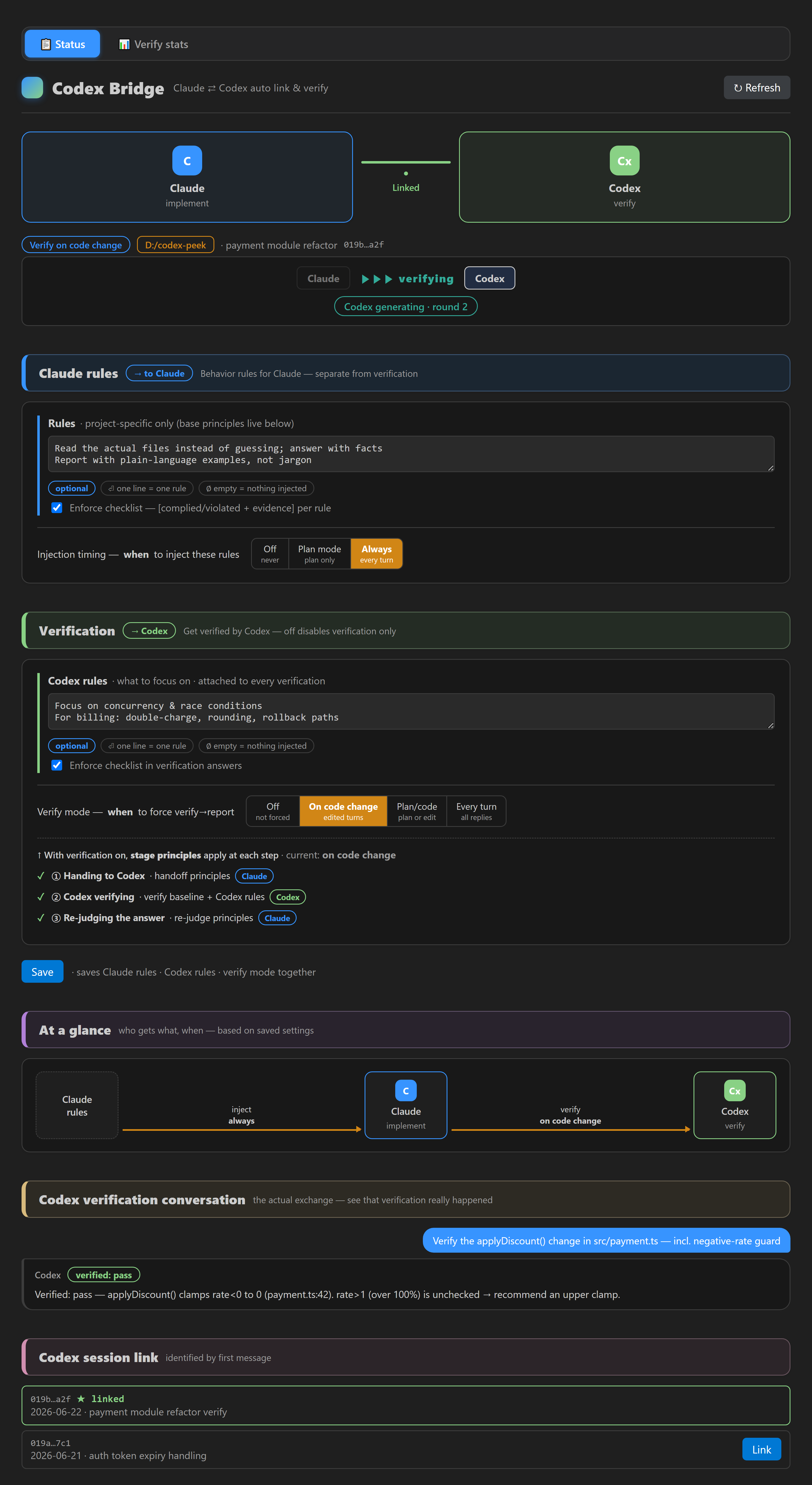
- Verify mode (opt-in, default OFF) — on code change / plan confirm / every turn (your pick), a Stop hook blocks the implementer from finishing until it gets a real, successful Codex verification. Fake or echoed commands don't count. Verification jobs run one at a time; after a failure and fix, the next round starts sequentially. At the user-set round cap, verifier calls stop and only the latest findings are assigned once to accepted-and-handled, evidence-backed rebuttal, receipt-backed parking, or a genuine user decision. Every item is a keyed line: each acceptance change/check/evidence field and each rebuttal observation/reason/evidence field must carry its own identifiable file, setting, test, or measurement; parking requires an open receipt whose title matches that finding. The implementer closes the first three lanes and asks one combined question only when the last lane is nonempty.
- Live visualization — status bar flow (
[Claude] ▶▶ verifying [Codex]), red/yellow integrity alerts (turn ended unverified, verdict failed, cap closeout missing, cited file:line doesn't exist, model/effort drift), and a dashboard showing the actual verification conversation with 4-color verdict chips. An exhausted cap with a real choice is awaiting user decision; one fully handled by the other three lanes is triage complete (not a pass). A red cap closeout missing alert means the four-way disposition was omitted and must not be ignored; it clears when the closeout is completed.
- Verification statistics tab — verdict distribution (donut + bars, 28 days), 14-day trend, weekday×hour activity heatmap, tokens per model·reasoning-effort·verify-mode, work tokens + turns, per-project comparison, and (3-track only) the cumulative 3-track contribution card plus Project MAP operations. The MAP section keeps current map evidence, recent automatic enrichment, current choices/recovery, external calls by purpose, and data coverage separate. It shows real tokens only when the provider reported both sides; calls without tokens retain input/output character counts instead of appearing as zero-token calls. The screen covers 28 days, logs are kept for 60 days, and locally recorded events are neither a service bill nor a map-accuracy score. The UI is bilingual (Korean/English, global toggle) — project rules, stage baselines and recon settings are stored in per-language slots (the scout-target folder is a fact rather than language content, so an empty slot inherits the other slot's value — set it in the current slot to make it independent), and scout prompts/map text follow the global language.
- Track selector (2-track default / 3-track advisory) — 3-track turns on the recon flow (see "Recon (3-track) at a glance" below): ① change sensing ② impact map ③ field journal ④ field manual. Advisory-centred, saved per project — the one exception is the plan gate (on by default in 3-track, promoted 2026-07-09): if the impact map is missing or stale, it asks for a map before plan confirmation, blocking at most 2×/session then passing (fail-open — errors never block), the notice carries that project's own observation signals, and
node "<bridge home>/scope-gate.js" <repo> off turns it off anytime (everything else blocks/forces nothing); data leaves the machine via exactly four routes — whenever a Codex verification is sent (2-track core: the request plus automatic attachments [map slice · coupling lines · harness base directives] through your existing codex CLI), with a DeepSeek key (②'s DeepSeek scout package plus a single connection check when 3-track is switched on; key registration = consent), when the Claude scout runs (the default in Claude↔Codex mode), the same package travels through your existing Claude CLI to the Claude service (no separate billing — same nature as verification going to Codex), and when the Codex scout is selected on the dashboard, the same package travels through your existing codex CLI to the Codex service (one independent run separate from verification, forced read-only — within your existing Codex account usage; see PRIVACY). Prerequisite: ①'s "changed-together" hints read the local change history (git commits) — without one, or with few commits, only those hints say "no data" (normal, not a bug); ② maps still work from recently modified files. Scout-target self-diagnosis: when the session folder differs from the actual dev repo, the harness detects the mismatch from where verification citations actually live — the auto-directive tells the agent how to set the target, the dashboard shows a one-click setup card, and switching 3-track on includes a target confirmation step (all advisory · saved to the current language slot).
- Automatic semantic enrichment (opt-in) — pick an enrichment provider (default Claude / DeepSeek / Codex / auto) and give explicit consent (one click for the default provider; a modal when selecting a billed one — previously saved choices never auto-run). The map draft plus source excerpts are then sent to that provider in the background when a new map or source change is observed; results flow through the map patch pipeline (propose→verify→apply) with a 60-day routing/cost audit log (see PRIVACY.md). Source excerpts sent to the provider are taken around this change's edited lines (git baseline vs. working tree; head-of-file fallback with a title note when there is no git or the file is new), and evidence quotes in the provider's answer count only when they come from the excerpt that was sent · Excerpt scope (under the provider row): choose per project how many files and how many characters per file are sent — presets Light 8/2,000 · Recommended 10/3,000 (default) · Large 15/4,000 · Max 20/4,000; out-of-range values are not saved, and the numbers are yours to tune by the status card's citation line (not a benchmark result) · Re-asking: when an answer is rejected and asked again (automatic retry, unattended resume, or the Retry button), only the machine classification of the dropped items (stage · code · item index · kind) is attached — no file contents or answer sentences are re-sent, and the number of calls does not grow.
- Project MAP policy and recovery (P9, 3-track only) — after enrichment, pending changes that match an effective user policy continue through the P2 pipeline automatically. The Project MAP choices & recovery card asks only when effective policies oppose each other. A choice is durably recorded locally first; the resulting policy and decision are shared under the repository's
project-map/policies/ and decisions/. If automatic completion is safely parked, only the dashboard's explicit retry resumes that choice or delegation. Replacing or revoking a policy keeps old files as supersession/.revoke.json history. Corruption recovery requires two explicit steps—create a recovery copy, then back up and replace; its confirmation plan binds a nonce and the original/candidate/recovery fingerprints, and an interrupted replacement converges on the next read. Core APIs recheck 3-track mode even after a dialog, so in 2-track mode this channel and its automatic sweep are entirely off.
- Project MAP verification waiting — when semantic enrichment has no verifier connection or receives an inconclusive verdict, only that advanced semantic patch moves to a durable waiting ledger. The base map and independent later items continue. The dashboard separates applied, awaiting verification, rejected, and investigation-needed counts. Normal observation never repeats the verifier call; only an explicit retry or an eligible new verifier connection can reopen it.
- Project MAP operations (P10, 3-track only) — the Verification Stats tab shows current evidence as current / source changed and refresh needed / insufficient evidence / temporarily excluded, folds the latest states of unique enrichment runs and job generations over 28 days with an explicit completion numerator and denominator, reuses the current P9 choice/retry/recovery snapshot, and separates impact-map generation, global readiness checks, semantic enrichment, and verifier adjudication usage. A missing terminal record is reported as a data limitation, not proof of interruption. In 2-track mode the cards are hidden and the two statistics logs and Project MAP reader are not read.
- One-click setup, clean uninstall — the extension deploys its bridge engine into its own folder automatically. Claude Code hooks are registered only after you review and consent (you see the exact file, backup path, and the 4 hook lines first; other hooks are preserved). Uninstalling the extension removes only what it installed — your links, contracts, and stats are kept.
Requirements
- Claude Code CLI (hooks support) and OpenAI Codex CLI (
codex exec) — the codex binary is auto-detected (ChatGPT VS Code extension, PATH, or CODEX_BIN).
- Node.js 20+ (used by the hooks; the setup flow verifies the path actually runs).
Install from GitHub
For the complete extension, bridge, hooks, and developer scripts (retro/reconcile/sync — the 3-track recon runtime itself is bundled in the marketplace build as well, since 2026-09-16), download codex-peek-0.1.104-installer.zip, extract it, then run install.cmd on Windows or sh install.sh on macOS/Linux. Node.js 20+ is the only prerequisite; the bundle includes a prebuilt VSIX, so npm install is not required. Finish with Developer: Reload Window in VS Code.
If 0.1.104 is already installed, the bundled installer backs up and overlays only the changed runtime files instead of asking VS Code to force-delete the live extension directory. For an extension-only install (verification, dashboard and 3-track recon all work), install codex-bridge-0.1.104.vsix with Extensions: Install from VSIX...; existing 0.1.104 installations should use the full bundle for a safe same-version refresh. Checksums are published as SHA256SUMS.txt on the v0.1.104 release page.
Getting started
- Install this extension.
- A notification appears if verification hooks aren't registered — click Review & install, check what will change (file, backup, 4 hook lines), then click Install. (Command palette:
Codex Bridge: Claude Code 검증 훅 설치 any time.)
- Recon (3-track) works from the marketplace build alone (since 2026-09-16): the recon runtime (3 runners, package collector, store, target/gate/map commands, journal tools) is deployed to the bridge home next to the engine, and hook/dashboard hints point there — e.g.
node "<bridge home>/scope-scout-self.js" <repo>. Only developer tools (retro, reconcile, sync) stay repo-only. The default scout follows the harness mode — Claude↔Codex defaults to the Claude scout (free), Codex↔Codex to the Codex scout. If the scout's CLI (or DeepSeek key) is missing, the dashboard shows "not ready" with the reason, and the plan gate and auto-directive pass instead of demanding a run you cannot perform (2026-09-17).
- Click the status bar item to open the dashboard: link a Codex session, write your contract, pick a verify mode.
- Verification takes effect right away: Claude Code watches the settings file, so a session that already had this file picks the change up without restarting. One exception: a session that started when this settings file did not exist is not watching it, so that session needs a restart.
Safety & privacy
- The extension and bridge add no telemetry and no server of their own. All bridge data stays in local files. Calling Codex (verification) runs your local
codex CLI, the Claude scout (map generation; the default in Claude↔Codex mode) runs your local claude CLI, and the Codex scout (when selected on the dashboard) runs your local codex CLI as one independent, forced-read-only run separate from verification — so the evidence package travels through the Claude service when the Claude scout runs, and through the Codex service when the Codex scout runs; network traffic to OpenAI/Anthropic is what those CLIs normally do, nothing extra. A DeepSeek key adds two flows (only with a key registered): ① when DeepSeek map generation runs (3-track scouting) — either you run it directly, or the implementer of the current mode (Claude, or an implementer Codex) runs it under the 3-track auto-directive (key registration = consent; the extension/hooks themselves never send the package) — the evidence package is sent to the DeepSeek API; ② a single connection check when 3-track is switched on (not a package); what is sent, what is auto-excluded, and the trigger conditions are documented in PRIVACY.
- Recon (3-track) at a glance — the dashboard's recon section is one flow, each step badged by whether it uses an LLM:
① change sensing (files you're editing + hints of files that used to change with them; formerly "scope ledger") ⚙ no LLM ·
② impact map (a scout AI previews how far the change reaches; formerly "impact-map board") ⚡ LLM call (Claude scout = no separate billing, within the usage you already have (the default in Claude↔Codex mode) / DeepSeek scout with a key / Codex scout within your existing Codex account usage (the default in Codex↔Codex mode)) ·
③ field journal (right/wrong accrues automatically through verification; formerly "observed/MAP ledger") ⚙ no extra LLM ·
④ field manual (stamp items into repo docs, docs/MAP.md, only when you want — ①–③ keep running without it. After cutover (P3b — a manual command): the old document is frozen with a migration-source banner and new approvals go through Project MAP only — the "we never touch your docs" promise describes the pre-cutover mode, and cutover happens only when you run it yourself) 👤 optional.
Accrual/promotion/demotion are fully automatic. A verifier that explicitly selects a journal coupling and actually reads and cites its exact two paths supplies one strong confirmation; incidental co-citations and legacy confirmations require two separate runs. Old unknown records are not rewritten merely because time passed or nobody objected—later checks add new evidence. Journal rechecks remain available without including missing or invalid map text. Direct confirm/correct and pin/ban/manual export are optional exceptions for cases where a person knows better; ignoring them never stops automation. Verified means prioritized in future scout packages, not that code or Project MAP was automatically changed. The dashboard separates recorded machine confirmations, promotion-eligible evidence events, and unknown file handling. The status-bar hover always shows whether an LLM call is running right now.
- Codex session files are read-only (single exception: the "permanently delete" button you explicitly confirm).
- Large/long-running projects: the Project MAP draft scans up to 100,000 non-excluded entries and 20 directory levels, keeps up to 10,000 freshness baselines, about 10,000 field-journal events, and the latest 30 impact-map originals. The journal list shows only the latest 12 items, but status totals, observation signals, and automatic selection use the whole retained journal. Per-call package limits remain relevance filters, not storage limits; hitting a scan cap is reported as partial/unknown rather than complete.
settings.json is only modified after your consent, with a timestamped backup; other hooks are preserved.- Full policy docs: PRIVACY · SECURITY · COMPATIBILITY
Honest limits
Injection keeps rules in front of the model every turn, and the verify loop enforces that a real verification happened — but no harness can guarantee a model's judgment is correct. That's why the dashboard shows you the actual verification conversation instead of just a green badge.
Docs & source
Full documentation (Korean): https://github.com/kimbyungsu/codex-peek
Issues & feedback: https://github.com/kimbyungsu/codex-peek/issues
License
MIT
| |

