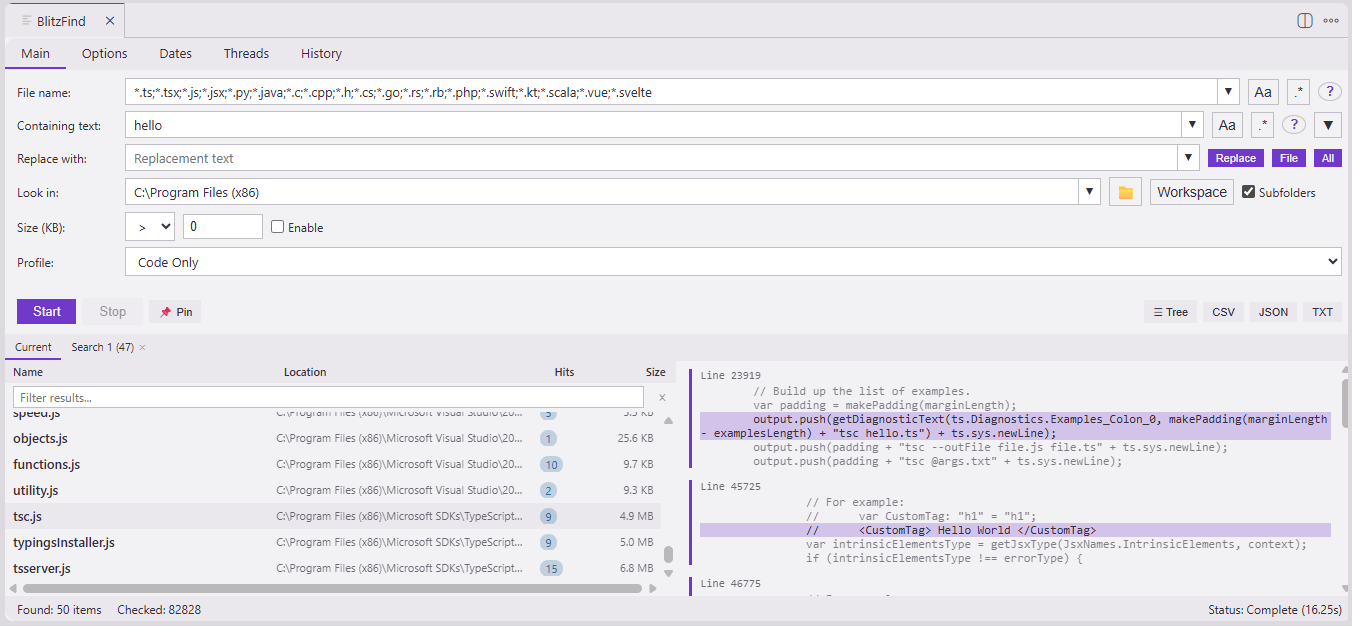
Multi-workspace support — search across all folders in a multi-root workspace
Usage
Open BlitzFind from the activity bar icon, or run the command:
Ctrl+Shift+F9 / Cmd+Shift+F9 — Open BlitzFind
Command Palette → "BlitzFind: Open Search"
Search Options
Option
Description
File name pattern
Glob or regex pattern to match file names
Containing text
Search within file contents
Look in
Root directory to search
Include subfolders
Recurse into subdirectories
Case sensitive
Toggle for file name and content separately
Regex
Toggle for file name and content separately
Size filter
Filter files by size (e.g., > 100 KB)
Date filter
Filter by last modified date range
Thread count
Number of worker threads (auto-capped to CPU count)
Multi-Workspace Search
In a multi-root workspace, clicking the "Workspace" button shows a dropdown with:
"All Workspaces" — searches all open workspace folders at once
Individual folder names — searches just that folder
With a single workspace folder, the button works as before, setting the path directly. Multiple paths are joined with semicolons in the "Look in" field, which you can also edit manually.