Codex Ubuntu NotificationsDesktop completion notifications, optional answer previews and audio for local Codex workspaces on Ubuntu, with dependency diagnostics. Installation Launch VS Code Quick Open ( Ctrl+P), paste the following command, and press enter.Copied to clipboard |

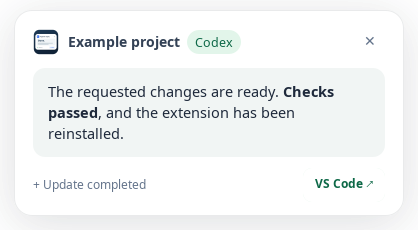
Codex Ubuntu NotificationsGet a bottom-left answer preview and a chime when Codex finishes a reply in VS Code. Keep track of working chats across your Ubuntu workspaces, and return to the right project when a reply is ready. This is an independent extension, not an official OpenAI or Microsoft product. What you can do
Answer previews and sound are enabled by default. Native Ubuntu desktop notifications are optional and start disabled.
Track chat activityThe Ubuntu top bar shows the number of working chats across your VS Code workspaces. Multiple windows share the same count. Open its menu to switch to a workspace with active chats.
Counts normally update about every two seconds. Disable Flash While Working for a steady display, or turn off Ubuntu Top-Bar Icon to hide the activity count. Conversation titles are not displayed in the top-bar menu.
The screenshots use sample content and activity counts. Get started
If dependencies are missing, choose Install Missing Dependencies or use Finish Setup in the panel. Setup opens a visible Ubuntu terminal. Review the package changes and enter your administrator password there if asked. If prompted to choose an audio system, select the one already used by your desktop. Choosing Later dismisses the first-use setup prompt. You can return to setup from the panel or Command Palette. Failed or cancelled installation can be retried. Installing packages requires administrator privileges and access to your configured Ubuntu package repositories. Choose your alertsUse the extension panel or the
Use Colors to change backgrounds, text, buttons, borders and activity states. Color fields accept values such as Use Import Custom Sound File to add a regular local If the bottom-left preview is unavailable, the extension uses an in-editor message. Native Ubuntu notifications are sent only when you enable them. Disable all visual channels for audio-only alerts. Compatibility
Desktop Do Not Disturb, lock-screen behavior, display scaling and notification history are controlled partly by your desktop. Opening or reloading VS Code does not replay historical replies. Changes to Codex's local data format can temporarily affect detection. TroubleshootingRun Codex Ubuntu Notifications: Check Configuration to recheck your setup and open the diagnostic Output channel. The panel reports whether monitoring is ready, paused, waiting for Codex or partially available. If something is missing, use Install Missing Dependencies. If a test works but automatic alerts do not, check that a local folder is open, notifications are enabled and your chosen focus mode allows an alert. For native Ubuntu notifications, also check your desktop's Do Not Disturb setting. PrivacyThe extension reads local Codex activity and reply content without modifying Codex's databases. No telemetry or application network requests are implemented. Optional dependency installation contacts your configured Ubuntu package repositories. Answer previews may be visible to people looking at your screen, and native notifications may remain in desktop notification history. Disable the visual channels if you do not want replies displayed. Imported sounds stay on your computer. License and supportThe source is available under the MIT License subject to Commons Clause v1.0. Ordinary personal and work use is allowed. Selling the extension or services covered by the clause's definition is restricted. See LICENSING.md for the full scope. Report problems through GitHub Issues, including your Ubuntu and VS Code versions and the result of Check Configuration. Do not include credentials or private conversation content. |