Features
Language Support
- Syntax highlighting for
.tree files, including \startverb%tex blocks that inherit your installed TeX highlighter.
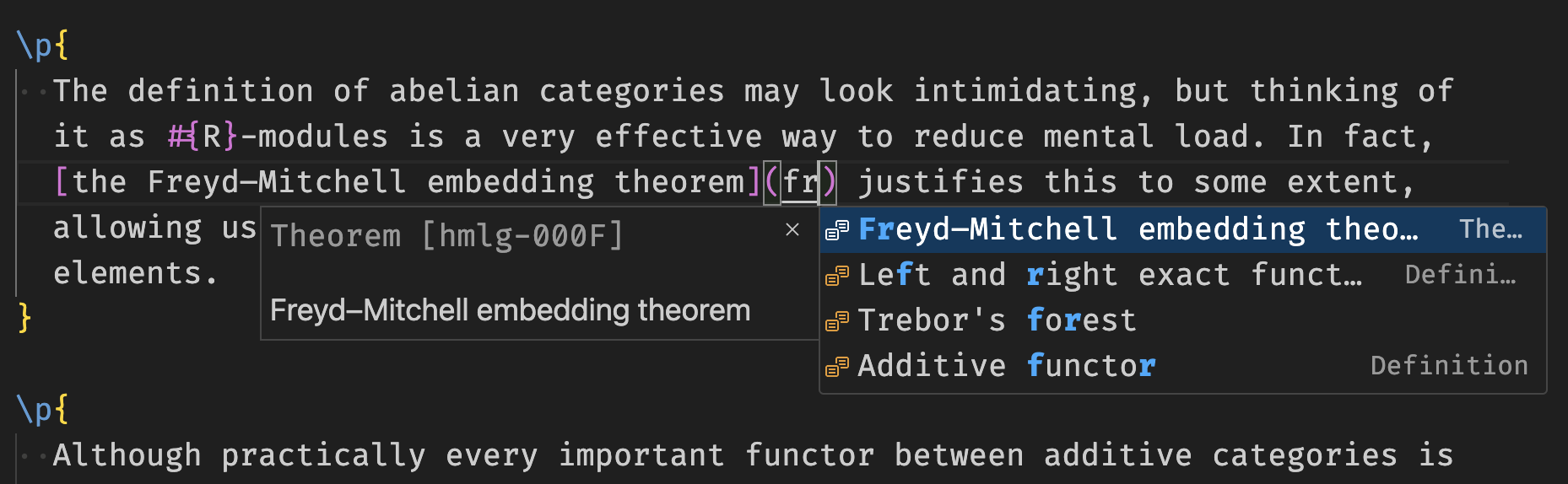
- Tree ID completions — type a partial title, ID, or taxon to filter trees; Tab inserts the ID.
- Go-to-definition / Ctrl+click on
\transclude{id}, \ref{id}, [text](https://github.com/KaiErikNiermann/topos-vscode-forester/blob/HEAD/id), and [[id]] links.
- Inline title hints — the title and taxon of a transcluded/imported/exported tree appear beside the link.
- LaTeX hover preview — hover over
#{...}, ##{...}, or \tex{...}{...} to see a rendered preview.
- Tag closure inlay hints — shows the opening command name after its closing brace (e.g.,
} ul). Configurable allowlist of tags.
- Subtree auto-ID — new
\subtree{...} blocks get the next canonical 4-character lowercase base36 ID automatically (opt-in).
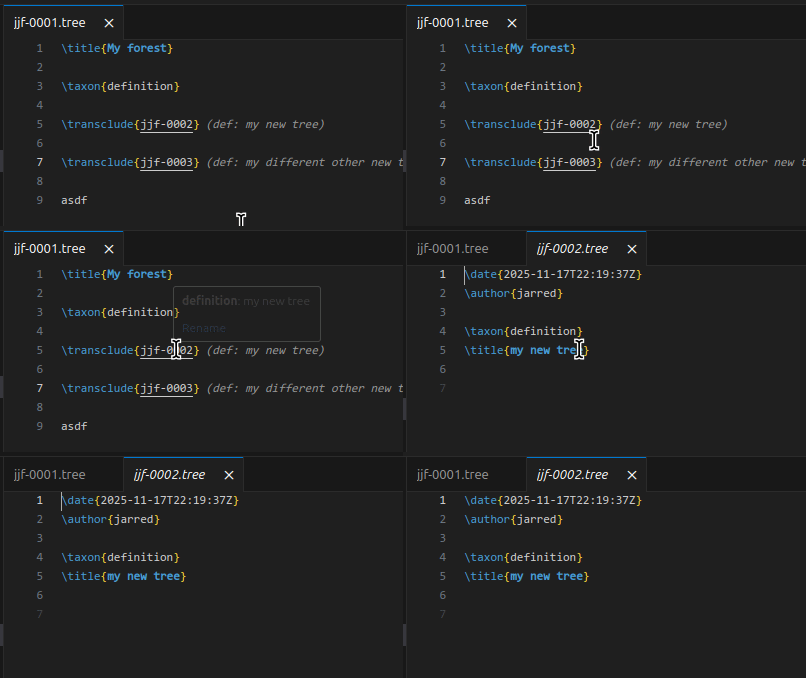

- Document and range formatter (Shift+Alt+F or right-click → Format Document).
- Preserves verbatim blocks (
\startverb/\stopverb), \tex{...}{...}, and \codeblock{...}{...} exactly.
Forester: Scan Macros for Formatter — scans the workspace for macro definitions and adds them to the ignored-commands list automatically.Forester: Format All Tree Files — bulk-format every .tree file in the workspace.forester.formatter.ignoredCommands — commands whose content is never reformatted.forester.formatter.autoScanMacros — auto-scan on startup (default: on).
Tree Creation & Editing
Forester: New Tree — create a new tree; prompts for prefix and template (both have configurable defaults). If text is selected, it is moved into the new tree.Forester: New Tree from Template — like above but always prompts for a template even if a default is set.Forester: Transclude New Tree (Ctrl+Shift+T / Cmd+Shift+T) — create a new tree and insert a \transclude{} link at the cursor.Forester: Rename Tree — rename the active tree's title and/or taxon. Also triggers when hovering over a link.Forester: Set Default Prefix / Template / Open Behaviour — configure creation defaults without touching settings JSON.

Four views are registered in the Explorer sidebar under the Forester panel:
| View |
Description |
| Forester Structure |
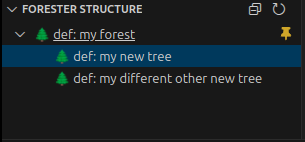
Transclusion tree rooted at the active file, with taxon labels and click-to-navigate. |
| Forester Transclusions |
All trees transcluded by the active file (direct). |
| Forester Backlinks |
All trees that transclude, import, export, or reference the active file. |
| Forester Contributors |
Direct contributors (\author{…} in the current tree) and indirect contributors (authors of transitively transcluded trees). Clicking opens the person's .tree file. |
Forest Graph View
Forester: Show Forest Graph View opens an interactive D3.js force-directed graph of the entire forest.
- Nodes sized by in-degree, coloured by taxon.
- Edges for
\transclude, \import, \export, \ref, [text](https://github.com/KaiErikNiermann/topos-vscode-forester/blob/HEAD/addr), and [[addr]] links — each type has a distinct colour.
- Clustering (dropdown in the panel): By taxon, By community (label propagation over all edge types), or None.
- Cross-cluster links are visually de-emphasised (dashed, low opacity) and promoted on hover.
- Hover a node to highlight its 1-hop neighbourhood; click to open the
.tree file.
- Search box and taxon legend with click-to-filter.
forester.graphView.excludedNodes — tree IDs to hide from the graph (default: ["basic-macros"]).
Language Server
A full Langium-based language server runs in a background process and provides:
- Diagnostics — undefined references, duplicate IDs, unresolved object method calls, and more.
- Completions — tree IDs, command names, taxons, tags.
- Hover — tree title, taxon, and metadata on hover over a link.
- Code actions — quick fixes for common issues.
Forester: Restart Language Server — restart the LSP without reloading the window.
Integrates with the LanguageTool VSCode extension to provide grammar and spell checking, with Forester-aware filtering to suppress false positives on commands, IDs, and syntax.
Setup:
- Install
adamvoss.vscode-languagetool and a language pack (e.g. adamvoss.vscode-languagetool-en).
- Disable the base LanguageTool extension — the Forester extension takes over its language server with filtering applied.
Commands:
Forester: Check All Tree Files (Grammar) — run a full grammar check across the workspace.Forester: SpeedFix — rapid keyboard-driven workflow for spelling and grammar corrections.Forester: Auto-Hide Forester Syntax Noise — suppress common false-positive patterns in workspace LTeX settings.
Filtering: Forester commands, brace arguments, verbatim blocks, code blocks, and whitespace/punctuation rules are automatically stripped before text reaches LanguageTool.
Custom ignores: Add a .foresterLangIgnore file to your workspace root (one regex per line). Use the "Add to .foresterLangIgnore" code action (lightbulb) to populate it quickly.
Datalog Queries
\datalog{...} blocks in .tree files get a CodeLens button:
- (▶ Run datalog query) — evaluates the query against the forest index and shows results in the output panel.
- (⬡ Datalog rules) — shown for rule-only blocks (no
:- head).
Supported predicates: has-taxon, has-tag, is-reference, is-person, is-article.
Commands Reference
| Command |
Default keybinding |
Description |
Forester: New Tree |
— |
Create a new tree |
Forester: New Tree from Template |
— |
Create a new tree, always prompting for template |
Forester: Transclude New Tree |
Ctrl+Shift+T |
Create a new tree and insert a transclusion link |
Forester: Rename Tree |
— |
Rename the active (or linked) tree |
Forester: Show Forest Structure View |
— |
Open the Explorer sidebar forest view |
Forester: Show Forest Graph View |
— |
Open the interactive D3 graph panel |
Forester: Scan Macros for Formatter |
— |
Auto-detect macros and update formatter ignore list |
Forester: Format All Tree Files |
— |
Bulk-format all .tree files |
Forester: Check All Tree Files (Grammar) |
— |
Full LanguageTool pass over the workspace |
Forester: SpeedFix |
— |
Rapid spelling/grammar correction workflow |
Forester: Auto-Hide Forester Syntax Noise |
— |
Suppress syntax false-positives in LTeX settings |
Forester: Run Datalog Query |
— |
Evaluate a \datalog{...} block against the forest |
Forester: Restart Language Server |
— |
Restart the Langium LSP without reloading the window |
Forester: Set Default Prefix |
— |
Set the default tree ID prefix |
Forester: Set Default Template |
— |
Set the default tree template |
Forester: Change Forester Open Behaviour |
— |
Change how newly created trees are opened |
Extension Settings
Core
| Setting |
Default |
Description |
forester.path |
"forester" |
Path to the forester executable |
forester.config |
"" |
Path to forest.toml (per-workspace) |
Tree creation
| Setting |
Default |
Description |
forester.defaultPrefix |
"" |
Default ID prefix (skips the prompt if set) |
forester.defaultTemplate |
"" |
Default template (use "(No template)" to skip selection) |
forester.create.author |
"" |
Default \author{} for new trees |
forester.create.random |
false |
Generate IDs randomly instead of sequentially |
forester.create.openNewTreeMode |
"background" |
How new trees are opened: off, background, side, active |
Editor features
| Setting |
Default |
Description |
forester.completion.showID |
false |
Show tree ID in completion items |
forester.decorations.enabled |
true |
Inline title hints beside transclusion links |
forester.hover.latex.enabled |
true |
LaTeX preview on hover |
forester.inlayHints.tagClosures.enabled |
true |
Inlay hints showing the opening command after } |
forester.inlayHints.tagClosures.tags |
["ol","ul","li",…] |
Commands that receive closure hints |
forester.subtree.autoId.enabled |
false |
Auto-assign base36 IDs to new \subtree{} blocks |
forester.subtree.autoId.template |
\\subtree[<id>]{…} |
Snippet template for subtree completion |
| Setting |
Default |
Description |
forester.formatter.ignoredCommands |
[] |
Commands whose body is never reformatted |
forester.formatter.autoScanMacros |
true |
Auto-scan for macro definitions on startup |
Graph view
| Setting |
Default |
Description |
forester.graphView.excludedNodes |
["basic-macros"] |
Tree IDs hidden from the graph (and their edges) |
Taxon customisation
{
  "forester.taxonCustomization": {
    "theorem":    { "emoji": "⭐", "abbreviation": "thm" },
    "definition": { "emoji": "🧪", "abbreviation": "def" }
  }
}
Use "$default" as a key to set the fallback emoji for unknown taxons.
| Setting |
Default |
Description |
forester.languageTool.enable |
true |
Enable LanguageTool integration |
forester.languageTool.language |
"en" |
LanguageTool language code |
forester.languageTool.autoPopulateLtexConfig |
true |
Auto-add Forester noise to LTeX dictionary/disabled rules |
forester.languageTool.javaOpts |
"" |
Extra JAVA_OPTS for the LanguageTool server |
Requirements
- Forester installed and on your PATH (or configured via
forester.path).
- A
forest.toml in your workspace root (or set forester.config).
- For LanguageTool integration:
adamvoss.vscode-languagetool + a language pack.
| |

