Cockpit for Claude Code
by KODIKAS
Unofficial. Not affiliated with, endorsed by, or sponsored by Anthropic.
"Claude", "Claude Code" and "Anthropic" are trademarks of Anthropic, PBC, used here
only to describe interoperability. This project talks to the official Claude Code CLI;
it does not bundle or redistribute it.
Early version. This fork is a first version. Daemon mode, the side bar chat, the managed CLI
download and the per-chat controls work in day-to-day use on macOS, but they have had little
testing, and none on Linux or Windows. Expect rough edges and report what you find. This note
will be removed once the fork has had more use.
Cockpit keeps your Claude Code conversations running when your window goes away. A small background
service, the daemon, owns the claude process, so you can start a task on one device, continue it on
another, and follow it from your phone. On top of that it is a VS Code extension with a graphical
interface that shows what the tool is doing: the conversation, the tool calls, diffs, permission
prompts, and how much context, cache and budget you have used.
It is a fork of Tootega Cockpit for Claude Code by Tootega
Pesquisa e Inovação (HermesSilva). Almost everything good in it starts with their work: a thorough
GUI for Claude Code that keeps its figures honest and gives you fine control. Thank you for building
it in the open under the MIT license, which is what makes this fork possible.
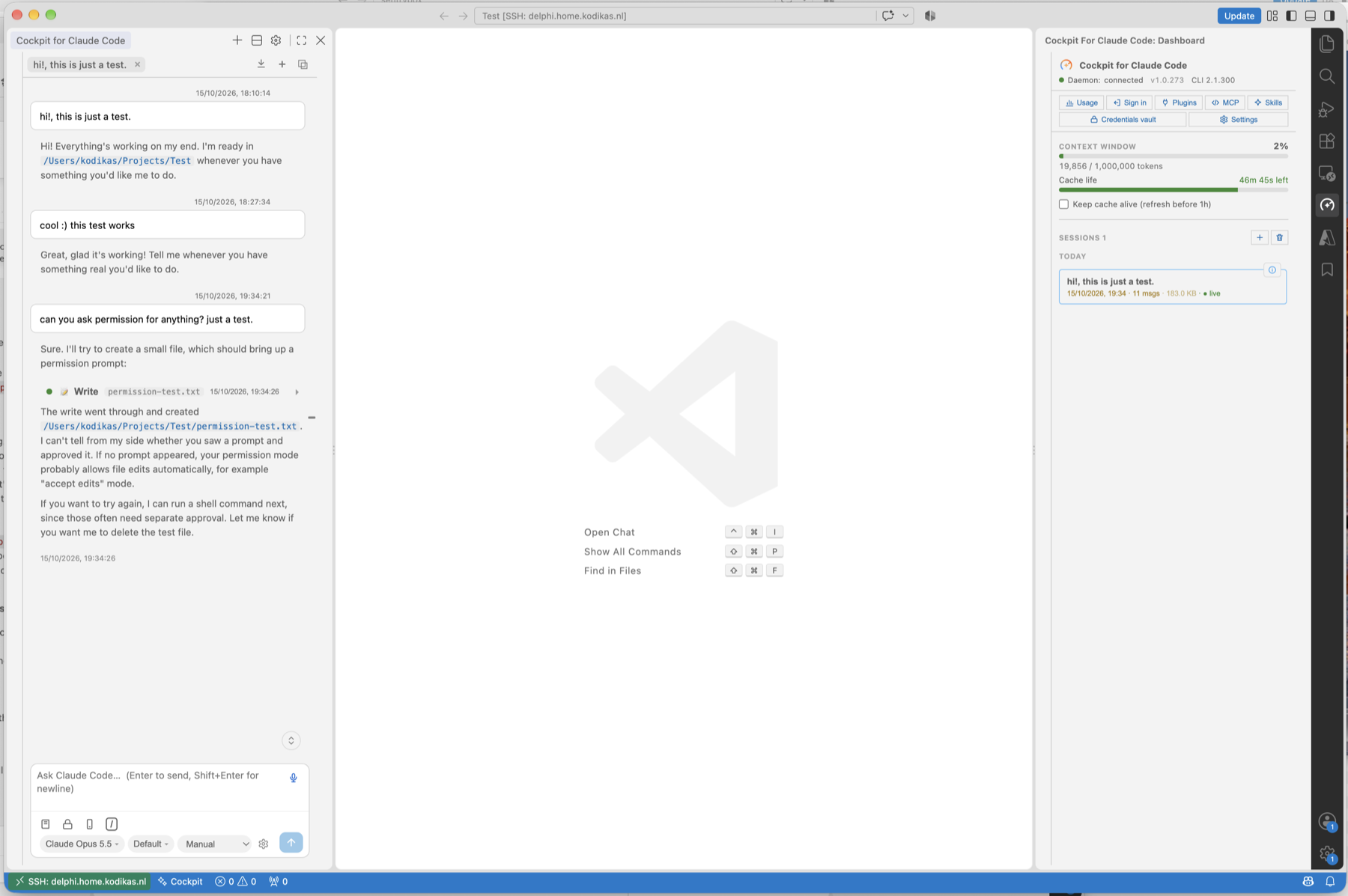
What it is for
You keep your code, and Claude Code, on one machine that is always on, such as a Mac mini or a home
server, and you reach it from other devices with Remote-SSH or code-server. A conversation should
not die when you close the laptop lid or the connection drops. You start a task on one device, come
back an hour later on another, and the conversation is still running, with its output and any
permission prompt waiting for you.
That is what the fork adds to the original:
- Daemon mode. Claude runs in
cockpit-daemon, a small background service on the machine that
holds the code, instead of as a child of the VS Code window. Any window on that machine can attach
to a running conversation. The first answer to a permission prompt wins and closes it everywhere.
On a Mac you can run the daemon from the included menu bar app. See
Docs/daemon-mode.md.
- Chat in the side bar, next to the code, with a strip of conversation tabs. A conversation is in
the side bar or in an editor tab, one place at a time.
- Controls that belong to a chat stay with the chat. Model, effort and permission mode are chips
in the prompt box. A menu there holds agents and workflows, the engine, a custom model id and an
auto-compact setting per conversation. The dashboard keeps what is global.
- Its own copy of the Claude Code CLI, if you do not have one. The extension offers to download
it from Anthropic's release server, verifies the checksum, and keeps it up to date.
- A quieter interface, closer to the official extension.
The extension can be installed next to the original. Its commands and settings are under
cockpitDaemon.* (the original's are tootega.*), so rename any settings you carry over.
What it does
- Chat. Streaming answers, thinking blocks, a timeline of tool calls with expandable input and
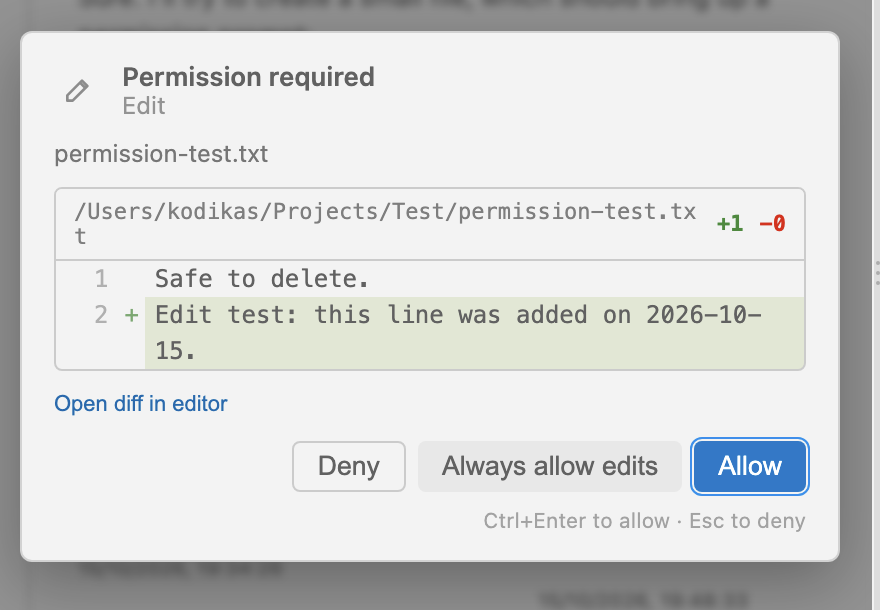
output, rendered diffs, permission prompts, plan mode with an editable plan, and multiple-choice
questions from the agent.
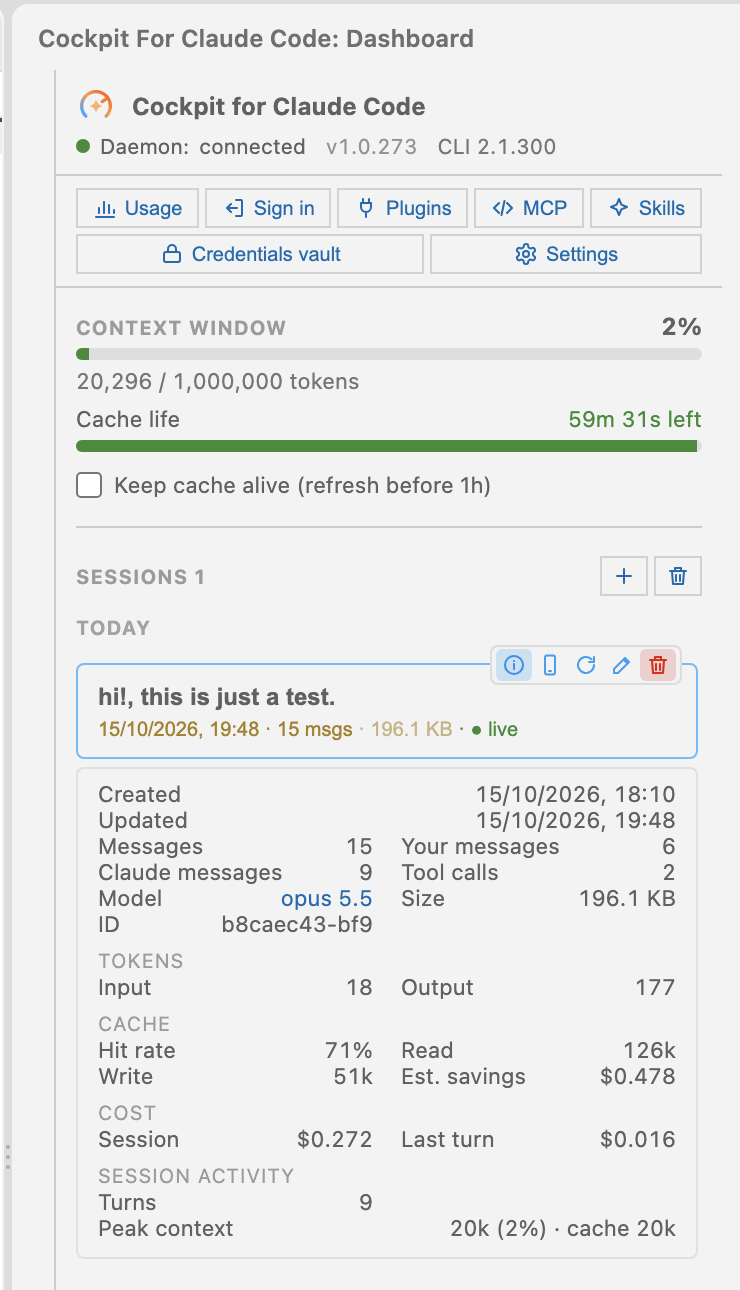
- The numbers. Context window, prompt cache (hit rate, a keep-alive that stops the one-hour cache
from lapsing, estimated savings), cost per turn and session, and your subscription limits. The
dashboard shows the context window; the rest sits under the (i) icon on the active session.
- Sessions. A list per folder with resume, rename, delete, rewind to an earlier prompt, and
remote control from your phone.
- Input.
@ file mentions, images, slash commands, voice dictation and an inline spell-checker
for Portuguese and English.
- Languages. The interface is in Brazilian Portuguese and English, switchable without a reload.
| A permission prompt with the diff |
The details of a session |
 |
 |
The full list is in Docs/features.md, and
Docs/comparison.md compares it with the official extension.
Install
| Requirement |
Version |
Note |
| VS Code |
1.90 or newer |
|
| Claude Code CLI |
recent (2.1.162 or newer) |
claude on the PATH and signed in, or let the extension download it |
| Node.js |
20 or newer |
only to build from source |
- Get a
.vsix (build one, see Docs/development.md, or take a release) and
install it: code --install-extension cockpit-claude-code-daemon-<version>.vsix, or in VS Code
Extensions, the ⋯ menu, Install from VSIX.
- Install and sign in to Claude Code if you have not: follow Anthropic's instructions, then run
claude once and log in. If claude is not on the PATH, set cockpitDaemon.claudePath.
- Start the daemon. Run Cockpit Daemon: Install daemon from the command palette (a launchd agent
on macOS, a background process elsewhere). On a Mac you can use the menu bar app instead, see
mac/CockpitDaemon.
- Open a project folder and open Cockpit with Ctrl+Alt+C (Cmd+Alt+C on a Mac), or from the
status bar. Pick a model, effort and permission mode, or keep the defaults, type a message and
press Enter. Shift+Enter inserts a line break.
With cockpitDaemon.autoResumeLastSession on (the default), opening a folder resumes its most recent
session.
Using it from other devices
Docs/remote-setup.md walks through the setup: the host Mac, a laptop with
Remote-SSH, and a tablet with code-server behind HTTPS.
Documentation
Troubleshooting
| Symptom |
Likely cause |
What to do |
| "CLI not found" on startup |
claude is not on the PATH |
Set cockpitDaemon.claudePath, and check claude --version |
| Chat does not answer, or an auth error |
The CLI is not signed in |
Use Sign in, or run claude in a terminal and log in |
| "Daemon: disconnected" |
The daemon is not running, or runs as another user |
Run Cockpit Daemon: Install daemon, or start the menu bar app. Every VS Code server must run as the same user |
| Model selector shows only aliases |
Subscription account without an API key |
Expected. Use an alias, the active model, or Custom… |
| Limit meters are empty |
No real usage source yet |
Turn on Real usage tracking and run a claude session |
| Stop does nothing |
CLI older than 2.1.162 |
Run claude update |
| The extension looks old after an update |
The new .vsix went into one server only |
Install it in every VS Code server you use, then reload the window |
| New events do not render |
The CLI changed its event format |
The parser ignores unknown events. Open an issue with the CLI version |
Host logs are in Output, Cockpit for Claude Code, and the daemon's in ~/.cockpit/daemon.log.
Known limitations
- Rewind restores the conversation, not the files on disk. File checkpoints through Git, and the
context breakdown from
/context, are not built.
- Cost is an estimate: the equivalent API price, which a subscription does not charge you. Usage
attribution is estimated from local transcripts, at about four characters per token.
- Everything derived from transcripts covers one machine. Voice capture needs
ffmpeg on the host.
- The statusline wrapper for real usage works on Windows only. The usage meters themselves work
everywhere.
- The daemon serves the Claude engine only, and the daemon and the windows must be on the same
machine.
- The event format of the CLI is not frozen. A new CLI version can change how parts render.
More detail is in Docs/implementation-status.md.
Privacy and security
- Credentials are never logged. The CLI's permission model is honored, and the interface does not
bypass approvals.
- The optional API key is kept encrypted in the OS keychain and is used only to list models.
- The local Claude login (
~/.claude/.credentials.json) is read, never written or logged, for a few
small isolated calls: your real usage, voice dictation and dictation correction. They carry no
agent context.
- Session data stays on your machine, in
~/.claude/.
Contributing
English only in the repository. Follow the neighboring file's style, do not reimplement what the CLI
already does, and run npm run typecheck && npm test && npm run build before a pull request. More in
Docs/development.md and CLAUDE.md.
License
MIT, see LICENSE. Original work © Tootega Pesquisa e Inovação; this fork © KODIKAS
(Jeroen Versteege). Third-party notices are in THIRD-PARTY-NOTICES.md.
| |

