Git Auto Commit Generator
🚀 Intelligent commit message generation powered by AI and smart defaults
Never write commit messages manually again! Git Auto Commit Generator analyzes your code changes and creates meaningful, professional commit messages automatically. Whether you prefer AI-powered messages or smart default generation, this extension has you covered.
✨ Features
🤖 AI-Powered Commit Messages
- Support for OpenAI, Anthropic Claude, Google Gemini, and OpenRouter
- Context-aware message generation based on actual code changes
- Follows best practices and conventional commit standards
- Smart fallback to default generator when AI is unavailable
📝 Smart Default Generation
- No AI required - works perfectly without any API keys
- Three message styles to match your workflow:
- Conventional:
feat(scope): subject - Standard conventional commits
- Simple: Clear, readable descriptions like "Updated 5 TypeScript files"
- Detailed: Narrative-style messages with full context
- Intelligent file type detection and categorization
- Automatic change type classification (features, fixes, docs, etc.)
⏰ Auto-Commit Timer
- Automatic commits at customizable intervals (1-120 minutes)
- Two modes: with confirmation (safe) or without (advanced)
- Smart detection of uncommitted changes
- Configurable reminders to prevent forgotten commits
📊 Commit History Dashboard
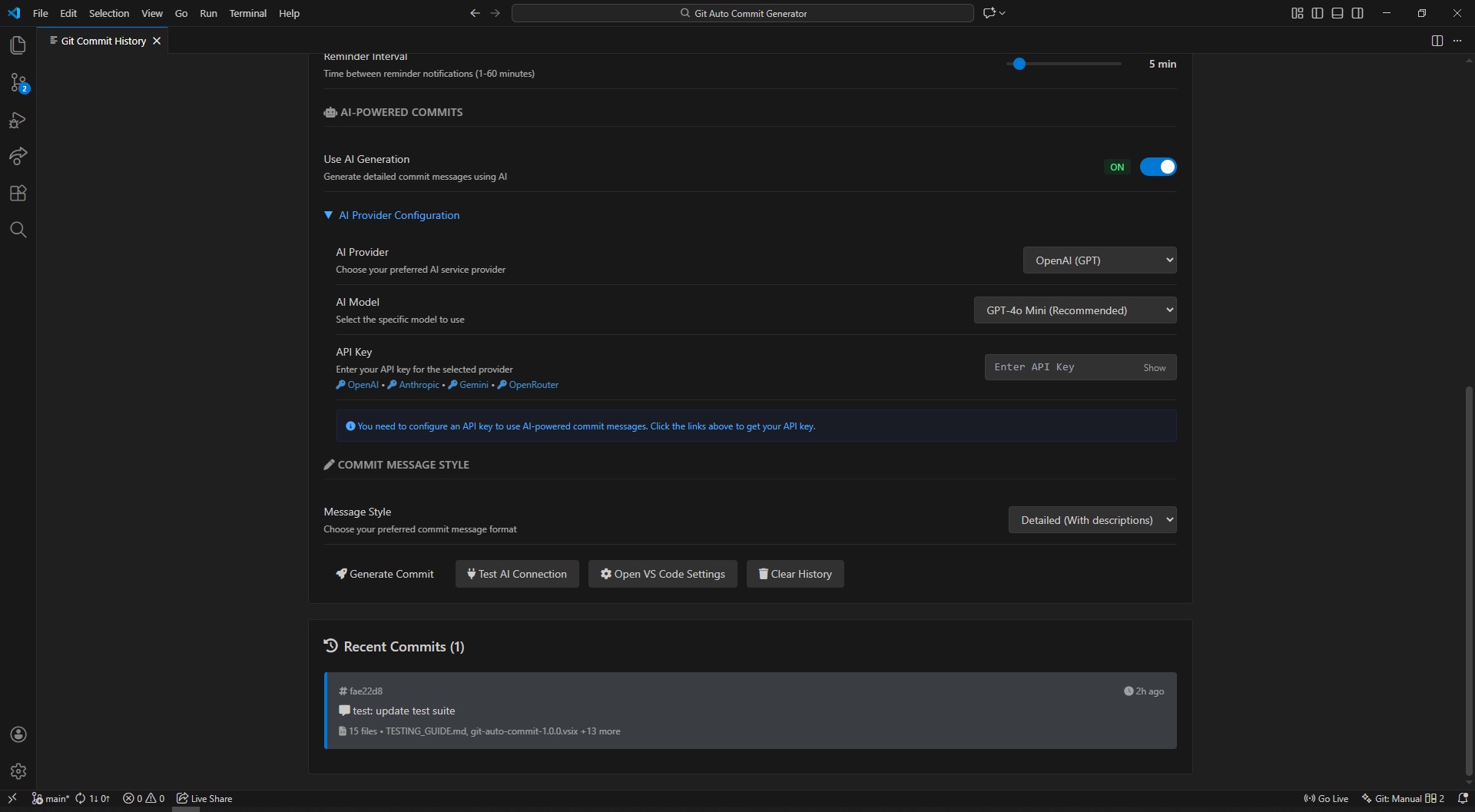
- Beautiful visual dashboard showing your commit history
- View timestamps, messages, and affected files
- Statistics and insights about your commits
- Quick access via status bar icon
- Always in sync with real Git history — stats and history update whether you commit through this extension, VS Code's built-in Source Control view, or the terminal
- Manual Refresh button to force an instant re-sync with
git log on demand
- Live AI model lists — the AI Model dropdown fetches your account's actual available models from OpenAI, Anthropic, Gemini, or OpenRouter instead of a fixed list
🎯 Seamless Integration
- Works with VS Code's built-in Git support
- Status bar integration for quick access
- Command palette commands for all features
- Automatic staging of changes before commit
🎬 Demo
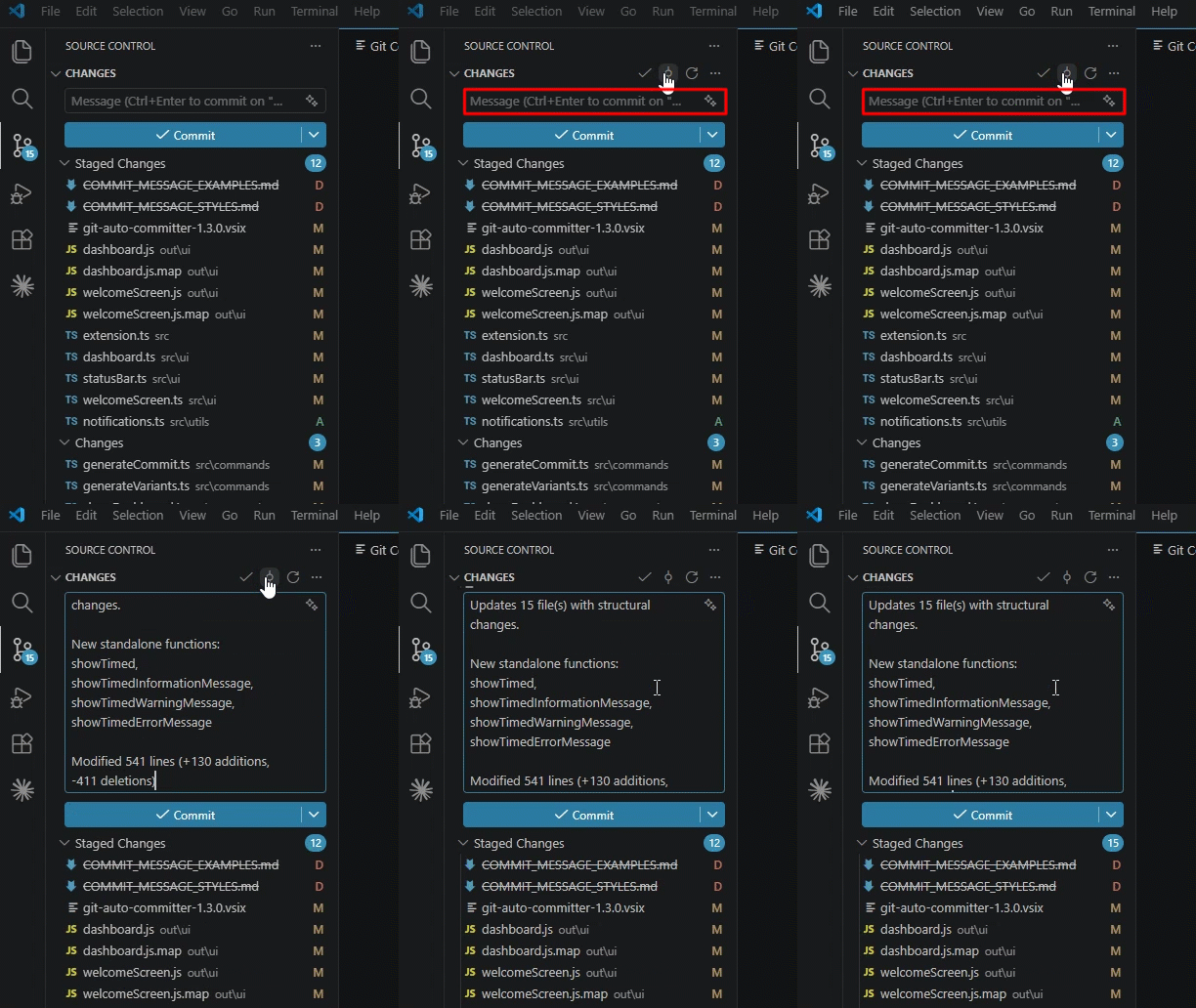
Quick Commit Generation
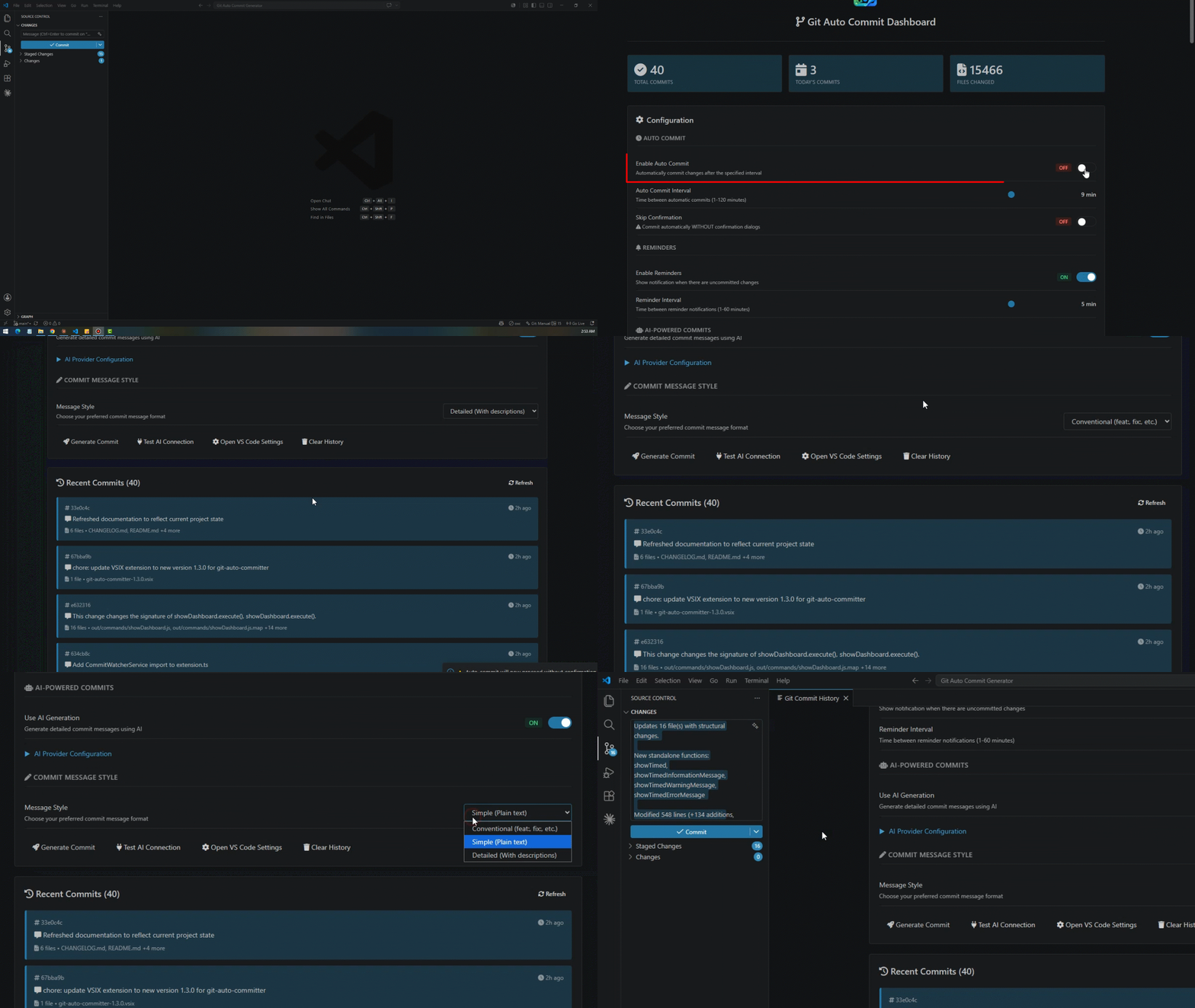
AI Setup & Generated Messages
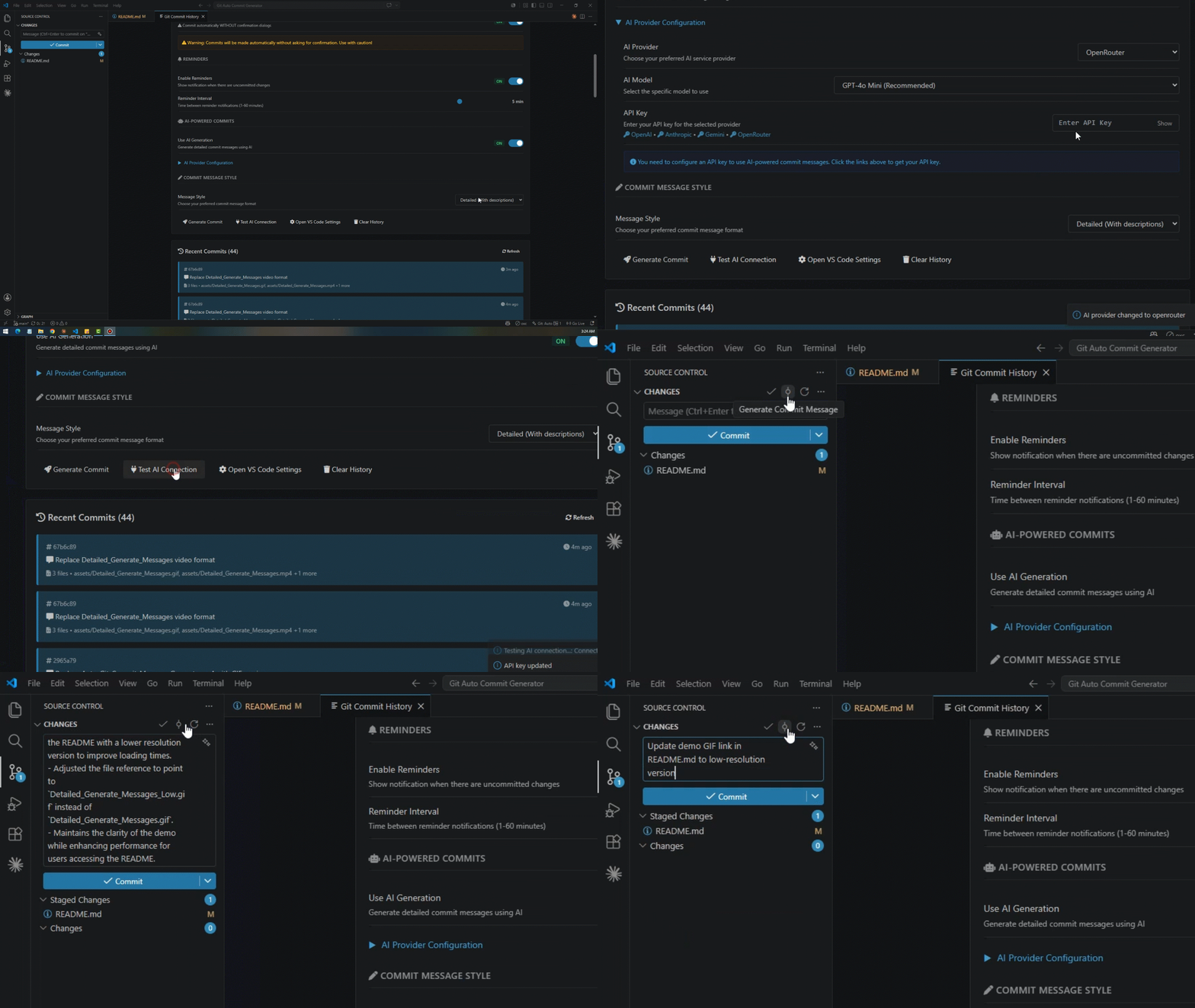
See how to configure an AI provider and what the resulting commit messages look like:
Dashboard Overview
Main Dashboard - 1
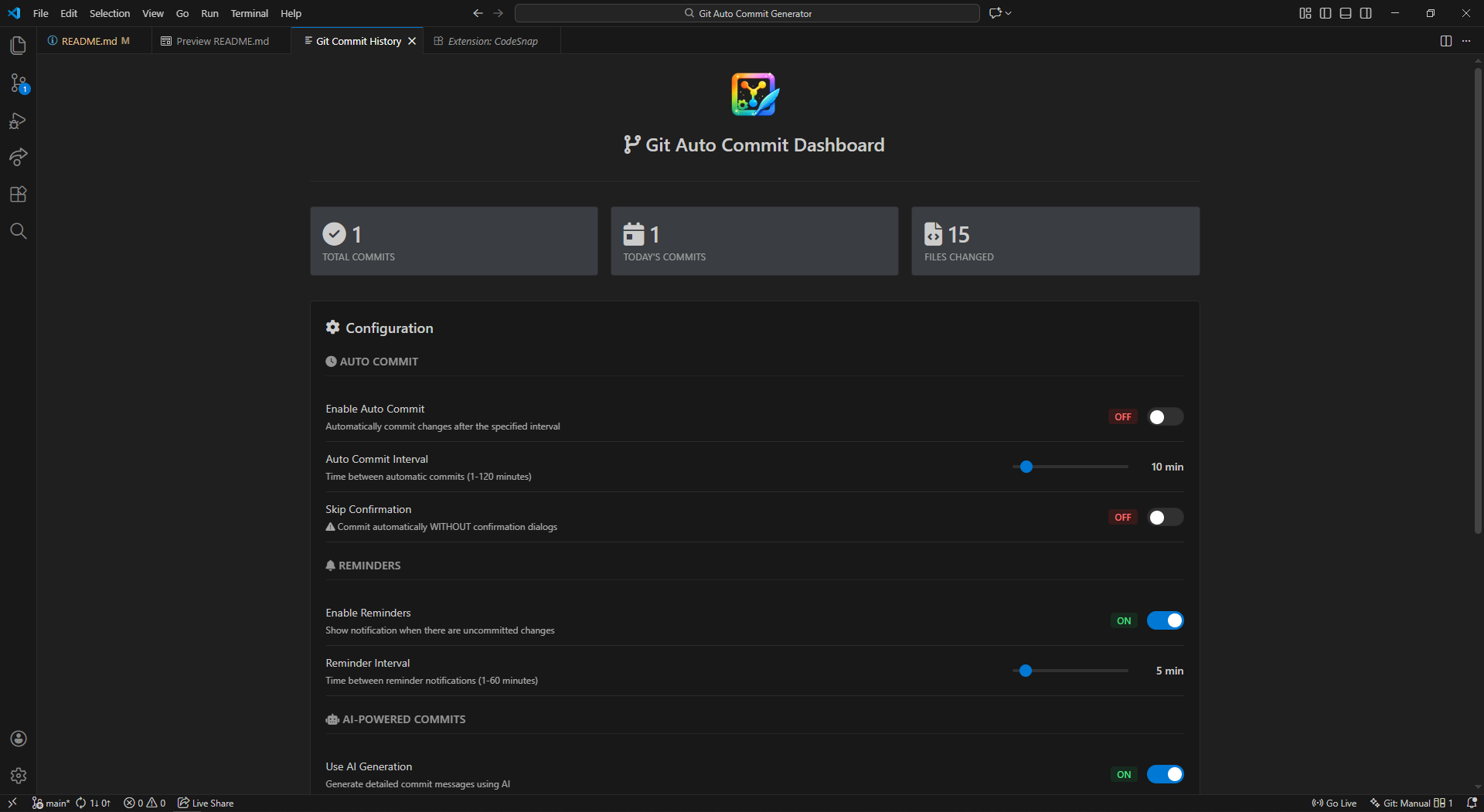
Main Dashboard - 2
🚀 Quick Start
- Install the extension from the VS Code Marketplace
- Make changes to your code
- Generate commit via Command Palette or status bar
- Review and commit - that's it!
First-Time Setup
On first use, you'll see a welcome screen to configure your preferences:
- Enable/disable auto-commit
- Choose your commit message style
- Optionally configure AI provider
📖 Usage
Generate Commit Messages
Method 1: Command Palette
- Press
Ctrl+Shift+P (Windows/Linux) or Cmd+Shift+P (Mac)
- Type "Generate Commit Message"
- Press Enter
Method 2: Status Bar
- Click the Git Auto Commit icon in the status bar
- Choose "Generate Commit"
What happens next:
- Extension analyzes your changes
- Generates a commit message (2-second notification)
- Opens Source Control view with message ready
- Review and click commit when ready
View Commit History
- Click the status bar icon
- Select "Show Dashboard"
- View your commits, statistics, and more
- Run "Git Auto Commit: Configure AI" from Command Palette
- Choose your AI provider
- Enter your API key
- Select your preferred model
⚙️ Settings
Core Settings
| Setting |
Default |
Description |
gitAutoCommit.commitMessageStyle |
conventional |
Message style: conventional, simple, or detailed |
gitAutoCommit.enableAutoCommit |
false |
Enable automatic commits on timer |
gitAutoCommit.autoCommitInterval |
10 |
Auto-commit interval (1-120 minutes) |
gitAutoCommit.autoCommitWithoutConfirmation |
false |
⚠️ Commit without asking (use carefully!) |
gitAutoCommit.enableReminder |
true |
Show reminders for uncommitted changes |
gitAutoCommit.reminderInterval |
5 |
Reminder interval (1-60 minutes) |
AI Settings
| Setting |
Default |
Description |
gitAutoCommit.useAIGeneration |
false |
Enable AI-powered commit messages |
gitAutoCommit.aiProvider |
openai |
AI provider: openai, anthropic, gemini, openrouter |
gitAutoCommit.aiApiKey |
"" |
Your API key for the selected provider |
gitAutoCommit.aiModel |
gpt-4o-mini |
Model to use for generation |
Quick Configuration Examples
Simple, human-readable messages (no AI needed):
{
  "gitAutoCommit.commitMessageStyle": "simple"
}
AI-powered with OpenAI:
{
  "gitAutoCommit.useAIGeneration": true,
  "gitAutoCommit.aiProvider": "openai",
  "gitAutoCommit.aiApiKey": "sk-..."
}
Auto-commit every 15 minutes with confirmation:
{
  "gitAutoCommit.enableAutoCommit": true,
  "gitAutoCommit.autoCommitInterval": 15,
  "gitAutoCommit.autoCommitWithoutConfirmation": false
}
🎨 Commit Message Styles
Conventional (Default)
feat(src): update 3 ts files

- 3 files changed: 45 insertions(+), 12 deletions(-)
Simple
Updated 5 TypeScript files in src
Detailed
Enhanced 3 files with improvements

Changes include: Updated 3 TypeScript files

Modified 90 lines (+67 additions, -23 deletions)
Learn more about commit message styles →
🤖 AI Providers
Supported Providers
| Provider |
Models |
Configuration |
| OpenAI |
gpt-4o, gpt-4o-mini, gpt-4-turbo |
Get API Key |
| Anthropic |
claude-3.5-sonnet, claude-3-opus |
Get API Key |
| Google Gemini |
gemini-pro, gemini-ultra |
Get API Key |
| OpenRouter |
Multiple models |
Get API Key |
Setting Up AI
- Run command: "Git Auto Commit: Configure AI"
- Select your provider
- Enter your API key
- Choose model
- Enable "Use AI Generation"
No API key? No problem! The extension works perfectly with smart default generation.
📊 Dashboard Features
The commit history dashboard provides:
- ✅ Current settings overview - See your configuration at a glance
- 📈 Commit statistics - Total commits, today's commits, and files changed
- 📋 Commit history - Last 50-100 commits with timestamps
- 📁 File details - Which files were changed in each commit
- 🔄 Quick actions - Refresh, clear history, adjust settings
How commit stats stay accurate
Earlier versions only recorded a commit in the dashboard's history when it went through this extension's own silent auto-commit flow — a commit made through VS Code's Source Control panel or a plain git commit in the terminal never showed up, so the counters could sit at 0 even on an active repo.
That's now fixed with a background CommitWatcherService that:
- Backfills on first run by reading your real
git log so stats are correct the moment you open the dashboard, even on a repo with existing history
- Listens to VS Code's Git extension so new commits made anywhere (Source Control, terminal, or this extension) are picked up as soon as they happen
- Polls
git log every 15 seconds as a robust fallback in case the Git extension's change events don't fire for a particular commit path
- Deduplicates by commit hash, so re-syncing never creates duplicate entries
You can also click the Refresh button above the commit list at any time to force an immediate re-sync instead of waiting for the next automatic check.
Live AI model lists
The AI Model dropdown in the dashboard's AI Provider Configuration section now queries each provider's live models endpoint (using your configured or just-entered API key) and repopulates itself with whatever models your account currently has access to:
- Triggered automatically when the dashboard loads, when you switch providers, or when you enter/update an API key
- Falls back silently to the built-in static model list if the live fetch fails (no key, network issue, invalid key, etc.) — you're never left with an empty dropdown
- OpenRouter's list is fetched without needing a key, since its catalog is public
⚠️ Auto-Commit Safety
With Confirmation (Recommended)
{
  "gitAutoCommit.autoCommitWithoutConfirmation": false
}
- Timer triggers notification
- Review message before committing
- Choose "Commit Now" or "Skip"
- ✅ Safe for all projects
Without Confirmation (Advanced)
{
  "gitAutoCommit.autoCommitWithoutConfirmation": true
}
- Commits automatically without asking
- ⚠️ Use only for personal projects
- Not recommended for team/production code
- Great for experimentation and prototyping
🛠️ Commands
| Command |
Description |
Git Auto Commit: Generate Commit Message |
Generate message for current changes |
Git Auto Commit: Show Dashboard |
View commit history and stats |
Git Auto Commit: Configure AI |
Set up AI provider and API key |
Git Auto Commit: Toggle Auto Commit |
Enable/disable auto-commit timer |
📚 Documentation
🔧 Requirements
- VS Code 1.85.0 or higher
- Git installed and accessible from command line
- Active Git repository in workspace
- (Optional) API key for AI-powered messages
🐛 Troubleshooting
Extension not generating messages?
- Ensure you have uncommitted changes
- Check you're in a Git repository
- Verify Git is installed:
git --version
AI not working?
- Verify API key is correct
- Check "Use AI Generation" is enabled
- Ensure you have internet connection
- Extension falls back to default generator automatically
Auto-commit not triggering?
- Check "Enable Auto Commit" is turned on
- Verify there are changes to commit
- Review auto-commit interval setting
View full troubleshooting guide →
📝 Changelog
Version 1.3.0 (Latest)
- 🐛 Fixed dashboard stats stuck at 0 — commit history now syncs with real
git log/Git extension state regardless of whether you commit via this extension, Source Control, or the terminal
- 🔄 Added a Refresh button on the dashboard to force an instant re-sync of commit history
- 🤖 Added live AI model fetching — the model dropdown now pulls your account's real available models from OpenAI, Anthropic, Gemini, and OpenRouter, falling back to the static list on failure
- 🤖 Implemented OpenRouter live model fetching and related AI configuration updates
- 🔧 General project configuration and dependency updates
Version 1.2.0
- ✨ Added three commit message styles (conventional, simple, detailed)
- 🤖 AI-powered commit message generation across multiple providers
- 🧠 Commit variant generation and personal commit-style learning from Git history
- 📊 Enhanced dashboard with statistics
- 🎨 Improved UI and notifications
Version 1.1.0
- 🤖 Expanded AI provider support beyond the initial integration (Anthropic Claude, Google Gemini, OpenRouter alongside OpenAI)
Version 1.0.0
- 🎉 Initial release
- ⏰ Auto-commit timer
- 📋 Commit history dashboard
- 🔔 Commit reminders
View full changelog →
🤝 Contributing
Contributions are welcome! Please feel free to submit issues and pull requests.
📄 License
MIT License - see LICENSE for details
💬 Support & Feedback
Made with ❤️ for developers who value clean commit history
Happy Committing! 🚀

