JSON Cleaner
Clean and filter JSON files easily with an interactive tree view and live preview.
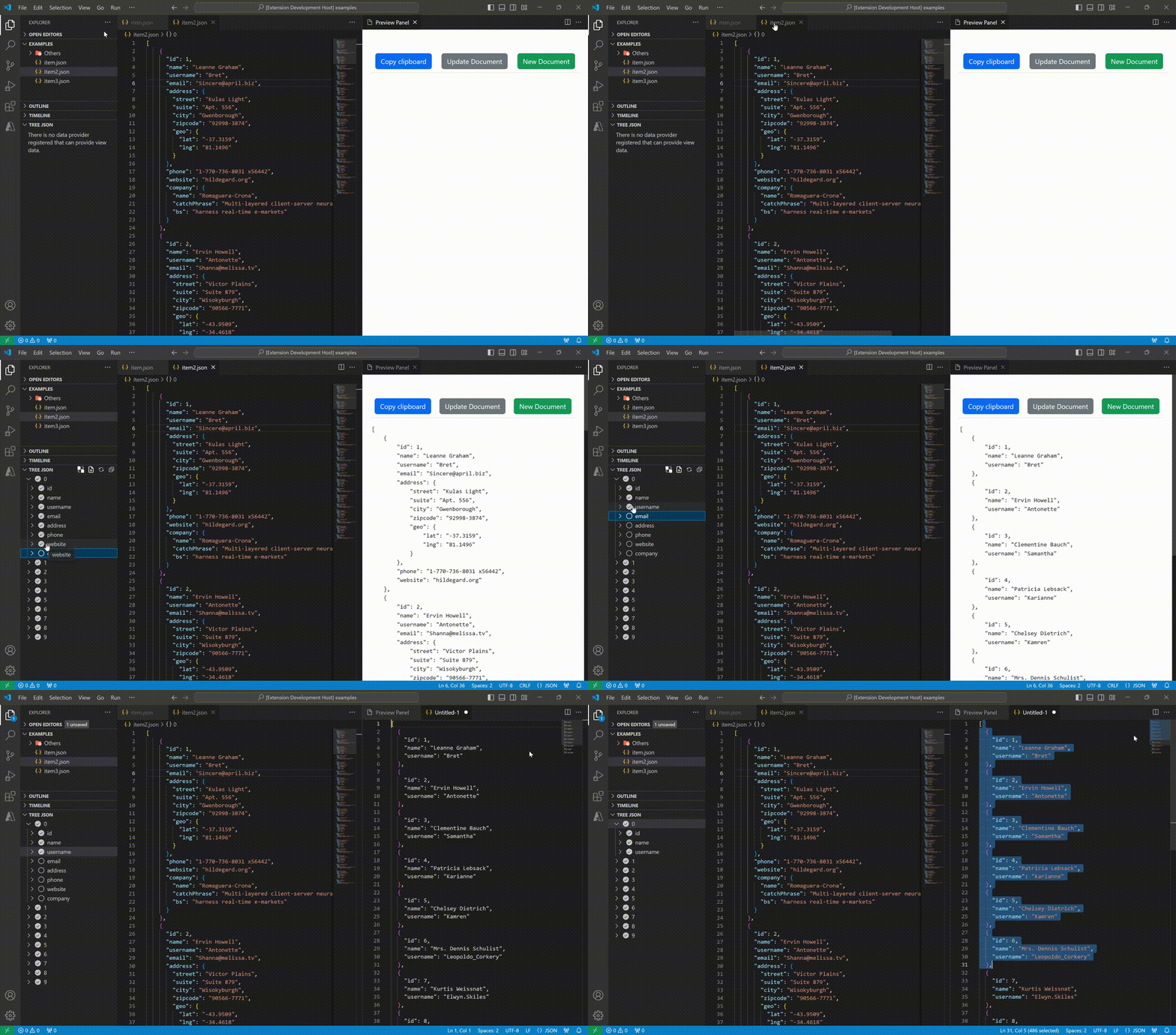
Features
- 📋 Interactive Tree View: Visualize your JSON structure in an easy-to-navigate tree
- ✅ Select/Deselect Properties: Choose only the fields you need with checkboxes
- 👁️ Live Preview: See the filtered JSON in real-time as you make selections
- 📦 Support for Arrays: Handle both arrays of objects and arrays of primitives
- 🔄 Auto-refresh: Preview updates automatically as you edit your JSON
- 💾 Multiple Export Options:
- Copy filtered JSON to clipboard
- Create a new file with filtered content
- 🎯 Smart Filtering:
- Empty objects are automatically removed from arrays
- Primitive arrays display values directly for easy selection
- State preservation when switching between files
Usage
- Open any
.json file in VS Code
- The Tree Json view will appear in the sidebar
- Check/uncheck properties you want to keep/remove
- Click the 👁️ eye icon to toggle the preview panel
- Use the buttons to:
- Copy to clipboard: Copy the filtered JSON
- New Document: Create a new file with the filtered content
Examples
Filtering Object Properties
// Original
{
  "name": "John Doe",
  "age": 30,
  "email": "john@example.com",
  "phone": "123-456-7890"
}

// After unchecking 'phone' and 'email'
{
  "name": "John Doe",
  "age": 30
}
Filtering Arrays
// Original
{
  "employees": [
    {"firstName": "John", "lastName": "Doe"},
    {"firstName": "Anna", "lastName": "Smith"}
  ]
}

// After unchecking 'firstName' fields
{
  "employees": [
    {"lastName": "Doe"},
    {"lastName": "Smith"}
  ]
}
Filtering Primitive Arrays
// Original
{
  "powers": ["Immortality", "Heat Immunity", "Inferno", "Teleportation"]
}

// After unchecking some items
{
  "powers": ["Heat Immunity", "Inferno"]
}
Commands
- Toggle JSON Preview: Show/hide the preview panel (available in editor toolbar and Tree Json view)
- New File: Create a new document with the filtered JSON
Requirements
- Visual Studio Code v1.86.0 or higher
Extension Settings
This extension works automatically when you open JSON files. No additional configuration needed.
Known Issues
None at the moment. Please report issues at: https://github.com/julioroldan/json-cleaner/issues
Release Notes
1.0.0
Initial Release 🎉
- Interactive tree view for JSON files
- Live preview panel
- Support for objects, arrays, and primitive arrays
- Copy to clipboard functionality
- Create new file from filtered JSON
- Auto-refresh on file changes
- State preservation across file switches
- Smart empty object filtering
Spanish / Español
Limpia y filtra archivos JSON fácilmente con una vista de árbol interactiva y vista previa en vivo.
Esta extensión fue creada para solucionar un problema personal: necesitaba limpiar JSONs en mis proyectos y en mi trabajo.
Es simple: selecciona las propiedades que necesitas mantener y la extensión te generará un JSON limpio con solo esos campos.
Características principales:
- Vista de árbol interactiva
- Vista previa en tiempo real
- Soporte para arrays de objetos y primitivos
- Copiar al portapapeles
- Crear nuevo archivo
- Actualización automática
Author: Julio Roldán (Pinamar, Buenos Aires, Argentina 🇦🇷)
Enjoy!