Palabre for VS Code
Bring multiple AI perspectives into your VS Code workflow.
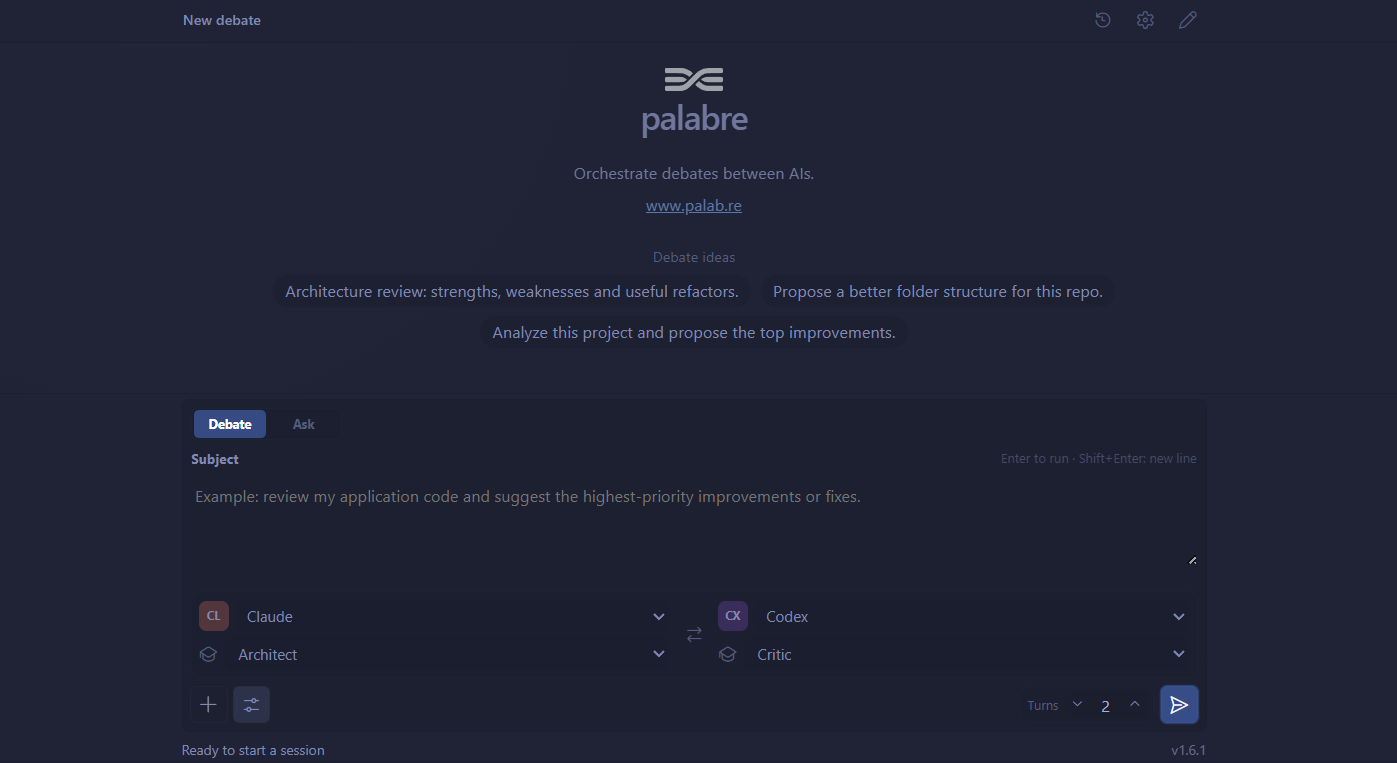
Palabre lets you run a structured Debate between two agents, hold a Chat with one active agent while consulting others, or start an Ask session where up to four agents respond independently. Follow everything live in the sidebar, add workspace context when useful, and keep the Markdown export when it is done.
Early access — Palabre for VS Code is a visual client for the locally installed palabre CLI. It does not bundle or reimplement the Palabre engine.
🇫🇷 Version française
Why Palabre?
Before a risky refactor, an architecture decision, or a release, a second opinion helps. Several independent perspectives help even more.
- Compare implementation options and their trade-offs.
- Ask one agent to propose a solution and another to challenge it.
- Review selected files or folders from your workspace.
- Keep a Markdown record of the discussion and its final summary.
Get started
Install this extension from the Marketplace.
Install the Palabre CLI:
npm install -g palabre
Configure compatible local agents:
palabre init
Open Palabre from the VS Code Activity Bar, choose Debate, Chat or Ask, enter a question, and start the session.
Use Palabre: Show Status if the extension cannot find the CLI, or Palabre: Run Doctor for a diagnostic.
What you get
- A sidebar composer for Debate, Chat and Ask sessions.
- In Chat, switch the active agent, request a one-off opinion from another agent, or continue the conversation with that agent.
- Live streamed answers, progress, cancellation, and guided setup errors.
- Agent and preset choices provided by your local Palabre installation.
- Optional workspace files and folders as context.
- Markdown exports for completed
.debate.md, .chat.md and .ask.md sessions.
- Quick settings for language, default preset, turns, summary agent, and Ollama when available.
Requirements
- VS Code 1.86 or newer.
- Node.js 20 or newer.
- Palabre CLI 0.13.0 or newer.
- At least one compatible agent for Chat or Ask, or two for Debate.
Palabre detects and configures the agents available on your machine, including Codex CLI, Claude Code, Antigravity CLI, OpenCode, Mistral Vibe, and Ollama. The extension does not install or authenticate those tools for you.
How it works
The extension handles the VS Code interface; the local Palabre CLI remains the source of truth for agents, presets, workspace context, orchestration, and exports. This keeps the same Palabre configuration usable from both the terminal and VS Code.
The interface follows VS Code's language by default. You can set palabre.language to fr or en explicitly.
Privacy and local setup
Palabre runs locally and does not send any data to a PALABRE-owned server. The data sent to agents depends on the tools you use: check the privacy policies of Claude Code, Codex CLI, Antigravity CLI, OpenCode, Mistral Vibe, Ollama, or any other agent you configure.
Palabre for VS Code starts the palabre command installed on your machine. The AI providers that receive your prompts and optional workspace context depend on the agents you configure in Palabre. Review each provider's terms and privacy policy before sending sensitive material.
Known limitations
- Reloading the VS Code window does not resume a running session.
- Sessions depend on the installed external agent CLIs, their availability, and their quotas.
- Rich history and replay are not implemented yet; recent exports can be opened from the current workspace.
Help and links
License
MIT.
Palabre pour VS Code
Faites entrer plusieurs points de vue IA dans votre workflow VS Code.
Palabre permet de lancer un Débat structuré entre deux agents, d'échanger en Chat avec un agent actif tout en consultant les autres, ou de démarrer une session Ask dans laquelle jusqu'à quatre agents répondent indépendamment. Suivez les échanges dans la barre latérale, ajoutez du contexte du workspace si nécessaire, puis conservez l'export Markdown.
Accès anticipé — Palabre pour VS Code est un client graphique du CLI local palabre. L'extension n'embarque pas et ne réimplémente pas le moteur Palabre.
🇬🇧 English version
Pourquoi Palabre ?
Avant un refactor risqué, un choix d'architecture ou une release, un second avis est utile. Plusieurs points de vue indépendants le sont encore davantage.
- Comparer des options d'implémentation et leurs compromis.
- Demander à un agent de proposer une solution et à un autre de la challenger.
- Examiner des fichiers ou dossiers sélectionnés du workspace.
- Conserver une trace Markdown de la discussion et de sa synthèse finale.
Démarrage rapide
Installez l'extension depuis le Marketplace.
Installez le CLI Palabre :
npm install -g palabre
Configurez des agents locaux compatibles :
palabre init
Ouvrez Palabre depuis l'Activity Bar de VS Code, choisissez Débat, Chat ou Ask, saisissez votre question, puis lancez la session.
Utilisez Palabre: Show Status si l'extension ne trouve pas le CLI, ou Palabre: Run Doctor pour un diagnostic.
Ce que l'extension apporte
- Un composer en barre latérale pour les sessions Débat, Chat et Ask.
- En Chat, changez l'agent actif, demandez ponctuellement l'avis d'un autre agent ou poursuivez la conversation avec lui.
- Les réponses, la progression, l'annulation et les erreurs de configuration en direct.
- Les agents et presets réellement fournis par votre installation locale de Palabre.
- Des fichiers et dossiers du workspace ajoutés en contexte, à la demande.
- Des exports Markdown
.debate.md, .chat.md et .ask.md à la fin des sessions.
- Des réglages rapides pour la langue, le preset, les tours, l'agent de synthèse et Ollama lorsqu'il est disponible.
Prérequis
- VS Code 1.86 ou plus récent.
- Node.js 20 ou plus récent.
- Palabre CLI 0.13.0 ou plus récent.
- Au moins un agent compatible pour Chat ou Ask, ou deux pour Débat.
Palabre détecte et configure les agents disponibles sur votre machine, notamment Codex CLI, Claude Code, Antigravity CLI, OpenCode, Mistral Vibe et Ollama. L'extension n'installe pas ces outils et ne vous y authentifie pas.
Fonctionnement
L'extension gère l'interface VS Code ; le CLI Palabre local reste la source de vérité pour les agents, presets, le contexte du workspace, l'orchestration et les exports. La même configuration Palabre est ainsi utilisable dans le terminal et dans VS Code.
Par défaut, l'interface suit la langue de VS Code. Le réglage palabre.language permet de forcer fr ou en.
Confidentialité et configuration locale
Palabre tourne localement et n'envoie aucune donnée à un serveur appartenant à PALABRE. Les données envoyées aux agents dépendent des outils que vous utilisez : vérifiez les politiques de confidentialité de Claude Code, Codex CLI, Antigravity CLI, OpenCode, Mistral Vibe, Ollama ou de tout autre agent configuré.
Palabre pour VS Code lance la commande palabre installée sur votre machine. Les fournisseurs IA qui reçoivent vos prompts et votre éventuel contexte de workspace dépendent des agents configurés dans Palabre. Vérifiez les conditions et règles de confidentialité de chaque fournisseur avant d'envoyer des informations sensibles.
Limites connues
- Recharger la fenêtre VS Code ne reprend pas une session en cours.
- Les sessions dépendent des CLIs d'agents externes installés, de leur disponibilité et de leurs quotas.
- L'historique riche et le replay ne sont pas encore disponibles ; les exports récents peuvent être ouverts depuis le workspace courant.
Aide et liens
Licence
MIT.

