Agent System — Multi-Agent Coding Assistant
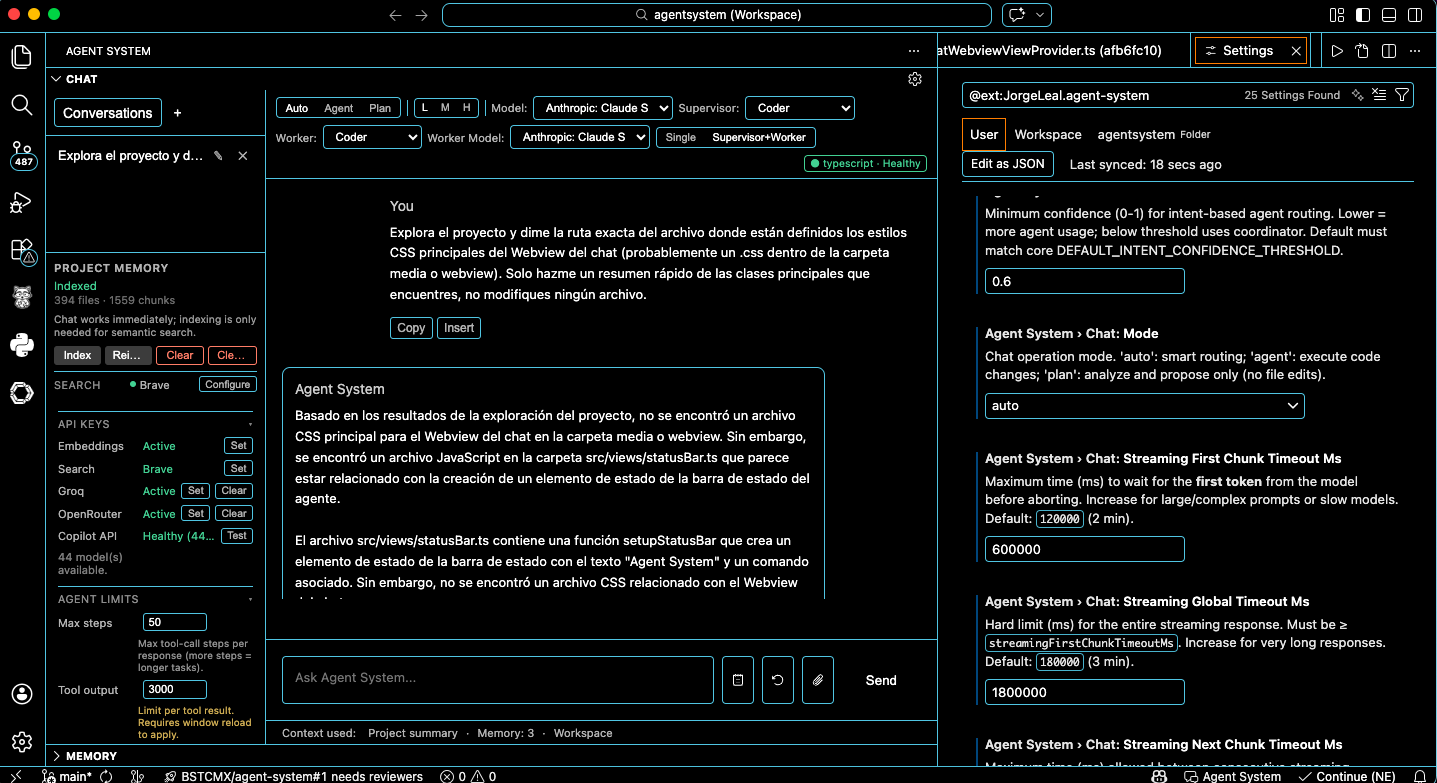
Agent System helps you write, review, and test code efficiently using an orchestra of specialized agents — Coder, Reviewer, Tester, and Coordinator. Turn on Swarm mode (Supervisor + Worker) to have one agent plan and another run the tools, both selectable in the sidebar. Chat with Copilot at no extra cost; run the agent (files, shell, tests) with Groq or OpenRouter. Max steps, tool output limit, and reasoning level are configurable in the chat UI. It keeps live project context, memory per workspace, and fits into your existing workflow.
What makes Agent System different
- Local persistent memory — Session, project, and global memory in SQLite; no cloud sync required.
- Agent orchestra and Swarm mode — Coder, Reviewer, Tester, and Coordinator; switch to Supervisor + Worker in the sidebar to choose who plans (e.g. Coordinator) and who runs tools (e.g. Coder). Max steps, tool output limit, and reasoning are editable in the chat UI.
- API-agnostic — Chat with Copilot (no API key) or run the agent (tool loop) with Groq or OpenRouter; add providers from the UI and switch from the model dropdown. Copilot is for chat only; agent mode (files, shell, tests) uses Groq or OpenRouter.
- Works without API keys — DuckDuckGo and Copilot for chat work without keys; for agent mode (tools) add Groq or OpenRouter API key; add OpenAI only if you want workspace RAG.
Features
Sidebar chat — Streaming chat with tool use (read/edit files, run shell, web search, run tests). Multiple conversations saved per workspace.
Configurable streaming timeouts — First chunk, next chunks, and global hard limit; clear errors when exceeded.
Chat UI and parameters
- Mode selector — Auto / Agent / Plan (pills): smart routing, execute code, or analyze and propose only.
- Reasoning level — Low (L), Medium (M), High (H) pills; affects providers that support it (e.g. o3, o4-mini).
- Agent selector — Dropdown: Auto or a specific agent (Coder, Reviewer, Tester, Coordinator).
- Swarm mode — Single agent vs Supervisor + Worker: when Supervisor + Worker is on, a second dropdown appears to choose the worker (sub-agent) that will run the tool loop (e.g. Coordinator plans, Coder executes).
- Max steps — In-chat numeric input (1–100) for tool-call steps per turn.
- Max tool output chars — In-chat numeric input (1k–100k) for truncation of tool results in context.
- Model selector — Dropdown; persistent across sessions.
- Settings (gear) — Quick access to full configuration.
Specialized agents — Coder, Reviewer, Tester, Coordinator; selectable via the agent dropdown and, in supervisor–worker mode, the worker dropdown for the executing sub-agent.
AI Project Awareness — Automatic static analysis of framework, language, build tool, test runner, and architecture pattern; injected into system prompt; shown as status badge.
Project Memory panel — Index, Reindex, Clear Index, Clear local data; shows current index status and active web search provider.
Persistent workspace index — Indexed chunks stored locally; unchanged files skipped via SHA-256 hashing.
Persistent memory — Session, project, and global memory in SQLite with TTL and LRU eviction; no cloud sync.
Project context — Loads AGENT_SYSTEM.md into system prompt; supports multi-root workspaces.
Workspace RAG (optional) — Semantic retrieval over the workspace index using OpenAI embeddings when an OpenAI API key is configured; otherwise falls back to full-text search. The chat model remains Copilot, Groq, or OpenRouter.
Tool approval — Optional confirmation for sensitive actions.
Model providers — Copilot — Chat only (VS Code Language Model API; no API key when signed in). Groq and OpenRouter — Chat and agent mode with tool use (read/edit files, run shell, web search, run tests); optional API keys, select from model dropdown. For agent mode you need at least one of Groq or OpenRouter (or a VS Code Language Model with tool support). Add OpenRouter via "Add model provider" for 400+ models.
Groq support (optional) — Optional API key; use for agent mode (tool use) or chat; select from model dropdown.
Copilot Chat integration — Use @agent from Copilot Chat extension.
Web search — DuckDuckGo works out of the box; configure premium or custom providers.
Copilot API check and GitHub sign-in — On opening the chat, the extension checks Copilot API availability and GitHub sign-in status. If not signed in, the sidebar shows Authorize Copilot; clicking it opens VS Code's built-in GitHub sign-in (same session as Copilot, no API key). Status and model list update automatically after sign-in.
Requirements
- VS Code 1.99 or later
- A language model provider (e.g., GitHub Copilot) that supports the VS Code Language Model API for chat
- For agent mode (tool loop): Groq or OpenRouter API key (or a VS Code Language Model that supports tool calling)
- Optional: OpenAI API key for workspace semantic RAG (embeddings)
Configuration
| Setting |
Description |
agentSystem.enabled |
Turn the extension on or off |
agentSystem.logLevel |
debug, info, warn, error |
agentSystem.memory.* |
Memory limits per scope |
agentSystem.model.selection |
Preferred model ID |
agentSystem.chat.mode |
auto | agent | plan |
agentSystem.reasoning.effort |
Default reasoning level: low, medium, or high |
agentSystem.agent.maxSteps |
Max agent loop steps per turn |
agentSystem.agent.autoApproveStateChanging |
When enabled, state-changing tools (e.g. apply_edit, search_web) are auto-approved; destructive and run_shell still require approval |
agentSystem.agent.llmTimeoutMs |
LLM request timeout (ms) |
agentSystem.agent.synthesisTimeoutMs |
Final synthesis request timeout (ms) |
agentSystem.advanced.maxToolOutputChars |
Max characters per tool result kept in context (truncation) |
agentSystem.advanced.maxEditContentChars |
Max characters per apply_edit/create_file content; 0 = no limit |
agentSystem.chat.intentConfidenceThreshold |
Minimum confidence (0–1) for intent-based agent routing; lower = more agent usage |
agentSystem.chat.streamingFirstChunkTimeoutMs |
Timeout for first streaming chunk (ms) |
agentSystem.chat.streamingNextChunkTimeoutMs |
Timeout between chunks |
agentSystem.chat.streamingGlobalTimeoutMs |
Hard limit for entire streaming response |
agentSystem.index.* |
Workspace index configuration (maxChunks, concurrency, minSimilarityThreshold, etc.) |
Agent/worker selection and swarm mode (Single vs Supervisor + Worker) are persisted from the chat UI (globalState).
Parameters available in the chat UI
The following are adjustable directly in the sidebar and persist where applicable: mode (Auto/Agent/Plan), reasoning effort (L/M/H), agent (dropdown), worker (dropdown, when swarm mode is Supervisor + Worker), max steps (1–100), max tool output chars (1k–100k), model (dropdown). These can override or complement the settings above.
Optional features like embeddings, Groq API key, and web search provider can be configured via the Command Palette or sidebar controls.
Security and audit
Webview message validation and state sanitization never log raw payloads or user content. Rejections and sanitization events are logged with structured metadata only: reasonCode, keyPath/key, hintHash (non-reversible), and size/depth where applicable. This allows auditing and debugging without exposing sensitive data. See infra/vscode/webview/docs/STATE_SANITIZER_DESIGN.md for the sanitizer contract and audit behaviour.
Known limitations
- Agent mode — Auto/Agent with tools requires an LLM with tool-calling support (configure Groq or OpenRouter). Copilot is used for chat only.
- sql.js and multiple VS Code instances — Persistent storage (chat history, memory, workspace index metadata) uses sql.js (SQLite compiled to WebAssembly). sql.js is not safe for concurrent access from multiple processes. Do not open the same workspace in more than one VS Code window at the same time. Doing so can lead to database lock errors, corruption, or data loss. Use a single window per workspace. This is a known limitation of sql.js; the extension degrades to in-memory storage when SQLite cannot be opened (e.g. file locked or permission denied).
Development
From apps/vscode-extension/:
pnpm install
pnpm run compile
Press F5 in VS Code to open the Extension Development Host.
pnpm run watch — watch buildpnpm run validate — validation
Privacy
- No telemetry.
- Runs locally.
- Code never leaves your machine except via configured model provider.
Runtime notes
- Punycode deprecation: You may see a Node.js
DEP0040 deprecation warning for the punycode module in the Extension Development Host or E2E logs. This comes from a transitive dependency; the extension does not use punycode directly. It is harmless for current Node LTS and can be addressed when that dependency updates.
Built by Jorge Leal
| |

