Kor Typo Completion
Korean IME typo guard for VS Code.
This extension helps when you accidentally type English code identifiers while the Korean IME is active.
For example, if you intended to type:
import pandas
but typed it with the Korean keyboard layout:
ㅑㅡㅔㅐㄱㅅ ㅔ무ㅇㅁㄴ
the extension can suggest or automatically convert it to the intended English key sequence.
example
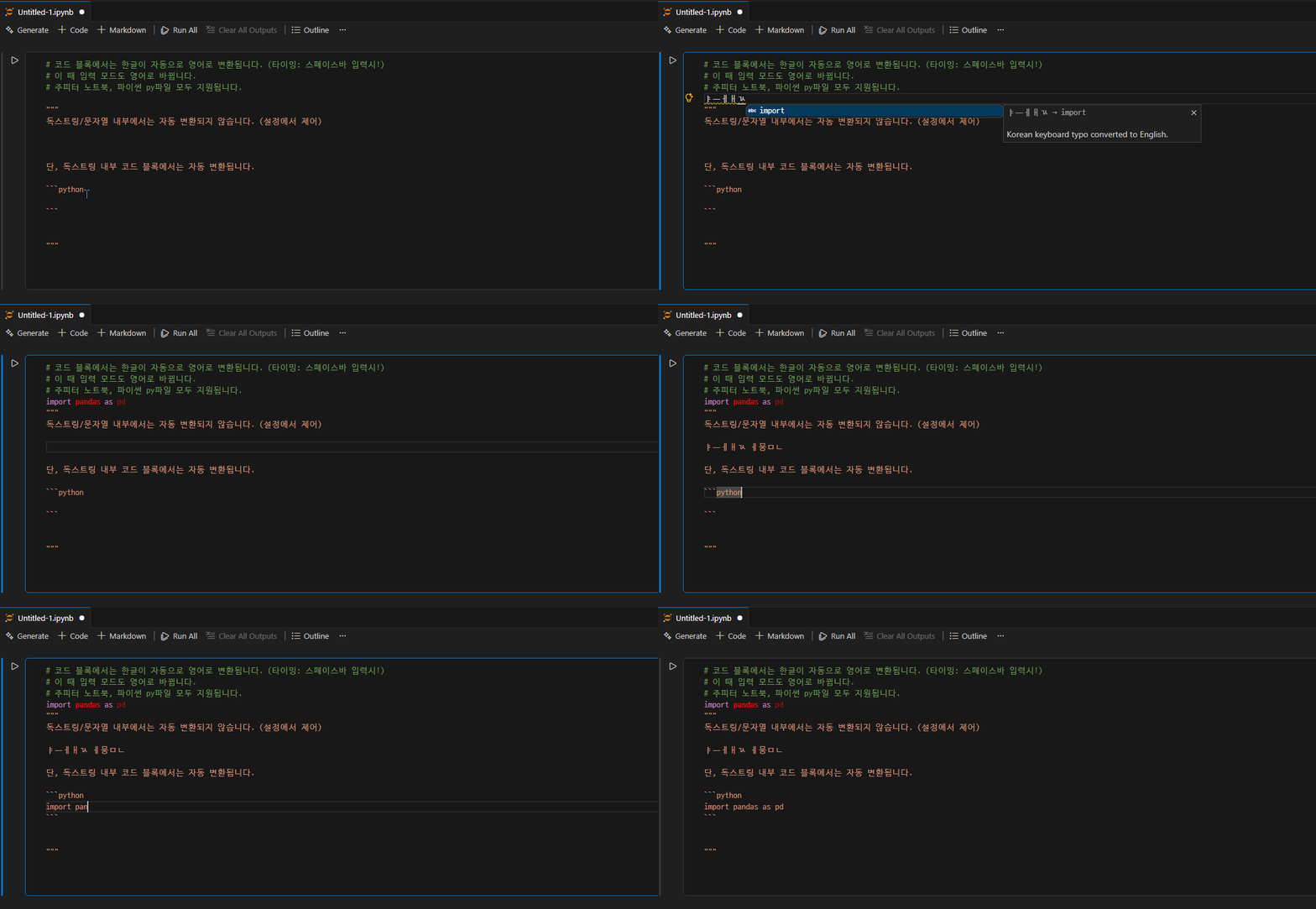
Features
- Converts Korean keyboard-layout typos to English key sequences.
- Shows completion suggestions without modifying text immediately.
- Automatically replaces typo text when Space is pressed in code context.
- Skips automatic replacement in Python comments.
- Skips automatic replacement inside Python triple-quoted docstrings.
- Switches Windows Korean IME to English after successful automatic replacement.
- Switches Windows Korean IME to English after accepting a Korean typo completion item.
- Supports double consonants such as
ㅃ, ㅉ, ㄸ, ㄲ, ㅆ.
- Supports combined final consonant jamo such as
ㄳ, ㄵ, ㄶ, ㄺ, ㄻ, ㄼ, ㄽ, ㄾ, ㄿ, ㅀ, ㅄ.
Example
Typing this in a Python code area:
ㅑㅡㅔㅐㄱㅅ
becomes:
import
Typing this:
ㅔ무ㅇㅁㄴ
becomes:
pandas
So a typical accidental Korean-layout input such as:
ㅑㅡㅔㅐㄱㅅ ㅔ무ㅇㅁㄴ
can become:
import pandas
Automatic replacement is disabled in Python comments.
Example:
# ㅑㅡㅔㅐㄱㅅ
This remains unchanged.
Automatic replacement is also disabled inside Python triple-quoted strings and docstrings.
Example:
"""
ㅑㅡㅔㅐㄱㅅ
"""
This remains unchanged.
Suggestions may still appear, but Space-triggered automatic replacement is not applied in these protected text contexts.
Inside fenced code blocks in Python triple-quoted docstrings, code text can still be converted, but comment portions beginning with # are protected.
IME Switching
After successful Space-triggered automatic replacement, the extension attempts to switch the Windows Korean IME to English input mode.
After accepting a Korean typo completion item, the extension attempts to switch the Windows Korean IME to English input mode.
This uses a native Windows addon.
Requirements
- Windows x64
- VS Code
- Local VS Code editor session
The native IME switching feature is intended for Windows local editing. It may not behave as expected in remote environments such as SSH, WSL, or containers.
Extension Settings
This extension contributes the following settings.
koreanTypoCompletion.enabled
Enable or disable Korean keyboard typo completion.
Default:
true
koreanTypoCompletion.autoReplaceOnSpace
Automatically replace Korean keyboard typo text with English text when Space is pressed outside comments and docstrings.
Default:
true
koreanTypoCompletion.switchImeToEnglishOnAutoReplace
Switch Windows Korean IME to English after successful automatic replacement.
Default:
true
koreanTypoCompletion.switchImeToEnglishOnCompletionAccept
Switch Windows Korean IME to English after a Korean typo completion item is accepted.
Default:
true
koreanTypoCompletion.debug
Enable debug logging.
Default:
false
Known Limitations
- The extension currently targets Windows x64.
- IME switching depends on the active Windows input context.
- Remote editing environments may not support native IME switching correctly.
- The extension does not implement a full Python parser. Comment and docstring detection is heuristic but designed for common editing patterns.
Release Notes
0.2.0
Initial beta release.
- Korean keyboard typo to English key sequence conversion.
- Completion suggestion support.
- Space-triggered automatic replacement.
- Python comment and docstring guard, including comments inside fenced docstring code blocks.
- Native Windows IME switching support.

